Module 00 of 17
Everything You Need Before Day One
A practitioner's checklist for getting started with GenAI development — the Python patterns, API skills, terminal comfort, and tooling you need before writing your first LLM application. No math required.
00. Why These Prerequisites Exist
This course is designed around building real production-grade GenAI systems — not studying theory from a whiteboard. Every module involves writing code that calls APIs, processes data, orchestrates multi-step pipelines, and deploys to cloud infrastructure. The material will not pause to explain what a Python decorator is, what an HTTP status code means, or how to commit code to a repository. These things are used constantly, without narration.
The prerequisites below are organized by how often you will use each skill. Each section tells you what the course expects, gives you the exact patterns you will encounter, and helps you honestly assess whether you are ready. If something feels unfamiliar, close the gap before Module 01 — feeling underprepared at that stage sets you behind for every module that follows.
Think of it like this: These prerequisites are like knowing how to drive before starting a road trip. The course teaches you where to go and why — it does not teach you how to use the steering wheel. If you can write Python, call an API, and navigate a terminal, you are ready for the journey.
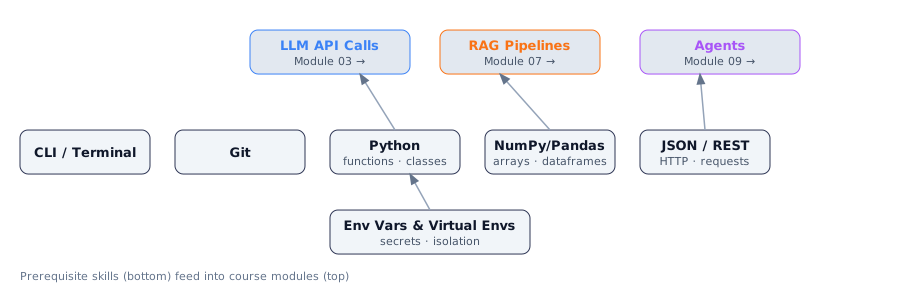
Each prerequisite skill is used repeatedly across many course modules. The diagram shows the primary dependency paths.
What This Means for Practitioners
This is not a math course. You will not need linear algebra, calculus, or statistics. The course explains concepts like embeddings, attention, and training stages in plain language with practical analogies. If you have ever worried about math prerequisites for AI courses, this one is different — it is built for engineers, not researchers.
The real prerequisites are tool fluency. The skills that matter most are: writing Python confidently, calling HTTP APIs, managing secrets, using Git, and being comfortable in a terminal. Everything else is taught as you go.
| Skill | Level Needed | Why It Matters |
|---|---|---|
| Python (functions, classes, async) | Intermediate | Every SDK, framework, and pipeline is Python-first |
| REST APIs & HTTP | Working knowledge | Every LLM is accessed via HTTP API calls |
| Terminal / command line | Comfortable daily use | Deployment, Docker, virtual environments, AWS CLI |
| Git version control | Basic workflow | Saving progress, collaboration, CI/CD triggers |
| JSON reading & writing | Fluent | Every API request and response is JSON |
| Environment variables / .env | Know the pattern | API keys must never be in source code |
01. Python — The Patterns You Will See Everywhere
Python is the lingua franca of the entire GenAI ecosystem. Every library you will use — OpenAI's SDK, Anthropic's SDK, LangChain, LangGraph, FAISS, ChromaDB, FastAPI — is Python-first. The course does not use Python as a scripting toy; it uses Python as an engineering language, with proper structure, error handling, classes, and asynchronous code.
You do not need to be a Python expert. You need to be functionally fluent: able to read code using decorators, inheritance, and async/await without pausing to look up the fundamentals. Here are the three patterns that appear most often.
Decorators wrap functions with extra behavior. LangChain uses them to register tools. FastAPI uses them for route definitions. They appear in the very first code examples.
import time
from functools import wraps

def timing(func):
    @wraps(func)
    def wrapper(*args, **kwargs):
        start = time.perf_counter()
        result = func(*args, **kwargs)
        elapsed = time.perf_counter() - start
        print(f"{func.__name__} took {elapsed:.3f}s")
        return result
    return wrapper

@timing
def call_llm(prompt: str) -> str:
    time.sleep(0.5)
    return "LLM response"
Pydantic models define structured data with automatic validation. They are used for API request/response schemas, LLM output schemas, and pipeline configuration throughout the course.
from pydantic import BaseModel, Field
from typing import Optional, List

class DocumentChunk(BaseModel):
    content: str = Field(..., description="The text content of this chunk")
    source: str = Field(..., description="Source file or URL")
    chunk_index: int = Field(0, ge=0)
    embedding: Optional[List[float]] = None
    metadata: dict = Field(default_factory=dict)

chunk = DocumentChunk(
    content="Transformers are sequence-to-sequence models...",
    source="module-01.pdf",
    chunk_index=3
)
Async/await is required because LLM API calls are I/O-bound — your program spends most of its time waiting for network responses. With async code, Python handles hundreds of pending requests simultaneously in a single thread.
import asyncio
from anthropic import AsyncAnthropic

async def generate(prompt: str) -> str:
    client = AsyncAnthropic()
    message = await client.messages.create(
        model="claude-sonnet-4-6",
        max_tokens=1024,
        messages=[{"role": "user", "content": prompt}]
    )
    return message.content[0].text
Self-check: You are ready if you can write a decorator without looking at documentation, read async code and explain the execution flow, and define a Pydantic model with type annotations.
02. REST APIs & HTTP
Every LLM you will work with in this course is accessed via a REST API over HTTPS. Whether you are calling OpenAI, Anthropic, or a model you deployed yourself, the mechanics are identical: send an HTTP request with a JSON body, get back an HTTP response with a JSON body.
The status codes you need to know cold: 200 = OK, 400 = your request is malformed, 401 = bad API key, 429 = rate limited (wait and retry), 500/502/503 = server error (retry with backoff). Understanding these codes is the difference between debugging for five minutes and debugging for five hours.
In practice, you will mostly use official SDK libraries rather than raw HTTP. The reason to understand raw HTTP is: when the SDK fails, you need to read the error response and debug from first principles.

A single LLM API call: your code sends an authenticated POST request; the API routes it to the model and streams or returns the generated text.
import httpx
import os

# Raw HTTP call to Anthropic — what the SDK does internally
async def raw_anthropic_call(prompt: str) -> dict:
    async with httpx.AsyncClient() as client:
        response = await client.post(
            "https://api.anthropic.com/v1/messages",
            headers={
                "x-api-key": os.environ["ANTHROPIC_API_KEY"],
                "anthropic-version": "2023-06-01",
                "content-type": "application/json",
            },
            json={
                "model": "claude-sonnet-4-6",
                "max_tokens": 1024,
                "messages": [{"role": "user", "content": prompt}]
            }
        )
    response.raise_for_status()
    return response.json()
Think of it like this: An API call is like ordering food at a restaurant. You give the waiter (HTTP request) your order (the prompt), the kitchen (the model) prepares it, and the waiter brings back your meal (the response). A 429 error is the kitchen saying "we are swamped, please wait a moment." A 401 is "you are not on the reservation list."
03. Secrets Management — API Keys and .env Files
API keys are secrets. A secret should never appear in your source code — not even in a private repository. The course uses four or more API keys simultaneously (OpenAI, Anthropic, Groq, AWS), and every project requires you to manage them cleanly.
The standard pattern: store secrets in a .env file (listed in .gitignore so it is never committed), load them at startup with python-dotenv, and read them via os.environ. In production, you inject environment variables via your cloud provider's secrets management service — the code reads from the environment either way.
# .env file (NEVER commit this to git)
# OPENAI_API_KEY=sk-proj-abc123...
# ANTHROPIC_API_KEY=sk-ant-abc123...
# AWS_REGION=us-east-1

from dotenv import load_dotenv
import os

load_dotenv()

api_key = os.environ["OPENAI_API_KEY"]      # raises if missing
region  = os.getenv("AWS_REGION", "us-east-1")  # returns default if missing
04. Git — Version Control
Git is used for three things in this course: saving your progress (committing), sharing code (pushing to GitHub), and in deployment modules, triggering CI/CD pipelines that automatically build and deploy your application when you push.
You should be able to execute the full workflow — clone, branch, stage, commit, push — without hesitation.
git clone https://github.com/CareerAlign/genai-exercises.git
cd genai-exercises
git checkout -b module-03-api-exercise
# ... do your work ...
git status
git diff
git add src/api_client.py src/models.py
git commit -m "feat: add retry logic to LLM API client"
git push -u origin module-03-api-exercise
Critical: Always add .env to your .gitignore before your first commit. Accidentally exposed API keys on GitHub is one of the most common and costly security mistakes.
05. Terminal, Virtual Environments & Package Management
All course work happens in the terminal. Deployment scripts, Docker commands, virtual environment management, running local servers, AWS CLI — none of this has a reliable GUI equivalent.
On macOS and Linux use Bash or Zsh. On Windows, use WSL2. The commands you must know: cd, ls, pwd, mkdir, rm, cat, grep, echo, export, and piping with |.
Virtual environments are not optional. Different projects need different library versions, and the GenAI ecosystem moves fast. Each module has a requirements.txt. Create an isolated environment per project.
python -m venv .venv
source .venv/bin/activate      # macOS/Linux
which python                   # should show .venv/bin/python
pip install -r requirements.txt
pip freeze > requirements.txt  # pin versions for reproducibility
Think of it like this: A virtual environment is like a separate toolbox for each project. The wrench you need for the plumbing project should not interfere with the wrench for the car repair. Without virtual environments, installing one project's dependencies can silently break another's.
06. JSON — The Universal Data Format
JSON is the universal data format for LLM APIs. Every request, response, vector database metadata entry, agent tool call, and configuration file uses JSON. You will read and write it constantly.
The patterns the course uses most: deeply nested JSON (LLM responses have structure like response["content"][0]["text"]), JSON with optional keys (use .get()), and JSON arrays of objects (the messages list in chat APIs).
import json

# Typical LLM API response (nested JSON)
data = {
    "content": [{"type": "text", "text": "The capital of France is Paris."}],
    "usage": {"input_tokens": 14, "output_tokens": 9}
}

text = data["content"][0]["text"]
tokens_used = data["usage"]["input_tokens"] + data["usage"]["output_tokens"]

# Chat messages format — used in EVERY LLM API call
messages = [
    {"role": "system",  "content": "You are a helpful assistant."},
    {"role": "user",    "content": "What is the capital of France?"},
    {"role": "assistant", "content": "The capital of France is Paris."},
    {"role": "user",    "content": "What about Germany?"},
]
07. Tools Checklist for Day One
Install and verify these tools before starting. Each item includes the verification command.
| Tool | Verify | Notes |
|---|---|---|
| Python 3.11+ | python --version | Some libraries require 3.11+ |
| pip & venv | pip --version | Bundled with Python 3.11+ |
| API Keys | Store in .env file | OpenAI, Anthropic, Groq, OpenRouter |
| AWS CLI | aws --version | Configure with aws configure |
| Jupyter | jupyter notebook | Install: pip install jupyter ipykernel |
| Git 2.40+ | git --version | Configure user.name and user.email |
Core Python Packages
# Run this in your project virtual environment
pip install openai anthropic google-generativeai
pip install litellm tiktoken
pip install langchain langchain-openai langchain-anthropic
pip install chromadb qdrant-client
pip install fastapi uvicorn python-dotenv httpx
pip install boto3 sagemaker
pip install jupyter ipykernel
pip install pydantic ragas pandas numpy

# Verify key packages loaded correctly
python -c "import anthropic, openai, langchain, chromadb, fastapi; print('All OK')"
Day One Readiness Checklist
- Python 3.11+ installed and accessible as
pythonorpython3 - At least one virtual environment created and activated successfully
- All core packages installed (verify with the command above)
- API keys for OpenAI and Anthropic stored in a
.envfile - Git configured with your name and email; at least one repository cloned
- AWS CLI installed and configured with your credentials
- Jupyter notebook opens in browser without errors
- You can make a successful API call to at least one LLM provider
Interview Ready
How to Explain This in 2 Minutes
Elevator Pitch: Building production GenAI systems is fundamentally a software engineering discipline, not a research exercise. Before you ever touch a large language model, you need fluency in the tools that surround it — Python for orchestration, REST APIs for communicating with model endpoints, environment variables for secrets management, Git for version control, and Pydantic for structured data. You also need comfort with async Python because LLM API calls are I/O-bound and production systems handle hundreds of concurrent requests. These are not nice-to-haves; every single module in a GenAI pipeline assumes you can write async Python, parse JSON responses, manage virtual environments, and navigate a terminal without hesitation. Getting these foundations right means you spend your time solving actual AI engineering problems instead of fighting your toolchain.
Likely Interview Questions
| Question | What They're Really Asking |
|---|---|
| Why do GenAI projects use async Python? | Do you understand I/O-bound vs CPU-bound workloads and how LLM API calls benefit from concurrency? |
| How do you securely manage API keys across multiple LLM providers? | Do you follow production security practices or do you hardcode secrets? |
| Walk me through consuming a streaming REST API response from an LLM endpoint. | Can you integrate with real-world LLM APIs beyond just calling a wrapper library? |
| What is a virtual environment and why does it matter? | Can you manage dependency isolation in fast-moving AI ecosystems? |
| How would you set up a new team to work on a multi-provider GenAI project? | Can you think about project structure, secrets, dependencies, and onboarding holistically? |
Model Answers
Q1 — Async Python for GenAI: LLM API calls are I/O-bound — you send a prompt and wait hundreds of milliseconds to seconds for a response. Using async/await, you fire off multiple calls concurrently with asyncio.gather(), dramatically improving throughput. This matters in production when processing batches or running parallel chains. You would not use async for CPU-bound work like heavy computation — that needs multiprocessing.
Q2 — Secure API key management: Never hardcode keys. Store them in a .env file listed in .gitignore, load at runtime with python-dotenv. In production, use AWS Secrets Manager or environment variables injected by your deployment platform. Each provider gets its own variable — OPENAI_API_KEY, ANTHROPIC_API_KEY — and your code validates all keys at startup with clear errors if any are missing.
Q3 — Streaming REST responses: Set stream=True in the API call. The server returns tokens incrementally via Server-Sent Events. Each line prefixed with data: contains a JSON chunk with the next token. Iterate over response lines, parse each chunk, and display progressively. This lets users see output in real time rather than waiting for the entire completion.
Q4 — Virtual environments: A venv is an isolated Python installation with its own packages. AI projects are particularly sensitive to dependency conflicts — PyTorch, transformers, LangChain each pin specific versions. Without isolation, one project's dependencies can break another's. Create a venv per project with python -m venv .venv and pin with pip freeze > requirements.txt.
Q5 — Team setup for multi-provider GenAI: A single repo with clear package boundaries and a shared pyproject.toml. Pinned requirements per service, separate venvs or Docker containers. .env files for local dev (gitignored), AWS Secrets Manager for production, and a config module that validates all keys at startup. A Makefile or setup script that creates the venv, installs dependencies, copies .env.example to .env, and runs a smoke test against each API.
Common Mistakes
- Committing API keys to Git — Even deleted in a later commit, they remain in history. Always use
.envwith.gitignore, and rotate any key that has ever been committed. - Confusing async with parallel —
asyncioruns in a single thread and only helps with I/O waits. CPU-heavy work needsmultiprocessing. Candidates often claim async "makes things parallel" — it does not. - Installing packages globally — This leads to version conflicts that surface as mysterious import errors. Every project should have its own isolated environment.
Up Next
Phase 1 · Foundations