1. Overview
Every team in your company wants to use AI, marketing wants to generate copy, engineering wants code assistants, support wants chatbots, and the legal team wants contract summarization. Without a gateway, each team calls LLM APIs directly — different API keys, no cost tracking, no security controls, no consistency. You end up with a dozen teams burning through tokens with no visibility into what's being sent, what it costs, or whether anyone is accidentally leaking sensitive data in their prompts.
An AI Gateway is like a front door for your organization's AI usage. Every AI request — whether it comes from a web app, an internal tool, or a batch pipeline — goes through this single entry point. The gateway handles authentication (who is making the request?), rate limiting (how much can they use?), routing (which model should handle this?), and logging (what happened?). Think of it as an API gateway, like you'd use for microservices, but purpose-built for LLM traffic with AI-specific features like prompt guardrails and token-level cost tracking.
The LLM Router is the intelligent brain inside the gateway. Not every request needs the most expensive model. A simple text classification task can go to a small, fast, cheap model. A complex reasoning task gets routed to a frontier model. The router makes this decision automatically based on rules you define — considering cost, latency, capability requirements, and even provider availability. If one provider goes down, the router fails over to another without any application code changing.
If you get this wrong, you'll have shadow AI sprawling across the organization with no visibility. Teams will overspend on the most expensive models for trivial tasks. Sensitive data will leak into prompts with no one watching. And when a provider has an outage, every AI-powered feature in the company goes down simultaneously. The AI Gateway is the foundation that makes every other AI initiative manageable, observable, and secure.
2. Architecture Diagram
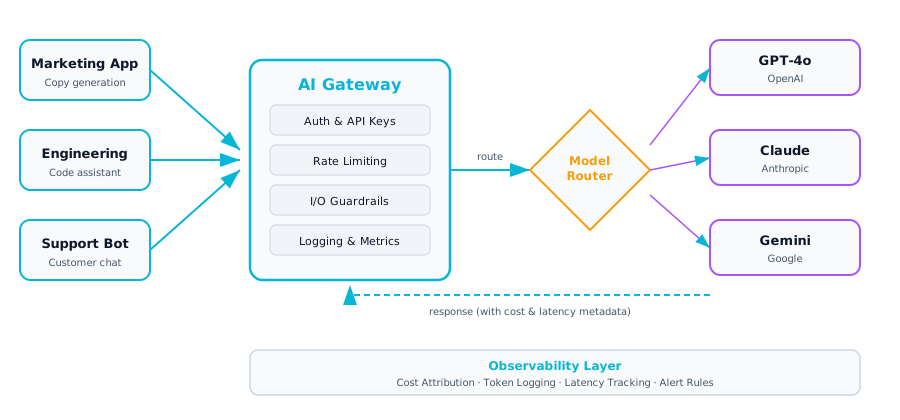
Architecture diagram — AI Gateway & LLM Router: centralized control plane for all LLM traffic
3. Component Breakdown
| Component | Description |
|---|---|
| 🔑 Authentication & API Keys | Each team or application gets its own API key scoped to specific models, rate limits, and cost budgets. Centralized key management prevents shadow AI and enables per-team audit trails. |
| ⚡ Rate Limiting & Quotas | Per-team and per-application rate limits prevent runaway costs and ensure fair resource sharing. Quotas can be set on tokens-per-day, requests-per-minute, or monthly spend caps. |
| 🔌 Intelligent Routing | Route requests to the optimal model based on task complexity, cost requirements, latency SLAs, and provider availability. Simple tasks go to cheap models; complex tasks to frontier models. |
| 🛡 Input / Output Guardrails | Scan incoming prompts for PII, injection attacks, and policy violations. Scan outputs for hallucinations, toxic content, and data leakage before returning to the caller. |
| 💰 Cost Attribution & Billing | Track token usage and cost per team, application, and model. Generate chargeback reports so business units see exactly what their AI usage costs. Trigger alerts on budget thresholds. |
| 📈 Observability & Logging | Log every request and response (with PII redacted) including latency, token counts, model used, and routing decisions. Feed into dashboards for real-time visibility and troubleshooting. |
4. Decision Points & Trade-offs
| Advantage | Limitation |
|---|---|
| Centralized control over all LLM usage | Single point of failure if not architected for HA |
| Consistent security and guardrail policies | Adds routing latency overhead (typically 10-50ms) |
| Model flexibility — swap providers without code changes | Added operational complexity to manage the gateway |
| Full cost visibility and chargeback capability | Requires dedicated platform team to maintain |
| Automatic failover across providers | Prompt format differences across models need abstraction |
Key Decision: Build vs. buy? Open-source options (LiteLLM, Portkey, MLflow Gateway) can get you started quickly. Managed solutions (Apigee, Kong) offer enterprise support. Most organizations start with open-source and migrate to managed as traffic grows.
Latency Budget: The gateway adds overhead to every request. Target under 20ms of added latency. Use async processing for guardrails where possible and cache routing decisions for repeated request patterns.
5. Cloud Mapping
| Component | GCP | AWS | Azure |
|---|---|---|---|
| API Gateway | Apigee / Cloud Endpoints | API Gateway / Kong | Azure API Management |
| LLM Access | Vertex AI Model Garden | Amazon Bedrock | Azure OpenAI Service |
| Auth | IAM + API Keys | IAM + Cognito | Entra ID |
| Logging | Cloud Logging + BigQuery | CloudWatch + S3 | Azure Monitor + Log Analytics |
| Cost Tracking | Billing Export + Looker | Cost Explorer + QuickSight | Cost Management + Power BI |
6. Anti-Patterns
- Letting teams call LLM APIs directly with their own keys (shadow AI). Without a gateway, you have zero visibility into what data is being sent to which models. Compliance, security, and cost control all go out the window.
- Routing all requests to the most expensive model "to be safe." A simple text classification does not need GPT-4o or Claude Opus. You'll spend 10-50x more than necessary. Use model routing based on task complexity.
- No fallback chain — single provider outage equals total outage. If your only LLM provider goes down, every AI feature in the company stops. Configure at least two providers per capability tier.
- Logging prompts in plaintext without PII redaction. Prompts often contain customer data, internal documents, or code. If you log them without redaction, your logging system becomes a data breach waiting to happen.
- Rate limits too aggressive — blocking legitimate peak usage. If your rate limits are based on average usage, you'll block users during legitimate spikes (product launch, quarter-end reports). Use burst-capable limits with token bucket algorithms.
7. Architect's Checklist
- Centralized authentication with per-team API keys and scoped permissions
- Per-team rate limits and monthly cost quotas configured and tested
- Model fallback chain defined (e.g., Claude → GPT-4o → Gemini) with automatic failover
- Input guardrails deployed: PII detection, prompt injection scanning, content policy
- Output guardrails deployed: toxicity filtering, data leakage detection, format validation
- Token-level logging with request tracing (correlate gateway logs to downstream LLM calls)
- Cost attribution dashboard showing spend by team, application, and model
- PII redaction in all log storage — verified with automated tests
- Latency SLAs defined: gateway overhead under 20ms at p99
- Kill switches per team and per model — ability to disable access immediately
- Disaster recovery plan: multi-region gateway deployment or fast failover
- Prompt caching strategy for repeated/similar requests to reduce cost and latency