1. Architecture Overview
The Fine-Tuning & Serving architecture enables you to adapt a pre-trained foundation model to your specific domain, style, or task. Instead of relying solely on prompt engineering, you modify the model's weights using your own curated dataset — then deploy the customized model behind a high-performance serving layer with A/B testing and drift monitoring.
When to Use
- Prompt engineering and few-shot examples have plateaued in quality
- You need consistent style, tone, or format that is hard to maintain via prompts alone
- Domain-specific terminology or knowledge requires weight-level adaptation
- You want to reduce inference cost by using a smaller, specialized model
- Latency requirements demand a smaller model that still meets quality thresholds
Decision Guide: Fine-Tune vs. Prompt Engineer
| Signal | Prompt Engineering | Fine-Tuning |
|---|---|---|
| Data available | < 50 examples | 500+ high-quality examples |
| Task complexity | Can be described in natural language | Requires pattern learning |
| Output consistency | Acceptable variation | Must follow rigid format |
| Iteration speed | Minutes (prompt edits) | Hours to days (training runs) |
| Cost at scale | Higher (long prompts) | Lower (shorter prompts, smaller model) |
| Maintenance | Version control prompts | Retrain on new data periodically |
Tip: Always start with prompt engineering. Only move to fine-tuning when you have strong evidence that prompts cannot achieve the required quality, and you have a robust evaluation pipeline to measure improvement.
2. Architecture Diagram
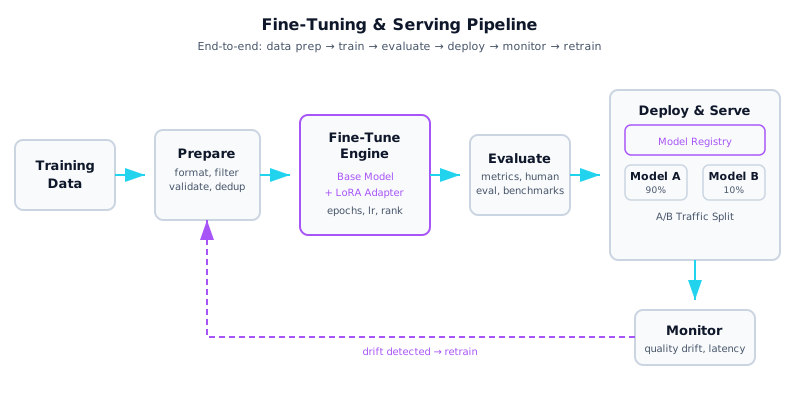
Architecture diagram — Fine-Tuning & Serving: data preparation through deployment with drift-driven retraining loop
3. Components Deep Dive
| Component | Description |
|---|---|
| 🗃 Data Preparation | Convert raw data into JSONL instruction/response pairs. Apply quality filtering, deduplication, length balancing, and train/validation splitting. Data quality is the single largest factor in fine-tuning success. |
| ⚙ Fine-Tuning Methods | Choose between full fine-tuning (all weights), LoRA (low-rank adapters on attention layers), QLoRA (quantized LoRA for lower memory), or prefix tuning. LoRA is the default choice for most use cases. |
| 📊 Evaluation Pipeline | Combine automated metrics (loss, perplexity, BLEU/ROUGE) with held-out test sets and human evaluation. A model that scores well on metrics but fails human review is not ready for production. |
| 🚀 Serving Infrastructure | Deploy with optimized inference engines: vLLM (PagedAttention, continuous batching), TGI (HuggingFace), or Triton (NVIDIA). Each offers different trade-offs in throughput, latency, and hardware support. |
| ⚖ A/B Testing | Route traffic between model versions using weighted splits. Compare quality metrics, latency, and user satisfaction scores. Gradually ramp new models from 5% to 100% as confidence grows. |
| 📐 Model Registry | Version every model artifact with metadata: training config, dataset hash, evaluation scores, and lineage. Enables instant rollback and reproducibility. Use MLflow, Weights & Biases, or cloud-native registries. |
Fine-Tuning Methods Comparison
| Method | Trainable Params | GPU Memory | Quality | Best For |
|---|---|---|---|---|
| Full Fine-Tuning | 100% | Very High (4x model size) | Highest | Unlimited compute, maximum quality |
| LoRA | 0.1 – 1% | Low (1.1x model size) | Near-full | Most production use cases |
| QLoRA | 0.1 – 1% | Very Low (0.5x) | Good | Limited GPU memory, prototyping |
| Prefix Tuning | < 0.1% | Minimal | Moderate | Simple style/format adaptation |
Key Hyperparameters
| Parameter | Typical Range | Notes |
|---|---|---|
| Learning Rate | 1e-5 – 2e-4 | Lower for larger models; use cosine scheduler |
| Epochs | 1 – 5 | More epochs risk overfitting; monitor val loss |
| LoRA Rank (r) | 4 – 64 | Higher rank = more capacity but more params |
| LoRA Alpha | 16 – 128 | Usually 2x rank; controls scaling |
| Batch Size | 4 – 32 | Use gradient accumulation if GPU-limited |
| Warmup Ratio | 0.03 – 0.1 | Gradual learning rate increase |
4. Implementation
Data Preparation Pipeline
import json
import hashlib
from pathlib import Path

def prepare_dataset(raw_path: str, output_path: str, max_len: int = 2048):
    """Convert raw data to JSONL, filter, and deduplicate."""
    seen_hashes = set()
    valid, skipped = 0, 0

    with open(raw_path) as f_in, open(output_path, "w") as f_out:
        for line in f_in:
            row = json.loads(line)

            # Validate required fields
            if not row.get("instruction") or not row.get("response"):
                skipped += 1
                continue

            # Length filter
            total_len = len(row["instruction"]) + len(row["response"])
            if total_len > max_len or total_len < 20:
                skipped += 1
                continue

            # Deduplicate by content hash
            content_hash = hashlib.md5(
                (row["instruction"] + row["response"]).encode()
            ).hexdigest()
            if content_hash in seen_hashes:
                skipped += 1
                continue
            seen_hashes.add(content_hash)

            # Format as chat messages
            formatted = {
                "messages": [
                    {"role": "user", "content": row["instruction"]},
                    {"role": "assistant", "content": row["response"]},
                ]
            }
            f_out.write(json.dumps(formatted) + "\n")
            valid += 1

    print(f"Prepared {valid} examples, skipped {skipped}")
    return valid
LoRA Training Configuration
from peft import LoraConfig, get_peft_model, TaskType
from transformers import (
    AutoModelForCausalLM, AutoTokenizer,
    TrainingArguments, Trainer
)

# Load base model
model_name = "meta-llama/Llama-3.1-8B-Instruct"
tokenizer = AutoTokenizer.from_pretrained(model_name)
model = AutoModelForCausalLM.from_pretrained(
    model_name,
    torch_dtype="bfloat16",
    device_map="auto",
)

# Configure LoRA
lora_config = LoraConfig(
    task_type=TaskType.CAUSAL_LM,
    r=16,                     # rank
    lora_alpha=32,             # scaling factor
    lora_dropout=0.05,
    target_modules=["q_proj", "k_proj", "v_proj", "o_proj"],
    bias="none",
)
model = get_peft_model(model, lora_config)
model.print_trainable_parameters()
# trainable params: 6,553,600 || all params: 8,030,261,248 || 0.08%

# Training arguments
training_args = TrainingArguments(
    output_dir="./ft-output",
    num_train_epochs=3,
    per_device_train_batch_size=4,
    gradient_accumulation_steps=8,
    learning_rate=2e-4,
    lr_scheduler_type="cosine",
    warmup_ratio=0.05,
    bf16=True,
    logging_steps=10,
    eval_strategy="steps",
    eval_steps=50,
    save_strategy="steps",
    save_steps=100,
    report_to="wandb",
)

trainer = Trainer(
    model=model,
    args=training_args,
    train_dataset=train_dataset,
    eval_dataset=eval_dataset,
    tokenizer=tokenizer,
)
trainer.train()
vLLM Serving Setup
# Launch vLLM server with LoRA adapter
# Command line:
# python -m vllm.entrypoints.openai.api_server \
#   --model meta-llama/Llama-3.1-8B-Instruct \
#   --enable-lora \
#   --lora-modules my-adapter=./ft-output/adapter \
#   --max-loras 4 \
#   --port 8000

from openai import OpenAI

# Client code (vLLM is OpenAI-compatible)
client = OpenAI(base_url="http://localhost:8000/v1", api_key="na")

def query_fine_tuned(prompt: str, model: str = "my-adapter") -> str:
    """Query the fine-tuned model via vLLM."""
    response = client.chat.completions.create(
        model=model,
        messages=[{"role": "user", "content": prompt}],
        max_tokens=512,
        temperature=0.3,
    )
    return response.choices[0].message.content

# A/B traffic routing
import random

def ab_route(prompt: str, new_model_pct: float = 0.1) -> str:
    """Route traffic between model versions."""
    model = "my-adapter-v2" if random.random() < new_model_pct else "my-adapter-v1"
    result = query_fine_tuned(prompt, model=model)
    # Log which model served the request for analysis
    log_ab_result(prompt, model, result)
    return result
5. Data Flow
Here is the step-by-step flow through the Fine-Tuning & Serving pipeline:
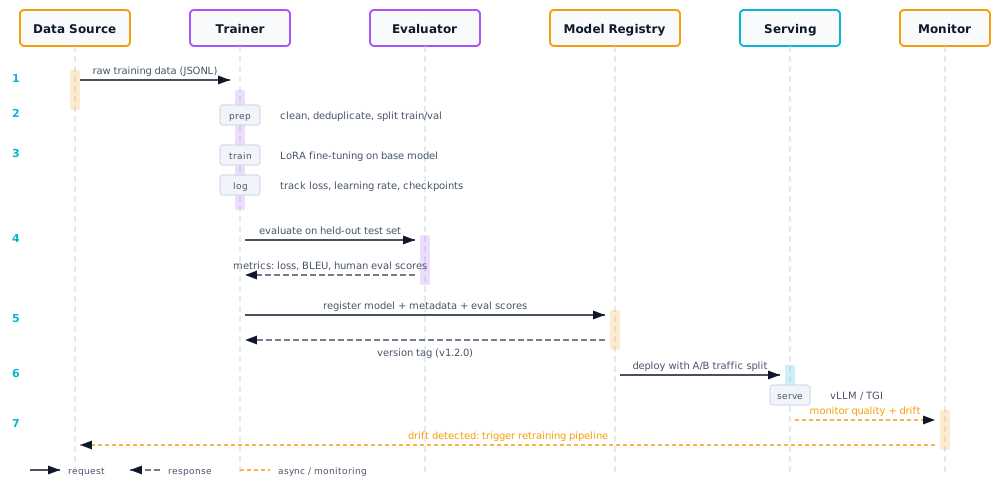
| Step | Action | Details |
|---|---|---|
| 1 | Collect training data | Gather instruction/response pairs from production logs, human annotators, or synthetic generation |
| 2 | Prepare & validate | Convert to JSONL, filter by quality/length, deduplicate, split into train/validation/test sets (80/10/10) |
| 3 | Configure training | Select base model, LoRA rank, learning rate, epochs; set up experiment tracking (W&B, MLflow) |
| 4 | Fine-tune | Train with LoRA adapters; monitor training/validation loss for convergence and overfitting |
| 5 | Evaluate | Run held-out test set, compute automated metrics, conduct human evaluation on 50-100 sample outputs |
| 6 | Register model | Push adapter weights + metadata (dataset version, scores, config) to model registry |
| 7 | Deploy with A/B split | Start new model at 5-10% traffic; compare quality and latency against production baseline |
| 8 | Monitor & iterate | Track quality drift, latency p99, error rates; trigger retraining when metrics degrade |
6. Trade-offs & Considerations
| Advantage | Limitation |
|---|---|
| Domain-specific quality improvements | Requires curated, high-quality training data |
| Reduced inference cost (smaller model, shorter prompts) | Training compute and GPU costs |
| Consistent output style and format | Risk of catastrophic forgetting on general tasks |
| Lower latency with smaller specialized models | Ongoing maintenance: retraining on new data |
| Intellectual property stays in your adapter weights | Harder to debug than prompt-based approaches |
Serving Infrastructure Comparison
| Engine | Strengths | Best For |
|---|---|---|
| vLLM | PagedAttention, continuous batching, multi-LoRA | High-throughput production serving |
| TGI (HuggingFace) | Easy setup, HF ecosystem integration | Quick deployment, HF model hub |
| Triton (NVIDIA) | Multi-framework, ensemble pipelines | Complex ML pipelines, NVIDIA GPUs |
When to upgrade: If you need multiple specialized models collaborating on complex tasks, move to Architecture 09 (Multi-Agent). If you need a full platform with model management, routing, and observability, see Architecture 10 (Production Platform).
7. Production Checklist
- Data quality pipeline: automated filtering, deduplication, and validation on every training run
- Dataset versioning with hash-based tracking (DVC, LakeFS, or cloud storage versioning)
- Experiment tracking: log all hyperparameters, metrics, and artifacts (W&B, MLflow)
- Evaluation gate: model must pass automated + human eval thresholds before deployment
- Model registry with rollback capability (tag: production, staging, deprecated)
- A/B testing framework with statistical significance checks before full rollout
- Serving infrastructure with auto-scaling, health checks, and graceful draining
- Quality drift monitoring: periodic evaluation on held-out set, alert on regression
- Cost tracking per training run and per-inference cost comparison across model versions
- Automated retraining pipeline triggered by drift alerts or scheduled cadence
- Security: model weights encrypted at rest, access-controlled registry, audit logs
- Disaster recovery: model artifacts backed up, serving can cold-start from registry