Module 09 of 17
Agents & Multi-Agent Systems
A practitioner's guide to LLM agents — ReAct patterns, tool definition best practices, when to use agents vs. chains, memory strategies, multi-agent architectures, human-in-the-loop gates, and production guardrails. Patterns that ship, not theory.
01. The ReAct Pattern
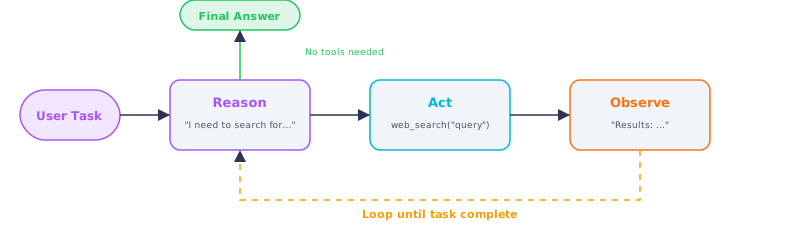
Figure 1 — The ReAct loop: Reason, Act, Observe, repeating until the task is complete
The ReAct pattern (Reasoning + Acting) is the foundational framework for LLM agents. The model alternates between reasoning (thinking through the problem and planning the next step) and acting (executing a tool). After each action, the agent observes the result and uses that observation to inform its next reasoning step. This loop repeats until the task is solved.
Consider a user asking: "What was the weather in the city where Apple was founded, on the day the iPhone was announced?" A standard LLM guesses from memory and likely gets details wrong. A ReAct agent thinks: "I need to know where Apple was founded." It calls a search tool and learns "Cupertino." Then it searches for the iPhone announcement date, finds "January 9, 2007." Finally, it calls a weather API for Cupertino on that date. Each step builds on the previous result.
What makes ReAct powerful is its flexibility. Unlike traditional programming where you specify every step in advance, a ReAct agent figures out steps at runtime based on what it discovers. If the first search returns ambiguous results, it can rephrase and search again. If an API fails, it can try an alternative. This adaptive behavior makes agents robust for real-world tasks where the path to the answer is not known in advance.
Think of it like this: A ReAct agent works like a detective solving a case. They do not just think and announce the solution. They think ("the suspect was in Paris -- let me check flight records"), take an action (look up flights), observe the result ("no flight to Paris"), update their thinking ("then they could not have been there -- who else had motive?"), and repeat until the case is solved.
What This Means for Practitioners
When to use agents vs. simpler approaches:
| Pattern | Use When | Latency | Cost | Complexity |
|---|---|---|---|---|
| Single LLM call | Task is straightforward, no external data needed | Lowest | Lowest | None |
| Chain (linear pipeline) | Steps are known in advance, no branching | Low | Low | Low |
| ReAct agent | Path to answer is unknown, requires dynamic tool use | 3-10x single call | 5-10x single call | Medium |
| Multi-agent system | Task requires multiple specialties collaborating | 10-30x single call | 10-50x single call | High |
Build an agent only when you need dynamic decision-making. If your task is a linear pipeline (classify, retrieve, generate), use a chain. Agents are justified when the task requires a variable number of tool calls, iterative refinement, or runtime planning.
Minimal ReAct agent from scratch:
from openai import OpenAI
import json

client = OpenAI()

tools = [
    {"type": "function", "function": {
        "name": "web_search",
        "description": "Search the web for current information",
        "parameters": {"type": "object",
            "properties": {"query": {"type": "string"}},
            "required": ["query"]}
    }},
    {"type": "function", "function": {
        "name": "calculator",
        "description": "Evaluate a mathematical expression",
        "parameters": {"type": "object",
            "properties": {"expression": {"type": "string"}},
            "required": ["expression"]}
    }}
]

def run_agent(user_message: str, max_steps: int = 10) -> str:
    messages = [
        {"role": "system", "content": "You are a helpful assistant with tools. "
                                      "Think step by step. Use tools when needed."},
        {"role": "user", "content": user_message}
    ]

    for step in range(max_steps):
        response = client.chat.completions.create(
            model="gpt-4o", messages=messages,
            tools=tools, tool_choice="auto"
        )
        msg = response.choices[0].message
        messages.append(msg)

        if not msg.tool_calls:
            return msg.content

        for tool_call in msg.tool_calls:
            args = json.loads(tool_call.function.arguments)
            result = execute_tool(tool_call.function.name, args)
            messages.append({
                "role": "tool",
                "tool_call_id": tool_call.id,
                "content": result
            })

    return "Max steps reached without completing the task."
Always cap iterations. Without a maximum, a model that repeatedly fails a tool call will spin indefinitely and burn tokens. 8-12 iterations is reasonable for most tasks.
02. Tool Definition Best Practices
Tools are the arms and legs of an LLM agent. The mechanism that enables them is function calling: the LLM generates structured JSON specifying which function to call and with what arguments. Your code executes the function and feeds the result back. Both OpenAI and Anthropic support this natively.
The quality of tool descriptions is the single biggest factor in agent reliability. The LLM decides which tool to use and constructs arguments based entirely on your description and schema.
What This Means for Practitioners
Tool description checklist:
| Element | Bad Example | Good Example |
|---|---|---|
| What it does | "Does stuff with data" | "Queries a PostgreSQL database with a SQL SELECT statement" |
| When to use it | (missing) | "Use when the user asks about customer data, orders, or inventory" |
| Parameter constraints | (missing) | "Only SELECT queries allowed. Max 100 rows returned." |
| Return format | (missing) | "Returns results as JSON array of objects" |
Keep tool count between 3 and 10. Too few tools limit capability; too many confuse the model about which to choose. For many capabilities, organize tools into categories and have the agent first select a category, then a specific tool.
Anthropic tool calling example:
import anthropic

client = anthropic.Anthropic()

tools = [
    {
        "name": "query_database",
        "description": "Execute a read-only SQL query against the application database. "
                       "Returns results as JSON array. Only SELECT queries allowed. "
                       "Use for: customer lookups, order history, product searches.",
        "input_schema": {
            "type": "object",
            "properties": {
                "sql": {"type": "string", "description": "SQL SELECT query"}
            },
            "required": ["sql"]
        }
    },
    {
        "name": "send_email",
        "description": "Send an email. Requires explicit user confirmation before sending.",
        "input_schema": {
            "type": "object",
            "properties": {
                "to": {"type": "string"},
                "subject": {"type": "string"},
                "body": {"type": "string"}
            },
            "required": ["to", "subject", "body"]
        }
    }
]

def run_claude_agent(task: str, max_steps: int = 10) -> str:
    messages = [{"role": "user", "content": task}]
    for _ in range(max_steps):
        response = client.messages.create(
            model="claude-sonnet-4-6", max_tokens=4096,
            system="You are a helpful assistant. Use tools when needed.",
            tools=tools, messages=messages
        )
        if response.stop_reason == "tool_use":
            tool_results = []
            for block in response.content:
                if block.type == "tool_use":
                    result = execute_tool(block.name, block.input)
                    tool_results.append({
                        "type": "tool_result",
                        "tool_use_id": block.id,
                        "content": result
                    })
            messages.append({"role": "assistant", "content": response.content})
            messages.append({"role": "user", "content": tool_results})
        else:
            return "".join(b.text for b in response.content if hasattr(b, "text"))
    return "Max steps reached."
03. LangGraph Workflows
While the basic ReAct loop works for straightforward tasks, complex workflows need more structure. Consider a customer support agent that must: identify the customer, look up order history, determine issue type, route to the right resolution workflow (refund, replacement, support), and execute with approval. This is not a simple loop -- it is a directed graph with conditional branches, parallel paths, and approval gates.
LangGraph builds these workflows as state machines. You define nodes (functions), edges (connections), and conditional edges (branches based on state). Its key advantage over simple chains is cycles -- the ability to loop back to earlier nodes for retry or refinement.
Think of it like this: A simple chain is an assembly line -- parts go in one end and come out the other. LangGraph is a flowchart that actually executes -- each box is a function, arrows include conditions, and some arrows loop back to earlier boxes.
What This Means for Practitioners
When to use LangGraph vs. simpler options:
| Requirement | Simple chain | ReAct agent | LangGraph |
|---|---|---|---|
| Linear sequence of steps | Yes | Overkill | Overkill |
| Dynamic tool selection | No | Yes | Yes |
| Conditional branching | No | Limited | Yes |
| Retry/refinement loops | No | Implicit | Explicit, controllable |
| Human approval gates | No | No | Yes (interrupt_before) |
| State persistence across restarts | No | No | Yes (checkpointing) |
from langgraph.graph import StateGraph, END
from langgraph.checkpoint.memory import MemorySaver
from typing import TypedDict, Annotated
from operator import add

class AgentState(TypedDict):
    task: str
    plan: list[str]
    results: Annotated[list[str], add]
    current_step: int
    final_answer: str

def planner(state: AgentState) -> AgentState:
    response = client.chat.completions.create(
        model="gpt-4o",
        messages=[{"role": "user",
            "content": f"Break this into 2-4 research steps as JSON array: {state['task']}"}],
        response_format={"type": "json_object"}
    )
    steps = json.loads(response.choices[0].message.content)["steps"]
    return {"plan": steps, "current_step": 0}

def researcher(state: AgentState) -> AgentState:
    step = state["plan"][state["current_step"]]
    response = client.chat.completions.create(
        model="gpt-4o",
        messages=[{"role": "user", "content": f"Research: {step}"}]
    )
    return {"results": [response.choices[0].message.content],
            "current_step": state["current_step"] + 1}

def should_continue(state: AgentState) -> str:
    if state["current_step"] < len(state["plan"]):
        return "research"
    return "synthesize"

def synthesizer(state: AgentState) -> AgentState:
    all_results = "\n\n".join(state["results"])
    response = client.chat.completions.create(
        model="gpt-4o",
        messages=[{"role": "user",
            "content": f"Synthesize findings for: {state['task']}\n\n{all_results}"}]
    )
    return {"final_answer": response.choices[0].message.content}

graph = StateGraph(AgentState)
graph.add_node("planner", planner)
graph.add_node("researcher", researcher)
graph.add_node("synthesizer", synthesizer)
graph.set_entry_point("planner")
graph.add_edge("planner", "researcher")
graph.add_conditional_edges("researcher", should_continue,
    {"research": "researcher", "synthesize": "synthesizer"})
graph.add_edge("synthesizer", END)

app = graph.compile(checkpointer=MemorySaver())
04. Multi-Agent Systems
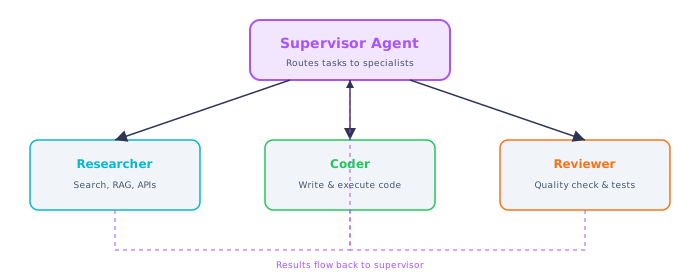
Figure 2 — Supervisor multi-agent pattern: manager routes tasks to specialist agents
A single agent with many tools becomes unreliable as complexity grows. Multi-agent systems split responsibilities across specialized agents that each excel at one thing. Instead of one person doing sales, engineering, and accounting, you have specialists who collaborate.
What This Means for Practitioners
Multi-agent pattern comparison:
| Pattern | How It Works | Best For | Tradeoff |
|---|---|---|---|
| Supervisor | Manager agent delegates to specialists | Most use cases (recommended start) | Single point of control, easier to debug |
| Sequential (pipeline) | Each agent's output feeds the next | Content creation, report generation | Clear stages, but no backtracking |
| Collaborative (debate) | Agents discuss and refine together | Code gen (coder + tester), analysis | Higher quality but slower, more tokens |
The supervisor pattern is the most practical starting point. A manager receives the request, breaks it down, and delegates to specialist agents (researcher, coder, writer, reviewer). Each specialist has its own tools and system prompt optimized for its domain.
Key design decision: granularity. Too many agents add coordination overhead and latency. Too few lose the specialization benefit. Start with 2-3 agents and add more only when a single agent is measurably struggling with its scope.
Memory strategies for multi-turn agents:
| Strategy | How It Works | Best For |
|---|---|---|
| Full history | Pass entire conversation | Short conversations (<20 turns) |
| Sliding window | Keep last N messages | Long conversations, cost control |
| Summary memory | LLM summarizes older history | Very long sessions |
| Shared state (LangGraph) | Structured state object passed between nodes | Multi-agent collaboration |
05. Human-in-the-Loop
Fully autonomous agents are powerful but risky. An agent that can send emails, modify databases, or deploy code could cause significant damage from a wrong decision. Human-in-the-loop (HITL) patterns add checkpoints where the agent pauses for human approval before taking high-impact actions.
What This Means for Practitioners
Approval gate decision guide:
| Action Type | Reversible? | Blast Radius | Gate Needed? |
|---|---|---|---|
| Reading data, search queries | N/A | None | No gate |
| Drafting content (not sending) | Yes | None | No gate or light review |
| Sending emails/messages | No | Medium | Yes -- always gate |
| Modifying production data | No | High | Yes -- hard stop for review |
| Financial transactions | No | High | Yes -- mandatory approval |
| Deploying code | Partially | High | Yes -- mandatory approval |
LangGraph supports HITL natively through its interrupt mechanism. The graph saves state, pauses, and waits for external approval:
from langgraph.graph import StateGraph, END
from langgraph.checkpoint.memory import MemorySaver
from typing import TypedDict

class ApprovalState(TypedDict):
    task: str
    proposed_action: str
    approved: bool
    result: str

def plan_action(state: ApprovalState) -> ApprovalState:
    return {"proposed_action": f"Send email to customer about: {state['task']}"}

def execute_action(state: ApprovalState) -> ApprovalState:
    if state["approved"]:
        return {"result": f"Executed: {state['proposed_action']}"}
    return {"result": "Action was rejected by human reviewer."}

graph = StateGraph(ApprovalState)
graph.add_node("plan", plan_action)
graph.add_node("execute", execute_action)
graph.set_entry_point("plan")
graph.add_edge("plan", "execute")
graph.add_edge("execute", END)

app = graph.compile(
    checkpointer=MemorySaver(),
    interrupt_before=["execute"]  # Pause here for approval
)

# Run until interrupt
config = {"configurable": {"thread_id": "approval-1"}}
state = app.invoke(
    {"task": "refund order #12345", "approved": False,
     "proposed_action": "", "result": ""},
    config=config
)

# Human reviews and approves...
app.update_state(config, {"approved": True})
final = app.invoke(None, config=config)  # Resume from checkpoint
06. Production Guardrails
Agents introduce safety challenges that do not exist with simple LLM calls. A chatbot that generates incorrect text is annoying; an agent that executes incorrect actions can delete data, send embarrassing emails, or burn through your cloud budget.
What This Means for Practitioners
Production safety layer checklist:
| Safety Layer | What It Prevents | Implementation |
|---|---|---|
| Max iterations | Infinite loops | Counter in agent loop (8-12 default) |
| Token budget | Runaway costs | Token counter + hard limit per request |
| Tool timeouts | Hung tool calls | asyncio.timeout or threading timeout |
| Input validation | Injection attacks, malformed args | Pydantic schemas per tool |
| Output filtering | PII leaks, policy violations | Regex + LLM guardrail check |
| Audit logging | Untrackable actions | Structured logs per step with trace IDs |
| Human approval | Irreversible actions | LangGraph interrupt_before |
| Least privilege | Damage from compromised agents | Scoped API keys, read-only by default |
Cost tracking wrapper:
class AgentBudget:
    def __init__(self, max_llm_calls: int = 20, max_tokens: int = 50_000):
        self.max_llm_calls = max_llm_calls
        self.max_tokens = max_tokens
        self.llm_calls = 0
        self.total_tokens = 0

    def track(self, tokens_used: int):
        self.llm_calls += 1
        self.total_tokens += tokens_used
        if self.llm_calls > self.max_llm_calls:
            raise RuntimeError(f"Agent exceeded max LLM calls: {self.max_llm_calls}")
        if self.total_tokens > self.max_tokens:
            raise RuntimeError(f"Agent exceeded token budget: {self.max_tokens}")
Observability is non-negotiable. Every tool call, every reasoning step, every decision branch must be logged with timestamps, input/output data, and latency. When an agent produces a wrong answer or takes an incorrect action, you need to trace back through the entire execution. Tools like LangSmith, Phoenix (Arize), and custom structured logging provide this visibility.
Interview Ready
How to Explain This in 2 Minutes
Elevator Pitch: Agents are the leap from LLMs that answer questions to LLMs that take actions. A basic LLM generates one response and stops, but an agent follows the ReAct loop -- Reason about the task, Act by calling a tool, Observe the result, and repeat until the goal is met. Tool use is implemented through function calling: you declare tool schemas, the model returns structured JSON calls, your code executes them and feeds results back. For complex workflows, LangGraph models the agent as a stateful graph with conditional branching and cycles. Multi-agent architectures let specialized agents collaborate through a supervisor pattern. Human-in-the-loop checkpoints ensure high-stakes actions require approval. Safety comes from iteration budgets, tool sandboxing, and structured audit logging.
Likely Interview Questions
| Question | What They're Really Asking |
|---|---|
| Walk me through the ReAct pattern. | Do you understand the Reason-Act-Observe loop and why iterative tool use beats one-pass generation? |
| How does function calling work at the API level? | Can you explain the mechanics -- schemas, tool call objects, execution, result feeding? |
| When would you use LangGraph over a simple chain? | Do you know when conditional branching, cycles, or approval gates are needed? |
| What safety mechanisms would you implement for an action-taking agent? | Do you understand sandboxing, HITL, budgets, logging, and least privilege? |
Common Mistakes
- Building an agent when a simple chain would suffice. Agents add 3-5x latency and 5-10x cost. Use them only for dynamic decision-making and variable tool use.
- Not setting iteration and token budgets. Without limits, agents can enter infinite loops. Always set max iterations, max tokens, and wall-clock timeouts.
- Giving agents unrestricted tool access. Every irreversible action should require human approval in production. All tool executions should be logged for audit and rollback.
Previous
Next