Module 08 of 17
Advanced RAG & Multimodal
A practitioner's guide to upgrading basic RAG — hybrid search, reranking, query transformation, parent-child chunks, self-corrective loops, and when each technique is worth the added complexity. Decision frameworks, not algorithms.
01. Query Transformation
Users rarely ask questions in the way that is most effective for retrieval. A user might ask "Why is my app slow?" when the actual documents discuss "performance optimization," "latency reduction," and "caching strategies." Query transformation bridges this gap by rewriting, expanding, or decomposing the user's query before it hits the vector store.
Think of it like this: Query transformation is like having a research librarian. When you ask "Why is my app slow?", the librarian translates that into three targeted searches: "application performance bottlenecks," "latency optimization techniques," and "caching best practices." You get much better results than your original phrasing would have produced.
What This Means for Practitioners
Query transformation technique comparison:
| Technique | How It Works | Best For | Cost |
|---|---|---|---|
| Multi-query | Generate 3-5 reformulations, retrieve for each, merge via RRF | Ambiguous queries (good default) | 1 extra LLM call |
| HyDE | Generate hypothetical answer, embed that instead of the question | Technical/scientific content | 1 extra LLM call |
| Query decomposition | Break multi-hop question into sub-questions, retrieve separately | "Compare X and Y", "How does A affect B through C" | 1 extra LLM call + N retrievals |
| Step-back prompting | Generate a broader version of a too-specific query | Overly narrow queries that return nothing | 1 extra LLM call |
Multi-query is always a good default -- low cost, high impact:
from openai import OpenAI
import json

client = OpenAI()

def generate_multi_queries(question: str, n: int = 3) -> list[str]:
    response = client.chat.completions.create(
        model="gpt-4o-mini",
        messages=[{
            "role": "system",
            "content": f"Generate {n} alternative versions of the given question "
                       f"for document retrieval. Use different keywords and phrasing. "
                       f"Return as JSON array under key 'queries'."
        }, {"role": "user", "content": question}],
        temperature=0.7,
        response_format={"type": "json_object"}
    )
    return json.loads(response.choices[0].message.content).get("queries", [question])
HyDE works because answers look more like documents than questions do. Instead of embedding the question, generate a hypothetical answer first and embed that:
def generate_hyde(question: str) -> str:
    response = client.chat.completions.create(
        model="gpt-4o-mini",
        messages=[{
            "role": "system",
            "content": "Write a short paragraph that would appear in a technical "
                       "document answering the given question. Write as factual "
                       "content, not as a response."
        }, {"role": "user", "content": question}],
        temperature=0.5, max_tokens=200
    )
    return response.choices[0].message.content
Query decomposition handles multi-hop questions that a single retrieval would fail on. "How does our company's RAG system compare to industry standard for financial documents?" becomes two retrievals: (1) "How does our RAG system process financial documents?" and (2) "What is the industry standard for financial document RAG?"
02. Parent-Child Chunks
The fundamental tension in chunking is between retrieval precision and context completeness. Small chunks (256 tokens) retrieve with high precision but lack surrounding context. Large chunks (2048 tokens) provide context but dilute the retrieval signal with irrelevant text. Parent-child chunking resolves this by using a two-level hierarchy: small "child" chunks are used for retrieval (high precision), but when a child matches, the system returns its larger "parent" chunk (rich context).
Think of it like this: Parent-child chunking is like a textbook index. The index lists specific terms and exact pages where they appear -- that is small chunk retrieval. But when you flip to that page, you read the entire section, not just the sentence where the term appears -- that is the parent chunk providing full context.
What This Means for Practitioners
When to use parent-child chunks:
- Users complain that answers are incomplete or missing context
- Your documents have clear section structure (manuals, contracts, guides)
- Small chunks retrieve precisely but the LLM cannot generate good answers from fragments
Size guidelines: Parent chunks: 1500-2500 tokens (full sections). Child chunks: 200-500 tokens (focused passages). Typical ratio: 3-6 children per parent.
from langchain.text_splitter import RecursiveCharacterTextSplitter
from langchain.storage import InMemoryStore
from langchain.retrievers import ParentDocumentRetriever
from langchain_community.vectorstores import Chroma
from langchain_openai import OpenAIEmbeddings

parent_splitter = RecursiveCharacterTextSplitter(chunk_size=2000, chunk_overlap=200)
child_splitter = RecursiveCharacterTextSplitter(chunk_size=400, chunk_overlap=50)

retriever = ParentDocumentRetriever(
    vectorstore=Chroma(
        collection_name="parent_child",
        embedding_function=OpenAIEmbeddings(model="text-embedding-3-small"),
    ),
    docstore=InMemoryStore(),
    child_splitter=child_splitter,
    parent_splitter=parent_splitter,
)

# Index: automatically creates parent + child chunks
retriever.add_documents(docs)

# Retrieve: searches child chunks, returns parent chunks
results = retriever.invoke("How does PagedAttention manage GPU memory?")
Sentence window retrieval is a lighter-weight alternative. Each individual sentence is embedded for maximum precision. When a sentence matches, the system returns a window of N sentences before and after. This works well for dense, information-rich content like legal contracts and medical guidelines.
03. Graph RAG
Standard RAG treats each document chunk as an independent island. There is no understanding of how concepts relate across chunks. Graph RAG builds a knowledge graph alongside the vector index -- a network of entities connected by relationships ("uses," "depends on," "is part of"). When a user asks a question, the system traverses these relationships to find connected information that simple vector similarity would miss.
Graph RAG is particularly effective for global questions that span many documents: "What are all the dependencies of our payment processing module?" or "How do these technologies relate to each other?" Standard vector search excels at local questions where the answer is in one or two chunks. Graph traversal aggregates information across the entire corpus.
What This Means for Practitioners
When Graph RAG adds value vs. when it does not:
| Query Type | Vector RAG | Graph RAG | Use Graph RAG? |
|---|---|---|---|
| "What is X?" (factual lookup) | Excellent | Unnecessary | No |
| "How does X relate to Y?" | Often misses connections | Finds relationships | Yes |
| "Find all things related to X" | Returns similar chunks only | Traverses connections | Yes |
| "Summarize themes across documents" | Poor (local only) | Good (global aggregation) | Yes |
| "What is our refund policy?" | Excellent | Unnecessary | No |
Use Graph RAG alongside vector RAG, not instead of it. Run both in parallel and merge results. Vector search handles most queries well. Graph traversal adds value for multi-hop, relational, and global queries.
from openai import OpenAI
import networkx as nx
import json

client = OpenAI()
graph = nx.DiGraph()

def extract_graph(chunk: str) -> dict:
    response = client.chat.completions.create(
        model="gpt-4o-mini",
        messages=[{"role": "user", "content": f"""Extract entities and relationships.
Return JSON with:
- "entities": [{{"name": "...", "type": "concept|technology|process"}}]
- "relationships": [{{"source": "...", "target": "...", "relation": "..."}}]

Text: {chunk}"""}],
        response_format={"type": "json_object"}, temperature=0.0
    )
    return json.loads(response.choices[0].message.content)

def graph_retrieve(query: str, hops: int = 2) -> list[str]:
    query_data = extract_graph(query)
    seed_entities = [e["name"] for e in query_data.get("entities", [])]
    matched = [n for n in graph.nodes if any(
        e.lower() in n.lower() for e in seed_entities)]

    related = set(matched)
    for _ in range(hops):
        neighbors = set()
        for node in related:
            if node in graph:
                neighbors.update(graph.successors(node))
                neighbors.update(graph.predecessors(node))
        related.update(neighbors)

    return [graph.nodes[n].get("chunks", []) for n in related if n in graph.nodes]
04. Multimodal RAG
Real-world documents contain tables, charts, diagrams, and photographs that carry critical information. A financial report's value is in its tables as much as its text. Multimodal RAG extends the pipeline to handle these non-text elements.
What This Means for Practitioners
Two approaches to multimodal RAG:
| Approach | How It Works | Pros | Cons |
|---|---|---|---|
| Extraction-based | Vision model describes images as text, index text | Works with any text RAG system | Loses visual nuances |
| Native multimodal | Store images directly, use multimodal embeddings (CLIP) | Preserves visual information | Requires multimodal embedding model |
Extraction-based is simpler and works with existing infrastructure:
import base64
from openai import OpenAI
from pathlib import Path

client = OpenAI()

def describe_image(image_path: str) -> str:
    b64 = base64.b64encode(Path(image_path).read_bytes()).decode()
    response = client.chat.completions.create(
        model="gpt-4o",
        messages=[{"role": "user", "content": [
            {"type": "text", "text": "Describe this image in detail for document retrieval. "
                                     "Include all visible text, data, and what it represents."},
            {"type": "image_url", "image_url": {"url": f"data:image/png;base64,{b64}"}}
        ]}],
        max_tokens=1000
    )
    return response.choices[0].message.content
Table extraction deserves special attention. Tables are the most common non-text element in enterprise documents and contain some of the most important information. Convert to markdown format, which LLMs understand well:
import pdfplumber

def extract_tables_as_markdown(pdf_path: str) -> list[str]:
    tables_md = []
    with pdfplumber.open(pdf_path) as pdf:
        for page_num, page in enumerate(pdf.pages, 1):
            for table in page.extract_tables():
                if not table:
                    continue
                headers = table[0]
                md = "| " + " | ".join(str(h) for h in headers) + " |\n"
                md += "| " + " | ".join("---" for _ in headers) + " |\n"
                for row in table[1:]:
                    md += "| " + " | ".join(str(c) for c in row) + " |\n"
                tables_md.append(f"[Table from page {page_num}]\n{md}")
    return tables_md
Cost note: Vision API calls for image description are 5-10x more expensive than text calls. Cache descriptions aggressively -- re-describe only when documents are updated.
05. Self-Corrective RAG
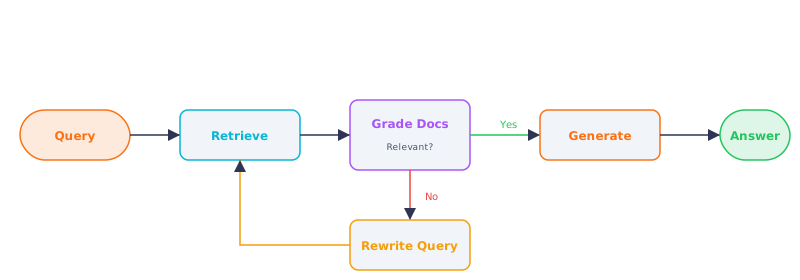
Figure 2 — Self-corrective RAG loop: retrieve, grade, rewrite or generate
Standard RAG is a one-shot pipeline: retrieve, generate, done. If retrieval returns irrelevant documents or generation is unfaithful to context, there is no mechanism to detect or fix the problem. Self-corrective RAG adds feedback loops that check quality and retry when results are insufficient.
The most practical framework is CRAG (Corrective RAG): after retrieving documents, use an LLM to judge whether they are relevant. If relevant, proceed normally. If ambiguous, supplement with a web search. If irrelevant, discard and fall back to a different retrieval strategy. This prevents the common failure where the LLM generates an answer based on tangentially related but unhelpful context.
What This Means for Practitioners
When to add self-corrective loops:
- High-stakes domains where wrong answers have real consequences (medical, legal, financial)
- Users report confidently wrong answers
- Retrieval quality is inconsistent across query types
When basic RAG is sufficient:
- Low-stakes internal Q&A
- Narrow, well-indexed document collections
- Latency requirements under 2 seconds
CRAG implementation with LangGraph:
from langgraph.graph import StateGraph, END
from typing import TypedDict

class RAGState(TypedDict):
    question: str
    documents: list[str]
    generation: str
    retries: int

def retrieve(state: RAGState) -> RAGState:
    docs = retriever.search(state["question"], k=5)
    return {**state, "documents": [d["text"] for d in docs]}

def grade_documents(state: RAGState) -> RAGState:
    relevant = []
    for doc in state["documents"]:
        response = client.chat.completions.create(
            model="gpt-4o-mini",
            messages=[{"role": "user",
                "content": f"Is this document relevant to: {state['question']}?\n"
                           f"Document: {doc[:500]}\nAnswer yes or no."}],
            temperature=0.0, max_tokens=3
        )
        if "yes" in response.choices[0].message.content.lower():
            relevant.append(doc)
    return {**state, "documents": relevant}

def should_rewrite(state: RAGState) -> str:
    if len(state["documents"]) < 2 and state["retries"] < 2:
        return "rewrite"
    return "generate"

def rewrite_query(state: RAGState) -> RAGState:
    response = client.chat.completions.create(
        model="gpt-4o-mini",
        messages=[{"role": "user",
            "content": f"This question didn't retrieve good results. "
                       f"Rewrite with different keywords.\nOriginal: {state['question']}"}],
        temperature=0.7
    )
    return {**state, "question": response.choices[0].message.content.strip(),
            "retries": state["retries"] + 1}

def generate(state: RAGState) -> RAGState:
    context = "\n\n".join(state["documents"])
    response = client.chat.completions.create(
        model="gpt-4o",
        messages=[
            {"role": "system", "content": "Answer based only on the provided context."},
            {"role": "user", "content": f"Context:\n{context}\n\nQuestion: {state['question']}"}
        ], temperature=0.1
    )
    return {**state, "generation": response.choices[0].message.content}

workflow = StateGraph(RAGState)
workflow.add_node("retrieve", retrieve)
workflow.add_node("grade", grade_documents)
workflow.add_node("rewrite", rewrite_query)
workflow.add_node("generate", generate)
workflow.set_entry_point("retrieve")
workflow.add_edge("retrieve", "grade")
workflow.add_conditional_edges("grade", should_rewrite,
    {"rewrite": "rewrite", "generate": "generate"})
workflow.add_edge("rewrite", "retrieve")
workflow.add_edge("generate", END)
app = workflow.compile()
06. Production Upgrade Path
The most important production principle is: start simple, add complexity only when measurement justifies it.
What This Means for Practitioners
Incremental upgrade path for RAG systems:
| Stage | Pattern | When to Upgrade | Complexity |
|---|---|---|---|
| 1 | Basic RAG (retrieve + generate) | Starting point | Low |
| 2 | + Hybrid search (vector + BM25) | Keyword queries fail | Low-Medium |
| 3 | + Cross-encoder reranking | Too many irrelevant results | Medium |
| 4 | + Parent-child chunks | Users complain about incomplete answers | Medium |
| 5 | + Query transformation | Paraphrased queries fail | Medium |
| 6 | + Self-corrective loop | High-stakes, wrong answers are costly | High |
| 7 | + Graph RAG | Multi-hop, relational questions | High |
| 8 | + Multimodal | Tables, images, diagrams in documents | High |
Each upgrade should be A/B tested against the previous baseline. Adding every technique at once makes it impossible to measure which one actually improved results. Stage 2+3 (hybrid search + reranking) covers 80% of use cases and should be your first upgrades.
Key Principle: Begin with basic RAG + hybrid search + reranking. Add parent-child chunks if users complain about incomplete answers. Add query transformation if retrieval fails on paraphrased queries. Add self-corrective loops only for high-stakes domains where answer accuracy is critical.
Interview Ready
How to Explain This in 2 Minutes
Elevator Pitch: Advanced RAG goes beyond basic retrieve-and-stuff by adding intelligence at every stage. Before retrieval, query expansion generates multiple reformulations to cast a wider net. During retrieval, hybrid search combines dense vectors with sparse keyword matching. After retrieval, a cross-encoder reranker surfaces the truly relevant chunks. Self-corrective loops evaluate whether retrieved documents actually support an answer and re-retrieve with rewritten queries if not. These techniques collectively transform demo-quality RAG into production-grade systems that handle ambiguous, multi-hop, and adversarial queries reliably.
Likely Interview Questions
| Question | What They're Really Asking |
|---|---|
| What is hybrid search and why is it better than pure vector search? | Do you understand complementary strengths of dense and sparse retrieval? |
| Explain how reranking works and where it fits in a RAG pipeline. | Can you distinguish bi-encoder retrieval (fast) from cross-encoder reranking (precise)? |
| What query expansion techniques would you use to improve retrieval? | Do you know HyDE, multi-query, step-back, and when each is appropriate? |
| How do Self-RAG and CRAG differ from standard RAG? | Can you explain self-corrective loops and retrieval grading? |
Common Mistakes
- Adding every advanced technique at once. Start with hybrid search + reranking (highest impact). Measure, then layer on query expansion and CRAG incrementally. Each addition should be A/B tested.
- Using query expansion without deduplication. Multi-query retrieval produces duplicate chunks. Always apply Reciprocal Rank Fusion and deduplicate by chunk ID.
- Treating reranker scores as absolute confidence. Cross-encoder scores are relative, not calibrated probabilities. Always set a minimum relevance threshold calibrated on your evaluation set.
Previous
Next