Module 07 of 17
Retrieval-Augmented Generation
A practitioner's guide to building RAG systems that work in production — when to use RAG, chunking strategy comparison, embedding model selection, vector database tradeoffs, retrieval quality tuning, and a production-readiness checklist.
01. What Is RAG and When to Use It
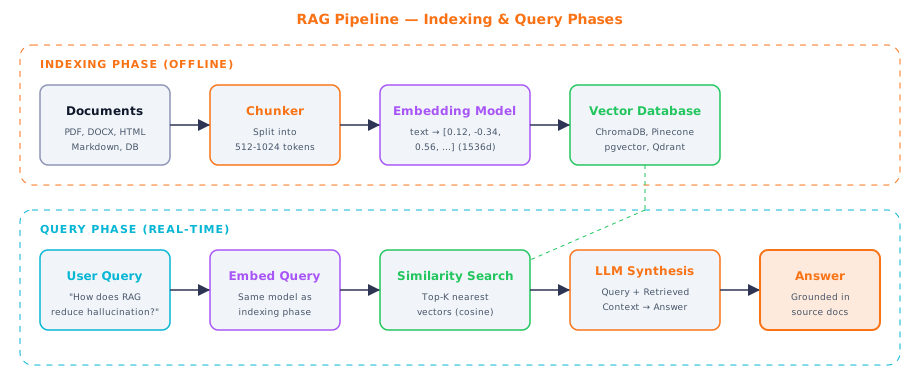
Figure 1 — Complete RAG pipeline: offline indexing phase and real-time query phase
Retrieval-Augmented Generation works like an open-book exam. Instead of asking the LLM to answer purely from memory (its training data), you first search a collection of documents for the most relevant passages, then hand those passages to the LLM along with the user's question. The LLM reads the retrieved context and writes an answer grounded in actual source material rather than potentially hallucinated information.
This pattern solves the three biggest problems with using LLMs for knowledge-intensive tasks. Knowledge cutoff: a model trained in 2024 knows nothing about 2025 updates. RAG lets it access current information. Hallucination: with actual source text to reference, fabrication drops dramatically. Domain specificity: RAG injects your proprietary knowledge at query time without requiring model training.
The pipeline has two phases. The indexing phase happens offline: load documents, split them into chunks, embed each chunk into a vector, and store those vectors in a specialized database. The query phase happens in real time: embed the user's question, find the most similar document vectors, retrieve those chunks, and pass them to the LLM as context.
Think of it like this: RAG is like giving a student their textbook during an exam. They already know how to read, reason, and write -- you are just making sure they have the right reference material in front of them instead of guessing from memory.
What This Means for Practitioners
When to use RAG vs. alternatives:
| Approach | Best For | Update Speed | Cost | Quality |
|---|---|---|---|---|
| RAG | Frequently updated knowledge, audit trails, large corpora | Minutes (re-index docs) | Low | High with good retrieval |
| Fine-tuning | Consistent style/format, domain reasoning patterns | Days (retrain) | Medium-High | High for narrow tasks |
| Long context stuffing | Small, stable document sets (<50 pages) | Instant | High per-request | Good but degrades in middle |
| RAG + fine-tuning | Best of both: domain style + current knowledge | Mixed | Highest | Highest ceiling |
RAG is the default for most enterprise applications because it offers the best combination of low cost, high quality, and operational simplicity. You can update knowledge by adding or modifying documents without any model retraining. Most enterprise AI assistants, customer support bots, and internal knowledge systems use RAG as their foundation.
The quality of a RAG system depends on every stage. Poor chunking produces fragments that lack context. A weak embedding model creates vectors that miss semantic relationships. An inefficient retriever returns irrelevant documents. Even a great LLM produces poor answers if the retrieved context is wrong. Understanding each stage is essential.
02. Document Chunking
Chunking is the process of breaking large documents into smaller pieces that can be individually embedded and retrieved. The challenge is finding the right size and boundaries. Too small and you lose context (a sentence in isolation may not make sense). Too large and you waste context window space by retrieving irrelevant text alongside the relevant parts.
Overlap is crucial. When you split without overlap, information that spans a chunk boundary is lost. Adding overlap (typically 10-20% of chunk size) ensures boundary-spanning information appears in at least one complete chunk. The tradeoff is increased storage and potential duplicate retrieval results.
Think of it like this: Chunking is like cutting a newspaper article into individual paragraphs for filing. You want each piece to make sense on its own, and you want a few lines of overlap so nothing falls through the cracks at the cuts.
What This Means for Practitioners
Chunking strategy comparison:
| Strategy | How It Works | Best For | Tradeoffs |
|---|---|---|---|
| Fixed-size | Split every N characters/tokens | Fast prototyping, uniform text | Cuts mid-sentence, ignores structure |
| Recursive character | Split on paragraphs, then sentences, then words | General-purpose (recommended default) | Good balance of speed and quality |
| Semantic | Split where embedding similarity drops between sentences | Topic-coherent chunks | Slower, requires embedding calls |
| Document-aware | Respect headers, sections, tables | Structured docs (manuals, contracts) | Needs format-specific parsers |
Start here: 512 tokens (~2000 characters) with 20% overlap using recursive character splitting. Adjust based on retrieval quality with real queries.
from langchain.text_splitter import RecursiveCharacterTextSplitter

splitter = RecursiveCharacterTextSplitter(
    chunk_size=1000,       # ~250 tokens
    chunk_overlap=200,     # 20% overlap
    separators=["\n\n", "\n", ". ", " ", ""],
)

chunks = splitter.split_documents(docs)
Semantic chunking splits at topic boundaries using embedding similarity. It produces topically coherent chunks regardless of formatting:
from langchain_experimental.text_splitter import SemanticChunker
from langchain_openai import OpenAIEmbeddings

semantic_splitter = SemanticChunker(
    embeddings=OpenAIEmbeddings(model="text-embedding-3-small"),
    breakpoint_threshold_type="percentile",
    breakpoint_threshold_amount=70,
)
Always enrich chunks with metadata. Each chunk should carry its source filename, page number, section heading, and document date. This enables filtered retrieval ("search only 2024 documents") and source attribution in answers.
Chunk Size Rule of Thumb: If retrieval quality is poor, try smaller chunks (256 tokens) for higher precision or larger chunks (1024 tokens) for more context. Always evaluate with real queries against your specific documents.
03. Embedding Model Selection
An embedding model takes text and converts it into a vector (list of numbers) that captures meaning. Similar meanings produce similar vectors. When you search for "how to deploy a web app," the embedding will be mathematically close to chunks about deployment, Docker, and hosting -- even if those chunks use completely different words. This is the magic that makes semantic search work: matching by meaning, not by keyword.
One critical rule: you must use the same embedding model for indexing and querying. Each model creates vectors in its own coordinate system. If you index with OpenAI and query with Cohere, similarity scores will be meaningless. Choosing an embedding model is a relatively permanent decision.
What This Means for Practitioners
Embedding model comparison for RAG:
| Model | Dimensions | MTEB Score | Cost | Best For |
|---|---|---|---|---|
| text-embedding-3-small (OpenAI) | 1,536 | 62.3 | $0.02/1M tokens | Cost-effective production |
| text-embedding-3-large (OpenAI) | 3,072 | 64.6 | $0.13/1M tokens | Max quality (OpenAI ecosystem) |
| BAAI/bge-large-en-v1.5 | 1,024 | 64.2 | Free (local) | Privacy-first, on-prem |
| Cohere embed-v3 | 1,024 | 64.5 | $0.10/1M tokens | Multilingual + compression |
| nomic-embed-text-v1.5 | 768 | 62.3 | Free (local) | Lightweight local |
| Voyage Code 2 | 1,536 | -- | $0.12/1M tokens | Code search and retrieval |
Decision guide: Use text-embedding-3-small for most production cases. Use bge-large if you need local/private embedding. Use Voyage Code 2 for code repositories. Use Cohere embed-v3 for multilingual corpora.
# OpenAI embeddings (production standard)
from openai import OpenAI
client = OpenAI()

def embed_batch(texts: list[str]) -> list[list[float]]:
    response = client.embeddings.create(
        input=texts, model="text-embedding-3-small"
    )
    return [item.embedding for item in response.data]

# Local embeddings (no API costs, full data privacy)
from sentence_transformers import SentenceTransformer

model = SentenceTransformer("BAAI/bge-large-en-v1.5")
vectors = model.encode(texts, normalize_embeddings=True)
Always embed in batches. OpenAI accepts up to 2048 texts per call. Embedding 10,000 chunks individually takes 10,000 API calls; batching reduces this to 5.
04. Vector Databases
A vector database stores and searches millions of embedding vectors efficiently. Traditional databases find exact matches (id = 42). Vector databases find approximate nearest neighbors -- the 10 vectors most similar to your query out of millions. This requires specialized data structures and algorithms (HNSW, IVF) that organize vectors by similarity for fast search without comparing every stored vector.
Think of it like this: A vector database is a library organized by meaning, not alphabetically. Books about cooking cluster together, astronomy books in another area. When you walk in with a question, the librarian goes directly to the relevant section instead of checking every single book.
What This Means for Practitioners
Vector database comparison:
| Database | Deployment | Best For | Key Feature |
|---|---|---|---|
| ChromaDB | In-process (pip install) | Prototyping, <1M vectors | Zero setup, 3 lines of Python |
| pgvector | PostgreSQL extension | Already using Postgres | SQL joins + vector search together |
| Pinecone | Fully managed cloud | Production, zero ops | Scales automatically, no infra |
| Qdrant | Self-hosted or cloud | Advanced filtering, multi-tenancy | Rich filtering + hybrid search |
| Weaviate | Self-hosted or cloud | Complex schemas, hybrid search | GraphQL API, native hybrid search |
Start with ChromaDB, migrate when you hit scale:
import chromadb
from chromadb.utils.embedding_functions import OpenAIEmbeddingFunction

client = chromadb.PersistentClient(path="./chroma_db")
embed_fn = OpenAIEmbeddingFunction(
    api_key="sk-...", model_name="text-embedding-3-small"
)

collection = client.get_or_create_collection(
    name="knowledge_base",
    embedding_function=embed_fn,
    metadata={"hnsw:space": "cosine"}
)

collection.add(
    ids=["doc1", "doc2"],
    documents=["RAG retrieves documents...", "Fine-tuning modifies weights..."],
    metadatas=[{"source": "rag_guide.pdf"}, {"source": "fine_tuning.pdf"}]
)

results = collection.query(query_texts=["How does RAG work?"], n_results=3)
pgvector for teams already on PostgreSQL -- full SQL power combined with vector search:
CREATE EXTENSION vector;

CREATE TABLE documents (
    id SERIAL PRIMARY KEY,
    content TEXT NOT NULL,
    source VARCHAR(255),
    embedding vector(1536),
    created_at TIMESTAMPTZ DEFAULT NOW()
);

CREATE INDEX ON documents USING hnsw (embedding vector_cosine_ops);

SELECT content, source,
       1 - (embedding <=> '[0.12, -0.34, ...]'::vector) AS similarity
FROM documents
WHERE source = 'rag_guide.pdf'
ORDER BY embedding <=> '[0.12, -0.34, ...]'::vector
LIMIT 5;
05. Retrieval & Reranking
The simplest retrieval -- pure vector similarity search -- works surprisingly well in most cases. But real-world retrieval often needs more. What if the user searches for an exact product ID? What if the top vector matches are all from the same document? What if 20 results come back but only 3 are truly relevant?
Hybrid search combines vector similarity with keyword matching (BM25). Semantic search understands that "car" and "automobile" are the same concept but fails on exact terms like product codes and error messages. Keyword search nails exact matches but fails on paraphrases. Hybrid search runs both and merges results using Reciprocal Rank Fusion (RRF).
Reranking dramatically improves precision as a second stage. The initial retrieval casts a wide net (20 candidates). A cross-encoder reranker examines each candidate alongside the query and produces much more accurate relevance scores. Cross-encoders are too slow for the full collection but excellent for re-scoring 20 candidates.
What This Means for Practitioners
Retrieval quality impact by technique:
| Technique | Precision@5 Improvement | Latency Added | Effort |
|---|---|---|---|
| Pure vector search | Baseline | Baseline | Low |
| + Hybrid search (BM25) | +10-20% | +10-20ms | Low-Medium |
| + Cross-encoder reranking | +15-30% (on top of hybrid) | +50-100ms | Medium |
from rank_bm25 import BM25Okapi
from sentence_transformers import CrossEncoder

class HybridRetriever:
    def __init__(self, collection, chunks: list[str]):
        self.collection = collection
        self.chunks = chunks
        tokenized = [doc.lower().split() for doc in chunks]
        self.bm25 = BM25Okapi(tokenized)
        self.reranker = CrossEncoder("cross-encoder/ms-marco-MiniLM-L-12-v2")

    def search(self, query: str, k: int = 5) -> list[dict]:
        # Vector search (top 20)
        vector_results = self.collection.query(
            query_texts=[query], n_results=20
        )
        vector_docs = vector_results["documents"][0]

        # BM25 keyword search (top 20)
        bm25_scores = self.bm25.get_scores(query.lower().split())
        bm25_top = sorted(range(len(bm25_scores)),
                          key=lambda i: bm25_scores[i], reverse=True)[:20]
        bm25_docs = [self.chunks[i] for i in bm25_top]

        # Reciprocal Rank Fusion
        fused = self._rrf_merge(vector_docs, bm25_docs)

        # Cross-encoder reranking
        pairs = [[query, doc] for doc in fused]
        scores = self.reranker.predict(pairs)
        ranked = sorted(zip(fused, scores), key=lambda x: x[1], reverse=True)
        return [{"text": doc, "score": float(s)} for doc, s in ranked[:k]]

    def _rrf_merge(self, list_a, list_b, k=60):
        scores = {}
        for rank, doc in enumerate(list_a):
            scores[doc] = scores.get(doc, 0) + 1 / (k + rank + 1)
        for rank, doc in enumerate(list_b):
            scores[doc] = scores.get(doc, 0) + 1 / (k + rank + 1)
        return sorted(scores, key=scores.get, reverse=True)
06. LLM Synthesis & Production Checklist
Synthesis is where everything comes together: retrieved chunks + user question + LLM = grounded answer. The synthesis prompt must clearly instruct the model to base its answer on provided context and to say "I don't know" when the context does not contain the answer.
SYSTEM_PROMPT = """You are an expert assistant that answers questions based
ONLY on the provided context documents. Follow these rules:
1. Base your answer entirely on the provided context.
2. If the context lacks the answer, say: "I don't have enough information."
3. Cite sources using [Source: filename, page N] format.
4. If context is contradictory, acknowledge both perspectives.
5. Use the same terminology as the source documents."""
What This Means for Practitioners
Production RAG checklist:
| Stage | Checkpoint | How to Verify |
|---|---|---|
| Document loading | All formats supported (PDF, DOCX, HTML, MD) | Load sample of each type, inspect output |
| Chunking | Chunks are semantically coherent | Manual review of 20 random chunks |
| Overlap | Boundary information preserved | Test queries that span chunk boundaries |
| Embedding | Same model for indexing and querying | Assert model name in config |
| Metadata | Source, page, date attached to every chunk | Query and inspect metadata fields |
| Retrieval | Top-5 chunks are relevant for test queries | Measure Precision@5 on golden set |
| Reranking | Cross-encoder improves over raw vector scores | A/B test with and without reranker |
| Synthesis | Answers grounded in context, no hallucination | RAGAS faithfulness score >0.8 |
| Streaming | Time-to-first-token under 1 second | Measure TTFT in load testing |
| Token budget | Input + output fits context window | Assert token count before API call |
| Temperature | Set to 0.0-0.2 for factual grounding | Verify in API call configuration |
| Caching | Repeated queries do not re-embed or re-retrieve | Monitor cache hit rate |
| Observability | Every stage logged with latency and token counts | Check structured logs in monitoring |
Temperature Matters: For RAG synthesis, use temperature 0.0-0.2. Higher temperatures encourage creative generation, which works against grounding answers in retrieved context.
Interview Ready
How to Explain This in 2 Minutes
Elevator Pitch: RAG -- Retrieval-Augmented Generation -- is the most widely deployed pattern in production GenAI. Instead of relying on what the LLM memorized during training, we retrieve relevant documents from an external knowledge base and inject them into the prompt as context. The pipeline has two phases: an offline indexing phase where documents are chunked, embedded into vectors, and stored in a vector database, and a real-time query phase where the user's question is embedded, similar chunks are retrieved via similarity search, and the LLM generates a grounded answer. RAG solves knowledge cutoff, hallucination, and domain specificity. Compared to fine-tuning, RAG is cheaper, faster to update, and auditable because every answer traces to source documents.
Likely Interview Questions
| Question | What They're Really Asking |
|---|---|
| Walk me through a RAG pipeline end to end. | Do you understand every component and how they connect? |
| How do you choose a chunking strategy and chunk size? | Can you reason about context completeness vs. retrieval precision? |
| When would you choose RAG over fine-tuning? | Can you articulate cost, latency, and accuracy tradeoffs? |
| How do you evaluate whether a RAG system is working? | Do you know retrieval metrics (recall@k, MRR) and generation quality metrics (faithfulness)? |
Common Mistakes
- Using chunks that are too large or too small. Chunks over 1024 tokens dilute relevance. Chunks under 128 tokens lose context. Test multiple sizes with real queries.
- Ignoring chunk overlap. Without overlap, information spanning a chunk boundary is lost. Always use 10-15% overlap.
- Skipping reranking. ANN similarity scores are not calibrated probabilities. A cross-encoder reranker improves answer quality by 15-25% with minimal latency.
- Using raw similarity scores as confidence. A top-ranked chunk with score 0.6 might still be irrelevant. Set a minimum relevance threshold calibrated on your data.
Previous
Next