Module 03 of 17
API for Accessing Large Language Models
A practitioner's guide to calling LLM APIs in production — the chat completions interface, provider SDK patterns, streaming, cost management, multi-provider routing with LiteLLM, and structured outputs with Pydantic.
01. The Chat Completions Interface
Every production LLM application communicates through the same pattern: you construct an array of messages representing a conversation, send it with configuration parameters to an HTTP endpoint, and receive back generated text plus metadata. This interface is universal across OpenAI, Anthropic, Google, and self-hosted models. Understanding it deeply is the foundation for everything else in this module.
The chat format exists because the older "send a string, get a continuation" approach created massive problems: developers had to manually format multi-turn conversations, there was no clean way to distinguish instructions from user input, and prompt injection was trivially easy. The chat format solves all of this by giving each message a role that the model treats differently during inference.
The three roles are: system (sets persona, behavioral constraints, and task instructions), user (represents the human or application), and assistant (previous model responses, included for multi-turn context). The system message is the single highest-leverage knob for controlling output quality. A system message like "You are a helpful assistant" is almost useless. A detailed, specific system message produces dramatically better results.
LLM APIs are inherently stateless. Each request is completely independent — the provider maintains zero conversation state between requests. Your application is entirely responsible for maintaining conversation history and sending relevant portions with each request.
Think of it like this: Calling an LLM API is like sending a letter to an expert consultant. Every letter must include all the context they need — they do not remember your previous letters. The system message is the job description you attach to every letter. The conversation history is a transcript of your previous exchanges that you photocopy and include each time.
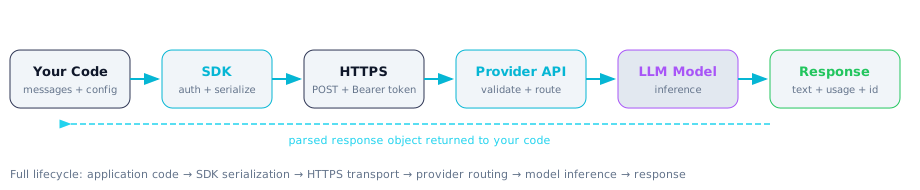
Figure 1 -- The complete lifecycle of an LLM API call, from application code through the SDK, network, provider infrastructure, model, and back.
What This Means for Practitioners
The provider differences matter for your code but not for your architecture. Here are the key differences you need to handle:
| Feature | OpenAI | Anthropic |
|---|---|---|
| System message | First message in array with role: "system" | Separate top-level system parameter |
| Response structure | response.choices[0].message.content | message.content[0].text |
| Stop reason | finish_reason: "stop", "length", "tool_calls" | stop_reason: "end_turn", "max_tokens", "tool_use" |
| Auth header | Authorization: Bearer sk-... | x-api-key: sk-ant-... |
| Temperature range | 0 to 2 | 0 to 1 |
| Prompt caching | Automatic, 50% discount on cached prefixes >1024 tokens | Explicit cache_control annotation, 90% discount |
| Structured output | Native response_format with JSON schema | Via tool use mechanism |
Always check finish_reason in production code. When it is "length" instead of "stop", the model's response was truncated. Silently accepting truncated responses leads to broken JSON, incomplete data, and subtle downstream bugs.
Few-shot examples are extraordinarily powerful. Instead of only describing what you want in the system message, demonstrate it by including example user/assistant message pairs before the real query. The model sees these and mimics the pattern, producing dramatically more consistent output formats.
# OpenAI Chat Completions request
import openai

client = openai.OpenAI()

response = client.chat.completions.create(
    model="gpt-4o",
    messages=[
        {"role": "system", "content": "You are a senior Python developer."},
        {"role": "user",   "content": "Explain decorators with an example."},
    ],
    temperature=0.0,
    max_tokens=1024,
)

text   = response.choices[0].message.content
reason = response.choices[0].finish_reason   # "stop" | "length" | "tool_calls"
usage  = response.usage                       # prompt_tokens, completion_tokens

# --- Anthropic Messages request ---
import anthropic

client = anthropic.Anthropic()

message = client.messages.create(
    model="claude-sonnet-4-20250514",
    system="You are a senior Python developer.",
    messages=[
        {"role": "user", "content": "Explain decorators with an example."},
    ],
    temperature=0.0,
    max_tokens=1024,
)

text   = message.content[0].text
reason = message.stop_reason    # "end_turn" | "max_tokens" | "tool_use"
usage  = message.usage          # input_tokens, output_tokens
02. Provider SDKs and Error Handling
Provider SDKs handle authentication, request construction, response parsing, retries, connection pooling, streaming, and type safety. The three SDKs you need are OpenAI, Anthropic, and LiteLLM (unified interface across all providers).
Both OpenAI and Anthropic SDKs return fully typed Pydantic objects — your IDE provides autocompletion for every response field, and typos become development-time errors instead of runtime crashes. Both expose synchronous and async clients (OpenAI / AsyncOpenAI, Anthropic / AsyncAnthropic). Always use the async client in async code — using the sync client inside a FastAPI endpoint blocks the entire event loop and serializes all requests.
Retry logic is essential because LLM APIs are inherently unreliable at scale. Rate limiting, server errors, and network failures are routine. Only retry transient errors (429, 500, 502, 503, connection errors). Never retry 400 (bad request) or 401 (auth error) — those indicate bugs in your code.
# The same call in three SDKs
# ---- 1. OpenAI SDK ----
from openai import OpenAI
oai = OpenAI()
rsp = oai.chat.completions.create(
    model="gpt-4o",
    messages=[
        {"role": "system", "content": "Return only valid JSON."},
        {"role": "user",   "content": "List 3 Python web frameworks."},
    ],
    temperature=0, max_tokens=256,
)
print(rsp.choices[0].message.content)

# ---- 2. Anthropic SDK ----
from anthropic import Anthropic
ant = Anthropic()
msg = ant.messages.create(
    model="claude-sonnet-4-20250514",
    system="Return only valid JSON.",
    messages=[{"role": "user", "content": "List 3 Python web frameworks."}],
    temperature=0, max_tokens=256,
)
print(msg.content[0].text)

# ---- 3. LiteLLM (unified) ----
import litellm
for model in ["gpt-4o", "anthropic/claude-sonnet-4-20250514", "groq/llama-3.1-70b-versatile"]:
    rsp = litellm.completion(
        model=model,
        messages=[
            {"role": "system", "content": "Return only valid JSON."},
            {"role": "user",   "content": "List 3 Python web frameworks."},
        ],
        temperature=0, max_tokens=256,
    )
    print(f"{model}: {rsp.choices[0].message.content}")
What This Means for Practitioners: Error Handling
import openai
from tenacity import (
    retry, stop_after_attempt, wait_exponential,
    retry_if_exception_type
)

@retry(
    retry=retry_if_exception_type((
        openai.RateLimitError,       # 429
        openai.APIConnectionError,   # network
        openai.InternalServerError,  # 500
    )),
    wait=wait_exponential(multiplier=1, min=2, max=60),
    stop=stop_after_attempt(5),
)
def robust_completion(messages: list, model: str = "gpt-4o") -> str:
    client = openai.OpenAI()
    try:
        rsp = client.chat.completions.create(
            model=model, messages=messages,
            temperature=0, max_tokens=1024
        )
        if rsp.choices[0].finish_reason == "length":
            raise ValueError("Response truncated -- increase max_tokens")
        return rsp.choices[0].message.content
    except openai.BadRequestError as e:
        raise ValueError(f"Bad request: {e}") from e
Production Warning: Never retry 400 Bad Request or 401 Unauthorized errors. These indicate bugs in your code, not transient failures. Only retry 429, 500, 502, 503, and connection errors.
03. Streaming Responses
Without streaming, the user stares at a blank screen for 5-30 seconds while the model generates its entire response. With streaming, the first token appears in 200-500 milliseconds and text flows in progressively as the model generates. Every production LLM application uses streaming for user-facing interactions.
The protocol is Server-Sent Events (SSE): you send a request with stream: true, and the server keeps the connection open, sending each token as a data: event. Your code accumulates these deltas to build the complete response. The stream ends with data: [DONE] (OpenAI) or a final event with stop_reason (Anthropic).
Key production considerations: (1) Error handling is more complex — the HTTP connection already returned 200 before errors occur, so errors arrive as stream events. (2) If the client disconnects, cancel the upstream API call to avoid paying for unseen tokens. (3) Token usage is only reported in the final event, so real-time cost tracking during streaming requires client-side token counting.
Think of it like this: Non-streaming is like waiting for a chef to finish the entire meal before bringing anything to your table. Streaming is like a sushi conveyor belt — each piece arrives as it is ready, and you start eating immediately while the chef keeps working.
What This Means for Practitioners: Streaming Implementation
import asyncio
from openai import AsyncOpenAI
from anthropic import AsyncAnthropic
from fastapi import FastAPI
from fastapi.responses import StreamingResponse

app = FastAPI()

# --- OpenAI async streaming ---
async def stream_openai(prompt: str):
    client = AsyncOpenAI()
    stream = await client.chat.completions.create(
        model="gpt-4o",
        messages=[{"role": "user", "content": prompt}],
        stream=True, max_tokens=2048,
    )
    full_text = ""
    async for chunk in stream:
        delta = chunk.choices[0].delta
        if delta.content:
            full_text += delta.content
            print(delta.content, end="", flush=True)
    return full_text

# --- Anthropic async streaming ---
async def stream_anthropic(prompt: str):
    client = AsyncAnthropic()
    full_text = ""
    async with client.messages.stream(
        model="claude-sonnet-4-20250514",
        messages=[{"role": "user", "content": prompt}],
        max_tokens=2048,
    ) as stream:
        async for text in stream.text_stream:
            full_text += text
            print(text, end="", flush=True)
    return full_text

# --- FastAPI streaming endpoint ---
@app.get("/stream")
async def stream_endpoint(prompt: str):
    async def event_generator():
        client = AsyncOpenAI()
        stream = await client.chat.completions.create(
            model="gpt-4o",
            messages=[{"role": "user", "content": prompt}],
            stream=True, max_tokens=2048,
        )
        async for chunk in stream:
            delta = chunk.choices[0].delta
            if delta.content:
                yield f"data: {delta.content}\n\n"
        yield "data: [DONE]\n\n"

    return StreamingResponse(
        event_generator(),
        media_type="text/event-stream",
    )
Performance Tip: Always use the async client (AsyncOpenAI, AsyncAnthropic) in FastAPI endpoints. The sync client blocks the event loop, reducing your server from thousands of concurrent streams to effectively one at a time.
04. Cost Management
LLM API costs can escalate from a few dollars during prototyping to thousands per day in production. Understanding the economics is a core engineering requirement that should influence your architecture from day one.
The cost model: you pay per token, with separate rates for input and output. Output tokens are 3-5x more expensive because they require sequential autoregressive generation while input tokens are processed in parallel.
What This Means for Practitioners: Cost Optimization
The highest-impact optimization is model tiering. Route simple tasks to cheap models and reserve expensive models for complex reasoning:
| Task Type | Recommended Model | Cost (per 1M tokens in/out) | Savings vs GPT-4o |
|---|---|---|---|
| Classification, routing, simple Q&A | GPT-4o-mini | $0.15 / $0.60 | 94% cheaper |
| Standard summarization, extraction | Gemini 2.0 Flash | $0.075 / $0.30 | 97% cheaper |
| Complex reasoning, multi-step analysis | GPT-4o | $2.50 / $10.00 | Baseline |
| Production reliability, complex prompts | Claude 3.7 Sonnet | $3.00 / $15.00 | 50% more expensive |
| Batch processing (non-real-time) | Any model via Batch API | 50% off standard | 50% cheaper |
Cost optimization checklist:
- Count tokens before sending. Use
tiktokenfor OpenAI models. A "short" prompt might be 50 tokens in English but 150 tokens in Korean. - Set
max_tokensexplicitly. Never let a model generate unlimited output. - Use prompt caching. Anthropic: 90% discount with
cache_controlannotations. OpenAI: 50% automatic discount on prefixes >1024 tokens. - Cache responses in Redis. Hash the messages array and serve cached responses for identical queries. Even 30% cache hit rate saves significantly.
- Monitor from day one. Log every call with token usage and model. Set daily budget alerts.
import tiktoken
import hashlib, json, redis

# ---- Token counting before sending ----
def count_tokens(text: str, model: str = "gpt-4o") -> int:
    enc = tiktoken.encoding_for_model(model)
    return len(enc.encode(text))

def estimate_cost(messages: list, model: str = "gpt-4o", est_output: int = 500) -> dict:
    PRICING = {
        "gpt-4o": (2.50, 10.00), "gpt-4o-mini": (0.15, 0.60),
        "claude-sonnet": (3.00, 15.00), "gemini-flash": (0.10, 0.40),
    }
    enc = tiktoken.encoding_for_model(model)
    input_tokens = sum(len(enc.encode(m["content"])) + 4 for m in messages)
    rate_in, rate_out = PRICING.get(model, (2.50, 10.00))
    return {
        "input_tokens": input_tokens,
        "est_cost_usd": round((input_tokens / 1e6) * rate_in + (est_output / 1e6) * rate_out, 6),
    }

# ---- Redis response cache ----
rdb = redis.Redis(host="localhost", port=6379, db=0)

def cached_completion(messages: list, model: str = "gpt-4o") -> str:
    blob = json.dumps({"model": model, "messages": messages}, sort_keys=True)
    key = "llm:" + hashlib.sha256(blob.encode()).hexdigest()
    cached = rdb.get(key)
    if cached:
        return cached.decode()
    import openai
    rsp = openai.OpenAI().chat.completions.create(
        model=model, messages=messages, temperature=0, max_tokens=1024
    )
    text = rsp.choices[0].message.content
    rdb.setex(key, 3600, text)
    return text
05. LiteLLM Provider Switching
LiteLLM provides a unified interface for calling 100+ LLM providers through a single API. Write your code against the OpenAI-compatible interface, and switch providers by changing a single string. This enables cost optimization (route to cheaper models for simpler tasks), reliability (fall back to alternative providers during outages), and future-proofing (adopt new models without code changes).
The LiteLLM Router is where this becomes production-grade. Configure a primary model and fallbacks — if GPT-4o fails due to rate limiting or outage, the Router automatically tries Claude Sonnet, then Llama on Groq. It also provides load balancing across multiple API keys, cost tracking, and spending limits.
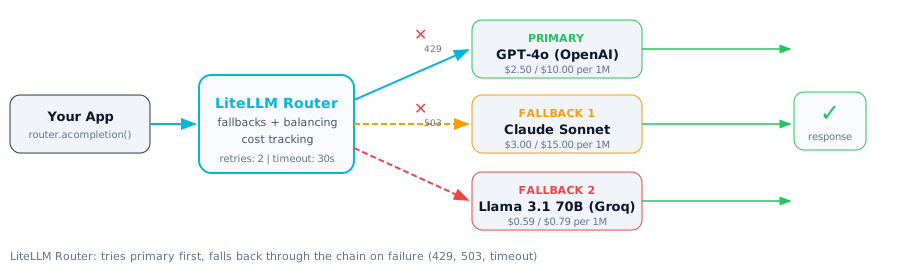
Figure 2 -- LiteLLM Router fallback chain: requests go to GPT-4o first; on failure they fall back to Claude Sonnet, then Llama 3.1 on Groq.
What This Means for Practitioners: Router Setup
from litellm import Router

model_list = [
    {
        "model_name": "main-llm",
        "litellm_params": {"model": "gpt-4o", "api_key": "sk-..."},
    },
    {
        "model_name": "main-llm",
        "litellm_params": {"model": "anthropic/claude-sonnet-4-20250514", "api_key": "sk-ant-..."},
    },
    {
        "model_name": "main-llm",
        "litellm_params": {"model": "groq/llama-3.1-70b-versatile", "api_key": "gsk-..."},
    },
]

router = Router(
    model_list=model_list,
    fallbacks=[{"main-llm": ["main-llm"]}],
    num_retries=2, timeout=30,
    routing_strategy="least-busy",
)

async def call_with_fallback(prompt: str) -> str:
    response = await router.acompletion(
        model="main-llm",
        messages=[{"role": "user", "content": prompt}],
        temperature=0, max_tokens=1024,
    )
    return response.choices[0].message.content

# Cost tracking via callbacks
import litellm
litellm.success_callback = ["langfuse"]  # or "lunary", "helicone"
LiteLLM Proxy: Run litellm --model gpt-4o --port 4000 to start a local OpenAI-compatible proxy. Point any SDK client at http://localhost:4000 for fallback and tracking features. For development, route to local Ollama models using the openai/ prefix with a custom api_base.
06. Structured Outputs
For production LLM applications, you often need structured data — not free-form text. Without enforcement, the model might produce invalid JSON, extra text around the JSON, or field names that differ from what you expected. There are three levels of reliability:
Level 1 — Prompt-based: Ask the model to return JSON. Works surprisingly well but provides no guarantee. Fine for prototyping.
Level 2 — Provider-native: OpenAI's response_format with json_schema constrains generation at the token level — the model physically cannot produce invalid JSON. Anthropic achieves this through tool use, where you define a tool whose input schema matches your desired output.
Level 3 — Instructor library: Wraps both providers with Pydantic models as output schemas. Handles schema conversion, API calls, parsing, and automatic retries on validation failure. The model gets the validation error fed back so it can self-correct.
Think of it like this: Asking an LLM to return JSON via prompting is like asking a contractor to follow building codes verbally. Using structured outputs is like giving them the actual blueprint with measurements — the output is constrained to match the specification.
What This Means for Practitioners: Instructor with Pydantic
import instructor
from openai import OpenAI
from pydantic import BaseModel, Field, field_validator
from typing import List, Literal

class ExtractedEntity(BaseModel):
    name: str = Field(..., description="Entity name")
    entity_type: Literal["person", "org", "location", "date"]
    confidence: float = Field(..., ge=0.0, le=1.0)

    @field_validator("name")
    @classmethod
    def name_not_empty(cls, v):
        if not v.strip():
            raise ValueError("Entity name cannot be empty")
        return v.strip()

class ExtractionResult(BaseModel):
    reasoning: str = Field(..., description="Step-by-step reasoning")
    entities: List[ExtractedEntity] = Field(default_factory=list)
    document_summary: str = Field(..., max_length=200)

# Patch the OpenAI client with instructor
client = instructor.from_openai(OpenAI())

result = client.chat.completions.create(
    model="gpt-4o",
    response_model=ExtractionResult,
    max_retries=3,
    messages=[
        {"role": "system", "content": "Extract entities from the document."},
        {"role": "user",   "content": """
            Anthropic, based in San Francisco, announced on March 4 2025
            that CEO Dario Amodei will present new safety research at
            the United Nations headquarters in New York.
        """},
    ],
    temperature=0,
)

# result is a validated Pydantic object, not raw text
for entity in result.entities:
    print(f"  {entity.name} ({entity.entity_type}) conf={entity.confidence}")

# Works with Anthropic too:
from anthropic import Anthropic
ant_client = instructor.from_anthropic(Anthropic())
Schema Design Tip: Always include a reasoning field in your Pydantic model. Forcing the model to explain its reasoning before producing structured fields consistently improves extraction accuracy — it is chain-of-thought built into the output schema.
Interview Ready
Elevator Pitch (2 Minutes): LLM APIs expose language models as stateless HTTP services. You send a messages array with system, user, and assistant roles plus configuration parameters, and receive generated text plus token usage metadata. Provider SDKs handle authentication, retries, and type safety. Streaming via SSE delivers tokens incrementally for responsive UIs. Structured outputs using JSON schema mode or instructor guarantee parseable Pydantic-validated responses. Cost management revolves around model tiering, prompt caching, response caching, and token counting with tiktoken. LiteLLM provides a unified interface across 100+ providers with automatic fallbacks and cost tracking.
Common Interview Questions
| Question | What They're Really Asking |
|---|---|
| How does the Chat Completions API work? | Do you understand stateless request/response and the role system? |
| How do you handle streaming in a production web app? | Can you implement SSE with async clients and handle mid-stream errors? |
| What strategies manage LLM API costs at scale? | Do you think about model tiering, caching, token counting, and monitoring? |
| How do you guarantee structured output from an LLM? | Can you compare prompt-based, native JSON schema, and instructor approaches? |
| How do you build a resilient multi-provider LLM client? | Do you know tenacity retries, retryable vs non-retryable errors, and LiteLLM Router? |
Model Answers
Q1 — Chat Completions: The API accepts a messages array with roles (system, user, assistant), a model identifier, and parameters like temperature and max_tokens. It is completely stateless — every request must include full conversation context. The response contains generated text, a finish_reason (always check for "length" = truncated), and token usage for cost calculation.
Q2 — Streaming: Set stream=True, consume SSE events via async iterator, accumulate content deltas. In FastAPI, wrap the stream in an async generator and return via StreamingResponse. Always use the async SDK client. Handle mid-stream errors (arrive as events, not HTTP codes) and detect client disconnections to cancel upstream calls.
Q3 — Cost management: Highest impact: model tiering (GPT-4o-mini for simple tasks = 94% savings). Then: token counting with tiktoken before sending, explicit max_tokens, prompt caching (Anthropic 90%, OpenAI 50%), Redis response caching, Batch API for non-real-time (50% off), and daily budget alerts from day one.
Q4 — Structured outputs: Three levels. Prompt-based JSON (no guarantee). OpenAI native response_format with JSON schema (token-level constraint, cannot produce invalid JSON). Instructor library with Pydantic (works across providers, auto-retries on validation failure with error fed back to model). Always include a reasoning field for chain-of-thought quality improvement.
Q5 — Resilient multi-provider client: Tenacity with exponential backoff for transient errors (429, 500, 503). Never retry 400/401. LiteLLM Router with fallback chain: GPT-4o primary, Claude Sonnet fallback, Llama on Groq as final fallback. Load balancing across multiple API keys. Built-in cost tracking and spending limits.
Common Mistakes
- Using sync SDK in async code.
openai.OpenAI()inside a FastAPI endpoint blocks the event loop, reducing capacity from thousands to one concurrent request. Always useAsyncOpenAI(). - Retrying non-retryable errors. 400 and 401 indicate code bugs, not transient failures. Only retry 429, 500/502/503, and connection errors.
- Ignoring finish_reason. When it is "length", the response was truncated and you are missing content. Check this in every production call.
Previous Module
Next Module
Phase: API & Customization