Module 15 of 17
Capstone I: Document Portal
Build a production-grade document Q&A portal from scratch — document ingestion, chunking, embeddings, vector storage, RAG retrieval, FastAPI backend, and chat frontend. A practitioner's end-to-end project.
01. Project Architecture
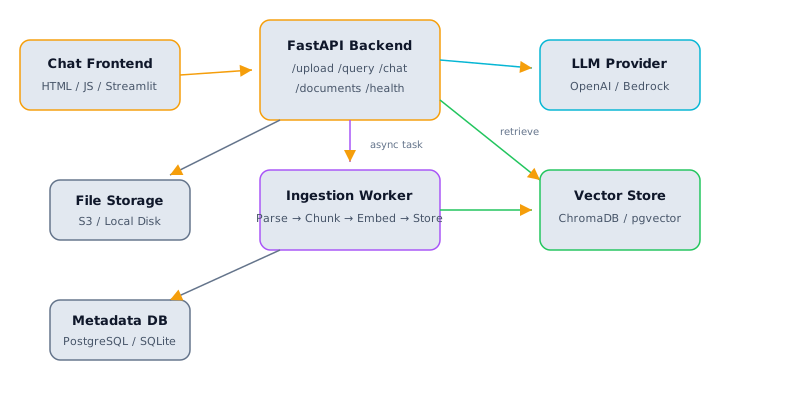
Document Portal architecture — Frontend communicates with FastAPI; ingestion is handled asynchronously; retrieval queries both vector store and LLM
The system has three major layers. The ingestion pipeline accepts uploaded documents (PDFs, Word files, text files), breaks them into smaller chunks, converts those chunks into numerical vectors (embeddings), and stores everything in a vector database. The retrieval pipeline handles incoming user questions — converting the question into a vector, searching the vector database for the most similar document chunks, and ranking results by relevance. The synthesis layer takes the retrieved chunks and the user's question, then generates a coherent, grounded answer with citations back to the source documents.
Think of it like this: The document portal is a smart librarian for a private document collection. The ingestion pipeline is the librarian reading each new book and writing detailed index cards for every section. The retrieval pipeline is the librarian taking your question and pulling the most relevant books off the shelves. The synthesis layer is the librarian reading the relevant passages and giving you a clear answer with page references.
All three layers are tied together by a FastAPI backend that exposes REST endpoints for document upload, querying, and conversation management, plus a simple chat frontend that gives users a familiar conversational interface. The entire system is containerized with Docker for deployment.
Why this matters: This architecture mirrors real-world production RAG systems. The separation of concerns (parsing, chunking, embedding, retrieval, synthesis) means each component is independently testable and replaceable. You can swap ChromaDB for pgvector, or change from OpenAI embeddings to a local model, without rewriting the rest of the system.
The architecture has four distinct services: an API server (FastAPI), a worker service (for async document processing), a vector database (ChromaDB or pgvector), and a frontend (Streamlit for prototyping, React for production). The metadata database (PostgreSQL or SQLite) tracks document-level metadata separately from the vector store because relational queries (list all documents, filter by date) are better served by a traditional database. The file storage layer persists original uploaded documents so you can reprocess them if you change your chunking strategy.
Architecture Tip: Start with the simplest possible setup: a single process running FastAPI with background tasks, SQLite for metadata, ChromaDB in-process, and local file storage. Only split into separate services when you have a specific scaling need. Premature distribution adds complexity without benefit.
02. Document Ingestion Pipeline
The pipeline has four stages. Parsing extracts raw text from whatever file format the user uploaded. Cleaning normalizes whitespace, removes repeated headers/footers, and fixes encoding issues. Chunking splits the cleaned text into pieces (typically 500-1500 tokens each) that are the right size for embedding and retrieval. Metadata enrichment tags each chunk with its source document, page number, and section.
Why this matters: The quality of your ingestion pipeline directly determines your retrieval quality. Bad parsing produces garbled chunks. Bad chunking produces chunks that are too small (missing context) or too large (diluting the signal). Bad metadata means you cannot provide accurate citations.
import fitz  # PyMuPDF
from pathlib import Path
from dataclasses import dataclass
from typing import Optional
import re, hashlib, uuid

@dataclass
class ParsedPage:
    page_number: int
    text: str
    char_count: int

@dataclass
class ParsedDocument:
    doc_id: str
    filename: str
    pages: list[ParsedPage]
    total_pages: int
    content_hash: str

class DocumentParser:
    """Multi-format document parser."""
    SUPPORTED = {".pdf", ".txt", ".md", ".docx"}

    def parse(self, file_path: Path) -> ParsedDocument:
        suffix = file_path.suffix.lower()
        if suffix == ".pdf":
            pages = self._parse_pdf(file_path)
        elif suffix in {".txt", ".md"}:
            pages = self._parse_text(file_path)
        else:
            raise ValueError(f"Unsupported: {suffix}")
        full_text = "\n".join(p.text for p in pages)
        return ParsedDocument(
            doc_id=str(uuid.uuid4()),
            filename=file_path.name,
            pages=pages,
            total_pages=len(pages),
            content_hash=hashlib.sha256(full_text.encode()).hexdigest()[:16]
        )

    def _parse_pdf(self, path: Path) -> list[ParsedPage]:
        doc = fitz.open(path)
        pages = []
        for i, page in enumerate(doc):
            text = page.get_text("text")
            text = self._clean(text)
            if text.strip():
                pages.append(ParsedPage(i + 1, text, len(text)))
        return pages

    def _parse_text(self, path: Path) -> list[ParsedPage]:
        text = path.read_text(encoding="utf-8")
        text = self._clean(text)
        return [ParsedPage(1, text, len(text))]

    def _clean(self, text: str) -> str:
        text = re.sub(r'\n{3,}', '\n\n', text)
        text = re.sub(r'[ \t]+', ' ', text)
        return text.strip()
The chunker splits parsed pages into retrieval-sized pieces with overlap so information at chunk boundaries is not lost:
@dataclass
class Chunk:
    chunk_id: str
    doc_id: str
    text: str
    metadata: dict

class RecursiveChunker:
    def __init__(self, chunk_size: int = 800, overlap: int = 200):
        self.chunk_size = chunk_size
        self.overlap = overlap
        self.separators = ["\n\n", "\n", ". ", " "]

    def chunk_document(self, doc: ParsedDocument) -> list[Chunk]:
        chunks = []
        for page in doc.pages:
            page_chunks = self._split_recursive(page.text, self.separators)
            for i, text in enumerate(page_chunks):
                chunks.append(Chunk(
                    chunk_id=f"{doc.doc_id}_p{page.page_number}_c{i}",
                    doc_id=doc.doc_id,
                    text=text,
                    metadata={
                        "filename": doc.filename,
                        "page": page.page_number,
                        "chunk_index": i,
                        "char_count": len(text),
                    }
                ))
        return chunks

    def _split_recursive(self, text: str, seps: list[str]) -> list[str]:
        if len(text) <= self.chunk_size:
            return [text] if text.strip() else []
        sep = seps[0] if seps else ""
        parts = text.split(sep) if sep else list(
            text[i:i+self.chunk_size]
            for i in range(0, len(text), self.chunk_size)
        )
        chunks, current = [], ""
        for part in parts:
            candidate = (current + sep + part).strip() if current else part.strip()
            if len(candidate) <= self.chunk_size:
                current = candidate
            else:
                if current:
                    chunks.append(current)
                if len(part) > self.chunk_size and len(seps) > 1:
                    chunks.extend(self._split_recursive(part, seps[1:]))
                    current = ""
                else:
                    current = part
        if current:
            chunks.append(current)
        return self._add_overlap(chunks)

    def _add_overlap(self, chunks: list[str]) -> list[str]:
        if len(chunks) <= 1:
            return chunks
        result = [chunks[0]]
        for i in range(1, len(chunks)):
            overlap_text = chunks[i - 1][-self.overlap:]
            result.append(overlap_text + " " + chunks[i])
        return result
Chunking Tip: Start with 800-character chunks and 200-character overlap. These values work well for most business documents. Experiment with larger chunks (1200-1500) for documents with long arguments, or smaller chunks (400-600) for FAQ-style content.
The full ingestion orchestrator ties parsing and chunking together:
import asyncio
from datetime import datetime

class IngestionService:
    def __init__(self, parser, chunker, embedder, vector_store, metadata_db):
        self.parser = parser
        self.chunker = chunker
        self.embedder = embedder
        self.vector_store = vector_store
        self.db = metadata_db

    async def ingest(self, file_path: Path, collection: str = "default") -> str:
        doc = self.parser.parse(file_path)
        if await self.db.hash_exists(doc.content_hash):
            return f"Duplicate detected: {doc.content_hash}"
        await self.db.insert_document({
            "doc_id": doc.doc_id, "filename": doc.filename,
            "pages": doc.total_pages, "hash": doc.content_hash,
            "collection": collection, "status": "processing",
            "created_at": datetime.utcnow().isoformat()
        })
        chunks = self.chunker.chunk_document(doc)
        texts = [c.text for c in chunks]
        embeddings = await self.embedder.embed_batch(texts, batch_size=64)
        self.vector_store.add(
            ids=[c.chunk_id for c in chunks],
            documents=texts,
            embeddings=embeddings,
            metadatas=[c.metadata for c in chunks]
        )
        await self.db.update_status(doc.doc_id, "ready", chunk_count=len(chunks))
        return doc.doc_id
03. Embeddings & Vector Store
Why this matters: The embedding model and vector store are the backbone of retrieval quality. Choosing the wrong embedding model or misconfiguring the vector store leads to irrelevant search results regardless of how good your LLM is.
| Embedding Model | Dimensions | Cost (per 1M tokens) | Best For |
|---|---|---|---|
| text-embedding-3-small | 1,536 | $0.02 | Cost-sensitive, general use |
| text-embedding-3-large | 3,072 | $0.13 | High accuracy requirements |
| Cohere embed-v3 | 1,024 | $0.10 | Multilingual documents |
| all-MiniLM-L6-v2 (local) | 384 | Free | Offline / privacy-sensitive |
from openai import AsyncOpenAI
import hashlib

class EmbeddingService:
    def __init__(self, model: str = "text-embedding-3-small"):
        self.client = AsyncOpenAI()
        self.model = model
        self._cache: dict[str, list[float]] = {}

    async def embed_batch(self, texts: list[str], batch_size: int = 64) -> list[list[float]]:
        all_embeddings = [None] * len(texts)
        uncached_indices = []
        for i, text in enumerate(texts):
            key = hashlib.md5(text.encode()).hexdigest()
            if key in self._cache:
                all_embeddings[i] = self._cache[key]
            else:
                uncached_indices.append(i)
        for start in range(0, len(uncached_indices), batch_size):
            batch_idx = uncached_indices[start:start + batch_size]
            batch_texts = [texts[i] for i in batch_idx]
            response = await self.client.embeddings.create(model=self.model, input=batch_texts)
            for j, item in enumerate(response.data):
                idx = batch_idx[j]
                all_embeddings[idx] = item.embedding
                key = hashlib.md5(texts[idx].encode()).hexdigest()
                self._cache[key] = item.embedding
        return all_embeddings

    async def embed_query(self, text: str) -> list[float]:
        result = await self.embed_batch([text])
        return result[0]
import chromadb

class VectorStore:
    def __init__(self, persist_dir: str = "./chroma_data"):
        self.client = chromadb.PersistentClient(path=persist_dir)

    def get_collection(self, name: str = "documents"):
        return self.client.get_or_create_collection(
            name=name, metadata={"hnsw:space": "cosine"}
        )

    def add(self, ids, documents, embeddings, metadatas, collection_name="documents"):
        col = self.get_collection(collection_name)
        col.add(ids=ids, documents=documents, embeddings=embeddings, metadatas=metadatas)

    def query(self, query_embedding, n_results=5, where=None, collection_name="documents"):
        col = self.get_collection(collection_name)
        results = col.query(
            query_embeddings=[query_embedding], n_results=n_results,
            where=where, include=["documents", "metadatas", "distances"]
        )
        return [
            {"text": results["documents"][0][i],
             "metadata": results["metadatas"][0][i],
             "score": 1.0 - results["distances"][0][i]}
            for i in range(len(results["documents"][0]))
        ]
Production Note: For production with pgvector, the setup is: CREATE EXTENSION vector; then create a table with a vector(1536) column. The advantage is that your vectors live alongside your relational metadata in the same PostgreSQL database, simplifying operations and enabling hybrid queries.
04. RAG Retrieval Pipeline
The retrieval pipeline is more sophisticated than a simple vector search. It follows a multi-stage funnel: embed the query, retrieve candidate chunks (3x more than needed), filter low-confidence matches, then rerank the remaining candidates using an LLM or cross-encoder for precision.
Why this matters: Raw vector similarity scores are not always reliable. A chunk can score highly because it shares vocabulary with the query but does not actually answer the question. The reranking step is what separates a mediocre RAG system from a good one.
from openai import AsyncOpenAI
from dataclasses import dataclass

@dataclass
class RetrievalResult:
    text: str
    score: float
    metadata: dict

class RAGPipeline:
    def __init__(self, embedder, vector_store, llm_client=None):
        self.embedder = embedder
        self.vector_store = vector_store
        self.llm = llm_client or AsyncOpenAI()

    async def reformulate_query(self, query: str, history: list[dict]) -> str:
        if not history:
            return query
        messages = [
            {"role": "system", "content":
                "Rewrite the user's follow-up question to be self-contained. "
                "Return ONLY the rewritten question."},
            *history[-4:],
            {"role": "user", "content": query}
        ]
        resp = await self.llm.chat.completions.create(
            model="gpt-4o-mini", messages=messages, temperature=0, max_tokens=200
        )
        return resp.choices[0].message.content.strip()

    async def retrieve(self, query: str, top_k: int = 5,
                       filters: dict = None, history: list[dict] = None) -> list[RetrievalResult]:
        search_query = await self.reformulate_query(query, history or [])
        query_vec = await self.embedder.embed_query(search_query)
        raw = self.vector_store.query(query_embedding=query_vec, n_results=top_k * 3, where=filters)
        candidates = [r for r in raw if r["score"] > 0.3]
        reranked = await self._rerank(search_query, candidates, top_k)
        return reranked

    async def _rerank(self, query, candidates, top_k):
        if len(candidates) <= top_k:
            return [RetrievalResult(c["text"], c["score"], c["metadata"]) for c in candidates]
        scored = []
        for c in candidates[:top_k * 2]:
            resp = await self.llm.chat.completions.create(
                model="gpt-4o-mini",
                messages=[{"role": "user", "content":
                    f"Rate 0-10 how relevant this passage is to the query.\n"
                    f"Query: {query}\nPassage: {c['text'][:500]}\nScore (just the number):"}],
                temperature=0, max_tokens=5
            )
            try:
                score = float(resp.choices[0].message.content.strip())
            except:
                score = c["score"] * 10
            scored.append((c, score))
        scored.sort(key=lambda x: x[1], reverse=True)
        return [RetrievalResult(c["text"], s / 10, c["metadata"]) for c, s in scored[:top_k]]
The synthesis step generates the final answer with citations:
class RAGSynthesizer:
    def __init__(self, llm_client=None):
        self.llm = llm_client or AsyncOpenAI()

    def build_context(self, results: list[RetrievalResult]) -> str:
        parts = []
        for i, r in enumerate(results, 1):
            source = f"{r.metadata['filename']}, page {r.metadata.get('page', '?')}"
            parts.append(f"[Source {i}] ({source}):\n{r.text}\n")
        return "\n".join(parts)

    async def generate(self, query: str, results: list[RetrievalResult],
                       history: list[dict] = None, stream: bool = False):
        context = self.build_context(results)
        system_prompt = (
            "You are a document assistant. Answer based ONLY on the provided sources. "
            "Cite sources using [Source N] notation. If the sources don't contain the "
            "answer, say so clearly. Never make up information."
        )
        messages = [
            {"role": "system", "content": system_prompt},
            *(history or []),
            {"role": "user", "content": f"Sources:\n{context}\n\nQuestion: {query}"}
        ]
        if stream:
            return await self.llm.chat.completions.create(
                model="gpt-4o", messages=messages, temperature=0.1, max_tokens=1500, stream=True
            )
        resp = await self.llm.chat.completions.create(
            model="gpt-4o", messages=messages, temperature=0.1, max_tokens=1500
        )
        return {
            "answer": resp.choices[0].message.content,
            "sources": [{"filename": r.metadata["filename"],
                         "page": r.metadata.get("page"), "score": round(r.score, 3)}
                        for r in results],
            "model": "gpt-4o"
        }
05. FastAPI Backend
The FastAPI backend exposes five core endpoints: POST /upload for document ingestion, GET /documents for listing uploaded documents, POST /query for single-shot RAG questions, POST /chat for conversational RAG with history, and GET /health for monitoring.
Why this matters: FastAPI was chosen for its async support (handles many simultaneous requests), automatic OpenAPI documentation (interactive Swagger UI at /docs), and Pydantic validation (malformed requests are rejected with clear error messages before reaching business logic).
from fastapi import FastAPI, UploadFile, File, HTTPException, BackgroundTasks
from fastapi.middleware.cors import CORSMiddleware
from pydantic import BaseModel, Field
from typing import Optional
import tempfile, shutil, json, uuid
from pathlib import Path

app = FastAPI(title="Document Portal API", version="1.0")
app.add_middleware(CORSMiddleware, allow_origins=["*"], allow_methods=["*"], allow_headers=["*"])

class QueryRequest(BaseModel):
    question: str = Field(..., min_length=1, max_length=2000)
    collection: str = "default"
    top_k: int = Field(default=5, ge=1, le=20)

class ChatRequest(BaseModel):
    message: str = Field(..., min_length=1, max_length=2000)
    conversation_id: Optional[str] = None
    collection: str = "default"
    stream: bool = False

@app.post("/upload")
async def upload_document(file: UploadFile = File(...),
                          background_tasks: BackgroundTasks = None,
                          collection: str = "default"):
    suffix = Path(file.filename).suffix.lower()
    if suffix not in DocumentParser.SUPPORTED:
        raise HTTPException(400, f"Unsupported: {suffix}")
    tmp = tempfile.NamedTemporaryFile(delete=False, suffix=suffix)
    shutil.copyfileobj(file.file, tmp)
    tmp_path = Path(tmp.name)
    tmp.close()
    ingestion = IngestionService(parser, chunker, embedder, store, db)
    background_tasks.add_task(ingestion.ingest, tmp_path, collection)
    return {"status": "processing", "filename": file.filename}

@app.post("/query")
async def query_documents(req: QueryRequest):
    results = await pipeline.retrieve(req.question, top_k=req.top_k)
    if not results:
        return {"answer": "No relevant documents found.", "sources": [], "model": "none"}
    response = await synthesizer.generate(req.question, results)
    return response
06. Frontend & Deployment
Why this matters: Docker ensures "it works on my machine" translates to "it works everywhere." The deployment section covers the unglamorous but essential concerns that separate a demo from a reliable service.
| Component | Dev Setup | Production Setup |
|---|---|---|
| API Server | uvicorn, 1 worker | ECS Fargate, 2+ tasks, ALB |
| Vector Store | ChromaDB (in-process) | pgvector on RDS or OpenSearch |
| Metadata DB | SQLite | PostgreSQL on RDS |
| File Storage | Local disk | S3 with lifecycle policies |
| Frontend | Streamlit | React/Next.js on CloudFront |
| Secrets | .env file | AWS Secrets Manager |
| Monitoring | Console logs | CloudWatch + X-Ray |
# docker-compose.yml
version: "3.9"
services:
  api:
    build: .
    ports:
      - "8000:8000"
    environment:
      - OPENAI_API_KEY=${OPENAI_API_KEY}
      - CHROMA_PERSIST_DIR=/data/chroma
      - DATABASE_URL=postgresql://portal:secret@db:5432/portal
    volumes:
      - chroma_data:/data/chroma
      - uploads:/data/uploads
    depends_on:
      db:
        condition: service_healthy
    healthcheck:
      test: ["CMD", "curl", "-f", "http://localhost:8000/health"]
      interval: 30s
      timeout: 10s
      retries: 3

  db:
    image: postgres:16-alpine
    environment:
      POSTGRES_USER: portal
      POSTGRES_PASSWORD: secret
      POSTGRES_DB: portal
    volumes:
      - pg_data:/var/lib/postgresql/data
    healthcheck:
      test: ["CMD-SHELL", "pg_isready -U portal"]
      interval: 5s
      timeout: 5s
      retries: 5

volumes:
  chroma_data:
  pg_data:
  uploads:
Deployment Checklist: Before deploying to production: (1) Store API keys in AWS Secrets Manager, not environment variables. (2) Set up CloudWatch alarms for error rates and latency. (3) Enable HTTPS via an ALB with ACM certificate. (4) Restrict CORS to your frontend domain. (5) Add rate limiting to prevent abuse. (6) Set up log aggregation with CloudWatch Logs.
Interview Ready
How to Explain This in 2 Minutes
Elevator Pitch: I built a production-grade Document Q&A Portal that lets users upload PDFs, Word docs, and text files, then ask natural-language questions and get accurate, cited answers. The system uses a document ingestion pipeline that parses, chunks, and embeds documents into a vector store. At query time a RAG pipeline retrieves the most relevant chunks, reranks them for precision, and streams an LLM-generated answer through a FastAPI backend to a chat-based frontend. The entire application is containerized with Docker for deployment.
Likely Interview Questions
| Question | What They're Really Asking |
|---|---|
| Walk me through how a user's document goes from upload to being searchable. | Do you understand the full ingestion pipeline: parsing, chunking, embedding, and indexing? |
| How did you choose your chunking strategy and chunk size? | Can you reason about trade-offs between recall, precision, and latency in retrieval? |
| What happens when the retriever returns irrelevant chunks? | Do you have fallback strategies and understand failure modes in RAG systems? |
| How would you scale this system to millions of documents? | Do you understand production concerns: sharding, async ingestion, caching, and infrastructure? |
| How do you evaluate the quality of the answers? | Can you measure faithfulness, relevance, and groundedness beyond simple accuracy? |
Model Answers
Ingestion Pipeline: When a document is uploaded, the backend parses it into raw text using format-specific extractors, then splits it into overlapping chunks of roughly 800 characters. Each chunk is embedded using text-embedding-3-small and stored alongside its metadata in ChromaDB. The content hash enables deduplication so re-uploading the same document is detected and skipped. The pipeline is idempotent and processes documents asynchronously to avoid blocking the API.
RAG Retrieval: At query time the user question is embedded with the same model, a cosine-similarity search retrieves 3x the desired results, low-confidence matches are filtered out, and an LLM-based reranker scores the remaining candidates for precision. The selected chunks are injected into a prompt that instructs the LLM to answer only from the provided context and cite source numbers. This design keeps the LLM grounded and reduces hallucination.
Production Readiness: The FastAPI backend exposes async endpoints with streaming responses. I containerized the stack with Docker Compose, added health-check endpoints, and designed the architecture so each component (vector store, metadata DB, file storage) can be swapped independently for production equivalents (pgvector, RDS, S3).
Common Mistakes
- Ignoring chunk overlap: Using non-overlapping chunks causes answers to miss information that spans chunk boundaries, leading to incomplete or incorrect responses.
- Skipping evaluation: Deploying a RAG system without measuring faithfulness and relevance means you cannot tell whether the system is hallucinating or returning stale information.
- Treating the vector store as a black box: Not inspecting retrieved chunks during debugging makes it nearly impossible to diagnose whether poor answers stem from bad retrieval, bad prompting, or bad source data.
Previous
Next
16 · Capstone II: Report Agent
Phase 7 · Projects