Module 14 of 17
No-Code Agents with n8n
A practitioner's guide to building AI workflows without code — when no-code makes sense, n8n workflow patterns for LLMs, connecting AI to business tools, limitations vs. custom code, and production deployment.
01. What n8n Is and When to Use It
n8n (pronounced "n-eight-n" or "nodemation") is an open-source workflow automation tool similar to Zapier or Make, but with three crucial differences: it is self-hostable (your data never leaves your infrastructure), it has a code node that lets you write arbitrary JavaScript/Python when the visual interface is not enough, and it has native AI capabilities with dedicated nodes for LLM chat, embeddings, vector stores, and autonomous agents. This combination of no-code simplicity and code-when-needed flexibility makes n8n uniquely powerful for building AI-powered workflows.
Think of it like this: n8n is like a visual programming language for business workflows. If Python is writing a recipe from scratch, n8n is assembling a meal kit — the ingredients are pre-prepared (400+ integrations), you snap them together in the right order, and you can always add your own spice (Code node) when the kit does not have what you need.
The core concept is a workflow — a visual graph of connected nodes where each node performs one action: receive a webhook, call an API, transform data, send an email, query a database, or invoke an LLM. Data flows through connections between nodes, with each node receiving input from its predecessor and passing output to its successor. Workflows can be triggered by schedules (cron), webhooks (HTTP requests), events (new email, new Slack message), or manual execution.
For GenAI applications, n8n's value is in orchestration and integration. While Python code excels at building the core AI logic (RAG pipelines, agent loops, prompt engineering), n8n excels at connecting that AI logic to the rest of your business systems. Need to trigger a RAG query when a customer emails support, send the answer to Slack, log it in a Google Sheet, and create a Jira ticket if the confidence is low? In n8n, this is 10 minutes of drag-and-drop rather than hours of API integration code. The AI does the thinking; n8n does the plumbing.
What This Means for Practitioners
When to use n8n vs. custom Python code:
| Scenario | Use n8n | Use Custom Code |
|---|---|---|
| Connect LLM to Slack/Gmail/Sheets/CRM | Yes — pre-built integrations | Only if n8n lacks the connector |
| Prototype AI workflow, iterate with stakeholders | Yes — visual, non-engineers can modify | If latency/precision matters from day 1 |
| Document ingestion + RAG pipeline | Good for simple pipelines | Better for custom chunking/reranking |
| Latency-critical inference (<100ms) | No — workflow overhead adds latency | Yes — direct API calls |
| Complex prompt chains with 10+ steps | Workflow gets unwieldy beyond 30 nodes | Yes — code is clearer at this scale |
| Production agent with custom evaluation | No — limited observability tooling | Yes — full control over metrics |
| Quick email triage / document summarization | Yes — fastest path to production | Overkill for this use case |
The best approach is often hybrid: n8n handles the workflow plumbing (triggers, routing, notifications, error handling) and calls a custom FastAPI endpoint via the HTTP Request or Code node for the complex AI-specific logic.
# Install n8n locally with Docker
docker run -it --rm \
  --name n8n \
  -p 5678:5678 \
  -v n8n_data:/home/node/.n8n \
  -e GENERIC_TIMEZONE="America/Chicago" \
  n8nio/n8n

# Access the UI at http://localhost:5678
02. AI & LLM Nodes
n8n provides a comprehensive set of AI-specific nodes that cover the entire GenAI stack. The Chat Model nodes connect to OpenAI, Anthropic, Google, Ollama, or any OpenAI-compatible endpoint (including your vLLM or self-hosted models). The Embedding nodes generate vector embeddings. The Vector Store nodes connect to Pinecone, Qdrant, Supabase, or in-memory stores. The Text Splitter nodes handle document chunking. And the Agent node orchestrates a complete ReAct agent with tools — all configurable through the visual interface.
The AI nodes use LangChain under the hood, which means they support the same patterns and configurations that the LangChain Python library offers: chat memory for multi-turn conversations, output parsers for structured responses, chain-of-thought prompting, and tool-using agents. The difference is that instead of writing Python code, you configure these components through dropdown menus and text fields in the n8n UI.
A particularly powerful pattern is using n8n's sub-workflow feature to create reusable AI components. You can build a "RAG query" sub-workflow, a "document ingestion" sub-workflow, and a "content moderation" sub-workflow. These sub-workflows become building blocks that you compose into larger applications, just like functions in traditional programming.
| Node | Category | Purpose |
|---|---|---|
| OpenAI Chat Model | LLM | GPT-4o, GPT-4o-mini chat completions |
| Anthropic Chat Model | LLM | Claude 3.5 Sonnet, Haiku |
| Ollama Chat Model | LLM | Local models via Ollama |
| AI Agent | Agent | ReAct agent with configurable tools |
| Vector Store (Pinecone, Qdrant) | RAG | Store and query embeddings |
| Embeddings (OpenAI, Cohere) | RAG | Generate text embeddings |
| Text Splitter | RAG | Chunk documents for indexing |
| Document Loader | RAG | Load PDF, CSV, JSON, web pages |
| Output Parser | Utility | Parse structured output (JSON, lists) |
| Memory (Buffer, Summary) | Utility | Conversation history management |
| Code (JS/Python) | Custom | Run arbitrary code in workflow |
03. Building AI Agents in n8n
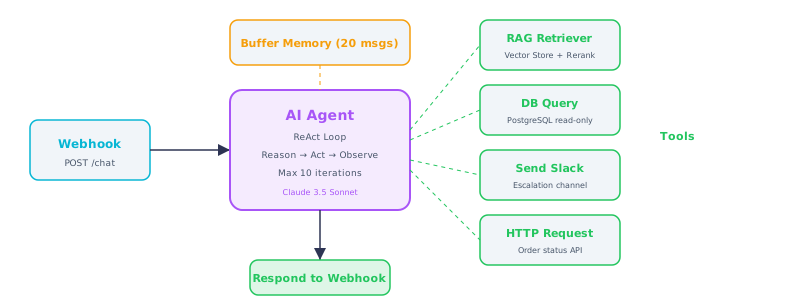
Figure 1 — n8n AI Agent workflow: Webhook trigger → Agent with tools → Response
The n8n AI Agent node creates a complete ReAct agent through the visual interface. You configure the LLM (which model to use), attach tools (other n8n nodes that the agent can invoke), set the system prompt, and configure memory for multi-turn conversations. The agent then operates in the same Reason, Act, Observe loop described in Module 09, but without writing any code.
Building an agent in n8n involves connecting five types of nodes to the central AI Agent node:
1. Chat Model — The LLM brain. Connect an OpenAI, Anthropic, or Ollama node to the agent's "model" input. Configure model selection, temperature, and max tokens.
2. Tools — Actions the agent can take. Each tool is a sub-workflow or node connected to the agent's "tools" input with a name and description. The agent sees these descriptions and decides when to invoke each tool.
3. Memory — Conversation history. Connect a Buffer Memory (stores last N messages) or Summary Memory (LLM-summarized history) node to maintain context across turns.
4. Output Parser — Optional structured output. Connect an Output Parser to force the agent's final response into a specific JSON schema.
5. Trigger — How the agent receives input. Typically a Webhook node (for API access), a Chat Trigger node (for the built-in chat widget), or a Schedule Trigger (for periodic tasks).
Think of it like this: Building an agent in n8n is like assembling a team in a meeting room. You bring in the smart person (LLM), hand them a set of reference binders (tools), give them a notepad for the meeting (memory), and tell them what format the meeting notes should follow (output parser). The meeting agenda comes from whoever scheduled it (trigger).
Tools in n8n agents are incredibly flexible because any n8n node can be a tool. This means your agent can: query a database (PostgreSQL node), search the web (HTTP Request node), read Google Sheets, send Slack messages, create Jira tickets, query your RAG pipeline (Vector Store Retriever node), or call any REST API. Each tool gets a name and description so the agent knows when to use it — exactly like function calling in the code-based approach, but configured visually.
04. RAG Workflows
Building a complete RAG pipeline in n8n requires two workflows: an ingestion workflow that processes documents and stores embeddings, and a query workflow that retrieves context and generates answers.
The ingestion workflow node chain: Google Drive Trigger (new file detected) → Google Drive Download (get file) → Document Loader (extract text from PDF) → Recursive Text Splitter (chunk at 1000 chars, 200 overlap) → OpenAI Embeddings (text-embedding-3-small) → Pinecone Vector Store Insert → Slack (notify: "New document indexed: filename.pdf").
The query workflow: Webhook (POST /query) → Pinecone Vector Store Retriever (top 5 results) → OpenAI Chat (system prompt: "Answer based on context...") → Respond to Webhook (JSON with answer + sources).
n8n's RAG implementation is particularly effective for automating document processing pipelines. You can set up a workflow that watches a Google Drive folder for new PDFs, automatically ingests them into the vector store, and notifies a Slack channel when the knowledge base is updated. Users then query the knowledge base through a chatbot interface, and the answers include citations pointing back to the original documents. This entire system — from document upload to answered query — is built without writing a single line of code.
What This Means for Practitioners
n8n RAG limitations vs. custom code:
| Capability | n8n RAG Nodes | Custom Python RAG |
|---|---|---|
| Basic chunking + embedding | Full support | Full support |
| Custom reranking | Not available natively | Full control |
| Hybrid search (vector + keyword) | Limited | Full control |
| Metadata filtering on retrieval | Basic support | Full control |
| Evaluation and quality metrics | Not available | Full control |
| Speed to first prototype | Minutes | Hours to days |
The sweet spot: Use n8n for the workflow orchestration (triggers, notifications, integrations) and call a custom FastAPI endpoint via the HTTP Request or Code node when you need advanced retrieval features. Best of both worlds.
05. Triggers & Integrations
The real power of n8n for GenAI is in its 400+ pre-built integrations. Every integration is both a trigger (start a workflow when something happens) and an action (do something as part of a workflow). This means your AI agent can be triggered by virtually any business event and can take action in virtually any business system.
High-value AI workflow patterns:
| Pattern | Trigger | AI Processing | Action |
|---|---|---|---|
| Email triage | Gmail Trigger | Classify urgency + topic | Route to team, draft reply |
| Document summarization | Google Drive / S3 | Summarize new documents | Post to Teams/Slack |
| Data enrichment | CRM new lead | Research company with LLM | Update CRM record |
| Content creation | Schedule (weekly) | Generate posts from blog content | Post to social media |
| Anomaly alerting | API polling | LLM analyzes trends | Alert via PagerDuty |
| Support auto-response | Chat widget / email | RAG search + draft answer | Send or queue for review |
| Trigger Type | n8n Nodes | AI Use Case |
|---|---|---|
| Webhook | Webhook, Chat Trigger | Chatbot API, form submission AI |
| Schedule | Schedule Trigger, Cron | Daily report generation, batch processing |
| Gmail, Outlook Trigger | Email classification, auto-response | |
| Messaging | Slack, Teams, Discord | Slash command bots, channel assistants |
| File | Google Drive, S3, FTP | Document ingestion, media processing |
| Database | PostgreSQL, MySQL Trigger | New record enrichment, change analysis |
| CRM | HubSpot, Salesforce | Lead scoring, account research |
Self-Hosted Advantage: Unlike Zapier or Make, n8n can run entirely on your infrastructure. API keys, customer data, and LLM interactions never leave your network. This is critical for enterprise compliance (HIPAA, SOC 2, GDPR) and for connecting to internal services that are not exposed to the internet.
06. Production Deployment
For production, n8n should be deployed with persistent storage, proper authentication, and monitoring. The recommended approach is Docker Compose with PostgreSQL for workflow storage (instead of the default SQLite), Redis for queue-based execution (so webhook workflows do not block each other), and a reverse proxy (Nginx, Traefik, or Caddy) for HTTPS termination.
Key production configurations: enable queue mode so workflows execute asynchronously via Redis queues (prevents webhook timeouts), set execution data pruning to avoid database bloat (keep 30 days of execution history), configure webhook authentication (basic auth, header tokens, or OAuth), and set up environment variables for API keys rather than storing them in workflow JSON.
# docker-compose.yml for production n8n
version: "3.8"
services:
  n8n:
    image: n8nio/n8n:latest
    restart: always
    ports:
      - "5678:5678"
    environment:
      - DB_TYPE=postgresdb
      - DB_POSTGRESDB_HOST=postgres
      - DB_POSTGRESDB_DATABASE=n8n
      - DB_POSTGRESDB_USER=n8n
      - DB_POSTGRESDB_PASSWORD=${DB_PASSWORD}
      - EXECUTIONS_MODE=queue
      - QUEUE_BULL_REDIS_HOST=redis
      - N8N_ENCRYPTION_KEY=${ENCRYPTION_KEY}
      - WEBHOOK_URL=https://n8n.yourdomain.com/
      - N8N_BASIC_AUTH_ACTIVE=true
      - N8N_BASIC_AUTH_USER=${N8N_USER}
      - N8N_BASIC_AUTH_PASSWORD=${N8N_PASSWORD}
      - EXECUTIONS_DATA_MAX_AGE=720  # 30 days in hours
      - GENERIC_TIMEZONE=America/Chicago
    volumes:
      - n8n_data:/home/node/.n8n
    depends_on:
      - postgres
      - redis

  postgres:
    image: postgres:16
    restart: always
    environment:
      POSTGRES_DB: n8n
      POSTGRES_USER: n8n
      POSTGRES_PASSWORD: ${DB_PASSWORD}
    volumes:
      - postgres_data:/var/lib/postgresql/data

  redis:
    image: redis:7-alpine
    restart: always

  # n8n worker for queue mode (scale horizontally)
  n8n-worker:
    image: n8nio/n8n:latest
    command: worker
    restart: always
    environment:
      - DB_TYPE=postgresdb
      - DB_POSTGRESDB_HOST=postgres
      - DB_POSTGRESDB_DATABASE=n8n
      - DB_POSTGRESDB_USER=n8n
      - DB_POSTGRESDB_PASSWORD=${DB_PASSWORD}
      - EXECUTIONS_MODE=queue
      - QUEUE_BULL_REDIS_HOST=redis
      - N8N_ENCRYPTION_KEY=${ENCRYPTION_KEY}
    depends_on:
      - postgres
      - redis

volumes:
  n8n_data:
  postgres_data:
Security: API Keys: Never store API keys (OpenAI, Anthropic) in workflow JSON files. Use n8n's credential system, which encrypts keys at rest using the N8N_ENCRYPTION_KEY. If you export workflows for version control, credentials are excluded by default. Set the encryption key once and never change it — changing it invalidates all stored credentials.
Interview Ready
How to Explain This in 2 Minutes
Elevator Pitch: n8n is an open-source, self-hostable workflow automation platform with native AI nodes that lets you build LLM-powered agents, RAG pipelines, and multi-step automations through a visual drag-and-drop interface. It bridges the gap between business users who need AI workflows fast and engineering teams who need data to stay on-prem — offering 400+ integrations, webhook triggers, and a code node for when the visual builder is not enough.
Likely Interview Questions
| # | Question | What They're Really Asking |
|---|---|---|
| 1 | What is n8n and how does it differ from Zapier or Make? | Do you understand the self-hosted, open-source, and code-node advantages? |
| 2 | How would you build an AI agent in n8n? | Can you describe the Agent node, tool connections, memory, and trigger setup? |
| 3 | When should you use n8n versus writing custom Python code? | Do you know the trade-offs between no-code prototyping and production code? |
| 4 | How do webhook triggers work in n8n AI workflows? | Can you explain the request-response lifecycle and async queue mode? |
| 5 | How would you deploy n8n for production use? | Do you understand PostgreSQL storage, Redis queues, encryption, and scaling workers? |
Model Answers
Q1 — What is n8n and how does it differ from Zapier or Make?
n8n is an open-source workflow automation platform that connects 400+ services through a visual node-based editor. Unlike Zapier and Make, n8n is fully self-hostable, meaning sensitive data — API keys, customer PII, LLM interactions — never leaves your infrastructure. It also provides a Code node for writing arbitrary JavaScript or Python inline when the visual interface is not flexible enough, and it has native AI/LLM nodes (chat models, embeddings, vector stores, agents) that Zapier and Make lack. This combination of no-code simplicity with code-when-needed power makes it uniquely suited for building AI automations in compliance-sensitive environments.
Q3 — When should you use n8n versus writing custom Python code?
Use n8n for orchestration and integration — connecting AI logic to business systems like Slack, Gmail, Google Sheets, CRMs, and databases. It excels at rapid prototyping where requirements change frequently, because a product manager can modify the workflow without an engineering sprint. Use custom Python code for core AI logic that requires fine-grained control: custom reranking algorithms, advanced prompt chaining, evaluation pipelines, or latency-critical inference. The best approach is often hybrid — n8n handles the workflow plumbing and calls a custom FastAPI endpoint for the complex AI-specific logic.
Q5 — How would you deploy n8n for production use?
Production n8n uses Docker Compose (or ECS/Kubernetes) with three services: the n8n main instance, PostgreSQL for persistent workflow and execution storage (replacing the default SQLite), and Redis for queue-based execution. You configure queue mode so workflows run on separate worker containers that scale horizontally. API keys are stored through n8n's credential system, encrypted at rest with the N8N_ENCRYPTION_KEY. A reverse proxy handles HTTPS termination. You set execution data pruning to 30 days to prevent database bloat, configure webhook authentication, and set up an error workflow that sends alerts to Slack or PagerDuty when any workflow fails.
System Design Scenario
Design Prompt: Design an automated customer support system using n8n that handles incoming emails, searches a knowledge base, drafts responses, and escalates to humans when confidence is low. Describe the ingestion and support workflows, your trigger and routing strategy, how you handle failures, and where you draw the line between n8n visual nodes and custom code endpoints.
Common Mistakes
- Using n8n for everything instead of recognizing its limits. n8n is excellent for orchestration and integration, but it is not the right tool for latency-critical inference pipelines, custom model training, or complex data transformations. The visual interface becomes unwieldy for workflows beyond 30-40 nodes. Know when to offload logic to a dedicated Python service and call it from n8n via HTTP Request.
- Storing API keys in workflow JSON instead of using the credential system. Workflow JSON files are often exported, shared, or version-controlled. If you paste API keys directly into node parameters, they end up in plaintext in Git repositories. Always use n8n's built-in credential system, which encrypts keys at rest and excludes them from workflow exports.
- Running production n8n without queue mode. Without queue mode, all workflows execute in the main n8n process. A single long-running LLM call (30+ seconds) blocks every other webhook and scheduled workflow. Queue mode with Redis workers is essential for production — it isolates execution, enables horizontal scaling, and prevents cascading timeouts.
← Previous
Next →