Module 05 of 17
LLM Hosting & API Exposure
A practitioner's guide to self-hosting LLMs — when to self-host vs use APIs, how to choose between vLLM, TGI, and Ollama, GPU sizing, cost comparisons, and production deployment patterns with FastAPI, SageMaker, and Docker.
01. Why Self-Host LLMs
The question is not whether self-hosting is universally better than APIs — it is whether it makes sense for your situation. Some organizations have strict data residency requirements that make it illegal to send data to third-party providers. Others run models at volumes where per-token pricing becomes prohibitive. Still others have custom fine-tuned models that only exist as local weight files.
The economic crossover point is surprisingly concrete. Most commercial APIs charge $0.15-$15 per million tokens depending on the model. A single A100 GPU costs roughly $2-3/hour, and a well-optimized inference engine can push through hundreds of thousands of tokens per minute on that hardware. If your application generates more than a few million tokens per day consistently, the math starts favoring self-hosting — but you also need to factor in engineering time for setup, monitoring, maintenance, and failover.
Privacy and compliance provide the most clear-cut reason. In healthcare, finance, and government, regulations like HIPAA, SOC 2, and GDPR may require that data never leaves a controlled environment. Self-hosting lets you run inference inside your own VPC with full audit trails. No request ever touches an external server.
Latency is a third consideration. Commercial APIs add 200-500ms of network overhead before the first token. A self-hosted model in the same data center eliminates this entirely — critical for real-time applications like coding assistants, interactive agents, and voice interfaces.
Think of it like this: Using an LLM API is like renting an apartment — convenient, someone else handles the plumbing, move in quickly. Self-hosting is like buying a house — full control, renovate however you like, but you handle every repair. The right choice depends on your situation, not on which is objectively "better."
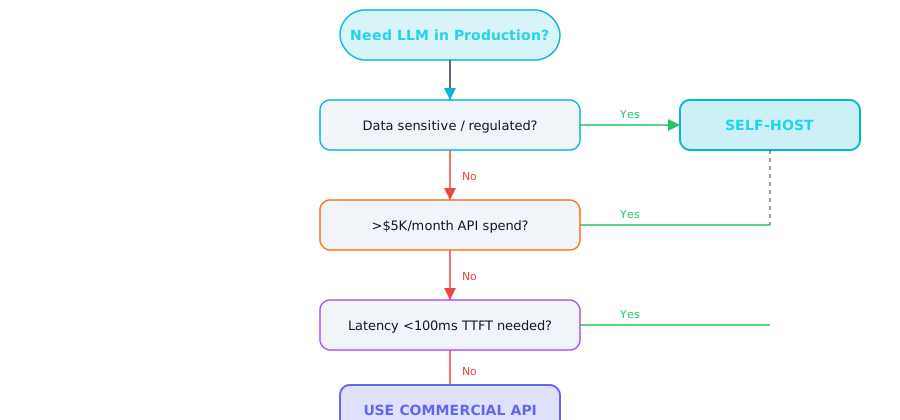
Figure 1 — Self-hosting decision flowchart: data sensitivity, volume, and latency thresholds
What This Means for Practitioners: The Decision Framework
Self-host when two or more of these conditions apply:
| Condition | Threshold | Why It Matters |
|---|---|---|
| Monthly API spend | > $5,000/month | Self-hosting pays for itself within 3-6 months |
| Data sensitivity | Regulated data (HIPAA, GDPR, SOC 2) | Data cannot leave your VPC |
| Latency requirement | < 100ms time-to-first-token | Network overhead from APIs is 200-500ms |
| Custom models | Fine-tuned weights that exist only locally | No commercial API can serve your custom model |
| Volume | > 5M tokens/day consistently | Fixed infrastructure cost beats per-token pricing |
Cost comparison — a concrete example:
A RAG application processing 10,000 queries/day, each consuming ~2,000 input tokens and generating ~500 output tokens:
| Approach | Monthly Cost | Notes |
|---|---|---|
| GPT-4o API | ~$3,000/month | Scales linearly with volume |
| Claude 3.7 Sonnet API | ~$4,500/month | Higher quality, higher cost |
| Self-hosted Llama 3 70B (A100) | ~$2,400/month | Fixed cost, unlimited tokens |
| Self-hosted Llama 3 8B (A10G) | ~$1,100/month | Lower quality, much cheaper |
At 100,000 queries/day, the API cost jumps to $30,000-$45,000/month while infrastructure stays fixed. Volume is where self-hosting wins decisively.
Decision Framework: Start with commercial APIs unless you have a clear reason not to. When two or more conditions from the table above apply, self-hosting pays for itself within 3-6 months.
02. Inference Engines: vLLM, TGI & Ollama
An inference engine is the runtime software that loads model weights into GPU memory and executes the computation needed to generate text. Just as Nginx serves web pages, vLLM and TGI serve language model predictions. The engine handles GPU memory allocation, request batching, and the KV cache that prevents redundant computation during generation.
If you have wondered why running a model locally feels slow compared to ChatGPT, the answer is usually the inference engine. A naive PyTorch implementation generates one request at a time. Production engines use continuous batching — dynamically inserting new requests into an ongoing batch — which can improve throughput by 10-30x.
Think of it like this: A naive inference engine is like a restaurant that seats one table at a time, finishing the entire meal before seating the next group. Continuous batching is like a normal restaurant — new tables are seated as soon as one opens up, the kitchen works on multiple orders simultaneously, and everyone gets served faster.
What This Means for Practitioners: Engine Comparison
| Feature | vLLM | TGI | Ollama |
|---|---|---|---|
| Primary use | Production serving | Production serving | Local development |
| Language | Python + CUDA | Rust + Python + CUDA | Go + C++ (llama.cpp) |
| API format | OpenAI-compatible | Custom + OpenAI-compatible | OpenAI-compatible |
| Key innovation | PagedAttention (memory efficiency) | Flash Attention 2, speculative decoding | Single-command simplicity |
| Tensor parallelism | Yes (simple flag) | Yes | No (single GPU only) |
| Quantization | GPTQ, AWQ, FP8, GGUF | GPTQ, AWQ, EETQ, bitsandbytes | GGUF (automatic) |
| Deployment | pip install / Docker | Docker (primary) | Native install |
| Best for | Max throughput, OpenAI drop-in | HuggingFace ecosystem | Prototyping, testing, offline dev |
| GPU acceleration | NVIDIA CUDA | NVIDIA CUDA | CUDA, Metal (Apple Silicon), CPU |
vLLM is the de facto standard for production serving. Its PagedAttention innovation manages KV cache in non-contiguous memory pages — like how an operating system manages virtual memory. Traditional serving allocates a contiguous block for each request sized to the maximum sequence length, wasting enormous memory on short sequences. PagedAttention allocates on demand, enabling 2-4x more concurrent requests on the same hardware.
# Start vLLM with OpenAI-compatible API
vllm serve meta-llama/Meta-Llama-3-8B-Instruct \
  --host 0.0.0.0 \
  --port 8000 \
  --dtype auto \
  --max-model-len 8192 \
  --gpu-memory-utilization 0.90 \
  --enable-chunked-prefill \
  --max-num-seqs 256

# Serve a 70B model across 2 GPUs
vllm serve meta-llama/Meta-Llama-3-70B-Instruct \
  --tensor-parallel-size 2 \
  --max-model-len 4096 \
  --gpu-memory-utilization 0.92

# Any OpenAI SDK code works unchanged — just change the base URL
TGI by HuggingFace takes a different approach — a Rust core for performance with tight HuggingFace Hub integration. Best when you need built-in speculative decoding or are already deep in the HuggingFace ecosystem.
# Run TGI via Docker
docker run --gpus all --shm-size 1g \
  -p 8080:80 \
  -v /data:/data \
  ghcr.io/huggingface/text-generation-inference:latest \
  --model-id meta-llama/Meta-Llama-3-8B-Instruct \
  --max-input-tokens 4096 \
  --max-total-tokens 8192
Ollama is for local development — a single ollama run llama3 downloads, quantizes, and serves a model. It exposes an OpenAI-compatible API on localhost, meaning your production code works unchanged during development.
# Install and run locally
curl -fsSL https://ollama.com/install.sh | sh
ollama run llama3:8b

# Custom Modelfile (like a Dockerfile for models)
# Save as "Modelfile.code-review"
# FROM codellama:13b
# SYSTEM "You are an expert code reviewer..."
# PARAMETER temperature 0.2

ollama create code-reviewer -f Modelfile.code-review
ollama run code-reviewer
# Use OpenAI SDK with local Ollama
from openai import OpenAI

client = OpenAI(
    base_url="http://localhost:11434/v1",
    api_key="ollama"
)

response = client.chat.completions.create(
    model="llama3:8b",
    messages=[{"role": "user", "content": "What is continuous batching?"}],
    temperature=0.7, max_tokens=500
)
print(response.choices[0].message.content)
Development Workflow: Set OPENAI_BASE_URL=http://localhost:11434/v1 in your .env file during development. Your code uses the standard OpenAI SDK everywhere. Switching to production requires only changing this variable.
03. GPU Sizing Guide
Choosing the right GPU is primarily a VRAM calculation. The model weights must fit in GPU memory, plus room for the KV cache and activations during inference.
What This Means for Practitioners: GPU Requirements
Rule of thumb: A model in FP16 needs ~2 bytes per parameter. A 7B model needs ~14 GB. A 70B model needs ~140 GB. Quantization to 4-bit divides this by 4.
| Model Size | FP16 VRAM | 4-bit VRAM | Minimum GPU | Recommended GPU |
|---|---|---|---|---|
| 3B (Phi-3-mini) | ~6 GB | ~2 GB | RTX 3060 (12GB) | Any modern GPU |
| 7-8B (Llama 3 8B) | ~14 GB | ~4 GB | RTX 3090 (24GB) | A10G (24GB) |
| 13B (CodeLlama 13B) | ~26 GB | ~7 GB | RTX 4090 (24GB, quantized) | A100 40GB |
| 34B | ~68 GB | ~17 GB | A100 40GB (quantized) | A100 80GB |
| 70B (Llama 3 70B) | ~140 GB | ~35 GB | A100 80GB (quantized) | 2x A100 80GB |
| 405B (Llama 3.1 405B) | ~810 GB | ~200 GB | 8x A100 80GB | 8x H100 80GB |
Quantization format matters for your deployment target:
| Format | Target | Quality vs FP16 | Notes |
|---|---|---|---|
| GGUF (Q4_K_M) | CPU, Apple Silicon, consumer GPU | -3-5% on benchmarks | Used by Ollama, llama.cpp. Best for local dev |
| GPTQ | NVIDIA GPU | -1-3% on benchmarks | One-shot calibration. Used by vLLM, TGI |
| AWQ | NVIDIA GPU | -1-2% on benchmarks | Protects salient weights. Often better than GPTQ |
| FP8 | H100 GPU | -0.5% on benchmarks | Native H100 support. Minimal quality loss |
Memory bandwidth matters as much as VRAM. LLM inference during the decode phase is memory-bandwidth-bound, not compute-bound. An H100 has 3.35 TB/s bandwidth vs A100's 2 TB/s — this directly translates to faster token generation. The H100 often wins on cost-per-token despite its higher hourly rate.
04. Building FastAPI LLM Services
Production applications need more than raw inference — they need input validation, authentication, rate limiting, prompt templates, logging, and business logic. FastAPI sits between your users and the inference engine, handling all application concerns.
The architecture is a three-layer sandwich: inference engine (vLLM/Ollama) at the bottom, FastAPI service in the middle, frontend at the top. This separation lets you swap inference engines, update prompts, and scale layers independently.
What This Means for Practitioners: Production FastAPI Pattern
from fastapi import FastAPI, HTTPException
from fastapi.responses import StreamingResponse
from pydantic import BaseModel, Field
from openai import AsyncOpenAI
from typing import AsyncGenerator
import json, time, logging

logger = logging.getLogger(__name__)
app = FastAPI(title="LLM Service", version="1.0.0")

class Message(BaseModel):
    role: str = Field(..., pattern="^(system|user|assistant)$")
    content: str = Field(..., min_length=1, max_length=100_000)

class ChatRequest(BaseModel):
    messages: list[Message] = Field(..., min_length=1)
    model: str = "llama3:8b"
    temperature: float = Field(default=0.7, ge=0.0, le=2.0)
    max_tokens: int = Field(default=1024, ge=1, le=4096)
    stream: bool = False

class ChatResponse(BaseModel):
    content: str
    model: str
    usage: dict
    latency_ms: float

client = AsyncOpenAI(base_url="http://localhost:8000/v1", api_key="not-needed")

@app.post("/v1/chat", response_model=ChatResponse)
async def chat(req: ChatRequest):
    start = time.perf_counter()
    try:
        response = await client.chat.completions.create(
            model=req.model,
            messages=[m.model_dump() for m in req.messages],
            temperature=req.temperature, max_tokens=req.max_tokens,
        )
    except Exception as e:
        logger.error(f"Inference failed: {e}")
        raise HTTPException(status_code=502, detail="Inference backend unavailable")
    elapsed = (time.perf_counter() - start) * 1000
    return ChatResponse(
        content=response.choices[0].message.content,
        model=response.model,
        usage={"prompt_tokens": response.usage.prompt_tokens,
               "completion_tokens": response.usage.completion_tokens,
               "total_tokens": response.usage.total_tokens},
        latency_ms=round(elapsed, 2)
    )

# Streaming endpoint
async def stream_tokens(req: ChatRequest) -> AsyncGenerator[str, None]:
    try:
        stream = await client.chat.completions.create(
            model=req.model,
            messages=[m.model_dump() for m in req.messages],
            temperature=req.temperature, max_tokens=req.max_tokens,
            stream=True,
        )
        async for chunk in stream:
            delta = chunk.choices[0].delta.content
            if delta:
                yield f"data: {json.dumps({'content': delta})}\n\n"
        yield "data: [DONE]\n\n"
    except Exception as e:
        yield f"data: {json.dumps({'error': str(e)})}\n\n"

@app.post("/v1/chat/stream")
async def chat_stream(req: ChatRequest):
    return StreamingResponse(stream_tokens(req), media_type="text/event-stream",
                             headers={"Cache-Control": "no-cache", "X-Accel-Buffering": "no"})

@app.get("/health")
async def health():
    try:
        models = await client.models.list()
        return {"status": "healthy", "models": [m.id for m in models.data]}
    except Exception as e:
        raise HTTPException(status_code=503, detail=f"Backend unhealthy: {e}")
Production Tip: Run with uvicorn app:app --workers 4 --loop uvloop for maximum async performance. The uvloop event loop is significantly faster than default asyncio for I/O-bound workloads.
05. AWS SageMaker Endpoints
SageMaker provides fully managed LLM deployment — you specify the model and instance type, and AWS handles provisioning, load balancing, auto-scaling, health checks, and TLS. You interact with your model through a simple API call and pay per hour of instance uptime.
The main tradeoff is cost and flexibility. SageMaker instances cost ~30% more than equivalent bare EC2. You have less control over the runtime environment. But you get auto-scaling, shadow deployments for A/B testing, blue/green deployments for zero-downtime updates, and CloudWatch monitoring — features that are extremely difficult to build yourself.
What This Means for Practitioners: SageMaker Deployment
import sagemaker
from sagemaker.huggingface import HuggingFaceModel, get_huggingface_llm_image_uri

role = sagemaker.get_execution_role()
sess = sagemaker.Session()

image_uri = get_huggingface_llm_image_uri(
    backend="huggingface", region=sess.boto_region_name, version="2.3.1"
)

model = HuggingFaceModel(
    role=role, image_uri=image_uri,
    env={
        "HF_MODEL_ID": "meta-llama/Meta-Llama-3-8B-Instruct",
        "HF_TOKEN": "hf_YOUR_TOKEN_HERE",
        "SM_NUM_GPUS": "1",
        "MAX_INPUT_TOKENS": "4096",
        "MAX_TOTAL_TOKENS": "8192",
    }
)

predictor = model.deploy(
    initial_instance_count=1,
    instance_type="ml.g5.2xlarge",  # 1x A10G 24GB
    endpoint_name="llama3-8b-endpoint",
    container_startup_health_check_timeout=600,
)
SageMaker instance guide:
| Instance | GPU | VRAM | Best For | ~Cost/hr |
|---|---|---|---|---|
| ml.g5.xlarge | 1x A10G | 24 GB | 7B models (quantized) | $1.41 |
| ml.g5.2xlarge | 1x A10G | 24 GB | 7-8B models (FP16) | $1.52 |
| ml.g5.12xlarge | 4x A10G | 96 GB | 70B models (quantized) | $7.09 |
| ml.p4d.24xlarge | 8x A100 | 640 GB | 70B+ models (FP16) | $42.60 |
| ml.g6.xlarge | 1x L4 | 24 GB | 7B models (cost-optimized) | $0.98 |
Cost Warning: SageMaker endpoints bill by the hour even when idle. Always implement auto-scaling with a minimum instance count, and use scheduled scaling to shut down dev/staging endpoints outside business hours.
06. Docker & ECS Deployment
For teams that want more control and lower costs than SageMaker, Docker containers on AWS ECS provide a flexible alternative. The typical architecture: an inference container (vLLM with model loaded) and an API wrapper container (FastAPI) running side-by-side, with only the API container exposed through a load balancer.
The biggest challenge is model loading time. A 7B model is ~14GB at FP16. Downloading weights every container start adds 5-15 minutes — unacceptable for auto-scaling. The solution: use an EFS volume mount that pre-caches weights. New containers mount the shared filesystem and load weights in 1-3 minutes.
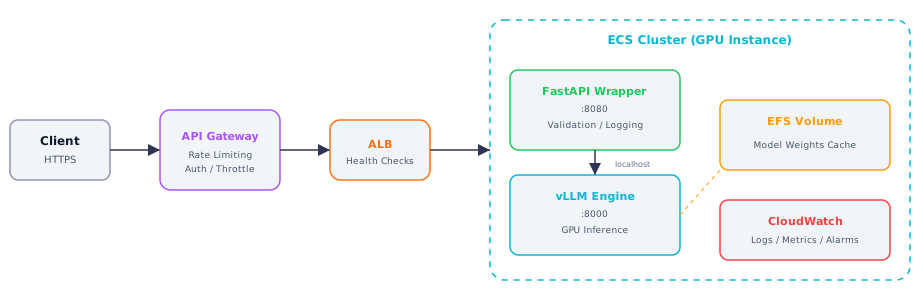
Figure 2 — Production deployment architecture: API Gateway → ALB → ECS with vLLM + FastAPI sidecar pattern
What This Means for Practitioners: Container Deployment
# Dockerfile for LLM inference service
FROM vllm/vllm-openai:latest AS base
RUN pip install fastapi uvicorn pydantic
WORKDIR /app
COPY app/ /app/
EXPOSE 8000 8080
COPY start.sh /app/start.sh
RUN chmod +x /app/start.sh
ENTRYPOINT ["/app/start.sh"]
# start.sh — launches vLLM and FastAPI together
#!/bin/bash
vllm serve ${MODEL_ID:-meta-llama/Meta-Llama-3-8B-Instruct} \
  --host 0.0.0.0 --port 8000 \
  --dtype auto --max-model-len ${MAX_MODEL_LEN:-8192} \
  --gpu-memory-utilization ${GPU_MEM_UTIL:-0.90} &

echo "Waiting for vLLM to start..."
until curl -s http://localhost:8000/health > /dev/null 2>&1; do sleep 2; done
echo "vLLM is ready!"

uvicorn app.main:app --host 0.0.0.0 --port 8080 --workers 2
EFS Pre-warming: Before first deployment, pre-download model weights to EFS: huggingface-cli download meta-llama/Meta-Llama-3-8B-Instruct --local-dir /mnt/efs/models/llama3-8b. This ensures containers load from cache instead of downloading 14+ GB over the network.
Interview Ready
How to Explain This in 2 Minutes
Elevator Pitch: LLM hosting means running models on your own infrastructure instead of relying on third-party APIs. You choose an inference engine like vLLM or TGI, select appropriate GPU hardware, apply quantization to fit larger models into less memory, and expose the model through a REST API. The key tradeoff: self-hosting gives you lower latency, full data privacy, and predictable costs at scale, but you take on GPU management, scaling, and monitoring. The decision hinges on token volume, data sensitivity, and latency requirements — once API spend exceeds ~$5K/month or you need sub-100ms time-to-first-token, self-hosting typically wins.
Likely Interview Questions
| Question | What They're Really Asking |
|---|---|
| When would you self-host vs use a commercial API? | Can you reason about cost, compliance, latency, and operational tradeoffs? |
| What is vLLM's PagedAttention? | Do you understand the GPU memory bottleneck and how modern engines solve it? |
| How would you choose a GPU for serving a 70B model? | Can you estimate VRAM, understand tensor parallelism, and balance cost vs throughput? |
| How do GGUF, GPTQ, and AWQ differ? | Can you pick the right quantization format for a given deployment target? |
| What strategies optimize latency and throughput? | Can you discuss continuous batching, KV-cache tuning, and autoscaling coherently? |
Model Answers
Q1 — Self-host vs API: Self-host when: API costs exceed $5K/month, data governance prohibits external APIs, latency needs sub-100ms TTFT, or you serve custom fine-tuned models. At high volume, a single A100 running vLLM serves hundreds of thousands of tokens per minute at a fixed hourly cost vs linear API pricing. But self-hosting demands operational maturity — monitoring, autoscaling, failover, model updates. Start with APIs and migrate when the economics or compliance case is clear.
Q2 — PagedAttention: Traditional serving allocates a contiguous memory block for each request sized to the maximum sequence length — massive waste on short sequences. PagedAttention allocates KV cache in small non-contiguous pages, on demand, like OS virtual memory. Memory is shared across requests and reclaimed immediately on completion. This enables 2-4x more concurrent requests on the same hardware.
Q3 — GPU for 70B model: 70B at FP16 needs ~140GB VRAM. Options: tensor parallelism across two A100-80GB GPUs, or quantize to 4-bit (~35GB) to fit on one card. For production throughput, two A100s with tensor parallelism is better because the KV cache also needs significant memory. Compare A100 ($2-3/hr) vs H100 ($5-8/hr, but 2-3x faster inference) — H100 often wins on cost-per-token despite higher hourly rate due to superior memory bandwidth.
Q4 — Quantization formats: GGUF is for CPU, Apple Silicon, and consumer GPUs — used by Ollama/llama.cpp, supports mixed precision (Q4_K_M). GPTQ and AWQ are GPU-focused, use calibration data to minimize quantization error. AWQ protects salient weight channels for slightly better quality. For production GPU serving with vLLM/TGI, use GPTQ or AWQ. For local development, use GGUF.
Q5 — Latency and throughput optimization: Continuous batching keeps GPUs saturated (vLLM default). Tune gpu-memory-utilization to 0.90-0.95 for maximum KV-cache space. Enable chunked prefill to reduce TTFT for long prompts. Consider speculative decoding with a smaller draft model. Scale with model replicas behind a load balancer, autoscaling on GPU utilization and queue depth.
Common Mistakes
- Ignoring operational costs in self-host vs API comparison. Teams compare only compute costs, forgetting engineering hours for infrastructure, monitoring, on-call, and incident response. A fair comparison includes 0.5-1 FTE of ongoing operational overhead.
- Over-provisioning by skipping quantization. Running a 70B model at full FP16 across four GPUs when a 4-bit quantized version achieves nearly identical quality on a single GPU wastes three-quarters of your hardware budget. Always benchmark quantized variants first.
- Treating GPU selection as pure VRAM math. VRAM determines if a model fits, but memory bandwidth determines how fast it runs. An H100 has 3.35 TB/s bandwidth vs A100's 2 TB/s — LLM inference is memory-bandwidth-bound during decode.
Previous Module
Next Module