01. The Problem
The National Vulnerability Database publishes over 25,000 CVEs per year. A typical enterprise runs hundreds of software products across thousands of servers. Security analysts must manually cross-reference each new CVE against their asset inventory, determine whether the vulnerability is actually exploitable in their environment, and prioritize remediation. This process is slow, error-prone, and does not scale.
The core challenge is contextual prioritization. A critical CVE in Apache Struts is irrelevant if your organization does not run Struts. A medium-severity CVE in OpenSSL matters enormously if it affects your internet-facing payment gateway and has a known exploit in the wild. Analysts need to correlate multiple data sources — vulnerability feeds, asset inventories, exploit databases, and threat intelligence — to make these determinations.
Traditional rule-based systems (SIEM correlation rules, vulnerability scanners) can match CVEs to installed software, but they cannot reason about exploitability context, attack chain likelihood, or business impact. This is where an LLM agent excels: it can synthesize unstructured threat intelligence, reason about multi-step attack scenarios, and produce human-readable prioritized reports.
02. Why an Agent
Why not a simple pipeline? A fixed pipeline (fetch CVEs, filter by keyword, generate report) cannot adapt its strategy based on intermediate findings. If the NVD returns 50 CVEs and the first 3 affect your infrastructure, the agent should deep-dive into those 3 immediately — checking MITRE ATT&CK for related techniques, looking up EPSS scores, and cross-referencing with known exploit kits. A pipeline would process all 50 uniformly.
Why not RAG? RAG retrieves relevant documents and generates a response in a single pass. Threat intelligence requires iterative investigation: the agent finds a CVE, discovers it relates to a specific ATT&CK technique, then checks whether that technique has been observed in recent campaigns, then assesses whether your infrastructure is vulnerable to that campaign's initial access vector. Each step depends on the previous step's results.
The agent advantage: A ReAct agent can call multiple APIs in sequence, reason about intermediate results, change its investigation strategy based on what it finds, and synthesize everything into a coherent report. It mimics the workflow of an experienced security analyst — but operates at machine speed across all CVEs simultaneously.
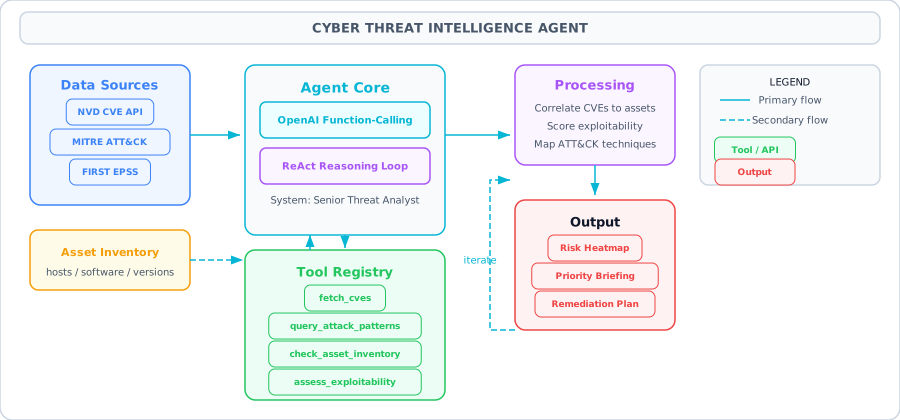
Architecture Diagram
03. Architecture
Data Sources
NVD CVE API (NIST), MITRE ATT&CK Enterprise JSON, FIRST EPSS API for exploit prediction scores, and an internal asset inventory represented as a JSON database mapping hostnames to installed software and versions.
Agent Core
An OpenAI function-calling agent with a system prompt that instructs it to act as a senior threat analyst. The agent receives a query (e.g., "Analyze today's critical CVEs for our infrastructure") and iteratively calls tools until it has enough information to produce a prioritized report.
Tool Registry
Five tools: fetch_cves (query NVD), query_attack_patterns (search MITRE ATT&CK), check_asset_inventory (match CVEs to internal assets), assess_exploitability (get EPSS scores), and generate_report (format findings into structured markdown).
Output
A prioritized threat briefing with: critical findings (CVEs affecting your assets with high EPSS), associated ATT&CK techniques, recommended remediation actions, and a risk heatmap. Delivered as structured markdown or JSON for integration with ticketing systems.
04. Tools & APIs
Each tool is defined as an OpenAI function-calling schema. The descriptions are critical — they guide the LLM on when and how to use each tool.
import json, requests
from datetime import datetime, timedelta

# ── Tool 1: Fetch CVEs from NVD ──
def fetch_cves(keyword: str, days_back: int = 7, severity: str = "CRITICAL") -> str:
    """Query the NVD CVE API for recent vulnerabilities."""
    end = datetime.utcnow()
    start = end - timedelta(days=days_back)
    url = "https://services.nvd.nist.gov/rest/json/cves/2.0"
    params = {
        "keywordSearch": keyword,
        "pubStartDate": start.strftime("%Y-%m-%dT00:00:00.000"),
        "pubEndDate": end.strftime("%Y-%m-%dT23:59:59.999"),
        "cvssV3Severity": severity,
        "resultsPerPage": 20
    }
    resp = requests.get(url, params=params, timeout=30)
    resp.raise_for_status()
    data = resp.json()

    results = []
    for item in data.get("vulnerabilities", []):
        cve = item["cve"]
        cve_id = cve["id"]
        desc = cve["descriptions"][0]["value"]
        metrics = cve.get("metrics", {})
        score = "N/A"
        if "cvssMetricV31" in metrics:
            score = metrics["cvssMetricV31"][0]["cvssData"]["baseScore"]
        results.append({"id": cve_id, "score": score, "description": desc[:200]})

    return json.dumps(results, indent=2)

# ── Tool 2: Query MITRE ATT&CK patterns ──
def query_attack_patterns(cve_description: str) -> str:
    """Map a CVE description to MITRE ATT&CK techniques using the STIX dataset."""
    url = ("https://raw.githubusercontent.com/mitre/cti/master/"
           "enterprise-attack/enterprise-attack.json")
    resp = requests.get(url, timeout=30)
    bundle = resp.json()

    keywords = set(cve_description.lower().split())
    matches = []
    for obj in bundle["objects"]:
        if obj.get("type") != "attack-pattern":
            continue
        name = obj.get("name", "").lower()
        desc = obj.get("description", "").lower()
        overlap = keywords & set(name.split() + desc.split()[:50])
        if len(overlap) >= 3:
            ext_refs = obj.get("external_references", [])
            technique_id = ext_refs[0]["external_id"] if ext_refs else "N/A"
            matches.append({"technique": obj["name"], "id": technique_id})

    return json.dumps(matches[:5], indent=2)

# ── Tool 3: Check asset inventory ──
def check_asset_inventory(software_keyword: str) -> str:
    """Check which internal assets run the specified software."""
    # In production, this queries a CMDB or asset management API
    inventory = {
        "web-prod-01": {"software": ["nginx/1.24", "openssl/3.0.9", "python/3.11"], "tier": "critical"},
        "api-prod-02": {"software": ["node/20.10", "openssl/3.0.9"], "tier": "critical"},
        "db-prod-01": {"software": ["postgresql/16.1", "openssl/3.0.8"], "tier": "critical"},
        "dev-server-01": {"software": ["apache/2.4.57", "python/3.10"], "tier": "low"},
        "ml-train-01": {"software": ["cuda/12.2", "pytorch/2.1", "python/3.11"], "tier": "medium"},
    }
    keyword = software_keyword.lower()
    affected = []
    for host, info in inventory.items():
        for sw in info["software"]:
            if keyword in sw.lower():
                affected.append({"host": host, "software": sw, "tier": info["tier"]})

    return json.dumps(affected, indent=2)

# ── Tool 4: Assess exploitability via EPSS ──
def assess_exploitability(cve_id: str) -> str:
    """Get the EPSS (Exploit Prediction Scoring System) score for a CVE."""
    url = f"https://api.first.org/data/v1/epss?cve={cve_id}"
    resp = requests.get(url, timeout=15)
    resp.raise_for_status()
    data = resp.json()
    if data.get("data"):
        entry = data["data"][0]
        return json.dumps({
            "cve": entry["cve"],
            "epss": float(entry["epss"]),
            "percentile": float(entry["percentile"]),
            "risk": "HIGH" if float(entry["epss"]) > 0.5 else "MEDIUM" if float(entry["epss"]) > 0.1 else "LOW"
        })
    return json.dumps({"error": "No EPSS data found"})

# ── Tool 5: Generate structured report ──
def generate_report(findings: str) -> str:
    """Format findings into a structured threat report."""
    data = json.loads(findings)
    lines = ["# Cyber Threat Intelligence Report", ""]
    lines.append(f"**Generated:** {datetime.utcnow().isoformat()}Z")
    lines.append(f"**Total Findings:** {len(data)}")
    lines.append("")
    for i, f in enumerate(data, 1):
        lines.append(f"## Finding {i}: {f.get('cve_id', 'N/A')}")
        lines.append(f"- **CVSS:** {f.get('cvss', 'N/A')} | **EPSS:** {f.get('epss', 'N/A')}")
        lines.append(f"- **Affected Assets:** {', '.join(f.get('assets', []))}")
        lines.append(f"- **ATT&CK Techniques:** {', '.join(f.get('techniques', []))}")
        lines.append(f"- **Action:** {f.get('recommendation', 'Review and patch')}")
        lines.append("")
    return "\n".join(lines)
05. The Agent Loop
The agent follows a ReAct (Reasoning + Acting) pattern. It receives the user's query, reasons about which tool to call first, executes it, observes the result, and decides the next step. The loop continues until the agent has gathered enough intelligence to produce a comprehensive report.
Typical execution flow:
- Fetch CVEs — Agent calls
fetch_cves("openssl", days_back=7, severity="CRITICAL")to get recent critical vulnerabilities. - Check assets — For each relevant CVE, agent calls
check_asset_inventory("openssl")to find affected servers. - Assess exploitability — For CVEs matching internal assets, agent calls
assess_exploitability("CVE-2024-XXXX")to get EPSS scores. - Map ATT&CK — Agent calls
query_attack_patternswith the CVE description to find related techniques. - Generate report — Agent compiles all findings and calls
generate_reportto produce a structured briefing.
Why this order matters: The agent triages early. If no CVEs match internal assets (step 2), it skips expensive EPSS and ATT&CK lookups. This adaptive behavior is what makes an agent superior to a fixed pipeline that always runs all steps.
06. Code Walkthrough
The complete agent implementation using OpenAI function calling. Note how the tool definitions include precise descriptions — these guide the LLM's tool selection decisions.
from openai import OpenAI
import json

client = OpenAI()

# ── Tool Definitions (OpenAI function calling format) ──
tools = [
    {
        "type": "function",
        "function": {
            "name": "fetch_cves",
            "description": "Query the NVD API for recent CVEs matching a keyword and severity level. Use this first to identify relevant vulnerabilities.",
            "parameters": {
                "type": "object",
                "properties": {
                    "keyword": {"type": "string", "description": "Software or product name to search for"},
                    "days_back": {"type": "integer", "description": "Number of days to look back (default 7)"},
                    "severity": {"type": "string", "enum": ["LOW", "MEDIUM", "HIGH", "CRITICAL"]}
                },
                "required": ["keyword"]
            }
        }
    },
    {
        "type": "function",
        "function": {
            "name": "query_attack_patterns",
            "description": "Map a CVE description to MITRE ATT&CK techniques. Use after fetching CVEs to understand attack context.",
            "parameters": {
                "type": "object",
                "properties": {
                    "cve_description": {"type": "string", "description": "The CVE description text to analyze"}
                },
                "required": ["cve_description"]
            }
        }
    },
    {
        "type": "function",
        "function": {
            "name": "check_asset_inventory",
            "description": "Check which internal assets run the specified software. Returns hostnames, versions, and criticality tiers.",
            "parameters": {
                "type": "object",
                "properties": {
                    "software_keyword": {"type": "string", "description": "Software name to search for in the inventory"}
                },
                "required": ["software_keyword"]
            }
        }
    },
    {
        "type": "function",
        "function": {
            "name": "assess_exploitability",
            "description": "Get the EPSS exploit prediction score for a specific CVE ID. Higher scores mean higher likelihood of exploitation in the wild.",
            "parameters": {
                "type": "object",
                "properties": {
                    "cve_id": {"type": "string", "description": "CVE identifier, e.g. CVE-2024-1234"}
                },
                "required": ["cve_id"]
            }
        }
    },
    {
        "type": "function",
        "function": {
            "name": "generate_report",
            "description": "Generate a structured threat report from compiled findings. Use as the final step after all analysis is complete.",
            "parameters": {
                "type": "object",
                "properties": {
                    "findings": {"type": "string", "description": "JSON array of finding objects with cve_id, cvss, epss, assets, techniques, recommendation"}
                },
                "required": ["findings"]
            }
        }
    }
]

# ── Tool Dispatcher ──
TOOL_MAP = {
    "fetch_cves": fetch_cves,
    "query_attack_patterns": query_attack_patterns,
    "check_asset_inventory": check_asset_inventory,
    "assess_exploitability": assess_exploitability,
    "generate_report": generate_report,
}

def dispatch_tool(name: str, args: dict) -> str:
    """Execute a tool by name with error handling."""
    fn = TOOL_MAP.get(name)
    if not fn:
        return json.dumps({"error": f"Unknown tool: {name}"})
    try:
        return fn(**args)
    except Exception as e:
        return json.dumps({"error": f"{type(e).__name__}: {e}"})

# ── Agent Loop ──
SYSTEM_PROMPT = """You are a senior cyber threat intelligence analyst. Your job is to:
1. Identify recent critical CVEs relevant to the user's query
2. Cross-reference with the internal asset inventory to find affected systems
3. Assess exploitability using EPSS scores
4. Map vulnerabilities to MITRE ATT&CK techniques
5. Generate a prioritized threat report

Always check the asset inventory before deep-diving into a CVE.
Skip CVEs that don't affect any internal assets.
Prioritize by: EPSS score * asset criticality tier."""

def run_threat_agent(query: str, max_steps: int = 15) -> str:
    messages = [
        {"role": "system", "content": SYSTEM_PROMPT},
        {"role": "user", "content": query}
    ]

    for step in range(max_steps):
        resp = client.chat.completions.create(
            model="gpt-4o",
            messages=messages,
            tools=tools,
            tool_choice="auto"
        )
        msg = resp.choices[0].message
        messages.append(msg)

        # No tool calls means the agent is done
        if not msg.tool_calls:
            return msg.content

        # Execute each requested tool
        for tc in msg.tool_calls:
            args = json.loads(tc.function.arguments)
            print(f"  [Step {step+1}] Calling {tc.function.name}({args})")
            result = dispatch_tool(tc.function.name, args)
            messages.append({
                "role": "tool",
                "tool_call_id": tc.id,
                "content": result
            })

    return "Agent reached max steps. Returning partial analysis."

# ── Run the agent ──
report = run_threat_agent(
    "Analyze critical CVEs from the past 7 days that affect our infrastructure. "
    "Focus on openssl and nginx vulnerabilities."
)
print(report)
07. Key Takeaways
-
Tool descriptions are the most important part of an agent — they determine whether the LLM selects the right tool at the right time
-
Early triage saves cost: check asset inventory before running expensive exploitability and ATT&CK lookups
-
The NVD API has rate limits (5 requests/30 seconds without an API key). Add exponential backoff and caching
-
EPSS scores change daily — cache them with a 24-hour TTL, not indefinitely
-
The MITRE ATT&CK dataset is 30MB+. In production, download it once and index it locally rather than fetching on every query
-
Always set a max_steps limit to prevent runaway API costs. 10-15 steps covers most threat analysis workflows
-
Log every tool call with timestamps for audit trails — security teams need to know what the agent investigated and why
-
Integrate the agent's output with your ticketing system (Jira, ServiceNow) to automatically create remediation tickets for critical findings