01. Architecture Overview
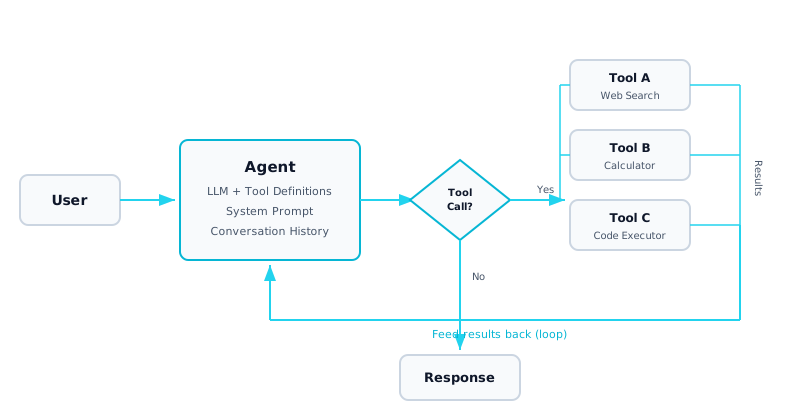
What it is: A single LLM agent equipped with a set of callable tools (functions). The agent receives a user request, reasons about which tool to invoke and with what arguments, executes the tool, observes the result, and repeats this loop until it has enough information to produce a final answer. This is the ReAct (Reasoning + Acting) pattern applied with modern function calling APIs.
When to use it: When a user query cannot be answered by the LLM alone and requires real-world interaction — looking up live data, performing calculations, executing code, querying databases, or calling external APIs. The agent dynamically decides which tools to use and in what order, adapting its plan based on intermediate results.
Why it matters: This architecture transforms an LLM from a passive text generator into an autonomous actor. Instead of returning stale or hallucinated information, the agent retrieves real data and takes verifiable actions. It is the foundation for all more complex agent architectures (multi-agent, orchestration, production platforms).
Complexity: Intermediate. Requires understanding of function calling schemas, the agent loop pattern, error handling for tool failures, and iteration budgets to prevent runaway costs.
02. Architecture Diagram
03. Components Deep Dive
Function Calling Schema
Tools are defined as JSON schemas that describe the function name, description, and parameter types. The LLM uses these schemas to decide which tool to invoke and generates structured JSON arguments. High-quality descriptions are critical — they determine whether the model selects the right tool.
Tool Registry
A central mapping of tool names to their implementations. When the LLM requests a tool call, the registry dispatches to the correct function. Production registries include versioning, access control, and health checks for each tool.
Agent Loop (ReAct)
The core observe-think-act cycle. The LLM receives the conversation history (including prior tool results), reasons about the next step, and either calls a tool or produces a final answer. The loop continues until no more tool calls are needed or the iteration limit is reached.
Error Handling
Tools can fail — APIs return errors, calculations overflow, searches find nothing. The agent must gracefully handle failures: retry with modified parameters, try an alternative tool, or report the failure in its response. Unhandled errors should never crash the loop.
Sandboxing
Code execution and database query tools require sandboxing to prevent security vulnerabilities. Use containerized execution environments, read-only database connections, and restricted system calls. Never pass raw user input directly to eval() or shell commands.
Iteration Budget
Set a maximum number of loop iterations (typically 5-15) and a token budget to prevent runaway costs. If the agent cannot solve the task within the budget, return the best partial answer with a disclaimer rather than looping indefinitely.
04. Implementation
A complete agentic tool-use implementation with three tools, function calling, and a bounded execution loop:
from openai import OpenAI
import json, math

client = OpenAI()

# ── Tool Definitions (JSON Schema for function calling) ──
tools = [
    {
        "type": "function",
        "function": {
            "name": "web_search",
            "description": "Search the web for current information",
            "parameters": {
                "type": "object",
                "properties": {
                    "query": {"type": "string", "description": "Search query"}
                },
                "required": ["query"]
            }
        }
    },
    {
        "type": "function",
        "function": {
            "name": "calculator",
            "description": "Evaluate a mathematical expression safely",
            "parameters": {
                "type": "object",
                "properties": {
                    "expression": {"type": "string"}
                },
                "required": ["expression"]
            }
        }
    },
    {
        "type": "function",
        "function": {
            "name": "run_python",
            "description": "Execute a Python code snippet and return stdout",
            "parameters": {
                "type": "object",
                "properties": {
                    "code": {"type": "string"}
                },
                "required": ["code"]
            }
        }
    }
]

# ── Tool Implementations ──
def execute_tool(name: str, args: dict) -> str:
    try:
        if name == "web_search":
            return f"Results for '{args['query']}': [simulated search data]"
        elif name == "calculator":
            # Safe math evaluation (no builtins)
            allowed = {"math": math}
            result = eval(args["expression"], {"__builtins__": {}}, allowed)
            return str(result)
        elif name == "run_python":
            # In production: use a sandboxed container
            import io, contextlib
            buf = io.StringIO()
            with contextlib.redirect_stdout(buf):
                exec(args["code"], {"__builtins__": {}})
            return buf.getvalue() or "(no output)"
    except Exception as e:
        return f"Error: {type(e).__name__}: {e}"
    return "Unknown tool"

# ── Agent Loop ──
def run_agent(user_msg: str, max_steps: int = 10) -> str:
    messages = [
        {"role": "system", "content": "You are an assistant with tools. "
         "Use them when needed. Think step by step."},
        {"role": "user", "content": user_msg}
    ]

    for step in range(max_steps):
        resp = client.chat.completions.create(
            model="gpt-4o", messages=messages,
            tools=tools, tool_choice="auto"
        )
        msg = resp.choices[0].message
        messages.append(msg)

        # No tool calls = final answer
        if not msg.tool_calls:
            return msg.content

        # Execute each tool and feed results back
        for tc in msg.tool_calls:
            result = execute_tool(
                tc.function.name,
                json.loads(tc.function.arguments)
            )
            messages.append({
                "role": "tool",
                "tool_call_id": tc.id,
                "content": result
            })

    return "Max steps reached — returning partial answer."

# Usage
answer = run_agent("What is 15% of the US population?")
print(answer)
05. Data Flow
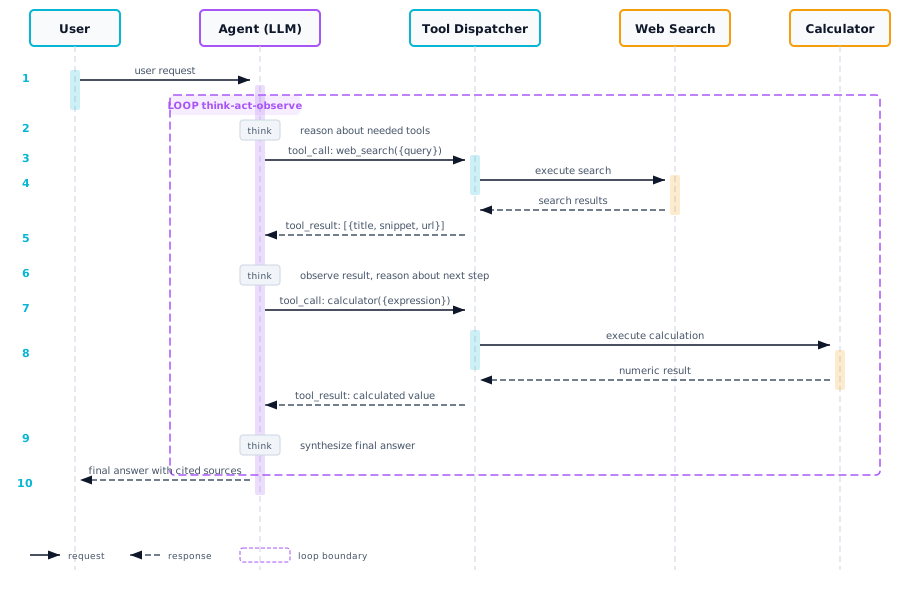
| Step | Action | Details |
|---|---|---|
| 1 | User sends a request | "What is 15% of the current US population?" enters the agent |
| 2 | Agent reasons | The LLM receives the system prompt, tool definitions, and user message. It decides it needs to search for the current US population |
| 3 | Tool call emitted | The LLM returns a structured function call: web_search({"query": "current US population 2024"}) |
| 4 | Tool executed | The dispatcher routes to the web_search implementation, which returns "~335 million" |
| 5 | Result fed back | The tool result is appended to the conversation history as a tool message |
| 6 | Agent reasons again | Now the LLM has the population. It decides to call the calculator: calculator({"expression": "335000000 * 0.15"}) |
| 7 | Second tool executed | Returns "50250000" |
| 8 | Final answer | The LLM now has all information. It produces a natural language response: "15% of the US population is approximately 50.25 million" |
06. Trade-offs
| Dimension | Pros | Cons |
|---|---|---|
| Flexibility | Agent dynamically selects tools and plans steps at runtime — no hardcoded pipeline | Non-deterministic execution path makes testing and debugging harder |
| Cost | Only calls tools when needed, avoiding unnecessary API usage | Multiple LLM calls per request (3-10x more expensive than a single call) |
| Latency | Can parallelize independent tool calls | Sequential loop adds latency: each iteration = LLM call + tool execution |
| Reliability | Can retry failed tools and adapt its approach | LLM may hallucinate tool arguments or enter infinite loops without proper guardrails |
| Complexity | Simple to implement with modern function calling APIs | Tool sandboxing, error recovery, and budget management add production complexity |
When to use this architecture: When user queries require dynamic, multi-step interaction with external data sources or computation. Not recommended for simple, single-turn Q&A where a direct LLM call or RAG retrieval suffices.
07. Production Checklist
Set max_iterations (5-15) and max_tokens budget per agent run to prevent runaway costs
Sandbox all code execution tools in containers with no network access and limited CPU/memory
Validate tool arguments with Pydantic schemas before execution — never trust raw LLM output
Log every tool call with arguments, results, latency, and trace IDs for debugging and audit
Implement retry logic with exponential backoff for transient tool failures
Use read-only database connections for query tools — never allow write access without approval
Rate-limit tool calls per user to prevent abuse (e.g., max 50 tool calls per minute)
Add timeout wrappers (5-30s) around each tool call to prevent hung executions
Test with adversarial prompts: prompt injection attempts, edge cases, and malformed inputs
Monitor token usage, tool call frequency, and error rates with alerts for anomalies