1. Overview
Your CTO says "we need to avoid vendor lock-in." Your ML team is all-in on AWS SageMaker. Your data team just signed a BigQuery contract with Google. And the new GenAI project needs Azure OpenAI because that is where GPT-4 is. Welcome to multi-cloud AI — not by strategy, but by accident. This is the reality for most enterprises: you end up multi-cloud not because you planned it, but because different teams chose different providers for valid, defensible reasons. The architecture challenge is not whether to go multi-cloud — you probably already are — it is how to manage it without drowning in complexity.
The key is an abstraction layer, but not the kind that tries to make everything work everywhere. That approach leads to the "lowest common denominator" problem where you cannot use any provider's best features. Instead, the architecture uses strategic abstraction: standardize on open formats where portability matters (ONNX for models, Parquet for data, Kubernetes for compute), use portable orchestration tools (Kubeflow, MLflow) for workflows that span clouds, and keep your AI gateway cloud-agnostic so you can route requests to any provider. But for provider-specific strengths — BigQuery's analytics, SageMaker's managed training, Azure OpenAI's GPT-4 access — use them directly.
Think of it like a company with offices in three cities. You do not require every employee to work the same way in every office. But you do standardize on the same email system, the same document format, and the same video conferencing tool so that people can collaborate across offices. The shared services — model registry, feature store, data catalog, AI gateway — are the collaboration tools. The per-cloud workloads are the local offices running their own way.
The worst outcome is paralysis: so afraid of lock-in that you build custom abstraction layers for every service, spend more on portability engineering than on actual AI development, and end up with a system that is portable to any cloud but performs well on none of them. The best outcome is strategic portability: you can move workloads when business needs change, negotiate from a position of strength with providers, and use each cloud's best features where they matter most — all without rewriting everything from scratch.
2. Architecture Diagram
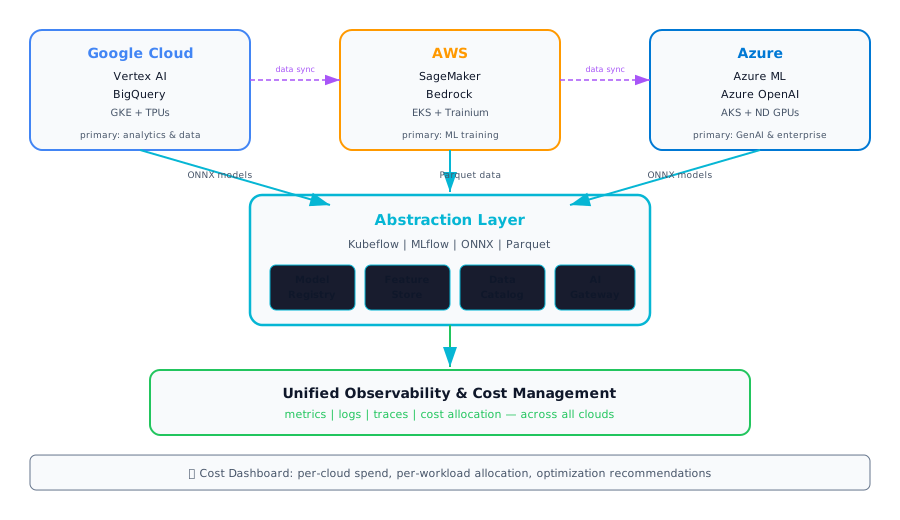
Architecture diagram — Multi-Cloud AI Strategy: abstraction layer with shared services connecting GCP, AWS, and Azure workloads
3. Component Breakdown
| Component | Description |
|---|---|
| ⚙ Cloud Abstraction Layer | Kubeflow and MLflow provide a consistent interface for ML pipelines and experiment tracking across clouds. Kubernetes (GKE/EKS/AKS) provides the common compute layer. Abstraction only where portability is needed — not everywhere. |
| 📦 Portable Model Format (ONNX) | Export models in ONNX format so they can be trained on one cloud and deployed on another. Not every model needs this — only those where cross-cloud portability is a real requirement, not a theoretical one. |
| 🔗 Cross-Cloud AI Gateway | A single entry point that routes AI requests to the appropriate cloud provider based on model type, cost, latency, or availability. Handles failover between providers and normalizes API differences. |
| 📈 Unified Observability | Aggregates metrics, logs, and traces from all three clouds into a single pane of glass. Essential for debugging cross-cloud workflows and maintaining SLAs when a request touches multiple providers. |
| 🔄 Data Synchronization Strategy | Defines how data moves between clouds: full replication, selective sync, or data gravity (compute moves to data). Uses Parquet as the interchange format. Addresses latency, cost, and consistency trade-offs. |
| 💰 Cost Management | Unified cost dashboard that tracks spend across all providers, allocates costs to teams and workloads, and identifies optimization opportunities. Prevents "bill shock" when multi-cloud costs are only visible per-provider. |
4. Decision Points & Trade-offs
| Advantage | Limitation |
|---|---|
| Leverage each provider's best-in-class services | Operational complexity multiplied by number of clouds |
| Portability provides vendor negotiation leverage | Abstraction layers add engineering overhead |
| Avoid single-vendor dependency risk | Unified tooling may not use each cloud's best features |
| Teams can choose the best tool for each workload | Skills fragmentation across teams (GCP experts, AWS experts) |
| Business continuity through multi-cloud redundancy | Data egress costs can be significant and unpredictable |
Data gravity is real: Moving compute is relatively easy — moving petabytes of data between clouds is slow, expensive, and fraught with consistency issues. Identify where your data lives (or will live) and assign that as the primary cloud for data-intensive workloads. Do not fight data gravity; design around it.
Primary cloud per workload: Multi-cloud does not mean "every workload runs on every cloud." Assign a primary cloud for each workload type: analytics on GCP, ML training on AWS, GenAI on Azure (for example). Use the abstraction layer for portability between primaries, not for running everything everywhere simultaneously.
5. Cloud Mapping
| Component | GCP | AWS | Azure |
|---|---|---|---|
| Orchestration | Vertex AI Pipelines / Kubeflow | SageMaker Pipelines / Kubeflow | Azure ML Pipelines / Kubeflow |
| Model Format | Vertex AI (ONNX support) | SageMaker (ONNX / Triton) | Azure ML (ONNX Runtime) |
| Kubernetes | GKE | EKS | AKS |
| Experiment Tracking | MLflow on GCE | MLflow on SageMaker | MLflow on Azure ML |
| Data Format | BigQuery (Parquet export) | Athena (Parquet) | Synapse (Parquet) |
6. Anti-Patterns
- Lowest common denominator — Refusing to use any managed service because it is "not portable." You end up building custom versions of services that already exist, at 10x the cost and effort, just to preserve theoretical portability you may never need.
- Replicating everything across all 3 clouds — Running identical infrastructure on GCP, AWS, and Azure "just in case" triples your costs, triples your operational burden, and does not actually help because the replicas are never truly identical.
- No primary cloud — Treating all providers equally for all workloads leads to 3x the operational burden with no clear ownership. Assign a primary cloud per workload type; use the abstraction layer for the exceptions, not the rule.
- Ignoring data gravity — Designing architectures that assume data moves freely between clouds. Data egress costs, latency, and consistency constraints mean that moving compute to data is almost always better than moving data to compute.
- Building custom abstraction layers — Writing your own orchestration framework, your own model registry, or your own experiment tracker when Kubeflow, MLflow, and other open-source tools already solve these problems with large communities and active maintenance.
7. Architect's Checklist
- Primary cloud identified for each workload type (analytics, training, inference, GenAI)
- Abstraction layer deployed only for workloads that genuinely need cross-cloud portability
- Model export in ONNX format tested and validated for cross-cloud deployment
- Data synchronization strategy defined — what data moves, how often, and at what cost
- Unified cost dashboard operational with per-cloud and per-workload allocation
- AI gateway is cloud-agnostic and can route to any provider based on policy
- Kubernetes as common compute layer deployed and consistent across all clouds
- Team skills mapped to cloud assignments — the right people own the right cloud
- Vendor contracts allow flexibility for workload migration without excessive penalties
- Disaster recovery tested across clouds — failover from primary to secondary validated
- Exit strategy documented for each provider — what it takes to leave, and at what cost