1. Architecture Overview
The Conversational Chatbot extends the Simple Chat API by adding memory. Instead of treating each message independently, it maintains a history of the conversation and sends previous turns along with each new request. This enables the LLM to understand references like "it", "that", and "as I mentioned".
When to Use
- Customer support chatbots that need to track issue context
- Interactive tutoring or coaching systems
- Any application where users expect follow-up questions to work
- Internal knowledge assistants with extended dialogues
Complexity Level
Low-Medium. The core pattern is simple (append messages to an array), but memory management becomes critical as conversations grow. You need strategies for context window limits and session persistence.
Key Insight: The hardest part of building a chatbot is not the LLM call — it is managing memory efficiently. A conversation that exceeds the context window will either fail or lose important context.
2. Architecture Diagram
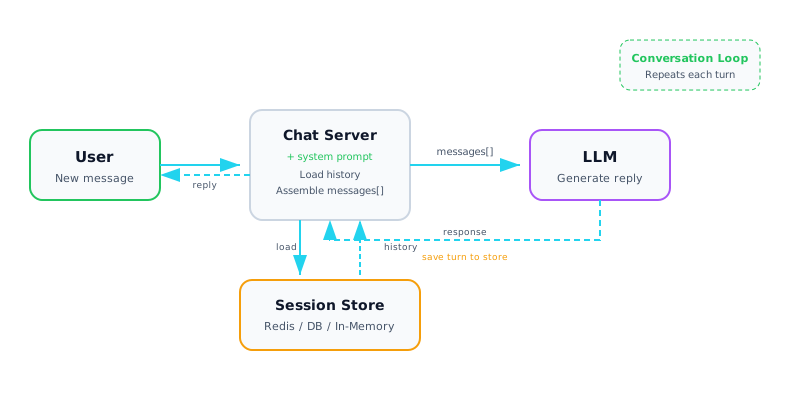
Architecture diagram — Conversational Chatbot with session store and memory loop
3. Components Deep Dive
| Component | Description |
|---|---|
| 📚 Window Buffer Memory | Keep the last N message pairs (e.g., 10 turns). Simple, predictable token usage. Older context is dropped entirely. Best for short, focused conversations. |
| 📝 Summary Memory | Periodically summarize older messages into a condensed form. Keeps key context while reducing tokens. Use the LLM itself to generate the running summary. |
| 🔀 Hybrid Memory | Combine summary of old turns + full recent turns. Best of both worlds: preserves long-term context while keeping recent detail. Most production chatbots use this pattern. |
| 🔑 Session Management | Each conversation gets a unique session ID. Map session IDs to message histories in your store. Handle session creation, expiry, and cleanup. |
| 🗃 Storage Backend | Redis for fast, ephemeral sessions. PostgreSQL for persistent history. DynamoDB for serverless scale. In-memory dict for prototyping only. |
| ✂ Context Truncation | When conversation exceeds context window, truncate strategically. Always keep the system prompt and most recent messages. Never silently fail on context overflow. |
4. Implementation
Window Buffer Chatbot
import anthropic

client = anthropic.Anthropic()

class ChatBot:
    def __init__(self, system_prompt, max_history=20):
        self.system = system_prompt
        self.max_history = max_history
        self.messages = []  # list of {role, content} dicts

    def chat(self, user_message: str) -> str:
        # Add user message
        self.messages.append({"role": "user", "content": user_message})

        # Truncate to window
        if len(self.messages) > self.max_history:
            self.messages = self.messages[-self.max_history:]

        # Call LLM with full history
        response = client.messages.create(
            model="claude-sonnet-4-20250514",
            max_tokens=1024,
            system=self.system,
            messages=self.messages,
        )
        assistant_msg = response.content[0].text

        # Store assistant reply
        self.messages.append({"role": "assistant", "content": assistant_msg})
        return assistant_msg
Session-Based with Redis
import json, redis, uuid

r = redis.Redis(host="localhost", port=6379, decode_responses=True)

def create_session() -> str:
    session_id = str(uuid.uuid4())
    r.setex(session_id, 3600, json.dumps([]))  # 1hr TTL
    return session_id

def chat_with_session(session_id: str, user_msg: str) -> str:
    # Load history
    history = json.loads(r.get(session_id) or "[]")
    history.append({"role": "user", "content": user_msg})

    # Call LLM
    response = client.messages.create(
        model="claude-sonnet-4-20250514",
        max_tokens=1024,
        system="You are a helpful assistant.",
        messages=history[-20:],  # window of last 20
    )
    reply = response.content[0].text
    history.append({"role": "assistant", "content": reply})

    # Save back
    r.setex(session_id, 3600, json.dumps(history))
    return reply
5. Data Flow
Step-by-step flow for each conversation turn:
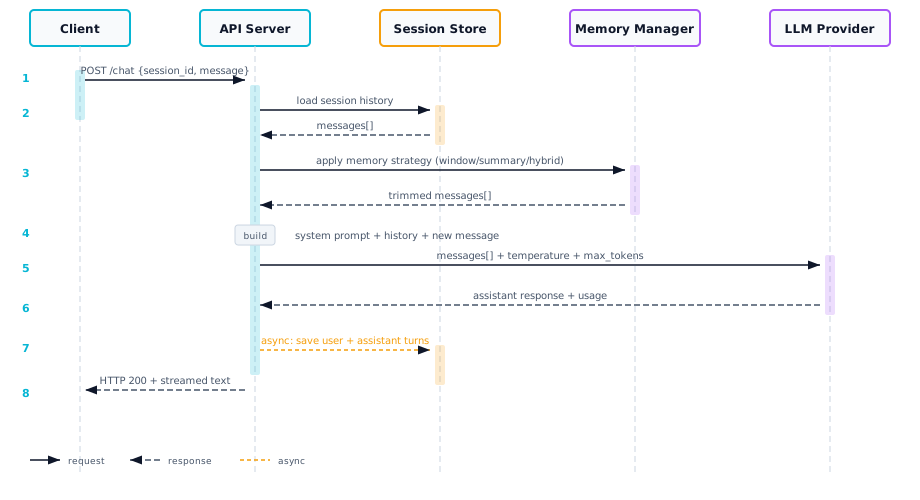
| Step | Action | Details |
|---|---|---|
| 1 | User sends message | Includes session ID in request header or body |
| 2 | Load session history | Retrieve previous messages from session store using session ID |
| 3 | Apply memory strategy | Truncate to window, summarize old turns, or hybrid approach |
| 4 | Build messages array | System prompt + trimmed history + new user message |
| 5 | Call LLM | Send assembled messages to the model |
| 6 | Save both turns | Store user message + assistant reply back to session store |
| 7 | Return response | Stream or return complete text to the user |
6. Trade-offs & Considerations
| Memory Strategy | Pros | Cons |
|---|---|---|
| Window Buffer | Simple, predictable token cost | Loses early context entirely |
| Summary Memory | Preserves key context long-term | Extra LLM call to summarize, may lose detail |
| Hybrid | Best balance of context and cost | More complex to implement |
| Full History | Never loses context | Hits context window limit, expensive |
Watch Out: Token costs scale linearly with conversation length. A 50-turn conversation sends all 50 turns with every request. This is the #1 cost trap in chatbot architectures.
7. Production Checklist
- Session store with TTL and automatic cleanup (Redis, DynamoDB)
- Token counting before sending to detect context window overflow
- Graceful degradation when history is truncated (inform the user)
- Session authentication — users can only access their own sessions
- Conversation export for user data portability
- Memory strategy selection based on conversation type
- Concurrent request handling per session (queue or lock)
- Analytics: conversation length distribution, drop-off turn number