1. Architecture Overview
The Simple Chat API is the most basic GenAI architecture pattern. It consists of a single, stateless request-response cycle: a user sends a message, the system prepends a system prompt, calls an LLM, and returns the generated text. No memory, no retrieval, no tool use — just a direct conversation turn.
When to Use
- Single-turn Q&A applications (FAQ bots, helpdesk)
- Text transformation tasks (summarization, translation, reformatting)
- Code generation or completion from a single prompt
- Prototyping and validating prompt designs before adding complexity
Complexity Level
Low. This is the starting point for every GenAI project. If this pattern solves your problem, do not add additional complexity. Many production applications are just well-crafted system prompts with good error handling.
Tip: Start with the simplest architecture that works. You can always layer on memory, RAG, or tool use later — but premature complexity is the biggest mistake in GenAI engineering.
2. Architecture Diagram
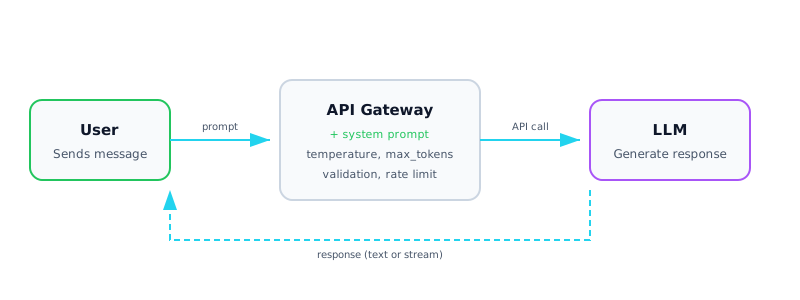
Architecture diagram — Simple Chat API: stateless request-response with system prompt injection
3. Components Deep Dive
| Component | Description |
|---|---|
| 💬 System Prompt | Defines the LLM's role, personality, constraints, and output format. This is your primary lever for controlling behavior. Keep it clear, specific, and tested. |
| 🌡 Temperature | Controls randomness in token selection. 0.0 = deterministic (factual tasks), 0.7 = creative balance, 1.0+ = highly creative. Always tune for your use case. |
| 📏 Max Tokens | Upper bound on output length. Set this to avoid runaway generation costs. Consider: input tokens + max_tokens must fit within the model's context window. |
| ⚡ Streaming | Delivers tokens incrementally via SSE (Server-Sent Events). Reduces perceived latency from seconds to milliseconds for first visible token. Essential for chat UIs. |
| 🛡 API Gateway | Handles authentication, rate limiting, request validation, and API key management. Sits between the client and the LLM provider to add security and control. |
| ⚠ Error Handling | Handle rate limits (429), timeouts, malformed responses, and provider outages. Implement retries with exponential backoff and circuit breaker patterns. |
4. Implementation
Basic Chat Completion
import anthropic

client = anthropic.Anthropic()

def chat(user_message: str, system: str = "You are a helpful assistant.") -> str:
    """Single-turn chat completion."""
    response = client.messages.create(
        model="claude-sonnet-4-20250514",
        max_tokens=1024,
        system=system,
        messages=[{"role": "user", "content": user_message}],
        temperature=0.3,
    )
    return response.content[0].text
Streaming Response
def chat_stream(user_message: str, system: str = "You are a helpful assistant."):
    """Stream tokens as they are generated."""
    with client.messages.stream(
        model="claude-sonnet-4-20250514",
        max_tokens=1024,
        system=system,
        messages=[{"role": "user", "content": user_message}],
    ) as stream:
        for text in stream.text_stream:
            print(text, end="", flush=True)
Error Handling with Retry
import time
from anthropic import RateLimitError, APITimeoutError

def chat_with_retry(user_message, max_retries=3):
    for attempt in range(max_retries):
        try:
            return chat(user_message)
        except RateLimitError:
            wait = 2 ** attempt  # exponential backoff
            print(f"Rate limited. Retrying in {wait}s...")
            time.sleep(wait)
        except APITimeoutError:
            print("Timeout. Retrying...")
    raise Exception("Max retries exceeded")
5. Data Flow
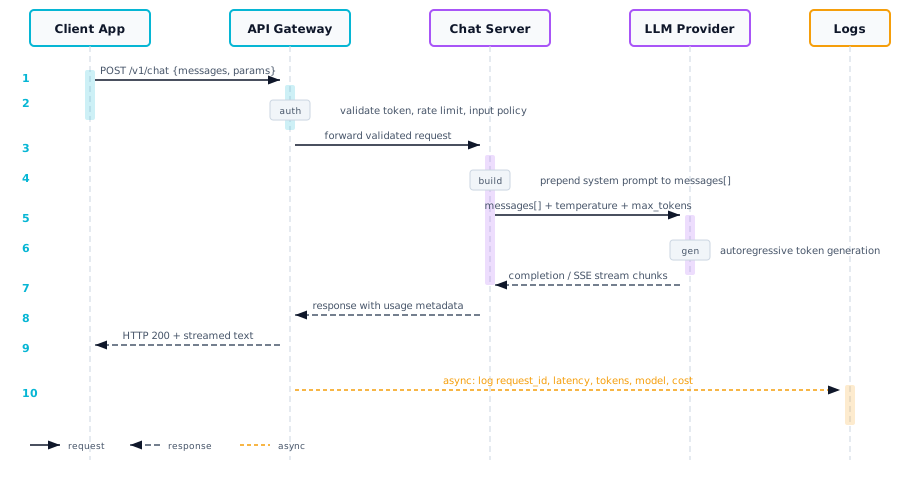
Here is the step-by-step flow of a single request through the Simple Chat API architecture:
| Step | Action | Details |
|---|---|---|
| 1 | Client sends request | User message + optional parameters (temperature, max_tokens) via HTTP POST |
| 2 | API gateway validates | Check auth token, rate limits, input length, and content policy |
| 3 | System prompt prepended | Server-side system prompt is added to the messages array (never exposed to client) |
| 4 | LLM API called | Request forwarded to the model provider (Anthropic, OpenAI, etc.) |
| 5 | Tokens generated | Model generates output tokens autoregressively |
| 6 | Response returned | Complete text (or streamed chunks) sent back to client |
| 7 | Logging & metrics | Log latency, token counts, and errors for observability |
6. Trade-offs & Considerations
| Advantage | Limitation |
|---|---|
| Simplest possible architecture | No conversation memory (stateless) |
| Low latency (single API call) | Cannot access external data or tools |
| Easy to debug and test | Limited to model's training knowledge |
| Minimal infrastructure needed | System prompt engineering can be finicky |
| Low cost per request | No built-in content grounding |
When to upgrade: Move to Architecture 02 (Conversational Chatbot) when users need multi-turn context. Move to Architecture 03 (RAG) when the model needs access to your proprietary data.
7. Production Checklist
- API key rotation and secrets management (e.g., AWS Secrets Manager, GCP Secret Manager)
- Rate limiting per user/API key to prevent abuse
- Input validation: max length, content filtering, injection detection
- Output validation: format checks, PII scanning, toxicity filtering
- Structured logging: request ID, latency, token usage, model version
- Retry logic with exponential backoff and circuit breaker
- Cost monitoring and alerting on token spend
- Prompt versioning and A/B testing framework
- Health check endpoint for load balancer
- Graceful degradation when LLM provider is down