Chapter 08 of 17
Adding AI to Existing Products
Retrofitting AI into an established product is fundamentally different from building AI-native. This chapter gives product managers the patterns, rollout strategies, and integration frameworks to add AI without breaking what already works — including managing the users who don't want it.
Overview
The Retrofit Problem
Building an AI feature into a greenfield product is a luxury most product managers never get. The more common situation, and the harder one, is that you are working with a product that already exists, already has users, already has data models and API contracts and a decade of design decisions baked into its architecture. And now someone wants you to add AI to it.
This is not the same problem as building AI-native. The mental models are different. The risks are different. The relationship with your users is different. An AI-native product can make AI the organizing principle around which everything else is built. A retrofit must make AI a guest in a house that was designed for someone else.
Done poorly, AI retrofits produce features that feel bolted-on, create new failure modes in previously stable systems, confuse users who had developed muscle memory, and generate expensive technical debt that haunts the team for years. Done well, they extend a product's competitive life, unlock new value from existing data, and delight users who never expected the product to get smarter.
The difference is almost entirely in how you approach the integration, not the AI itself.
Think of it like this: Adding AI to an existing product is like renovating a house while people are still living in it. You can add a new room without tearing down the kitchen, you can modernize the electrical wiring without making the lights flicker, and you can do it in phases so the family is not camping in the backyard. But you cannot pretend the house is not occupied. Every decision must account for the people who are already home.
The Sidecar Pattern: AI Alongside, Not Replacing
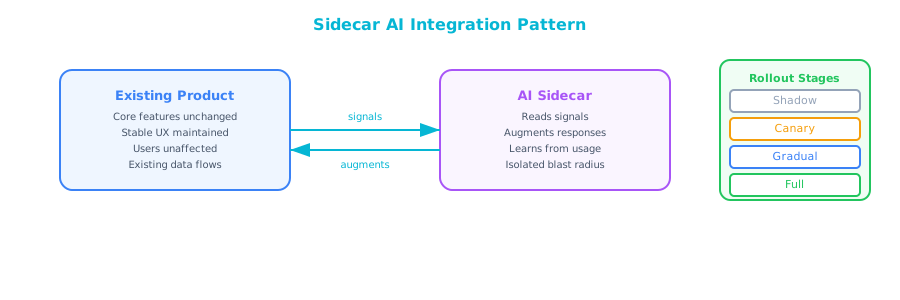
The single most important architectural and product concept for AI retrofits is the sidecar pattern. The name comes from software engineering. A sidecar is a process that runs alongside a main application, providing supplementary capability without modifying the core. The concept is equally useful for product managers thinking about user experience and rollout.
In the sidecar pattern, the AI feature lives beside the existing workflow rather than inside it. The user's existing path through the product remains intact and unchanged. The AI adds a parallel track, such as a suggestion, an annotation, a sidebar panel, or a notification, that users can engage with on their own terms.
This stands in contrast to the replacement pattern, where the AI takes over a function that the product previously handled differently. Replacement patterns are higher-reward when they work and higher-risk when they do not. The AI must be good enough to substitute entirely for the old behavior, because users no longer have the old behavior available to fall back on.
| Pattern | User experience | Risk level | When to use |
|---|---|---|---|
| Sidecar | AI runs alongside; existing flow unchanged | Low | Early stages, uncertain AI quality, risk-averse users |
| Enhancement | AI improves an existing UI element (e.g., auto-completing a field) | Medium | When quality is high enough to be helpful most of the time |
| Replacement | AI takes over a function entirely | High | When AI quality is demonstrably better and switching cost is justified |
| Augmentation | AI adds a net-new capability not previously possible | Medium | When the capability genuinely expands what users can do |
Most successful AI retrofits follow a progression: start with sidecar, validate quality and user behavior, move to enhancement when confidence is high, and only attempt replacement when the case is overwhelming. Many features should stay in sidecar mode indefinitely. That is not a failure. It is appropriate restraint.
What a Sidecar Looks Like in Practice
A document management product that adds AI-powered summarization might implement it as a collapsible panel that appears beside any open document. The document display is identical to what users already know. The summary panel can be ignored entirely. Over time, as users discover it and as quality improves, the team might move the summary higher in the hierarchy. The document itself is never touched.
A CRM that adds AI-generated meeting prep notes implements it as an email sent 30 minutes before each calendar event, completely separate from the existing CRM interface, requiring no behavioral change from the user, generating value with zero onboarding friction.
A project management tool that adds AI risk detection shows a flag icon on tasks it identifies as at risk, with a one-click explanation. The task list looks and works exactly as before. The flag can be ignored. The existing workflow is undisturbed.
In each case, the value is additive. The user does not have to learn a new pattern to benefit. And if the AI is wrong, the cost is low. The user dismisses the suggestion and continues as before.
Gradual Rollout Strategies
Even after you have decided on the sidecar pattern, you should not release the feature to all users simultaneously. Gradual rollout is not just a technical practice. It is a product practice that dramatically reduces the cost of being wrong.
Shadow Mode
Shadow mode is the first phase of any serious AI rollout. In shadow mode, the AI feature is running in production against real user data, but its output is never shown to users. The only people who see the results are your team.
This phase answers critical questions before you expose users to any risk:
- Is the AI producing outputs that make sense given your actual production data?
- Are there edge cases you did not anticipate in testing?
- What is the actual latency in production, not in a test environment?
- What does the cost per inference look like at real usage volumes?
- How often does the model refuse, fail, or return empty output?
Shadow mode is not optional. Teams that skip it and go straight to user-facing rollout are accepting risks they do not need to accept. Three to four weeks of shadow mode for a complex AI feature will surface more issues than months of pre-production testing.
What to track in shadow mode:
| Metric | What it tells you |
|---|---|
| Output error rate | How often the AI returns nothing, fails, or throws an exception |
| Output quality sample | Manual review of a random sample of outputs — does it make sense? |
| Latency p50 / p95 / p99 | Whether the AI response time is acceptable; tail latency is often the surprise |
| Cost per call | Real API cost at real volume; often higher than estimates |
| Empty/null output rate | How often the AI has nothing to say — relevant for sidecar features |
| Sensitive content rate | How often the AI surfaces something that requires review |
Canary Rollout
After shadow mode validation, you are ready to show results to real users, but not all of them. A canary rollout exposes the feature to a small, deliberately selected cohort, typically 1-5% of users or a specific user segment.
The name comes from the mining practice of using canaries to detect toxic gas. The canary takes the risk so that everyone else does not have to. In product terms, your canary cohort encounters the new experience first, and your monitoring tells you whether anything goes wrong before the broader population is affected.
Choose your canary cohort carefully. Early canaries should be:
- Internal users first: Your own employees using the product are the lowest-risk canary cohort and often the most willing to provide feedback.
- Beta or power users: Users who have explicitly opted into early access programs and have demonstrated tolerance for rough edges.
- Lower-stakes segments: If your product has a mix of user tiers, start with segments where an AI error has lower consequences.
Do not start canary rollout with your highest-value accounts. If the AI says something wrong to your most important customer, you have spent political capital and potentially customer trust that you cannot get back.
Percentage Rollout
Once the canary cohort has validated that the feature is working as expected, you expand gradually: 5% → 10% → 25% → 50% → 100%. Each threshold is a checkpoint where you review metrics and make an explicit decision to continue or pause.
The key discipline here is defining your rollout pause criteria before you begin. If you wait until something is going wrong to decide what "going wrong" means, your judgment will be clouded by the desire to continue. Decide in advance:
- If the AI error rate exceeds X%, we pause and investigate.
- If user satisfaction with the feature falls below Y, we pause.
- If cost per user exceeds Z, we pause and re-evaluate the economics.
- If we receive more than N escalations in a 24-hour period, we pause.
These are your automatic circuit breakers — write them down and share them with stakeholders before rollout begins.
User Opt-In vs. Default-On Decisions
One of the most consequential decisions in an AI retrofit is whether the feature is opt-in (users must choose to activate it) or default-on (users see it unless they choose to disable it). This is not a UX question. It is a product strategy decision with significant implications for adoption, trust, data, and risk.
The Case for Opt-In
Opt-in is the right choice when:
- AI quality is uncertain: If you are not confident the feature is helpful for the majority of users, forcing it on everyone creates a bad first impression that is hard to recover from. Users who encounter poor AI before they have developed a positive association with the feature are more likely to form negative views than users who opted in with some expectation of benefit.
- The feature is intrusive: Features that change a familiar workflow, add visual noise, or require behavioral adaptation should be opt-in. Users who did not ask for the change will notice the intrusion. Users who did ask for it will experience it as a feature.
- Privacy considerations are significant: If the AI feature requires processing user data in a new way, opt-in allows you to pair the feature with explicit consent in a way that default-on does not.
- Your user base is risk-averse: Enterprise B2B users often prefer stability and predictability over innovation. Defaulting new features on in an enterprise context can create IT and compliance friction.
The Case for Default-On
Default-on is the right choice when:
- AI quality is high and the use case is low-stakes: If the feature is genuinely helpful for the vast majority of users and the cost of a miss is low, default-on captures the value immediately rather than waiting for users to discover and activate the feature.
- Discovery is a real problem: Many users never explore beyond their primary workflow. A valuable feature that lives behind an opt-in menu may never be discovered by 80% of your user base. If the feature is important enough to build, it may be important enough to ensure users actually see it.
- You need data at scale quickly: Opt-in creates a self-selection bias. Only users who are predisposed to AI features will activate it. If you need representative data about how all users respond to the feature, default-on is the only way to get it.
- The competitive case requires adoption speed: If you are responding to a competitor who has shipped a similar feature, slow opt-in adoption may cede the market advantage you are trying to create.
A hybrid approach works well in many cases: default-on with prominent, persistent opt-out. The feature is visible and active from day one, but the path to disabling it is obvious and immediate, not buried in settings. This captures the discovery benefit of default-on while respecting user agency.
| Decision | Opt-in | Default-on | Hybrid |
|---|---|---|---|
| AI quality | Uncertain | High | Medium-high |
| User risk tolerance | Low | High | Medium |
| Adoption speed priority | Low | High | Medium |
| Privacy sensitivity | High | Low | Medium |
| Data collection need | Biased sample | Representative | Mostly representative |
Managing the Transition: Users Who Do Not Want AI
Not all of your users will be excited about the AI features you are adding. Some of them are paying customers who chose your product specifically because it was predictable, and they will experience AI additions as a change they did not ask for. This is not a fringe group. In many B2B contexts, it represents a meaningful segment of your user base.
Ignoring this segment is a mistake. Treating them as Luddites is condescending and counterproductive. Managing them well is a legitimate product responsibility.
The Four Archetypes of Resistant Users
The Workflow Purist has optimized their entire work pattern around the product as it exists. Any change, even a beneficial one, disrupts their efficiency before it helps it. They are not opposed to AI in principle. They are opposed to disruption in practice. Management strategy: respect their existing workflow by keeping the sidecar pattern's "ignore it" path permanently available and genuinely frictionless.
The Privacy Skeptic is concerned about what happens to their data when AI is involved. They want to know whether their documents are being used to train models, whether their usage patterns are being analyzed, and whether the AI can see content they have not shared deliberately. Management strategy: be radically transparent. Publish a clear, plain-language explanation of exactly what data the AI uses, how it is stored, and what opt-outs mean. Vague privacy statements make this worse, not better.
The Quality Skeptic has had a bad experience with AI features, in your product or another, and is waiting to be disappointed again. They are not reflexively anti-AI. They are skeptically pro-evidence. Management strategy: do not oversell. Let them watch others use the feature. Give them the feedback mechanism to tell you when it is wrong. Make it easy to report errors and show them that you act on the feedback.
The Role Threat is worried, consciously or unconsciously, that the AI feature is going to make their role redundant. This is more common in the professional tool market than most PMs want to admit. Management strategy: frame the AI as a tool that makes the user more capable, not one that replaces their judgment. Emphasize the cases where the user's expertise is still essential.
Practical Accommodations
- Provide a "classic mode" toggle for users who want the pre-AI experience. Sunset it gradually as adoption grows, with clear advance notice.
- Create a dedicated feedback channel for AI feature complaints, separate from general support. Route negative AI feedback to your team directly, not to a support tier.
- Offer enterprise admin controls that allow account administrators to disable AI features for their entire organization. This is a common enterprise procurement requirement and makes the buying conversation easier.
- Communicate changes in advance. Surprise AI activations feel like violations of trust. A one-week notice email, even for low-stakes features, reduces friction significantly.
Integration Complexity Estimation Framework
Before committing to an AI retrofit, your team will need to estimate how complex the integration actually is. "We will just call the API" is the most common and most expensive underestimate in AI product development.
Use this framework to scope integration work before planning begins.
The Five Complexity Dimensions
1. Data Access Complexity
Score 1–5 based on: How difficult is it to get the right data to the AI at inference time?
- 1: Data is in a single database table and can be retrieved with a simple query.
- 3: Data requires joining multiple systems, some of which have API rate limits or latency.
- 5: Data is unstructured, in legacy systems with no API, or requires real-time aggregation across siloed sources.
2. Prompt Engineering Complexity
Score 1–5 based on: How much work is required to reliably get good output?
- 1: The task is simple and general-purpose (e.g., summarize this text).
- 3: The task requires significant context, structured output formatting, or multi-step reasoning.
- 5: The task requires fine-tuning, retrieval-augmented generation, or complex multi-turn prompting.
3. Output Integration Complexity
Score 1–5 based on: How hard is it to put the AI's output back into the product?
- 1: The output is displayed as plain text in a new UI element.
- 3: The output drives UI state changes or must be stored and indexed.
- 5: The output must trigger downstream system actions, update records in other systems, or be validated before display.
4. Safety and Moderation Complexity
Score 1–5 based on: How much risk mitigation is required around the AI's output?
- 1: The AI can surface content errors, but consequences are minor (incorrect summary, etc.).
- 3: Errors could mislead users in consequential ways and require review workflows.
- 5: Errors could cause legal, compliance, safety, or significant reputational harm.
5. Existing System Fragility
Score 1–5 based on: How risky is it to modify the existing product to support the AI feature?
- 1: The integration touches isolated, well-tested components with good test coverage.
- 3: The integration touches core product flows with moderate test coverage.
- 5: The integration touches foundational systems, has poor test coverage, or the codebase is unfamiliar to the current team.
Scoring interpretation:
| Total score | Interpretation | Recommended approach |
|---|---|---|
| 5–10 | Low complexity | Standard sprint planning; 1–2 engineers for 2–4 weeks |
| 11–15 | Medium complexity | Discovery spike recommended; 2–3 engineers for 1–2 months |
| 16–20 | High complexity | Dedicated team; phased rollout; 2–3 months minimum |
| 21–25 | Very high complexity | Re-evaluate scope; consider narrowing to simpler version first |
This framework is not a precise estimate. It is a forcing function for honest conversations between PMs and engineering before commitments are made. If your team produces wildly different scores on the same feature, that disagreement is the signal. You have not agreed on what you are building.
The Non-Negotiable Pre-Integration Checklist
Before any AI retrofit begins, verify that the following have been addressed:
- You have confirmed the existing product's API contracts and data schemas will not be broken by the integration.
- You have identified the team members responsible for the existing systems and obtained their explicit sign-off on the integration plan.
- You have a documented rollback plan: a specific set of steps to remove or disable the AI feature if something goes wrong after launch.
- You have established baseline metrics for the affected parts of the product before the AI feature ships, so you can measure its impact.
- You have reviewed and updated your privacy policy and user-facing documentation to accurately reflect the new AI capabilities.
- You have briefed customer success and support teams so they can handle user questions and complaints from day one.
The retrofit is not complete when the code ships. It is complete when the existing users are protected, the new users are served, and the team is equipped to monitor and respond. Everything before that is just getting started.