Chapter 11 of 20
Graph-Aware Agents
A support agent answering "which customers are affected by this recall?" needs a graph traversal, not a vector search. This chapter builds the four essential graph tools (Cypher query, path finder, impact analysis, subgraph summarizer), wires them into a LangGraph agent with schema context and few-shot Cypher examples, and implements three production use cases with read-only guardrails, query timeouts, and audit logging.
Overview
The support agent needs to understand: this customer bought this product, which uses this component, which has this known issue. That is a graph traversal.
01. Why Agents Need Graph Access
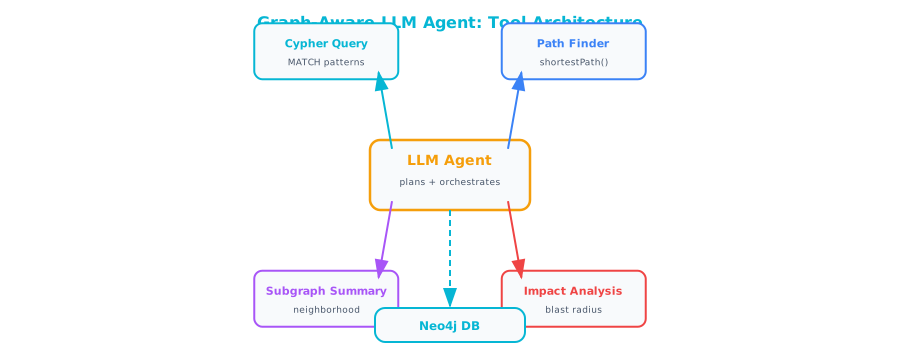
An AI agent is an LLM with tools. The LLM reasons about what to do, calls tools to interact with the world, observes the results, and decides what to do next. Most enterprise agents have tools for searching documents, calling APIs, and querying databases.
When an agent needs to reason about connections, it needs a different kind of tool. "Which customers are affected by this component recall?" "What is the blast radius of this service outage?" "Who should approve this exception request?" These questions require traversing a graph.
Standard database queries retrieve rows that match criteria. Graph queries follow paths. The distinction matters for agents because the most valuable enterprise questions are rarely about isolated facts. They are about chains of cause and effect, hierarchies of authority, and webs of dependency.
02. The Four Essential Graph Tools
You do not need twenty graph tools. You need four, each handling a distinct reasoning pattern.
Tool 1: Cypher Query Tool
The most flexible tool. The agent generates a Cypher query and executes it against the graph. Use this for specific lookups, filtering, and aggregation.
from neo4j import GraphDatabase
from pydantic import BaseModel, Field

driver = GraphDatabase.driver(
    "bolt://localhost:7687",
    auth=("neo4j", "password")
)


class CypherQueryInput(BaseModel):
    query: str = Field(
        description="A Cypher query to execute against the "
                    "knowledge graph. Must be a READ-ONLY query "
                    "(MATCH, no CREATE/DELETE/SET)."
    )


def cypher_query_tool(input: CypherQueryInput) -> str:
    """Execute a read-only Cypher query and return results."""
    query = input.query.strip()

    # Safety: reject write operations
    write_keywords = [
        "CREATE", "DELETE", "DETACH", "SET", "REMOVE",
        "MERGE", "DROP", "CALL {"
    ]
    query_upper = query.upper()
    for keyword in write_keywords:
        if keyword in query_upper and keyword != "SET":
            return f"Error: Write operations not allowed. " \
                   f"Found '{keyword}' in query."
        if keyword == "SET" and " SET " in f" {query_upper} ":
            return f"Error: Write operations not allowed. " \
                   f"Found 'SET' in query."

    try:
        with driver.session() as session:
            result = session.run(query)
            records = [dict(r) for r in result]

            if not records:
                return "No results found."

            # Limit output size
            if len(records) > 50:
                records = records[:50]
                return (
                    f"Showing first 50 of {len(records)} results:"
                    f"\n{format_records(records)}"
                )

            return format_records(records)

    except Exception as e:
        return f"Query error: {str(e)}"


def format_records(records: list[dict]) -> str:
    """Format Neo4j records as readable text."""
    lines = []
    for i, record in enumerate(records, 1):
        parts = []
        for key, value in record.items():
            if isinstance(value, dict):
                parts.append(f"{key}: {value}")
            elif isinstance(value, list):
                parts.append(
                    f"{key}: [{', '.join(str(v) for v in value)}]"
                )
            else:
                parts.append(f"{key}: {value}")
        lines.append(f"{i}. {' | '.join(parts)}")
    return "\n".join(lines)
Tool 2: Path Finder Tool
Finds the shortest path between two entities. Use this when answering "how are X and Y connected?" questions.
class PathFinderInput(BaseModel):
    source_name: str = Field(
        description="Name of the starting entity"
    )
    target_name: str = Field(
        description="Name of the ending entity"
    )
    max_depth: int = Field(
        default=6,
        description="Maximum path length (1-8)"
    )


def path_finder_tool(input: PathFinderInput) -> str:
    """Find the shortest path between two entities."""
    max_depth = min(input.max_depth, 8)  # Cap at 8

    with driver.session() as session:
        result = session.run("""
            MATCH (a), (b)
            WHERE toLower(a.name) CONTAINS toLower($source)
              AND toLower(b.name) CONTAINS toLower($target)
            MATCH path = shortestPath((a)-[*..{depth}]-(b))
            RETURN
              [n IN nodes(path) |
               n.name + ' (' + labels(n)[0] + ')'] AS nodes,
              [r IN relationships(path) |
               type(r)] AS relationships,
              length(path) AS hops
            LIMIT 3
        """.format(depth=max_depth),
            source=input.source_name,
            target=input.target_name
        )

        paths = list(result)
        if not paths:
            return (
                f"No path found between '{input.source_name}' "
                f"and '{input.target_name}' within "
                f"{max_depth} hops."
            )

        lines = []
        for i, path in enumerate(paths, 1):
            nodes = path["nodes"]
            rels = path["relationships"]
            chain = nodes[0]
            for j, rel in enumerate(rels):
                chain += f" --[{rel}]--> {nodes[j + 1]}"
            lines.append(f"Path {i} ({path['hops']} hops):\n  "
                         f"{chain}")

        return "\n\n".join(lines)
Tool 3: Impact Analysis Tool
Traverses outward from an entity to find everything that depends on it or is affected by it. Critical for incident response and change management.
class ImpactAnalysisInput(BaseModel):
    entity_name: str = Field(
        description="Name of the entity to analyze impact for"
    )
    direction: str = Field(
        default="downstream",
        description="'downstream' (what depends on this) or "
                    "'upstream' (what this depends on)"
    )
    max_depth: int = Field(
        default=3,
        description="How many hops to traverse (1-5)"
    )


def impact_analysis_tool(input: ImpactAnalysisInput) -> str:
    """Analyze the impact radius of an entity."""
    max_depth = min(input.max_depth, 5)

    # Direction determines traversal direction
    if input.direction == "upstream":
        pattern = "(start)-[*1..{depth}]->(affected)"
    else:
        pattern = "(start)<-[*1..{depth}]-(affected)"

    with driver.session() as session:
        result = session.run("""
            MATCH (start)
            WHERE toLower(start.name) CONTAINS toLower($name)
            WITH start LIMIT 1
            MATCH path = {pattern}
            WITH affected, min(length(path)) AS distance
            RETURN affected.name AS entity,
                   labels(affected)[0] AS type,
                   distance
            ORDER BY distance, type, entity
        """.format(
            depth=max_depth,
            pattern=pattern
        ), name=input.entity_name)

        records = list(result)
        if not records:
            return (
                f"No {input.direction} dependencies found for "
                f"'{input.entity_name}'."
            )

        # Group by distance
        by_distance = {}
        for r in records:
            d = r["distance"]
            if d not in by_distance:
                by_distance[d] = []
            by_distance[d].append(
                f"{r['entity']} ({r['type']})"
            )

        lines = [
            f"Impact analysis for '{input.entity_name}' "
            f"({input.direction}):\n"
        ]
        for distance in sorted(by_distance.keys()):
            items = by_distance[distance]
            lines.append(
                f"  {distance} hop(s) away "
                f"({len(items)} entities):"
            )
            for item in items[:15]:
                lines.append(f"    - {item}")
            if len(items) > 15:
                lines.append(
                    f"    ... and {len(items) - 15} more"
                )

        lines.append(
            f"\nTotal affected: {len(records)} entities"
        )
        return "\n".join(lines)
Tool 4: Subgraph Summarizer Tool
Retrieves a subgraph around an entity and produces a natural language summary. Use this when the agent needs to understand context before deciding what to do next.
import anthropic

llm_client = anthropic.Anthropic()


class SubgraphSummaryInput(BaseModel):
    entity_name: str = Field(
        description="Name of the central entity"
    )
    depth: int = Field(
        default=2,
        description="How many hops to include (1-3)"
    )


def subgraph_summarizer_tool(input: SubgraphSummaryInput) -> str:
    """Summarize the subgraph around an entity."""
    depth = min(input.depth, 3)

    with driver.session() as session:
        # Get the local subgraph
        result = session.run("""
            MATCH (center)
            WHERE toLower(center.name)
                  CONTAINS toLower($name)
            WITH center LIMIT 1
            MATCH path = (center)-[*1..{depth}]-(connected)
            WITH center,
                 collect(DISTINCT connected) AS neighbors,
                 collect(DISTINCT relationships(path)) AS all_rels
            RETURN center.name AS center_name,
                   labels(center)[0] AS center_type,
                   properties(center) AS center_props,
                   [n IN neighbors |
                    {{name: n.name, type: labels(n)[0]}}
                   ] AS neighbors,
                   size(neighbors) AS neighbor_count
        """.format(depth=depth), name=input.entity_name)

        record = result.single()
        if not record:
            return f"Entity '{input.entity_name}' not found."

        # Get explicit relationships
        rels_result = session.run("""
            MATCH (center)
            WHERE toLower(center.name)
                  CONTAINS toLower($name)
            WITH center LIMIT 1
            MATCH (center)-[r]-(other)
            RETURN type(r) AS rel_type,
                   other.name AS other_name,
                   labels(other)[0] AS other_type,
                   CASE
                     WHEN startNode(r) = center THEN 'outgoing'
                     ELSE 'incoming'
                   END AS direction
        """, name=input.entity_name)
        relationships = [dict(r) for r in rels_result]

    # Build a text description for the LLM to summarize
    subgraph_text = (
        f"Central entity: {record['center_name']} "
        f"({record['center_type']})\n"
        f"Properties: {record['center_props']}\n\n"
        f"Direct relationships:\n"
    )
    for rel in relationships:
        if rel["direction"] == "outgoing":
            subgraph_text += (
                f"  {record['center_name']} "
                f"--[{rel['rel_type']}]--> "
                f"{rel['other_name']} ({rel['other_type']})\n"
            )
        else:
            subgraph_text += (
                f"  {rel['other_name']} ({rel['other_type']}) "
                f"--[{rel['rel_type']}]--> "
                f"{record['center_name']}\n"
            )

    subgraph_text += (
        f"\nTotal neighbors within {depth} hops: "
        f"{record['neighbor_count']}"
    )

    # Summarize with LLM
    response = llm_client.messages.create(
        model="claude-sonnet-4-20250514",
        max_tokens=500,
        messages=[{
            "role": "user",
            "content": f"Summarize this knowledge graph subgraph "
                       f"in 2-3 sentences. Focus on the most "
                       f"important relationships and what they "
                       f"imply.\n\n{subgraph_text}"
        }]
    )

    return response.content[0].text
03. Agent Architecture
The full agent using LangChain and LangGraph:
from langchain_core.tools import tool
from langchain_anthropic import ChatAnthropic
from langgraph.prebuilt import create_react_agent

# Wrap our tools for LangChain
@tool
def query_graph(query: str) -> str:
    """Execute a read-only Cypher query against the knowledge
    graph. Use this for specific data lookups.
    Example: MATCH (p:Person)-[:MANAGES]->(team)
    RETURN p.name, team.name"""
    return cypher_query_tool(
        CypherQueryInput(query=query)
    )

@tool
def find_path(source: str, target: str) -> str:
    """Find the shortest path between two entities in the
    knowledge graph. Use this to understand how two things
    are connected."""
    return path_finder_tool(
        PathFinderInput(
            source_name=source,
            target_name=target
        )
    )

@tool
def analyze_impact(
    entity: str,
    direction: str = "downstream"
) -> str:
    """Analyze what is affected by (downstream) or what
    affects (upstream) a given entity. Use for incident
    response and change management."""
    return impact_analysis_tool(
        ImpactAnalysisInput(
            entity_name=entity,
            direction=direction
        )
    )

@tool
def summarize_entity(entity: str) -> str:
    """Get a summary of an entity and its immediate
    relationships in the knowledge graph. Use this to
    understand context before making decisions."""
    return subgraph_summarizer_tool(
        SubgraphSummaryInput(entity_name=entity)
    )

# Build the agent
GRAPH_SCHEMA = """
The knowledge graph has these node types:
- Person (name, title, department, email)
- Organization (name, org_type, status)
- Component (name, part_number, category, status)
- Document (name, doc_type, effective_date, status)
- Regulation (name, jurisdiction, effective_date)
- Location (name, city, state, country)
- Event (name, date, event_type, severity)

And these relationship types:
- WORKS_AT: Person -> Organization
- MANAGES: Person -> Person/Organization
- REPORTS_TO: Person -> Person
- SUPPLIES: Organization -> Component
- APPROVED_BY: Document -> Person
- COMPLIES_WITH: Component -> Regulation
- LOCATED_IN: Organization/Person -> Location
- REFERENCES: Document -> Document/Regulation
- DEPENDS_ON: Component -> Component
- CAUSED_BY: Event -> Component/Event
- AFFECTED: Event -> Organization/Component
"""

SYSTEM_PROMPT = f"""You are a knowledge graph assistant with access
to an enterprise knowledge graph. You can query the graph, find
paths between entities, analyze impact, and summarize entities.

{GRAPH_SCHEMA}

When writing Cypher queries:
1. Use MATCH, not CREATE/DELETE/SET
2. Always use parameterized-style patterns
3. Use toLower() for case-insensitive matching
4. LIMIT results to avoid overwhelming output
5. Return meaningful column names

Think step by step:
1. Understand what the user is asking
2. Decide which tool(s) to use
3. Execute the query
4. Interpret the results
5. Provide a clear answer
"""

model = ChatAnthropic(model="claude-sonnet-4-20250514")

agent = create_react_agent(
    model,
    tools=[query_graph, find_path, analyze_impact,
           summarize_entity],
    prompt=SYSTEM_PROMPT
)
04. Teaching the Agent to Generate Cypher
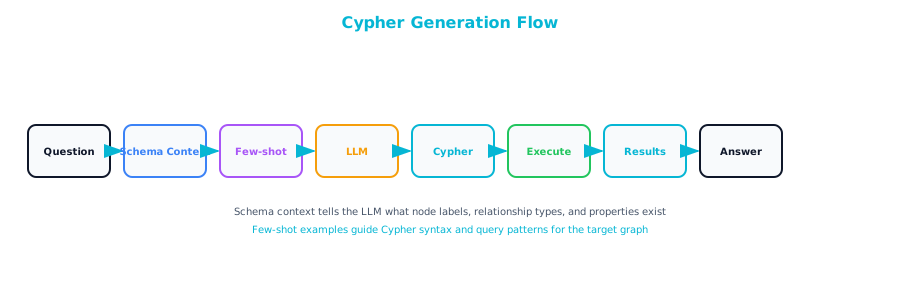
The biggest challenge with a Cypher query tool is getting the LLM to write correct Cypher. Few-shot prompting with schema context is the most effective approach — without it, the agent guesses at node labels and relationship types and produces invalid queries.
Few-Shot Examples
Add examples of common query patterns to the system prompt:
CYPHER_EXAMPLES = """
Example Cypher queries for common questions:

Q: "Who manages the engineering team?"
A: MATCH (p:Person)-[:MANAGES]->(o:Organization)
   WHERE toLower(o.name) CONTAINS 'engineering'
   RETURN p.name, p.title, o.name

Q: "Which vendors supply components for Building 7?"
A: MATCH (v:Organization)-[:SUPPLIES]->(c:Component)
         -[:LOCATED_IN]->(l:Location)
   WHERE toLower(l.name) CONTAINS 'building 7'
     AND v.org_type = 'vendor'
   RETURN v.name, c.name, l.name

Q: "What regulations apply to Product X?"
A: MATCH (c:Component)-[:COMPLIES_WITH]->(r:Regulation)
   WHERE toLower(c.name) CONTAINS 'product x'
   RETURN c.name, r.name, r.jurisdiction

Q: "Show me the reporting chain for Alice Johnson"
A: MATCH path = (p:Person {{name: 'Alice Johnson'}})
         -[:REPORTS_TO*1..10]->(manager:Person)
   RETURN [n IN nodes(path) | n.name] AS chain

Q: "Which components have open safety issues?"
A: MATCH (e:Event)-[:CAUSED_BY]->(c:Component)
   WHERE e.event_type = 'safety' AND e.status = 'open'
   RETURN c.name, e.name, e.date, e.severity
   ORDER BY e.severity DESC
"""
05. Guardrails for Production
An agent with database access needs guardrails.
Read-Only Access
The Cypher tool already rejects write keywords. Also use a read-only Neo4j user at the database level:
# Create a read-only user in Neo4j
# Run in Neo4j Browser:
# CREATE USER agent_reader SET PASSWORD 'readonly123'
#   SET PASSWORD CHANGE NOT REQUIRED
# GRANT ROLE reader TO agent_reader

readonly_driver = GraphDatabase.driver(
    "bolt://localhost:7687",
    auth=("agent_reader", "readonly123")
)
Query Timeout
Prevent runaway queries that consume database resources:
def safe_cypher_execute(
    query: str,
    timeout_ms: int = 5000
) -> list[dict]:
    """Execute Cypher with a timeout."""
    with driver.session() as session:
        result = session.run(
            query,
            timeout=timeout_ms  # Neo4j transaction timeout
        )
        return [dict(r) for r in result]
Result Size Limits
MAX_RESULTS = 100

def limited_query(query: str) -> list[dict]:
    """Execute query with result size limit."""
    # Add LIMIT if not present
    if "LIMIT" not in query.upper():
        query = query.rstrip().rstrip(";")
        query += f" LIMIT {MAX_RESULTS}"

    with driver.session() as session:
        result = session.run(query)
        records = [dict(r) for r in result]
        return records[:MAX_RESULTS]
Audit Logging
Log every query the agent executes:
import logging
from datetime import datetime

agent_logger = logging.getLogger("graph_agent")
agent_logger.setLevel(logging.INFO)

handler = logging.FileHandler("agent_queries.log")
handler.setFormatter(logging.Formatter(
    "%(asctime)s | %(message)s"
))
agent_logger.addHandler(handler)


def audited_query(query: str, user_question: str) -> str:
    """Execute query with audit logging."""
    agent_logger.info(
        f"QUESTION: {user_question} | QUERY: {query}"
    )
    try:
        result = safe_cypher_execute(query)
        agent_logger.info(
            f"RESULT: {len(result)} records returned"
        )
        return format_records(result)
    except Exception as e:
        agent_logger.error(f"ERROR: {str(e)}")
        raise
06. Use Case Examples
Use Case 1: Customer Support Agent
A support agent that traces product issues back to their root cause.
SUPPORT_PROMPT = """You are a customer support agent for a
manufacturing company. When a customer reports an issue with a
product, you should:

1. Look up the product in the knowledge graph
2. Find which components it contains
3. Check for known issues with those components
4. Identify the supplier of any problematic components
5. Provide the customer with accurate information about the
   issue and expected resolution

Be empathetic and clear. If you find a known issue, explain it
in plain language."""

# Example interaction:
# User: "My X-500 motor is overheating"
# Agent thinks: Need to look up X-500, find components, check
#   for known issues
# Agent calls: query_graph("MATCH (p:Component {name: 'X-500'})
#   -[:CONTAINS]->(c:Component) RETURN c.name, c.status")
# Agent calls: query_graph("MATCH (e:Event)-[:CAUSED_BY]->
#   (c:Component)-[:USED_IN]->(:Component {name: 'X-500'})
#   WHERE e.event_type = 'defect' RETURN e.name, c.name,
#   e.status")
# Agent synthesizes: "The X-500 uses a cooling fan from
#   Vendor ABC that has a known defect..."
Use Case 2: Compliance Investigator
An agent that helps compliance teams trace regulatory requirements to controls and findings.
COMPLIANCE_PROMPT = """You are a compliance investigation assistant.
Help compliance officers:

1. Trace which regulations apply to which business units
2. Find which controls implement each regulation
3. Identify open findings and their severity
4. Determine who is responsible for remediation
5. Find related historical findings

Always cite specific entities and relationships from the graph.
Present findings in a structured format."""

# Example: "Are we compliant with SOX Section 404?"
# Agent traces: SOX 404 -> implementing controls -> recent
#   audit findings -> responsible persons -> remediation status
Use Case 3: Dependency Analyzer
An agent for IT teams that maps service dependencies and assesses change risk.
DEPENDENCY_PROMPT = """You are an IT dependency analyzer. Help
engineering teams understand:

1. What depends on a given service or component
2. The blast radius of a potential failure
3. Which teams own affected services
4. What changes were recently deployed to affected services
5. Historical incidents involving the same dependency chain

When analyzing impact, always start with the immediate
dependencies and then expand outward. Flag any critical-tier
services in the impact radius."""

# Example: "We need to upgrade the payments database.
#   What's the impact?"
# Agent calls: analyze_impact("payments-db", "downstream")
# Agent calls: query_graph("MATCH (s:Service)-[:READS_FROM]->
#   (:Database {name: 'payments-db'}) RETURN s.name, s.tier")
# Agent synthesizes: "4 services directly depend on payments-db,
#   including 2 Tier-1 services..."
07. Graph Tool Patterns
| Tool | When to Use | Example Question | Output |
|---|---|---|---|
| Cypher Query | Specific data retrieval, filtering, aggregation | "How many vendors are in APAC?" | Structured records |
| Path Finder | Understanding how two entities connect | "How is Alice related to Vendor X?" | Node-relationship chain |
| Impact Analysis | Assessing blast radius or dependencies | "What breaks if this server goes down?" | Tiered entity list by distance |
| Subgraph Summary | Getting context before diving deeper | "Tell me about the Springfield facility" | Natural language summary |
| Cypher + Path | Following up a lookup with connection tracing | "Find the failed part, then trace it to the approver" | Multi-step reasoning |
| Impact + Summary | Understanding affected entities in detail | "What's impacted? Summarize the critical ones" | Impact list + context |
08. Chapter Checklist
Before moving to the next chapter, make sure you can answer these questions:
- Can you explain why agents need graph tools in addition to text search tools?
- Can you implement the four essential graph tools (query, path, impact, summary)?
- Can you build an agent with LangChain/LangGraph that uses graph tools?
- Can you teach an LLM to generate correct Cypher using few-shot examples?
- Can you implement read-only access, query timeout, and result limits?
- Can you design an agent prompt for a specific use case (support, compliance, IT)?
The next chapter dives deeper into one of the most powerful capabilities of graph-aware agents: multi-hop reasoning. These are questions that require traversing multiple relationships step by step to reach a verifiable answer.