Chapter 07 of 20
Knowledge Graphs from Documents
Your documents have the answers. The problem is they are prose, not data. This chapter walks the full pipeline from PDF ingestion to a queryable graph: chunking, LLM extraction with Pydantic schemas, entity resolution across four strategies, and production scaling with checkpointing and parallel processing.
Overview
You have 10,000 policy documents. Nobody can find anything. This chapter shows how to turn them into a searchable knowledge graph that answers questions instead of returning keyword matches.
01. The Document Problem
Every enterprise has a document graveyard. SharePoint sites with 40,000 files. Confluence spaces nobody navigates. Policy repositories where the only search is full-text keyword matching, which returns 300 results for "vendor approval" and zero results for "who needs to sign off on a new supplier."
The information exists. It is just trapped in prose. A contract says "Acme Corp shall deliver components to the Springfield facility by Q3 2026, subject to approval by the Procurement Director." That sentence contains four entities (Acme Corp, Springfield facility, Q3 2026, Procurement Director) and three relationships (delivers to, deadline, requires approval from). To a search engine, it is a bag of words.
A knowledge graph extracts those entities and relationships from text and stores them as nodes and edges. Once they are in the graph, the questions become graph traversals: "Which vendors deliver to Springfield?" "What deadlines fall in Q3?" "Who approves procurement for each facility?" Instead of keyword searches that return hundreds of documents, you get direct answers.
02. What a Knowledge Graph Actually Is
A knowledge graph is a graph where:
- Nodes represent entities — real-world things like people, organizations, documents, locations, products, regulations, and dates.
- Edges represent relationships — how entities connect: WORKS_AT, SUPPLIES, APPROVED_BY, LOCATED_IN, REFERENCES, EFFECTIVE_DATE.
- Properties carry details — both nodes and edges can have attributes: a Person node has a name and title, a SUPPLIES relationship has a contract number and start date.
The difference between a knowledge graph and a regular graph database model is the source. In a typical graph project, you migrate structured data from tables into nodes and edges. In a knowledge graph project, you extract semi-structured or unstructured data from documents, emails, and reports — creating structure that never existed before.
| Regular Graph Project | Knowledge Graph Project |
|---|---|
| Source: relational tables | Source: documents, PDFs, emails |
| Entities are known (employee, department) | Entities must be discovered |
| Relationships are explicit (foreign keys) | Relationships must be extracted |
| Schema is defined upfront | Schema emerges from the data |
| Data quality is inherited from the source | Data quality is a major challenge |
03. The Extraction Pipeline
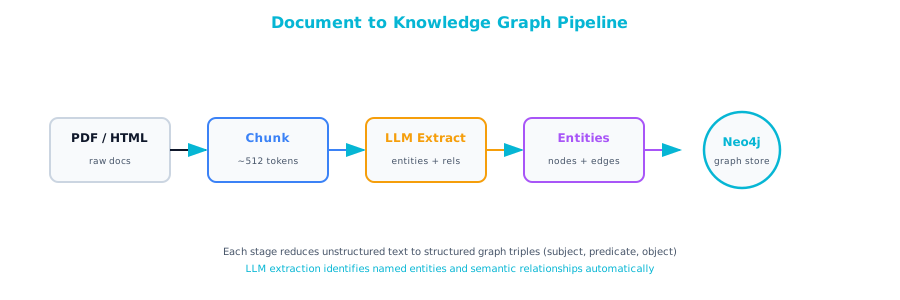
The pipeline from document to graph has five stages. Each stage introduces potential errors, so understanding the full chain is essential for building something reliable.
Document → Chunking → LLM Extraction → Entity Resolution → Graph Storage
Stage
Document Ingestion
Raw documents come in many formats: PDF, DOCX, HTML, plain text, scanned images. Before extracting anything, you need clean text. This stage is unglamorous but critical. A poorly parsed PDF produces garbage entities downstream.
from pathlib import Path
import fitz  # PyMuPDF

def extract_text_from_pdf(file_path: str) -> list[dict]:
    """Extract text from PDF, preserving page boundaries."""
    doc = fitz.open(file_path)
    pages = []
    for page_num, page in enumerate(doc, 1):
        text = page.get_text("text")
        if text.strip():
            pages.append({
                "page": page_num,
                "text": text.strip(),
                "source": Path(file_path).name
            })
    return pages
Stage
Chunking
LLMs have context limits, and extraction quality degrades with document length even within those limits. You need to split documents into chunks, but not arbitrarily. A chunk should contain enough context for the LLM to understand what it is reading.
def chunk_text(
    text: str,
    chunk_size: int = 1500,
    overlap: int = 200
) -> list[str]:
    """Split text into overlapping chunks at sentence boundaries."""
    sentences = text.replace("\n", " ").split(". ")
    chunks = []
    current_chunk = []
    current_length = 0

    for sentence in sentences:
        sentence = sentence.strip()
        if not sentence:
            continue
        sentence_length = len(sentence)

        if current_length + sentence_length > chunk_size and current_chunk:
            chunks.append(". ".join(current_chunk) + ".")
            # Keep overlap by retaining recent sentences
            overlap_chunk = []
            overlap_length = 0
            for s in reversed(current_chunk):
                if overlap_length + len(s) > overlap:
                    break
                overlap_chunk.insert(0, s)
                overlap_length += len(s)
            current_chunk = overlap_chunk
            current_length = overlap_length

        current_chunk.append(sentence)
        current_length += sentence_length

    if current_chunk:
        chunks.append(". ".join(current_chunk) + ".")

    return chunks
Stage
LLM Entity and Relationship Extraction
This is where the power and the risk converge. You send each chunk to an LLM with instructions to extract entities and relationships. The LLM returns structured data.
from pydantic import BaseModel, Field
from enum import Enum

class EntityType(str, Enum):
    PERSON = "Person"
    ORGANIZATION = "Organization"
    DOCUMENT = "Document"
    REGULATION = "Regulation"
    LOCATION = "Location"
    DATE = "Date"
    PRODUCT = "Product"
    ROLE = "Role"

class Entity(BaseModel):
    name: str = Field(description="Canonical name of the entity")
    entity_type: EntityType
    properties: dict = Field(
        default_factory=dict,
        description="Additional attributes extracted from text"
    )

class Relationship(BaseModel):
    source: str = Field(description="Name of the source entity")
    target: str = Field(description="Name of the target entity")
    relationship_type: str = Field(
        description="Relationship type in UPPER_SNAKE_CASE"
    )
    properties: dict = Field(
        default_factory=dict,
        description="Attributes of the relationship"
    )

class ExtractionResult(BaseModel):
    entities: list[Entity]
    relationships: list[Relationship]
The extraction prompt matters more than the model. Here is a template that works well across document types:
import anthropic
import json

client = anthropic.Anthropic()

EXTRACTION_PROMPT = """You are an entity and relationship extractor.
Given a text chunk from a {doc_type}, extract all entities and
relationships.

RULES:
1. Only extract entities explicitly mentioned in the text.
2. Use canonical names (full name, not abbreviations, unless the
   abbreviation is the standard reference).
3. Every relationship must connect two extracted entities.
4. Relationship types should be UPPER_SNAKE_CASE verbs:
   WORKS_AT, REPORTS_TO, SUPPLIES, APPROVED_BY, LOCATED_IN,
   REFERENCES, EFFECTIVE_ON, CONTAINS, MANAGES, CONTRACTED_WITH.
5. Do NOT infer entities or relationships not stated in the text.
6. Include relevant properties from the text on both entities
   and relationships.

TEXT:
{chunk}

Return valid JSON matching this schema:
{schema}
"""

def extract_from_chunk(
    chunk: str,
    doc_type: str = "policy document"
) -> ExtractionResult:
    """Extract entities and relationships from a text chunk."""
    schema = ExtractionResult.model_json_schema()

    response = client.messages.create(
        model="claude-sonnet-4-20250514",
        max_tokens=4096,
        messages=[{
            "role": "user",
            "content": EXTRACTION_PROMPT.format(
                doc_type=doc_type,
                chunk=chunk,
                schema=json.dumps(schema, indent=2)
            )
        }]
    )

    text = response.content[0].text
    # Parse the JSON from the response
    json_str = text
    if "```json" in text:
        json_str = text.split("```json")[1].split("```")[0]
    elif "```" in text:
        json_str = text.split("```")[1].split("```")[0]

    return ExtractionResult.model_validate_json(json_str)
Stage
Entity Resolution
This is covered in detail in section 06 below.
Stage
Graph Storage
Once entities are resolved, you load them into Neo4j:
from neo4j import GraphDatabase

driver = GraphDatabase.driver(
    "bolt://localhost:7687",
    auth=("neo4j", "password")
)

def store_extraction(result: ExtractionResult, source: str):
    """Store extracted entities and relationships in Neo4j."""
    with driver.session() as session:
        # Create entity nodes
        for entity in result.entities:
            session.run(
                """
                MERGE (e:{type} {{name: $name}})
                SET e += $properties
                SET e.source = $source
                SET e.updated_at = datetime()
                """.format(type=entity.entity_type.value),
                name=entity.name,
                properties=entity.properties,
                source=source
            )

        # Create relationships
        for rel in result.relationships:
            session.run(
                """
                MATCH (a {{name: $source_name}})
                MATCH (b {{name: $target_name}})
                MERGE (a)-[r:{rel_type}]->(b)
                SET r += $properties
                """.format(rel_type=rel.relationship_type),
                source_name=rel.source,
                target_name=rel.target,
                properties=rel.properties
            )
04. The Full Pipeline
Here is the complete pipeline that ties all stages together:
def build_knowledge_graph(
    file_paths: list[str],
    doc_type: str = "policy document"
) -> dict:
    """Full pipeline: documents to knowledge graph."""
    stats = {
        "documents": 0,
        "chunks": 0,
        "entities": 0,
        "relationships": 0,
        "errors": 0
    }

    for file_path in file_paths:
        stats["documents"] += 1
        try:
            # Stage 1: Extract text
            pages = extract_text_from_pdf(file_path)
            full_text = "\n".join(p["text"] for p in pages)

            # Stage 2: Chunk
            chunks = chunk_text(full_text)
            stats["chunks"] += len(chunks)

            # Stage 3: Extract entities and relationships
            for chunk in chunks:
                try:
                    result = extract_from_chunk(chunk, doc_type)
                    stats["entities"] += len(result.entities)
                    stats["relationships"] += len(result.relationships)

                    # Stage 5: Store in Neo4j
                    store_extraction(
                        result,
                        source=Path(file_path).name
                    )
                except Exception as e:
                    stats["errors"] += 1
                    print(f"Extraction error in {file_path}: {e}")

        except Exception as e:
            stats["errors"] += 1
            print(f"Document error {file_path}: {e}")

    return stats
05. Quality Challenges
LLM-based extraction is powerful but unreliable in specific, predictable ways. Three problems account for most of the quality failures.
Hallucinated Entities
The LLM invents entities that are not in the source text. You ask it to extract from a paragraph about vendor management, and it creates a "Vendor Management Committee" node even though the text only says "the committee" without specifying which one.
Add strict grounding rules to your prompt ("Only extract entities explicitly named in the text"). Post-process by checking that every entity name appears as a substring of the source chunk. Any entity the LLM named that does not appear verbatim in the text is a candidate for deletion.
def validate_grounding(
    result: ExtractionResult,
    source_text: str
) -> tuple[list[Entity], list[Entity]]:
    """Split entities into grounded and ungrounded."""
    text_lower = source_text.lower()
    grounded = []
    ungrounded = []

    for entity in result.entities:
        if entity.name.lower() in text_lower:
            grounded.append(entity)
        else:
            ungrounded.append(entity)

    return grounded, ungrounded
Duplicate Nodes
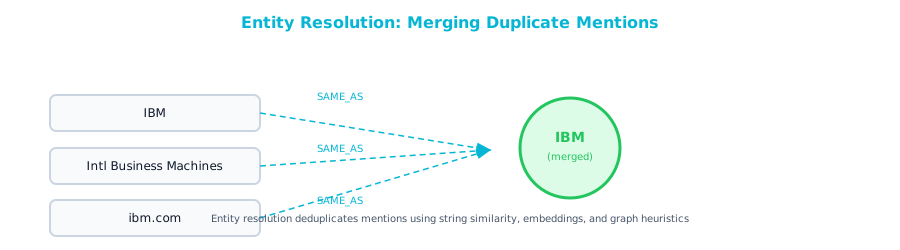
The same entity appears under different names across chunks or documents. "IBM" in one chunk, "International Business Machines" in another, "IBM Corporation" in a third. Without resolution, your graph has three disconnected nodes for the same company. Entity resolution (section 06) addresses this directly.
Missing Relationships
The LLM extracts two entities from a chunk but misses the relationship between them. This is especially common with implicit relationships. "The Springfield facility, managed by Regional Director Tom Chen" contains a MANAGES relationship that some models miss because it is expressed as a parenthetical clause rather than an active verb.
Run a second extraction pass focused specifically on relationships between already-extracted entities. Provide the entity list and ask the LLM to identify connections.
06. Entity Resolution
Entity resolution is the process of determining that two or more entity mentions refer to the same real-world thing. It is the hardest part of knowledge graph construction and the most impactful for graph quality. Skip it and you get a graph full of duplicate nodes and broken traversals.
Strategy 1: Exact Match with Normalization
Normalize entity names (lowercase, strip whitespace, remove punctuation) and merge on exact match.
import re

def normalize_name(name: str) -> str:
    """Normalize entity name for matching."""
    name = name.lower().strip()
    name = re.sub(r'[^\w\s]', '', name)
    name = re.sub(r'\s+', ' ', name)
    # Remove common suffixes
    for suffix in ['inc', 'corp', 'llc', 'ltd', 'co', 'company']:
        name = re.sub(rf'\b{suffix}\b', '', name).strip()
    return name
Strategy 2: Abbreviation and Alias Mapping
Maintain a lookup table of known aliases. This handles "IBM" / "International Business Machines" and similar well-known cases.
ALIAS_MAP = {
    "ibm": "International Business Machines",
    "aws": "Amazon Web Services",
    "gcp": "Google Cloud Platform",
    "ms": "Microsoft",
    "doj": "Department of Justice",
}

def resolve_alias(name: str) -> str:
    """Resolve known abbreviations to canonical names."""
    normalized = normalize_name(name)
    return ALIAS_MAP.get(normalized, name)
Strategy 3: LLM-Assisted Resolution
For ambiguous cases, use an LLM to determine whether two entity mentions refer to the same thing.
def resolve_with_llm(
    entity_a: str,
    entity_b: str,
    context_a: str,
    context_b: str
) -> bool:
    """Use LLM to determine if two entities are the same."""
    response = client.messages.create(
        model="claude-sonnet-4-20250514",
        max_tokens=100,
        messages=[{
            "role": "user",
            "content": f"""Do these two mentions refer to the same
real-world entity?

Entity A: "{entity_a}"
Context: "{context_a[:300]}"

Entity B: "{entity_b}"
Context: "{context_b[:300]}"

Answer ONLY "yes" or "no"."""
        }]
    )
    return "yes" in response.content[0].text.lower()
Strategy 4: Graph-Based Resolution
Use the graph structure itself. If two person nodes both have WORKS_AT relationships to the same organization and REPORTS_TO the same manager, and have similar names, they are probably the same person.
// Find potential duplicate Person nodes
MATCH (a:Person)-[:WORKS_AT]->(org)<-[:WORKS_AT]-(b:Person)
WHERE a.name <> b.name
  AND a.name CONTAINS split(b.name, ' ')[-1]  // Same last name
  AND id(a) < id(b)  // Avoid duplicate pairs
RETURN a.name, b.name, org.name
Merging in Neo4j
Once you have identified duplicates, merge them with APOC:
// Merge two nodes, keeping all relationships
MATCH (keep:Person {name: "John Smith"})
MATCH (duplicate:Person {name: "J. Smith"})
CALL apoc.refactor.mergeNodes([keep, duplicate], {
  properties: "combine",
  mergeRels: true
}) YIELD node
RETURN node
07. Extraction Prompt Patterns by Document Type
Different document types require different extraction strategies. The entities and relationships you care about vary by domain, and so does how those relationships appear in text.
| Document Type | Key Entity Types | Key Relationship Types | Prompt Emphasis |
|---|---|---|---|
| Contracts | Organization, Person, Date, Obligation, Payment | CONTRACTED_WITH, EFFECTIVE_ON, OBLIGATED_TO, PAYS | Focus on parties, obligations, dates, and financial terms |
| Policy documents | Policy, Role, Process, Regulation, Exception | GOVERNS, REQUIRES, EXEMPTS, REFERENCES, OWNED_BY | Focus on who is responsible, what is required, what triggers what |
| Technical docs | System, Component, API, Database, Protocol | DEPENDS_ON, CONNECTS_TO, READS_FROM, WRITES_TO | Focus on dependencies and data flows |
| Org charts / HR | Person, Role, Department, Location | REPORTS_TO, MANAGES, MEMBER_OF, LOCATED_IN | Focus on hierarchy and reporting lines |
| Audit reports | Finding, Control, Risk, Recommendation | IDENTIFIED_IN, MITIGATES, AFFECTS, RECOMMENDED_BY | Focus on what was found, what it affects, what was recommended |
| Incident reports | Incident, System, Person, RootCause, Action | CAUSED_BY, AFFECTED, RESPONDED_TO, RESOLVED_BY | Focus on causal chains and response actions |
08. Scaling the Pipeline
Moving from a 50-document proof of concept to a 10,000-document production system breaks three things: cost, speed, and error handling.
Cost Management
LLM extraction is not free. A 10-page document produces roughly 15–20 chunks. Each chunk requires one API call. At 10,000 documents, that is 150,000 to 200,000 API calls. With Claude Sonnet at roughly $3 per million input tokens and $15 per million output tokens, a large extraction run can cost $500 to $2,000 depending on document length and complexity.
Strategies: use a smaller model for simple entity recognition and a larger model only for complex relationship extraction. Cache extraction results and only re-extract when documents change. Batch similar documents and extract common entities once.
Parallel Processing
import asyncio
from concurrent.futures import ThreadPoolExecutor

async def extract_parallel(
    chunks: list[str],
    doc_type: str,
    max_workers: int = 5
) -> list[ExtractionResult]:
    """Extract from multiple chunks in parallel."""
    loop = asyncio.get_event_loop()
    results = []

    with ThreadPoolExecutor(max_workers=max_workers) as executor:
        futures = [
            loop.run_in_executor(
                executor,
                extract_from_chunk,
                chunk,
                doc_type
            )
            for chunk in chunks
        ]
        for future in asyncio.as_completed(futures):
            try:
                result = await future
                results.append(result)
            except Exception as e:
                print(f"Extraction failed: {e}")

    return results
Error Recovery
Production pipelines need checkpointing. If the pipeline fails at document 7,432 out of 10,000, you should not re-extract the first 7,431.
import json
from pathlib import Path

CHECKPOINT_FILE = "extraction_checkpoint.json"

def load_checkpoint() -> set:
    """Load set of already-processed file paths."""
    if Path(CHECKPOINT_FILE).exists():
        with open(CHECKPOINT_FILE) as f:
            return set(json.load(f))
    return set()

def save_checkpoint(processed: set):
    """Save set of processed file paths."""
    with open(CHECKPOINT_FILE, "w") as f:
        json.dump(list(processed), f)

def build_knowledge_graph_with_checkpoint(
    file_paths: list[str],
    doc_type: str = "policy document"
) -> dict:
    """Pipeline with checkpoint/restart support."""
    processed = load_checkpoint()
    remaining = [f for f in file_paths if f not in processed]
    print(f"Skipping {len(processed)} already processed. "
          f"{len(remaining)} remaining.")

    for file_path in remaining:
        try:
            pages = extract_text_from_pdf(file_path)
            full_text = "\n".join(p["text"] for p in pages)
            chunks = chunk_text(full_text)

            for chunk in chunks:
                result = extract_from_chunk(chunk, doc_type)
                store_extraction(result, source=Path(file_path).name)

            processed.add(file_path)
            save_checkpoint(processed)
        except Exception as e:
            print(f"Failed: {file_path}: {e}")

    return {"processed": len(processed), "total": len(file_paths)}
09. Verifying the Graph
After extraction, run basic sanity checks:
// How many entities of each type?
MATCH (n)
RETURN labels(n)[0] AS type, count(n) AS count
ORDER BY count DESC

// How many relationships of each type?
MATCH ()-[r]->()
RETURN type(r) AS relationship, count(r) AS count
ORDER BY count DESC

// Find orphan nodes (no relationships)
MATCH (n)
WHERE NOT (n)--()
RETURN labels(n)[0] AS type, n.name AS name, n.source AS source
LIMIT 50

// Find the most connected entities
MATCH (n)
RETURN n.name, labels(n)[0] AS type, count{(n)--()} AS connections
ORDER BY connections DESC
LIMIT 20
10. Chapter Checklist
Before moving to the next chapter, make sure you can answer these questions:
- Can you explain the five stages of a document-to-graph extraction pipeline?
- Can you write a Pydantic schema for entities and relationships?
- Can you craft an extraction prompt that minimizes hallucinated entities?
- Can you implement at least two entity resolution strategies?
- Do you understand the cost and scaling implications of LLM-based extraction?
- Can you write Cypher queries to verify the quality of an extracted graph?
The extraction pipeline gets your data into the graph. The next chapter addresses how to design the structure of that graph — the ontology decisions that determine whether the graph is useful a year from now or a maintenance burden.