Chapter 18 of 20
Capstone 3: Customer Support System
Every support team faces the same spiral: ticket volume grows, response times stretch, quality drops, customers churn, and the remaining agents burn out faster. You hire more people, but onboarding takes months and institutional knowledge stays locked in senior agents’ heads. Meanwhile, your knowled
Part 5 — Capstones
Capstone 3: Customer Support System
Every support team faces the same spiral: ticket volume grows, response times stretch, quality drops, customers churn, and the remaining agents burn out faster. You hire more people, but onboarding takes months and institutional knowledge stays locked in senior agents’ heads. Meanwhile, your knowledge base — hundreds of articles, runbooks, and policy documents — sits in a wiki that nobody searches correctly. This capstone builds the system that breaks that spiral: a RAG-powered support agent that retrieves the right documentation, drafts accurate responses, detects frustration before it escalates, and hands off to humans when the situation demands judgment that software should not fake.
What You Will Learn
- How to architect a multi-stage support pipeline combining RAG, memory, sentiment analysis, and human escalation
- How to ingest and chunk knowledge base articles for semantic search with metadata filtering
- How to maintain per-customer conversation memory across sessions for context continuity
- How to classify sentiment in real time and trigger escalation rules based on frustration signals
- How to implement human-in-the-loop handoff with full conversation context transfer
- How to instrument the entire pipeline with traces, metrics, and CSAT tracking for production observability
C3.1 The Support Automation Problem
Support teams operate under contradictory pressures. Customers expect instant, personalized responses. Managers expect consistency and compliance with company policies. Engineers expect the support tool to stop pinging them with questions that the documentation already answers. And the support agents themselves expect a workload that does not require memorizing a thousand-page knowledge base.
Chatbots from the previous generation failed because they operated on intent classification and decision trees. If the customer’s question did not match a predefined intent, the bot either looped (“I didn’t understand that, could you rephrase?”) or dumped the user into a queue. There was no retrieval, no reasoning, and no graceful degradation.
An agentic support system is different in three fundamental ways. First, it retrieves — it searches your actual documentation and returns grounded answers instead of templated responses. Second, it remembers — it carries context across turns and even across sessions, so the customer never has to repeat themselves. Third, it escalates intelligently — it recognizes when it is out of its depth and routes to a human with full context, not a cold transfer.
Scope of This Capstone
This project integrates patterns from four earlier chapters: RAG pipelines (Chapter 8), memory systems (Chapter 7), human-in-the-loop workflows (Chapter 11), and observability (Chapter 13). If you skipped any of those, you can still follow along, but you will benefit from reviewing the relevant sections when a concept appears unfamiliar.
C3.2 System Architecture
The support system is a pipeline of six cooperating components. A ticket arrives at the intake agent, which classifies priority and extracts structured metadata. The query then hits the RAG knowledge base, which performs semantic search over your documentation. The response generator synthesizes a draft answer grounded in retrieved documents. Meanwhile, the sentiment analyzer scores the customer’s emotional state on every message. The escalation router evaluates a rule set combining sentiment, topic complexity, and confidence scores to decide whether the response ships or the conversation routes to a human. Finally, the human handoff module transfers the full conversation context — including retrieved documents, sentiment history, and prior attempts — to a live agent.
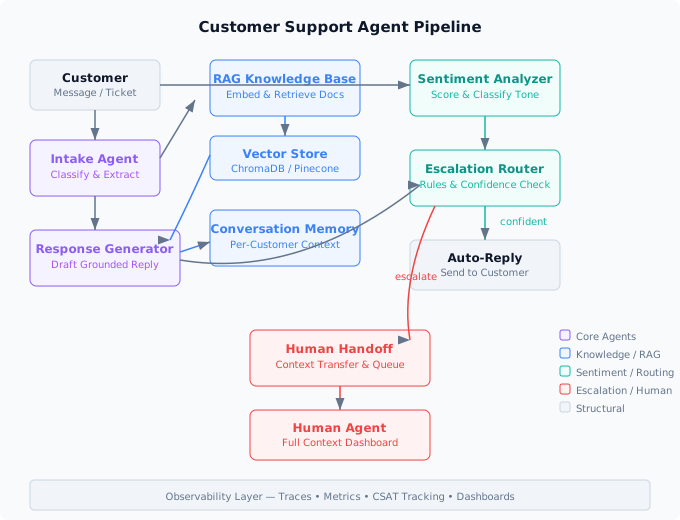
Figure C3.1 — Support system architecture: intake, RAG retrieval, response generation, sentiment analysis, escalation routing, and human handoff with observability instrumentation across all stages.
Every component communicates through a shared Ticket object that accumulates metadata as it flows through the pipeline. This design means any component can inspect the full history — the sentiment analyzer can see previous retrieval results, the escalation router can see both the draft response and the sentiment trajectory, and the human agent receives everything.
C3.3 Knowledge Base Ingestion
The foundation of any support agent is the quality of its retrieval. If the knowledge base is poorly chunked, the agent retrieves noise and hallucinates confidently. We start by building a robust ingestion pipeline that converts raw documentation into semantically meaningful chunks with rich metadata.
import hashlib
from dataclasses import dataclass, field
from datetime import datetime
from pathlib import Path

from langchain.text_splitter import RecursiveCharacterTextSplitter
from langchain_openai import OpenAIEmbeddings
from chromadb import PersistentClient


@dataclass
class Article:
    """A knowledge base article with metadata for filtered retrieval."""
    title: str
    content: str
    category: str          # billing, technical, account, shipping, etc.
    product: str           # which product line this covers
    last_updated: str      # ISO date string
    source_url: str = ""
    article_id: str = field(default="")

    def __post_init__(self):
        if not self.article_id:
            self.article_id = hashlib.sha256(
                f"{self.title}:{self.source_url}".encode()
            ).hexdigest()[:12]


class KnowledgeBaseIngestor:
    """Chunks articles and upserts them into a vector store."""

    def __init__(self, collection_name: str = "support_kb"):
        self.splitter = RecursiveCharacterTextSplitter(
            chunk_size=800,
            chunk_overlap=120,
            separators=["\n## ", "\n### ", "\n\n", "\n", ". ", " "],
        )
        self.embeddings = OpenAIEmbeddings(model="text-embedding-3-small")
        self.client = PersistentClient(path="./chroma_support_db")
        self.collection = self.client.get_or_create_collection(
            name=collection_name,
            metadata={"hnsw:space": "cosine"},
        )

    def ingest(self, articles: list[Article]) -> int:
        """Chunk, embed, and store articles. Returns chunk count."""
        all_chunks, all_ids, all_metas = [], [], []

        for article in articles:
            chunks = self.splitter.split_text(article.content)
            for i, chunk in enumerate(chunks):
                chunk_id = f"{article.article_id}_chunk_{i}"
                all_chunks.append(chunk)
                all_ids.append(chunk_id)
                all_metas.append({
                    "article_id": article.article_id,
                    "title": article.title,
                    "category": article.category,
                    "product": article.product,
                    "last_updated": article.last_updated,
                    "chunk_index": i,
                    "source_url": article.source_url,
                })

        # Embed in batches of 100
        for start in range(0, len(all_chunks), 100):
            batch_chunks = all_chunks[start:start + 100]
            batch_ids = all_ids[start:start + 100]
            batch_metas = all_metas[start:start + 100]
            batch_embeds = self.embeddings.embed_documents(batch_chunks)

            self.collection.upsert(
                ids=batch_ids,
                embeddings=batch_embeds,
                documents=batch_chunks,
                metadatas=batch_metas,
            )

        return len(all_chunks)

    def search(
        self,
        query: str,
        category: str | None = None,
        product: str | None = None,
        top_k: int = 5,
    ) -> list[dict]:
        """Semantic search with optional metadata filters."""
        query_embedding = self.embeddings.embed_query(query)

        where_filter = {}
        if category:
            where_filter["category"] = category
        if product:
            where_filter["product"] = product

        results = self.collection.query(
            query_embeddings=[query_embedding],
            n_results=top_k,
            where=where_filter if where_filter else None,
            include=["documents", "metadatas", "distances"],
        )

        return [
            {
                "content": doc,
                "metadata": meta,
                "score": 1 - dist,  # cosine similarity
            }
            for doc, meta, dist in zip(
                results["documents"][0],
                results["metadatas"][0],
                results["distances"][0],
            )
        ]
Three design choices matter here. First, the RecursiveCharacterTextSplitter uses heading-aware separators so chunks align with document structure rather than splitting mid-paragraph. Second, every chunk carries its parent article’s metadata — category, product, and recency — enabling filtered retrieval that narrows results before semantic ranking. Third, the upsert operation means re-ingesting updated articles replaces stale chunks rather than duplicating them.
Chunking Strategy
The 800-token chunk size with 120-token overlap is a starting point, not a rule. For highly structured documentation (step-by-step guides), smaller chunks of 400–500 tokens preserve procedural coherence. For conceptual articles (policy explanations), larger chunks of 1000–1200 tokens keep reasoning intact. Measure retrieval precision on a test set before committing to a chunk size.
C3.4 Conversation Memory
A support agent without memory forces customers to repeat their problem every time they return. This is the single most frustrating experience in customer support, and it is entirely avoidable. We implement a memory system that tracks both the current conversation and cross-session customer history.
import json
from datetime import datetime, timezone
from typing import Optional

import redis


class ConversationMemory:
    """Per-customer conversation memory with session and history tracking."""

    def __init__(self, redis_url: str = "redis://localhost:6379"):
        self.redis = redis.from_url(redis_url, decode_responses=True)
        self.session_ttl = 3600 * 2    # 2 hours for active sessions
        self.history_ttl = 3600 * 24 * 90  # 90 days for customer history

    def _session_key(self, customer_id: str, session_id: str) -> str:
        return f"support:session:{customer_id}:{session_id}"

    def _history_key(self, customer_id: str) -> str:
        return f"support:history:{customer_id}"

    def add_message(
        self,
        customer_id: str,
        session_id: str,
        role: str,
        content: str,
        metadata: Optional[dict] = None,
    ) -> None:
        """Append a message to the current session and customer history."""
        message = {
            "role": role,
            "content": content,
            "timestamp": datetime.now(timezone.utc).isoformat(),
            "metadata": metadata or {},
        }
        serialized = json.dumps(message)

        # Current session (ordered list)
        session_key = self._session_key(customer_id, session_id)
        self.redis.rpush(session_key, serialized)
        self.redis.expire(session_key, self.session_ttl)

        # Customer history (capped sorted set by timestamp)
        history_key = self._history_key(customer_id)
        score = datetime.now(timezone.utc).timestamp()
        self.redis.zadd(history_key, {serialized: score})
        self.redis.expire(history_key, self.history_ttl)

        # Trim history to last 500 messages
        self.redis.zremrangebyrank(history_key, 0, -501)

    def get_session(self, customer_id: str, session_id: str) -> list[dict]:
        """Retrieve all messages in the current session."""
        session_key = self._session_key(customer_id, session_id)
        raw = self.redis.lrange(session_key, 0, -1)
        return [json.loads(m) for m in raw]

    def get_recent_history(
        self, customer_id: str, limit: int = 20
    ) -> list[dict]:
        """Retrieve recent cross-session history for context."""
        history_key = self._history_key(customer_id)
        raw = self.redis.zrevrange(history_key, 0, limit - 1)
        return [json.loads(m) for m in reversed(raw)]

    def get_summary(self, customer_id: str) -> dict:
        """Build a customer context summary for the agent."""
        history_key = self._history_key(customer_id)
        total = self.redis.zcard(history_key)
        recent = self.get_recent_history(customer_id, limit=5)

        topics = set()
        for msg in recent:
            if msg.get("metadata", {}).get("category"):
                topics.add(msg["metadata"]["category"])

        return {
            "customer_id": customer_id,
            "total_interactions": total,
            "recent_topics": list(topics),
            "last_contact": recent[-1]["timestamp"] if recent else None,
        }
The memory system operates at two time scales. The session captures the current conversation as an ordered list with a two-hour TTL, long enough for a support interaction and short enough to avoid stale state. The history stores the last 500 messages in a sorted set keyed by timestamp, giving the agent access to prior interactions spanning 90 days. When a returning customer opens a new ticket, the agent can reference previous issues without the customer repeating anything.
C3.5 Sentiment Analysis and Escalation
The difference between a resolved ticket and a churned customer often comes down to detecting frustration early. A customer who writes “this is the third time I’ve contacted you about this” is not asking a question. They are warning you. The sentiment analyzer catches these signals and feeds them into the escalation router.
from enum import Enum
from openai import OpenAI
from pydantic import BaseModel


class SentimentLevel(str, Enum):
    POSITIVE = "positive"
    NEUTRAL = "neutral"
    FRUSTRATED = "frustrated"
    ANGRY = "angry"
    URGENT = "urgent"


class SentimentResult(BaseModel):
    level: SentimentLevel
    confidence: float        # 0.0 to 1.0
    frustration_score: float # 0.0 to 1.0, tracks escalation risk
    signals: list[str]       # e.g., ["repeated_issue", "threatening_churn"]


class SentimentAnalyzer:
    """Classifies customer sentiment using structured LLM output."""

    SYSTEM_PROMPT = """You are a sentiment classifier for customer support messages.
Analyze the customer message and return a JSON object with:
- level: one of positive, neutral, frustrated, angry, urgent
- confidence: 0.0 to 1.0
- frustration_score: 0.0 to 1.0 based on cumulative frustration signals
- signals: list of detected signals from this set:
  repeated_issue, long_wait, threatening_churn, profanity,
  all_caps, multiple_exclamations, legal_threat, billing_dispute,
  time_pressure, previous_escalation

Consider the conversation history for context. A polite message from
someone who has contacted three times about the same issue should have
a higher frustration_score than the words alone suggest."""

    def __init__(self):
        self.client = OpenAI()

    def analyze(
        self, message: str, conversation_history: list[dict]
    ) -> SentimentResult:
        """Analyze sentiment with conversation context."""
        history_text = "\n".join(
            f"[{m['role']}]: {m['content']}"
            for m in conversation_history[-6:]  # last 6 messages for context
        )

        response = self.client.beta.chat.completions.parse(
            model="gpt-4o-mini",
            messages=[
                {"role": "system", "content": self.SYSTEM_PROMPT},
                {"role": "user", "content": (
                    f"Conversation history:\n{history_text}\n\n"
                    f"Latest customer message:\n{message}"
                )},
            ],
            response_format=SentimentResult,
            temperature=0.1,
        )
        return response.choices[0].message.parsed
The analyzer uses structured output to guarantee a parseable result. The frustration_score is the key signal — it accounts for cumulative frustration, not just the tone of the current message. A customer who calmly writes “I understand you’re busy, but this is my fourth contact about this issue” should score higher than someone who writes “THIS IS ANNOYING!!!” for the first time, because repeated failure is a stronger churn predictor than momentary irritation.
The escalation router combines sentiment with other signals to make routing decisions:
from dataclasses import dataclass


@dataclass
class EscalationDecision:
    should_escalate: bool
    reason: str
    priority: str  # low, medium, high, critical
    assigned_queue: str  # auto, tier1, tier2, manager


class EscalationRouter:
    """Rule-based escalation with sentiment and confidence inputs."""

    def __init__(self, confidence_threshold: float = 0.75):
        self.confidence_threshold = confidence_threshold

    def evaluate(
        self,
        sentiment: SentimentResult,
        response_confidence: float,
        ticket_metadata: dict,
    ) -> EscalationDecision:
        """Decide whether to auto-reply or escalate to a human."""

        # Rule 1: Angry or urgent sentiment always escalates
        if sentiment.level in (SentimentLevel.ANGRY, SentimentLevel.URGENT):
            return EscalationDecision(
                should_escalate=True,
                reason=f"Sentiment: {sentiment.level.value}",
                priority="critical" if sentiment.level == SentimentLevel.URGENT else "high",
                assigned_queue="tier2" if sentiment.level == SentimentLevel.URGENT else "tier1",
            )

        # Rule 2: Legal threats go to manager queue
        if "legal_threat" in sentiment.signals:
            return EscalationDecision(
                should_escalate=True,
                reason="Legal threat detected",
                priority="critical",
                assigned_queue="manager",
            )

        # Rule 3: High frustration with low confidence = escalate
        if (
            sentiment.frustration_score > 0.7
            and response_confidence < self.confidence_threshold
        ):
            return EscalationDecision(
                should_escalate=True,
                reason="High frustration + low retrieval confidence",
                priority="high",
                assigned_queue="tier1",
            )

        # Rule 4: Low retrieval confidence alone = cautious auto-reply
        if response_confidence < 0.5:
            return EscalationDecision(
                should_escalate=True,
                reason="Retrieval confidence below threshold",
                priority="medium",
                assigned_queue="tier1",
            )

        # Rule 5: Repeated contact about same issue
        contact_count = ticket_metadata.get("contact_count", 1)
        if contact_count >= 3:
            return EscalationDecision(
                should_escalate=True,
                reason=f"Customer contacted {contact_count} times for same issue",
                priority="high",
                assigned_queue="tier2",
            )

        # Default: auto-reply
        return EscalationDecision(
            should_escalate=False,
            reason="Within confidence and sentiment thresholds",
            priority="low",
            assigned_queue="auto",
        )
Escalation Rules Are a Starting Point
Hard-coded rules get you to production fast, but they do not learn. After collecting a few thousand tickets with resolution outcomes, train a lightweight classifier (logistic regression is often sufficient) to predict which tickets need human intervention. Use the rule-based router as a fallback for the first month, then gradually shift to the learned model while keeping the rules as safety overrides for critical signals like legal threats.
C3.6 The Response Generator
The response generator is the core agent: it takes the customer message, retrieved documents, conversation history, and customer summary, then produces a grounded response with a confidence score.
class SupportResponseGenerator:
    """Generates grounded support responses with confidence scoring."""

    SYSTEM_PROMPT = """You are a customer support agent. Generate helpful,
accurate responses based ONLY on the provided documentation.

Rules:
1. Only use information from the retrieved documents. If the documents
   do not contain the answer, say so honestly.
2. Be empathetic but concise. Acknowledge the customer's situation
   before providing the solution.
3. Include specific steps when applicable.
4. If the customer has contacted before about the same issue,
   acknowledge that and express understanding of their frustration.
5. End with a clear next step or confirmation question.

After your response, rate your confidence from 0.0 to 1.0 based on:
- How well the retrieved documents match the question
- Whether the documents contain a complete answer
- Whether the answer requires interpretation beyond what is written"""

    def __init__(self):
        self.client = OpenAI()

    def generate(
        self,
        customer_message: str,
        retrieved_docs: list[dict],
        conversation: list[dict],
        customer_summary: dict,
    ) -> dict:
        """Generate a response grounded in retrieved documentation."""
        docs_text = "\n\n---\n\n".join(
            f"[Source: {d['metadata']['title']}]\n{d['content']}"
            for d in retrieved_docs
        )

        history_text = "\n".join(
            f"[{m['role']}]: {m['content']}"
            for m in conversation[-8:]
        )

        summary_text = (
            f"Customer has contacted {customer_summary['total_interactions']} times. "
            f"Recent topics: {', '.join(customer_summary['recent_topics']) or 'none'}. "
            f"Last contact: {customer_summary['last_contact'] or 'first contact'}."
        )

        response = self.client.chat.completions.create(
            model="gpt-4o",
            messages=[
                {"role": "system", "content": self.SYSTEM_PROMPT},
                {"role": "user", "content": (
                    f"Customer context: {summary_text}\n\n"
                    f"Conversation so far:\n{history_text}\n\n"
                    f"Retrieved documentation:\n{docs_text}\n\n"
                    f"Customer message: {customer_message}\n\n"
                    "Provide your response, then on a new line write "
                    "CONFIDENCE: followed by your confidence score."
                )},
            ],
            temperature=0.3,
            max_tokens=1024,
        )

        raw = response.choices[0].message.content
        # Parse confidence from the tail of the response
        if "CONFIDENCE:" in raw:
            parts = raw.rsplit("CONFIDENCE:", 1)
            reply_text = parts[0].strip()
            try:
                confidence = float(parts[1].strip())
            except ValueError:
                confidence = 0.5
        else:
            reply_text = raw.strip()
            confidence = 0.5

        return {
            "response": reply_text,
            "confidence": min(max(confidence, 0.0), 1.0),
            "sources": [d["metadata"]["title"] for d in retrieved_docs],
            "model": "gpt-4o",
            "tokens_used": response.usage.total_tokens,
        }
The confidence score is self-reported by the model, which makes it imperfect but useful. Models are well-calibrated when the retrieved context clearly answers the question (high confidence) or clearly does not (low confidence). The unreliable zone is the middle, when the documents are tangentially related. That is exactly the zone where the escalation router applies its frustration-weighted threshold to decide.
C3.7 Human Handoff
When the escalation router decides a ticket needs human attention, the handoff module packages the full context and queues it for a live agent. The goal is zero-repetition transfer: the human agent should be able to read the handoff package and immediately understand the customer’s problem, what the system already tried, and why it escalated.
from datetime import datetime, timezone


class HumanHandoff:
    """Packages conversation context and queues for human agents."""

    def __init__(self, memory: ConversationMemory):
        self.memory = memory

    def create_handoff_package(
        self,
        customer_id: str,
        session_id: str,
        escalation: EscalationDecision,
        sentiment: SentimentResult,
        draft_response: dict,
        retrieved_docs: list[dict],
    ) -> dict:
        """Build a complete context package for the human agent."""
        session = self.memory.get_session(customer_id, session_id)
        summary = self.memory.get_summary(customer_id)

        return {
            "handoff_id": f"hoff_{customer_id}_{session_id}",
            "timestamp": datetime.now(timezone.utc).isoformat(),
            "priority": escalation.priority,
            "assigned_queue": escalation.assigned_queue,
            "escalation_reason": escalation.reason,
            "customer": {
                "id": customer_id,
                "total_interactions": summary["total_interactions"],
                "recent_topics": summary["recent_topics"],
                "last_contact": summary["last_contact"],
            },
            "sentiment": {
                "level": sentiment.level.value,
                "frustration_score": sentiment.frustration_score,
                "signals": sentiment.signals,
            },
            "conversation": session,
            "agent_draft": {
                "response": draft_response["response"],
                "confidence": draft_response["confidence"],
                "sources": draft_response["sources"],
            },
            "retrieved_docs": [
                {
                    "title": d["metadata"]["title"],
                    "content": d["content"][:500],
                    "score": d["score"],
                }
                for d in retrieved_docs
            ],
            "suggested_action": self._suggest_action(escalation, sentiment),
        }

    def _suggest_action(
        self, escalation: EscalationDecision, sentiment: SentimentResult
    ) -> str:
        """Suggest a starting action for the human agent."""
        if "legal_threat" in sentiment.signals:
            return "Review with legal team before responding. Do not acknowledge liability."
        if sentiment.frustration_score > 0.8:
            return "Lead with empathy and a concrete resolution timeline. Consider a goodwill gesture."
        if escalation.reason.startswith("Retrieval confidence"):
            return "The AI could not find a matching article. This may require a custom solution or a knowledge base update."
        return "Review the AI draft response and edit as needed before sending."
The handoff package includes a suggested_action field that gives the human agent an immediate starting point. This is not a directive. It is a nudge that reduces the time a human spends reading context from minutes to seconds. The draft response is included so the human can edit and send it rather than writing from scratch, turning the AI from an autonomous agent into an intelligent assistant.
C3.8 Putting It All Together
The orchestrator ties every component into a single pipeline. Each customer message flows through intake, retrieval, generation, sentiment analysis, and routing in a deterministic sequence with full observability.
import uuid
from opentelemetry import trace

tracer = trace.get_tracer("support-agent")


class SupportPipeline:
    """Orchestrates the full support agent pipeline."""

    def __init__(self):
        self.kb = KnowledgeBaseIngestor()
        self.memory = ConversationMemory()
        self.sentiment = SentimentAnalyzer()
        self.generator = SupportResponseGenerator()
        self.router = EscalationRouter()
        self.handoff = HumanHandoff(self.memory)

    @tracer.start_as_current_span("process_message")
    def process_message(
        self,
        customer_id: str,
        session_id: str,
        message: str,
        category: str | None = None,
    ) -> dict:
        """Process a single customer message through the full pipeline."""
        span = trace.get_current_span()
        span.set_attribute("customer.id", customer_id)
        span.set_attribute("session.id", session_id)

        # Step 1: Store customer message
        self.memory.add_message(
            customer_id, session_id, "customer", message,
            metadata={"category": category},
        )

        # Step 2: Retrieve relevant documentation
        with tracer.start_as_current_span("retrieve_docs") as retrieval_span:
            docs = self.kb.search(query=message, category=category, top_k=5)
            retrieval_span.set_attribute("docs.count", len(docs))
            retrieval_span.set_attribute(
                "docs.top_score", docs[0]["score"] if docs else 0.0
            )

        # Step 3: Get conversation context
        conversation = self.memory.get_session(customer_id, session_id)
        summary = self.memory.get_summary(customer_id)

        # Step 4: Analyze sentiment
        with tracer.start_as_current_span("analyze_sentiment") as sent_span:
            sentiment_result = self.sentiment.analyze(message, conversation)
            sent_span.set_attribute("sentiment.level", sentiment_result.level.value)
            sent_span.set_attribute(
                "sentiment.frustration", sentiment_result.frustration_score
            )

        # Step 5: Generate response
        with tracer.start_as_current_span("generate_response") as gen_span:
            response = self.generator.generate(
                message, docs, conversation, summary
            )
            gen_span.set_attribute("response.confidence", response["confidence"])
            gen_span.set_attribute("response.tokens", response["tokens_used"])

        # Step 6: Escalation decision
        with tracer.start_as_current_span("escalation_check") as esc_span:
            ticket_meta = {
                "contact_count": summary["total_interactions"],
                "category": category,
            }
            decision = self.router.evaluate(
                sentiment_result, response["confidence"], ticket_meta
            )
            esc_span.set_attribute("escalation.result", decision.should_escalate)
            esc_span.set_attribute("escalation.reason", decision.reason)

        # Step 7: Route based on decision
        if decision.should_escalate:
            handoff_pkg = self.handoff.create_handoff_package(
                customer_id, session_id, decision,
                sentiment_result, response, docs,
            )
            span.set_attribute("outcome", "escalated")
            return {
                "action": "escalated",
                "message": "I am connecting you with a support specialist who can help further. They will have the full context of our conversation.",
                "handoff": handoff_pkg,
            }

        # Auto-reply path
        self.memory.add_message(
            customer_id, session_id, "agent", response["response"],
            metadata={
                "confidence": response["confidence"],
                "sources": response["sources"],
            },
        )
        span.set_attribute("outcome", "auto_reply")
        return {
            "action": "auto_reply",
            "message": response["response"],
            "confidence": response["confidence"],
            "sources": response["sources"],
            "sentiment": sentiment_result.level.value,
        }
Every step is wrapped in an OpenTelemetry span with attributes that capture the operational data you need for debugging: retrieval scores, sentiment levels, confidence values, token counts, and escalation decisions. When a customer complains that the agent gave them wrong information, you trace the run, inspect which documents were retrieved, check the confidence score, and determine whether the failure was a retrieval problem (wrong documents) or a generation problem (right documents, wrong interpretation).
C3.9 CSAT Tracking and Feedback Loop
A support system without outcome measurement is flying blind. Customer Satisfaction (CSAT) tracking closes the loop between agent behavior and customer experience, providing the ground truth you need to improve the system over time.
from dataclasses import dataclass
from datetime import datetime, timezone
from enum import IntEnum


class CSATScore(IntEnum):
    VERY_DISSATISFIED = 1
    DISSATISFIED = 2
    NEUTRAL = 3
    SATISFIED = 4
    VERY_SATISFIED = 5


@dataclass
class TicketOutcome:
    ticket_id: str
    customer_id: str
    session_id: str
    resolved: bool
    csat_score: CSATScore | None
    resolution_time_seconds: float
    was_escalated: bool
    escalation_reason: str | None
    auto_reply_count: int
    human_reply_count: int


class CSATTracker:
    """Tracks resolution outcomes and identifies improvement areas."""

    def __init__(self):
        self.outcomes: list[TicketOutcome] = []

    def record_outcome(self, outcome: TicketOutcome) -> None:
        self.outcomes.append(outcome)

    def compute_metrics(self, window_days: int = 30) -> dict:
        """Compute key support metrics over a time window."""
        cutoff = datetime.now(timezone.utc).timestamp() - (window_days * 86400)
        recent = self.outcomes  # In production, filter by timestamp

        if not recent:
            return {"error": "No data available"}

        total = len(recent)
        resolved = sum(1 for o in recent if o.resolved)
        escalated = sum(1 for o in recent if o.was_escalated)
        with_csat = [o for o in recent if o.csat_score is not None]
        avg_csat = (
            sum(o.csat_score for o in with_csat) / len(with_csat)
            if with_csat else None
        )
        avg_resolution = (
            sum(o.resolution_time_seconds for o in recent) / total
        )
        auto_resolved = sum(
            1 for o in recent if o.resolved and not o.was_escalated
        )

        return {
            "total_tickets": total,
            "resolution_rate": resolved / total,
            "escalation_rate": escalated / total,
            "auto_resolution_rate": auto_resolved / total if total else 0,
            "avg_csat": avg_csat,
            "avg_resolution_time_seconds": avg_resolution,
            "top_escalation_reasons": self._top_reasons(recent),
        }

    def _top_reasons(self, outcomes: list[TicketOutcome]) -> list[dict]:
        reasons: dict[str, int] = {}
        for o in outcomes:
            if o.escalation_reason:
                reasons[o.escalation_reason] = reasons.get(
                    o.escalation_reason, 0
                ) + 1
        sorted_reasons = sorted(reasons.items(), key=lambda x: -x[1])
        return [
            {"reason": r, "count": c} for r, c in sorted_reasons[:5]
        ]
The metrics that matter for a support agent are different from a generic chatbot. Auto-resolution rate measures the percentage of tickets the agent resolves without human intervention — this is your primary efficiency metric. Escalation rate should be monitored for drift; a sudden spike means either the knowledge base is stale or the model degraded. Average CSAT segmented by auto-reply versus human-handled tickets tells you whether the agent’s quality matches human quality. If auto-reply CSAT is within 0.5 points of human CSAT, the agent is performing well.
The Feedback Flywheel
Every escalated ticket is a training signal. When a human agent resolves a ticket that the AI could not, capture the human’s response and the documents they referenced. Use these to update the knowledge base (fill gaps the AI could not answer) and fine-tune retrieval (the human found the right document that the semantic search missed). Over time, this feedback loop reduces escalation rate without sacrificing quality.
C3.10 Ticket Lifecycle Management
Each ticket progresses through a defined lifecycle: created when the customer sends a message, processing while the pipeline runs, awaiting_customer after an auto-reply, escalated when routed to a human, resolved when closed, and reopened if the customer returns within a window. Tracking these state transitions gives you operational visibility into where tickets stall and how long each stage takes.
from enum import Enum
from datetime import datetime, timezone


class TicketStatus(str, Enum):
    CREATED = "created"
    PROCESSING = "processing"
    AWAITING_CUSTOMER = "awaiting_customer"
    ESCALATED = "escalated"
    RESOLVED = "resolved"
    REOPENED = "reopened"


class Ticket:
    """Tracks state transitions for a support ticket."""

    def __init__(self, ticket_id: str, customer_id: str, subject: str):
        self.ticket_id = ticket_id
        self.customer_id = customer_id
        self.subject = subject
        self.status = TicketStatus.CREATED
        self.priority = "medium"
        self.history: list[dict] = []
        self.created_at = datetime.now(timezone.utc)
        self._record_transition(TicketStatus.CREATED)

    def transition(self, new_status: TicketStatus, reason: str = "") -> None:
        """Move ticket to a new status with audit trail."""
        old_status = self.status
        valid_transitions = {
            TicketStatus.CREATED: {TicketStatus.PROCESSING},
            TicketStatus.PROCESSING: {
                TicketStatus.AWAITING_CUSTOMER,
                TicketStatus.ESCALATED,
            },
            TicketStatus.AWAITING_CUSTOMER: {
                TicketStatus.PROCESSING,
                TicketStatus.RESOLVED,
                TicketStatus.REOPENED,
            },
            TicketStatus.ESCALATED: {
                TicketStatus.RESOLVED,
                TicketStatus.AWAITING_CUSTOMER,
            },
            TicketStatus.RESOLVED: {TicketStatus.REOPENED},
            TicketStatus.REOPENED: {TicketStatus.PROCESSING},
        }

        if new_status not in valid_transitions.get(self.status, set()):
            raise ValueError(
                f"Invalid transition: {self.status} -> {new_status}"
            )

        self.status = new_status
        self._record_transition(new_status, reason)

    def _record_transition(
        self, status: TicketStatus, reason: str = ""
    ) -> None:
        self.history.append({
            "status": status.value,
            "timestamp": datetime.now(timezone.utc).isoformat(),
            "reason": reason,
        })

    def time_in_status(self, status: TicketStatus) -> float:
        """Calculate total seconds spent in a given status."""
        total = 0.0
        enter_time = None
        for entry in self.history:
            if entry["status"] == status.value:
                enter_time = datetime.fromisoformat(entry["timestamp"])
            elif enter_time is not None:
                exit_time = datetime.fromisoformat(entry["timestamp"])
                total += (exit_time - enter_time).total_seconds()
                enter_time = None
        # If still in this status, count up to now
        if enter_time and self.status == status:
            total += (
                datetime.now(timezone.utc) - enter_time
            ).total_seconds()
        return total
The state machine enforces valid transitions. A resolved ticket can only become reopened, not escalated directly. Every transition is recorded with a timestamp and reason, creating a complete audit trail. The time_in_status method lets you measure how long tickets sit in each stage, which is essential for identifying bottlenecks: if tickets spend an average of 45 minutes in the escalated state, you need more human agents in that queue.
Project: Build a Domain-Specific Support Agent
Implement the full support pipeline for one of the domains below. Ingest at least 20 knowledge base articles, implement conversation memory, wire up sentiment analysis with escalation routing, and add CSAT tracking. Your system should handle at least three end-to-end scenarios: a simple question answered by auto-reply, a frustrated customer escalated to a human, and a returning customer whose history informs the response.
| Variant | Domain Topics |
|---|---|
| SaaS Platform Support | Subscription billing, API errors, feature requests, account recovery |
| Healthcare Patient Portal | Appointment scheduling, insurance queries, prescription refills, lab results |
| Financial Services Help Desk | Transaction disputes, account security, loan inquiries, regulatory compliance |
| E-commerce Customer Service | Order tracking, returns, product questions, shipping issues, promotions |
| Telecom Support Center | Service outages, plan changes, device troubleshooting, coverage inquiries |
| EdTech Student Support | Course enrollment, technical issues, grade disputes, certification queries |
Summary
- Retrieval quality determines agent quality. A support agent is only as good as its knowledge base ingestion. Heading-aware chunking, rich metadata, and filtered retrieval prevent the agent from returning plausible but wrong answers grounded in irrelevant documents.
- Memory eliminates the most hated customer experience. Per-session state keeps the current conversation coherent, and cross-session history ensures returning customers never have to repeat their problem. Redis sorted sets with TTL give you both time scales without unbounded storage growth.
- Sentiment analysis catches what keywords miss. A polite message from a three-time repeat caller is more dangerous than an all-caps message from a first-time user. Context-aware frustration scoring, not just tone classification, drives the escalation decisions that prevent churn.
- Escalation is a feature, not a failure. The system’s value is not in replacing human agents but in handling the 60–80% of tickets that are routine, so human agents can focus on the cases that require judgment, empathy, and creative problem-solving.
- CSAT closes the loop. Without outcome tracking, you cannot distinguish a system that resolves tickets from one that frustrates customers into giving up. Auto-resolution rate, escalation rate, and segmented CSAT scores are the metrics that tell you whether the agent is actually helping.
Exercises
| Type | Exercise | Description |
|---|---|---|
| Conceptual | Sentiment and escalation analysis | A customer writes: “I have been waiting two weeks for a refund that your agent promised me last month. I am considering filing a complaint with the consumer protection bureau.” Walk through how the sentiment analyzer should score this message (level, frustration_score, signals) and what escalation decision the router should make. What information should the handoff package include for the human agent? |
| Coding | Adaptive chunker | The current chunking strategy uses a fixed 800-token size. Implement an adaptive chunker that detects document structure (headings, numbered lists, FAQ pairs) and creates chunks that respect semantic boundaries. Compare retrieval precision against the fixed-size chunker on a test set of 10 questions with known correct source articles. |
| Design | Feedback pipeline | Design a feedback pipeline where every escalated ticket that a human agent resolves generates a training signal. Specify: what data you capture from the human resolution, how you use it to update the knowledge base, and how you retrain or adjust the retrieval and generation components. Include a diagram of the data flow and describe how you prevent feedback loops where the model reinforces its own mistakes. |