Chapter 11 of 20
Human-in-the-Loop
It was 2:47 AM when the automated procurement agent placed a $2.3 million order for industrial solvents. The purchase order had passed the agent’s internal validation: the supplier was in the approved vendor list, the price-per-unit fell within historical ranges, and the requesting department had bu
Part 3: Multi-Agent Systems
Human-in-the-Loop
It was 2:47 AM when the automated procurement agent placed a $2.3 million order for industrial solvents. The purchase order had passed the agent’s internal validation: the supplier was in the approved vendor list, the price-per-unit fell within historical ranges, and the requesting department had budget remaining. What the agent could not know was that the department had submitted a cancellation request four hours earlier, through a channel the agent did not monitor. By the time a human reviewed the morning’s activity log, the order was confirmed, the supplier had begun fulfillment, and the reversal cost the company $180,000 in cancellation fees. The agent was not broken. It was unsupervised.
What You Will Learn
- Why fully autonomous agents fail in high-stakes domains and when human oversight is non-negotiable
- How to design interrupt points that pause agent execution without losing state
- How to implement approval gates with confidence thresholds that route decisions to humans selectively
- Escalation patterns that match urgency and risk to the right reviewer at the right time
- UX principles for human review interfaces that minimize cognitive load and decision fatigue
- How to resume agent execution after human intervention, including rollback when approval is denied
- How to use LangGraph’s
interrupt()mechanism to build stateful human-in-the-loop workflows
11.1 The Case for Human Oversight
The procurement disaster in the opening is not hypothetical. It is a composite of real incidents reported across organizations deploying autonomous agents in 2024 and 2025. The pattern repeats: an agent operates correctly within its knowledge boundary, encounters a situation that requires context it does not have, and takes an irreversible action. The cost of that action exceeds what any amount of post-hoc monitoring can recover.
Fully autonomous agents are appropriate when three conditions hold simultaneously: the action is reversible, the cost of error is low, and the domain is well-bounded. Sending a draft email for review is fine to handle autonomously. Executing a financial trade, modifying patient records, or deploying code to production? These require a human in the loop, not because the agent is incompetent, but because the consequences of edge-case failures exceed the value of speed.
The autonomy spectrum. Human-in-the-loop is not a binary switch. It is a spectrum with at least four levels:
- Full human control. The agent drafts and the human executes — every action requires explicit approval. Suitable for regulated environments where audit trails are mandatory.
- Approval gates. The agent executes routine actions autonomously but pauses at predefined decision points for human review. The 80/20 approach: most actions flow through, high-stakes ones get human eyes.
- Exception-based oversight. The agent runs autonomously and escalates only when it detects uncertainty, anomalies, or policy violations. Humans handle the edge cases. This requires the agent to know what it does not know.
- Full autonomy with audit. The agent operates independently, and humans review logs after the fact. Appropriate only when all actions are reversible and the blast radius of errors is contained.
Most production systems operate at level 2 or 3. The engineering challenge is building the interrupt and resume mechanisms that make these levels reliable.
Irreversibility Is the Key Variable
The single most important question when deciding whether an action needs human approval: can this be undone? If the answer is no, or if undoing it has significant cost, route it through a human. Database deletes, financial transactions, external API calls with side effects, and communications sent to customers are all examples of actions where the undo cost is high enough to warrant a pause.
11.2 Interrupt Points
An interrupt point is a location in the agent’s execution graph where processing halts, state is persisted, and control transfers to a human. The agent does not crash or restart. It suspends, like a thread waiting on I/O. When the human responds, execution resumes from exactly where it paused.
Designing interrupt points requires answering three questions: where should the agent pause, what context does the human need to make a decision, and how does execution resume after the human responds?
Where to place interrupts. Interrupts belong at the boundaries between thinking and acting. The agent can reason, plan, and retrieve information autonomously. The interrupt fires when the agent is about to take an action with external consequences:
- Before tool calls that modify external state (database writes, API calls, file system changes)
- Before sending communications to end users or external parties
- When the agent’s confidence in its chosen action falls below a configured threshold
- When the action’s estimated cost or impact exceeds a predefined limit
- At periodic checkpoints in long-running workflows (every N steps, or after a time threshold)
from dataclasses import dataclass, field
from enum import Enum
from typing import Any

class InterruptReason(Enum):
    HIGH_RISK_ACTION = "high_risk_action"
    LOW_CONFIDENCE = "low_confidence"
    COST_THRESHOLD = "cost_threshold"
    PERIODIC_CHECKPOINT = "periodic_checkpoint"
    POLICY_VIOLATION = "policy_violation"

@dataclass
class InterruptPoint:
    """Defines a point where the agent pauses for human review."""
    reason: InterruptReason
    action_description: str
    context: dict[str, Any]
    confidence: float
    estimated_impact: str
    proposed_action: dict[str, Any]
    alternatives: list[dict[str, Any]] = field(default_factory=list)

    def to_review_payload(self) -> dict:
        """Format the interrupt for human review."""
        return {
            "reason": self.reason.value,
            "description": self.action_description,
            "confidence": f"{self.confidence:.1%}",
            "impact": self.estimated_impact,
            "proposed": self.proposed_action,
            "alternatives": self.alternatives,
            "context_summary": {
                k: str(v)[:500] for k, v in self.context.items()
            },
        }
The InterruptPoint carries everything the human needs to make a decision. The alternatives field is important: presenting the human with options rather than a binary approve/reject reduces decision time and improves outcomes. Instead of “Should the agent send this email?” the review prompt becomes “The agent wants to send email A. Alternatives: email B (softer tone) or C (escalate to manager). Which should it send, or should it not send at all?”
11.3 Approval Gates
An approval gate is a specific type of interrupt that requires explicit human authorization before execution continues. Unlike a checkpoint (which is informational), an approval gate blocks: the agent cannot proceed until a human says yes, no, or modifies the proposed action.
import asyncio
import uuid
from datetime import datetime, timedelta
from enum import Enum
from typing import Callable, Any

class ApprovalStatus(Enum):
    PENDING = "pending"
    APPROVED = "approved"
    REJECTED = "rejected"
    MODIFIED = "modified"
    EXPIRED = "expired"

@dataclass
class ApprovalRequest:
    id: str
    interrupt: InterruptPoint
    status: ApprovalStatus = ApprovalStatus.PENDING
    created_at: datetime = field(default_factory=datetime.utcnow)
    timeout: timedelta = field(default=timedelta(hours=1))
    reviewer: str | None = None
    decision_reason: str | None = None
    modified_action: dict | None = None

    @property
    def is_expired(self) -> bool:
        return datetime.utcnow() > self.created_at + self.timeout


class ApprovalGate:
    """Manages approval requests and blocks until resolved."""

    def __init__(self, on_timeout: str = "reject"):
        self.pending: dict[str, ApprovalRequest] = {}
        self.on_timeout = on_timeout  # "reject", "escalate", or "approve"

    async def request_approval(self, interrupt: InterruptPoint,
                                timeout: timedelta = timedelta(hours=1)
                                ) -> ApprovalRequest:
        """Create an approval request and wait for resolution."""
        request = ApprovalRequest(
            id=str(uuid.uuid4()),
            interrupt=interrupt,
            timeout=timeout,
        )
        self.pending[request.id] = request

        # Notify reviewers (webhook, email, Slack, etc.)
        await self._notify_reviewers(request)

        # Block until resolved or timed out
        while request.status == ApprovalStatus.PENDING:
            if request.is_expired:
                request.status = ApprovalStatus.EXPIRED
                return self._handle_timeout(request)
            await asyncio.sleep(1)

        return request

    def resolve(self, request_id: str, status: ApprovalStatus,
                reviewer: str, reason: str = "",
                modified_action: dict | None = None):
        """Human resolves an approval request."""
        request = self.pending.get(request_id)
        if not request or request.status != ApprovalStatus.PENDING:
            raise ValueError(f"No pending request: {request_id}")

        request.status = status
        request.reviewer = reviewer
        request.decision_reason = reason
        if modified_action:
            request.modified_action = modified_action

    async def _notify_reviewers(self, request: ApprovalRequest):
        """Send notification to human reviewers."""
        payload = request.interrupt.to_review_payload()
        payload["request_id"] = request.id
        payload["expires_at"] = (
            request.created_at + request.timeout
        ).isoformat()
        # Integration point: Slack, email, dashboard webhook
        print(f"[APPROVAL NEEDED] {payload['description']}")

    def _handle_timeout(self, request: ApprovalRequest) -> ApprovalRequest:
        if self.on_timeout == "approve":
            request.status = ApprovalStatus.APPROVED
        elif self.on_timeout == "escalate":
            request.status = ApprovalStatus.PENDING
            # Re-notify with higher urgency
        else:
            request.status = ApprovalStatus.REJECTED
        return request
The timeout policy is a critical design decision. Defaulting to reject on timeout is the safe choice: if no one reviews the action within the window, it does not happen. Defaulting to approve is dangerous but sometimes necessary for time-sensitive workflows (a customer is waiting for a response). Escalation on timeout is the middle ground: ping a backup reviewer or a manager.
Batch Approvals
In high-volume systems, individual approval requests create reviewer fatigue. Group similar requests into batches: “The agent wants to send 47 order confirmation emails. Sample shown below. Approve all, reject all, or review individually.” Batch approval reduces reviewer cognitive load by 60–80% in production systems while maintaining oversight quality for homogeneous actions.
11.4 Confidence Thresholds
Not every action needs human approval. A well-calibrated agent should route only uncertain or high-impact decisions to humans. Confidence thresholds automate this routing: actions above the threshold proceed autonomously, actions below it trigger an interrupt.
The challenge is that LLM confidence is not well-calibrated out of the box. A model that says “I am 90% confident” in its text output is not actually calibrated to be correct 90% of the time. You need to build confidence estimation from multiple signals:
@dataclass
class ConfidenceSignals:
    """Aggregate multiple signals into a routing confidence score."""
    llm_stated_confidence: float     # Model's self-reported confidence
    tool_result_validity: float      # Did the tool call return expected format?
    retrieval_relevance: float       # Top retrieval score (if RAG involved)
    action_precedent: float          # How often has this exact action succeeded before?
    policy_alignment: float          # Does the action comply with known rules?

    def composite_score(self, weights: dict[str, float] | None = None) -> float:
        """Weighted composite confidence score."""
        w = weights or {
            "llm_stated_confidence": 0.15,
            "tool_result_validity": 0.20,
            "retrieval_relevance": 0.20,
            "action_precedent": 0.25,
            "policy_alignment": 0.20,
        }
        signals = {
            "llm_stated_confidence": self.llm_stated_confidence,
            "tool_result_validity": self.tool_result_validity,
            "retrieval_relevance": self.retrieval_relevance,
            "action_precedent": self.action_precedent,
            "policy_alignment": self.policy_alignment,
        }
        return sum(signals[k] * w[k] for k in w)


class ConfidenceRouter:
    """Route actions to autonomous execution or human review."""

    def __init__(self, auto_threshold: float = 0.85,
                 review_threshold: float = 0.60):
        self.auto_threshold = auto_threshold
        self.review_threshold = review_threshold

    def route(self, signals: ConfidenceSignals) -> str:
        """
        Returns:
          'auto'   - proceed without human review
          'review' - pause for human approval
          'reject' - block the action entirely
        """
        score = signals.composite_score()
        if score >= self.auto_threshold:
            return "auto"
        elif score >= self.review_threshold:
            return "review"
        else:
            return "reject"
Notice the three-tier routing. The middle band (between review_threshold and auto_threshold) captures actions where the agent has some confidence but not enough to act alone. The lower band catches actions that are so uncertain they should not be attempted even with human approval. The agent should reformulate or gather more information before proposing the action again.
Calibrating thresholds. Start with conservative thresholds (high auto_threshold, low review_threshold) so most actions route to humans. Over the first two weeks of production use, track the human approval rate for actions in each confidence band. If humans approve 95%+ of actions in a given band, raise the review_threshold to let those through automatically. If humans reject more than 10% of actions in a band, lower the auto_threshold. This empirical calibration converges to the right thresholds for your specific domain within 2–4 weeks.
Domain-Specific Thresholds
A single threshold rarely works across action types. A customer support agent might auto-send acknowledgment messages at 0.70 confidence but require human approval for refund actions at 0.95 confidence. Maintain a threshold table indexed by action type and estimated impact. The router checks the table before applying generic thresholds.
11.5 Escalation Patterns
Escalation determines who reviews an action and how urgently. A well-designed escalation system matches the risk and complexity of a decision to the right reviewer.
Tiered escalation. Define reviewer tiers based on authorization level:
- Tier 1: Frontline reviewers. Handle routine approvals: standard customer communications, low-value transactions, minor configuration changes. Response SLA: 15 minutes.
- Tier 2: Domain specialists. Handle actions requiring domain expertise: medical recommendations, legal document modifications, complex financial instruments. Response SLA: 1 hour.
- Tier 3: Senior decision-makers. Handle high-impact, irreversible, or policy-ambiguous actions: large financial commitments, regulatory submissions, actions with legal liability. Response SLA: 4 hours.
@dataclass
class EscalationPolicy:
    """Define how approval requests route to reviewers."""
    tier: int
    reviewer_pool: list[str]
    sla_minutes: int
    escalate_on_timeout: bool = True
    next_tier: int | None = None

class EscalationManager:
    """Route approval requests through escalation tiers."""

    def __init__(self):
        self.policies: dict[int, EscalationPolicy] = {}
        self.action_tier_map: dict[str, int] = {}

    def get_reviewers(self, action_type: str,
                      estimated_value: float = 0) -> EscalationPolicy:
        """Determine the appropriate reviewer tier."""
        base_tier = self.action_tier_map.get(action_type, 1)
        if estimated_value > 50_000:
            base_tier = max(base_tier, 3)
        elif estimated_value > 5_000:
            base_tier = max(base_tier, 2)
        return self.policies[base_tier]

    async def escalate(self, request: ApprovalRequest):
        """Escalate a timed-out request to the next tier."""
        current = self.action_tier_map.get(
            request.interrupt.proposed_action.get("type", ""), 1)
        policy = self.policies.get(current)
        if policy and policy.next_tier and policy.escalate_on_timeout:
            next_policy = self.policies[policy.next_tier]
            for reviewer in next_policy.reviewer_pool:
                print(f"[ESCALATION] Notifying {reviewer}")
Time-based escalation. If a Tier 1 reviewer does not respond within their SLA, the request automatically escalates to Tier 2. If Tier 2 misses their window, it goes to Tier 3. This prevents approval requests from blocking workflows indefinitely. In practice, three tiers are sufficient for most organizations. Beyond that, the escalation chain itself becomes a bottleneck.
Escalation Fatigue
If more than 20% of approval requests escalate beyond Tier 1, the system is miscalibrated. Either the confidence thresholds are too conservative (routing too many actions to humans), the Tier 1 reviewers lack the authority or information to decide, or the SLA is too tight. Track escalation rates weekly and adjust.
11.6 UX for Human Review
The human review interface is the most neglected component of human-in-the-loop systems. Engineers build the interrupt mechanism, connect it to Slack or a dashboard, and declare victory. But the quality of human decisions depends entirely on how well the review interface presents information.
Five principles for review UX:
1. Lead with the decision, not the context. The first thing the reviewer sees should be: “The agent wants to [action]. Approve or reject?” Context follows below. Most reviewers scan for the decision point first and then read supporting information. Putting a wall of context before the question increases decision time by 40%.
2. Show the agent’s reasoning chain. Do not just show the proposed action. Show why the agent chose it. “The agent selected Supplier X because it has the lowest price ($4.20/unit vs. $4.85/unit from Supplier Y) and a 98% on-time delivery rate.” This lets the reviewer evaluate the reasoning, not just the conclusion.
3. Highlight what is unusual. Flag deviations from normal patterns: “This order is 3x larger than the average for this department.” “This customer has had two refund requests in the past week.” Anomaly flags reduce the cognitive load of spotting problems in routine-looking requests.
4. Provide one-click defaults with escape hatches. For most approvals, the reviewer will agree with the agent. Make “Approve” a single click. But always provide “Modify” (edit the action before approving) and “Reject with reason” (which feeds back into the agent’s learning). Three buttons, not a form.
5. Show the cost of delay. Display a countdown or urgency indicator: “Customer is waiting. Average response time: 3 minutes. This request has been pending for 8 minutes.” Urgency context helps reviewers prioritize without creating false panic.
def format_review_card(request: ApprovalRequest) -> dict:
    """Format an approval request for the review dashboard."""
    interrupt = request.interrupt
    time_pending = (datetime.utcnow() - request.created_at).total_seconds()

    return {
        "id": request.id,
        # Lead with the decision
        "headline": f"Agent wants to: {interrupt.action_description}",
        "urgency": _urgency_level(time_pending, request.timeout),

        # Agent reasoning
        "reasoning": interrupt.context.get("reasoning_chain", ""),
        "confidence": interrupt.confidence,

        # Anomalies
        "flags": interrupt.context.get("anomaly_flags", []),

        # Actions
        "actions": {
            "approve": {"label": "Approve", "style": "primary"},
            "modify": {"label": "Modify & Approve", "style": "secondary"},
            "reject": {"label": "Reject", "style": "danger",
                       "requires_reason": True},
        },

        # Supporting detail (expandable)
        "detail": {
            "proposed_action": interrupt.proposed_action,
            "alternatives": interrupt.alternatives,
            "full_context": interrupt.context,
        },
    }

def _urgency_level(seconds_pending: float,
                   timeout: timedelta) -> str:
    ratio = seconds_pending / timeout.total_seconds()
    if ratio > 0.75:
        return "critical"
    elif ratio > 0.50:
        return "high"
    elif ratio > 0.25:
        return "medium"
    return "low"
11.7 Resuming After Interruption
The hardest engineering problem in human-in-the-loop is not pausing but resuming. When a human approves an action, the agent must pick up exactly where it left off with the full state of its reasoning intact. When a human rejects an action, the agent must gracefully handle the denial and either try an alternative or report failure.
State persistence. Before pausing, the agent must serialize its complete state: the conversation history, tool call results accumulated so far, the current position in the execution graph, and any intermediate variables. This state must survive process restarts, because the human might not respond for hours.
import json
from typing import Any

@dataclass
class AgentCheckpoint:
    """Serializable snapshot of agent state at an interrupt point."""
    conversation_history: list[dict[str, str]]
    tool_results: list[dict[str, Any]]
    graph_position: str  # Node ID in the execution graph
    pending_action: dict[str, Any]
    variables: dict[str, Any]
    timestamp: str = field(
        default_factory=lambda: datetime.utcnow().isoformat()
    )

    def serialize(self) -> str:
        return json.dumps({
            "conversation_history": self.conversation_history,
            "tool_results": self.tool_results,
            "graph_position": self.graph_position,
            "pending_action": self.pending_action,
            "variables": self.variables,
            "timestamp": self.timestamp,
        })

    @classmethod
    def deserialize(cls, data: str) -> "AgentCheckpoint":
        d = json.loads(data)
        return cls(**d)


class InterruptableAgent:
    """Agent that can pause and resume at interrupt points."""

    def __init__(self, approval_gate: ApprovalGate,
                 confidence_router: ConfidenceRouter):
        self.gate = approval_gate
        self.router = confidence_router
        self.checkpoints: dict[str, AgentCheckpoint] = {}

    async def execute_with_oversight(self, task: str) -> dict:
        """Execute a task, pausing at interrupt points as needed."""
        state = self._initialize_state(task)

        while not state["complete"]:
            next_action = self._plan_next_action(state)

            if next_action is None:
                state["complete"] = True
                break

            # Check if action needs human approval
            signals = self._assess_confidence(next_action, state)
            route = self.router.route(signals)

            if route == "auto":
                result = await self._execute_action(next_action)
                state = self._update_state(state, next_action, result)

            elif route == "review":
                # Create checkpoint before pausing
                checkpoint = self._create_checkpoint(state, next_action)
                interrupt = self._build_interrupt(next_action, signals, state)

                approval = await self.gate.request_approval(interrupt)

                if approval.status == ApprovalStatus.APPROVED:
                    result = await self._execute_action(next_action)
                    state = self._update_state(state, next_action, result)
                elif approval.status == ApprovalStatus.MODIFIED:
                    modified = approval.modified_action
                    result = await self._execute_action(modified)
                    state = self._update_state(state, modified, result)
                else:
                    # Rejected or expired: try alternative or stop
                    state = self._handle_rejection(state, next_action,
                                                    approval)

            else:  # reject
                state = self._handle_low_confidence(state, next_action)

        return state["results"]

    def _create_checkpoint(self, state: dict,
                           pending_action: dict) -> AgentCheckpoint:
        checkpoint = AgentCheckpoint(
            conversation_history=state["history"],
            tool_results=state["tool_results"],
            graph_position=state["current_node"],
            pending_action=pending_action,
            variables=state.get("variables", {}),
        )
        self.checkpoints[state["execution_id"]] = checkpoint
        return checkpoint

    def _handle_rejection(self, state: dict, action: dict,
                          approval: ApprovalRequest) -> dict:
        """Handle a rejected action: try alternatives or report failure."""
        alternatives = action.get("alternatives", [])
        if alternatives:
            # Try the first alternative on the next iteration
            state["forced_next_action"] = alternatives[0]
            state["rejection_history"].append({
                "action": action,
                "reason": approval.decision_reason,
            })
        else:
            state["results"]["status"] = "blocked"
            state["results"]["blocked_reason"] = approval.decision_reason
            state["complete"] = True
        return state

    def _initialize_state(self, task):
        return {
            "task": task, "history": [], "tool_results": [],
            "current_node": "start", "variables": {},
            "results": {"status": "in_progress"}, "complete": False,
            "execution_id": str(uuid.uuid4()),
            "rejection_history": [],
        }

    def _plan_next_action(self, state): ...
    def _assess_confidence(self, action, state): ...
    async def _execute_action(self, action): ...
    def _update_state(self, state, action, result): ...
    def _build_interrupt(self, action, signals, state): ...
    def _handle_low_confidence(self, state, action): ...
Rollback on rejection. When a human rejects an action mid-workflow, the agent may need to undo previous steps that were predicated on the rejected action succeeding. For example, if the agent reserved inventory (step 1) before requesting approval to charge the customer (step 2), and the charge is rejected, the inventory reservation must be released. Design your action graph with compensating actions: for every forward action, define the corresponding undo operation.
11.8 LangGraph interrupt() Mechanism
LangGraph provides a first-class primitive for human-in-the-loop: the interrupt() function. It pauses graph execution, persists state to a checkpointer, and resumes when a human provides input via Command(resume=...). This eliminates the need to build your own state serialization and resume logic.
from langgraph.graph import StateGraph, START, END
from langgraph.checkpoint.memory import MemorySaver
from langgraph.types import interrupt, Command
from typing import TypedDict

class WorkflowState(TypedDict):
    task: str
    plan: str
    approved: bool
    result: str
    human_feedback: str

def planning_node(state: WorkflowState) -> dict:
    """Agent creates a plan for the task."""
    # In production, this calls an LLM to generate a plan
    plan = f"Plan for: {state['task']}\n"
    plan += "1. Research the topic\n"
    plan += "2. Draft the response\n"
    plan += "3. Send to customer"
    return {"plan": plan}

def human_review_node(state: WorkflowState) -> dict:
    """Pause for human review using LangGraph interrupt()."""
    decision = interrupt({
        "question": "Do you approve this plan?",
        "plan": state["plan"],
        "options": ["approve", "reject", "modify"],
    })

    if decision["action"] == "approve":
        return {"approved": True, "human_feedback": ""}
    elif decision["action"] == "modify":
        return {
            "approved": True,
            "plan": decision.get("modified_plan", state["plan"]),
            "human_feedback": decision.get("feedback", ""),
        }
    else:
        return {
            "approved": False,
            "human_feedback": decision.get("feedback", "Rejected"),
        }

def execution_node(state: WorkflowState) -> dict:
    """Execute the approved plan."""
    return {"result": f"Executed: {state['plan']}"}

def rejection_node(state: WorkflowState) -> dict:
    """Handle rejected plan."""
    return {"result": f"Plan rejected: {state['human_feedback']}"}

def route_after_review(state: WorkflowState) -> str:
    return "execute" if state.get("approved") else "handle_rejection"

# Build the graph
workflow = StateGraph(WorkflowState)
workflow.add_node("plan", planning_node)
workflow.add_node("review", human_review_node)
workflow.add_node("execute", execution_node)
workflow.add_node("handle_rejection", rejection_node)

workflow.add_edge(START, "plan")
workflow.add_edge("plan", "review")
workflow.add_conditional_edges("review", route_after_review, {
    "execute": "execute",
    "handle_rejection": "handle_rejection",
})
workflow.add_edge("execute", END)
workflow.add_edge("handle_rejection", END)

# Compile with checkpointer for state persistence
checkpointer = MemorySaver()
app = workflow.compile(checkpointer=checkpointer)
Using the compiled graph with human-in-the-loop:
# Start the workflow
config = {"configurable": {"thread_id": "order-123"}}
initial_input = {"task": "Process refund for order #456"}

# Run until the interrupt
for event in app.stream(initial_input, config, stream_mode="updates"):
    print(event)
# Graph pauses at the interrupt() call in human_review_node

# Later, the human provides their decision
human_decision = Command(resume={
    "action": "approve",
})

# Resume execution from where it paused
for event in app.stream(human_decision, config, stream_mode="updates"):
    print(event)
# Graph continues through execution_node to END
The key advantage of LangGraph’s approach is that the MemorySaver (or a persistent checkpointer like PostgresSaver) stores the complete graph state. The process can crash and restart between the interrupt and the resume. The state is recovered from the checkpointer, not from memory. In production, replace MemorySaver with a database-backed checkpointer so state survives deployments.
Multiple Interrupts in One Graph
A single workflow can have multiple interrupt points. A loan approval agent might interrupt for document verification, then again for underwriter review, then a final time for compliance sign-off. Each interrupt() call pauses independently, and each Command(resume=...) advances to the next interrupt or to completion. The checkpointer tracks which interrupts have been resolved.
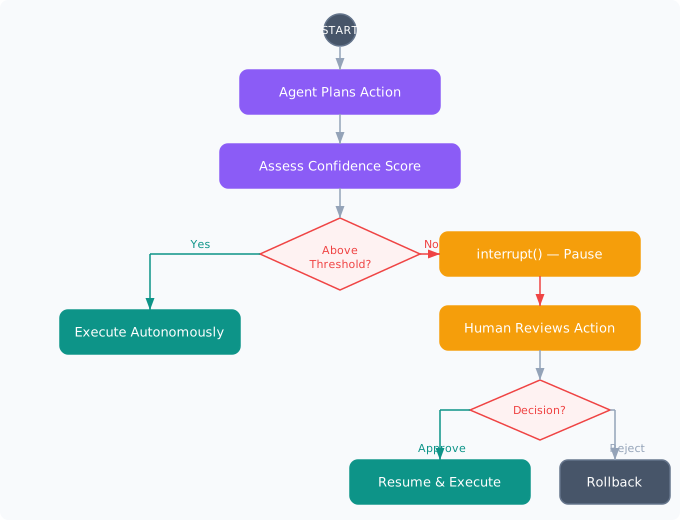
Figure 11-1. Human-in-the-loop interrupt flow. Blue nodes represent autonomous agent steps. Coral nodes mark interrupt and human review steps. Teal nodes show the approved execution path. The agent pauses at the interrupt, transfers control to a human, and resumes or rolls back based on the decision.
11.9 Patterns for Production
Several patterns emerge from organizations running human-in-the-loop agents at scale:
Progressive autonomy. Start with all actions requiring approval. As the system builds a track record, gradually increase the auto-approval threshold. This is not just about confidence calibration. It builds trust with stakeholders who are understandably nervous about autonomous agents. A system that starts fully supervised and earns autonomy is politically easier to deploy than one that starts autonomous and gets restricted after an incident.
Feedback loops. Every human decision (approve, reject, modify) is training data. Log the agent’s proposed action, the human’s decision, and the reason. Over time, this dataset reveals which action types the agent handles well and which consistently need correction. Use this data to fine-tune the confidence model and adjust routing thresholds.
Shadow mode. Before enabling real interrupts, run the agent in shadow mode: it takes actions autonomously but also computes what it would have escalated. Compare the shadow escalations against actual outcomes. If the agent would have escalated actions that turned out fine, the thresholds are too conservative. If it would have auto-approved actions that caused problems, the thresholds are too permissive.
Graceful degradation. When the human review system is unavailable (no reviewers online, Slack is down, the dashboard crashes), the agent should not crash or queue actions indefinitely. Define a fallback policy: queue up to N pending requests, then switch to a conservative default (reject all, or approve only the lowest-risk actions). Log everything for human review when the system comes back online.
Measuring Human-in-the-Loop Effectiveness
Track four metrics. First, approval rate by action type: above 95% suggests auto-approving is safe. Second, median time-to-decision: above 10 minutes indicates the UX needs work. Third, override rate: how often humans modify rather than simply approve or reject. Fourth, post-approval incident rate: how often approved actions lead to problems. Together these metrics tell you whether the human-in-the-loop is adding value or just adding latency.
Project: Approval Gateway
Build an approval gateway system that integrates with an LLM-powered agent to provide human oversight for high-stakes actions. The system should assess action risk, route decisions to appropriate reviewers, present a clear review interface, and resume or roll back agent execution based on human decisions. Use LangGraph with a persistent checkpointer.
Requirements
- Confidence scoring. Implement a multi-signal confidence scorer that evaluates at least four signals (LLM self-assessment, action precedent, policy compliance, estimated impact). Route actions to auto-execute, human review, or reject based on configurable thresholds.
- Approval gate. Build an async approval gate with timeout handling. Support approve, reject, and modify-then-approve responses. Persist pending requests so they survive process restarts.
- Escalation tiers. Implement at least two escalation tiers with automatic promotion on timeout. Track escalation metrics (rate, time-to-resolution per tier).
- Review interface. Create a review endpoint (REST API or CLI) that presents the action, reasoning, anomaly flags, and one-click decision buttons. Show time-pending and urgency indicators.
- LangGraph integration. Build the workflow as a LangGraph state graph with
interrupt()at the approval point. UseMemorySaverorPostgresSaverfor state persistence. Demonstrate pause and resume across separate process invocations. - Feedback logging. Log every decision (action proposed, confidence score, human decision, reason, time-to-decision) to a structured format. Generate a weekly summary showing approval rates and confidence calibration.
Domain Variants
| Variant | Domain | Approval Scenarios |
|---|---|---|
| Deployment Gatekeeper | Tech / Software | CI/CD pipeline approvals, production deploys, rollbacks |
| Clinical Order Reviewer | Healthcare | Medication orders, dosage changes, treatment plan modifications |
| Transaction Approver | Finance | Wire transfers, trade execution, credit limit adjustments |
| Content Moderator | Education | Course material publication, student communications, grade changes |
| Order Fulfillment Gate | E-commerce | High-value orders, bulk shipments, refund approvals |
| Contract Review Gate | Legal | Contract modifications, settlement offers, filing approvals |
Summary
Human-in-the-loop is not an admission that agents are unreliable. It is an engineering discipline that matches the level of autonomy to the stakes of the decision. Agents excel at speed, consistency, and tireless execution. Humans excel at contextual judgment, ethical reasoning, and handling novel situations. The best systems combine both: agents handle the 80% of decisions that are routine and well-understood, while humans focus their attention on the 20% that carry real risk. The engineering work is in the interrupt mechanism (pausing without losing state), the routing logic (knowing when to escalate), the review UX (making human decisions fast and accurate), and the resume mechanism (picking up exactly where the agent left off). LangGraph’s interrupt() and persistent checkpointing make this pattern implementable in production without building a custom state machine from scratch.
- The decision to require human approval should be driven by irreversibility and impact, not by agent capability. A perfectly capable agent should still pause before taking actions that cannot be undone.
- Confidence thresholds must be calibrated empirically, not guessed. Start conservative, track human approval rates per confidence band, and adjust weekly. A single threshold rarely works across action types. Maintain a per-action-type threshold table.
- Escalation policies prevent approval requests from becoming bottlenecks. Tiered reviewers with time-based auto-escalation ensure that no request blocks indefinitely, even when the primary reviewer is unavailable.
- Review UX determines the quality of human decisions. Lead with the decision, show the agent’s reasoning, highlight anomalies, and make the default action a single click. A poorly designed review interface negates the value of human oversight.
- LangGraph’s
interrupt()with persistent checkpointing solves the hardest engineering problem: resuming stateful execution after an arbitrary pause. Use database-backed checkpointers in production so state survives process restarts and deployments.
Exercises
| Type | Exercise | Description |
|---|---|---|
| Conceptual | Threshold trade-offs | Your agent auto-approves customer refunds when confidence exceeds 0.85. After two weeks, you find that 3% of auto-approved refunds were fraudulent (the customer had already received a chargeback). The fraud team wants to raise the threshold to 0.95, which would route 60% of all refund requests to human review. Analyze the trade-offs: what is the cost of each false positive (unnecessary human review) versus each false negative (approved fraud)? Propose a solution that does not simply move the threshold. |
| Coding | Multi-interrupt workflow | Build a LangGraph workflow with three sequential interrupt points: (1) plan approval, (2) resource allocation approval, and (3) execution approval. Each interrupt should present different context to the reviewer. Implement the workflow so that rejection at any stage rolls back all previously approved steps. Demonstrate the workflow with a test scenario where the second interrupt is rejected, and verify that the first step’s effects are reversed. |
| Design | Adaptive autonomy system | Design a system that automatically adjusts an agent’s autonomy level based on its track record. Define the data model for tracking agent decisions and outcomes, the algorithm for computing a trust score, the rules for promoting or demoting autonomy levels, and the safeguards that prevent the system from granting too much autonomy too quickly. Include a circuit breaker that reverts to full human oversight if the error rate spikes above a threshold within any rolling window. |