Chapter 02 of 20
LLM Primitives
A production order-fulfillment agent silently doubled its cloud bill in seventy-two hours. Nobody changed the prompt. Nobody deployed new code. A single upstream schema change added four extra fields to every tool-call response, ballooning each completion from 800 tokens to 3,200. The team had never
Part 1 — Foundations
LLM Primitives
A production order-fulfillment agent silently doubled its cloud bill in seventy-two hours. Nobody changed the prompt. Nobody deployed new code. A single upstream schema change added four extra fields to every tool-call response, ballooning each completion from 800 tokens to 3,200. The team had never instrumented token counts because they did not understand the request lifecycle well enough to know where costs accumulate. This chapter closes that gap.
Learning Objectives
- Explain how text becomes tokens and why tokenization choices affect cost, latency, and context limits
- Trace a full request/response lifecycle through the Completion API, including streaming and tool-call branches
- Use temperature, top-p, and other sampling parameters to control output determinism and creativity
- Structure conversations with system, user, and assistant messages for reliable agent behavior
- Implement tool/function calls and structured outputs to bridge LLMs with external systems
- Apply rate-limit handling and cost-optimization strategies suitable for production workloads
Tokens and Tokenization
Every interaction with a large language model begins and ends with tokens. Not characters, not words, not sentences — tokens. A token is the atomic unit of text that the model reads and produces. Understanding tokenization is not optional background knowledge; it is the single most important concept for predicting cost, managing context windows, and debugging the bizarre edge cases that plague production systems.
Modern LLMs use subword tokenization, most commonly a variant of Byte Pair Encoding (BPE). The algorithm starts with individual bytes and iteratively merges the most frequent adjacent pairs into new tokens. The result is a fixed vocabulary — typically 32,000 to 200,000 entries — where common words like "the" or "function" are single tokens, while rare words get split into subword fragments. The word "tokenization" itself might become ["token", "ization"] in one model's vocabulary and ["tok", "en", "iz", "ation"] in another's.
This has immediate practical consequences. First, token counts do not map intuitively to word counts. English prose averages roughly 1.3 tokens per word, but code can hit 2.5 tokens per word because variable names, operators, and whitespace each consume tokens. JSON is notoriously token-hungry: a simple key-value pair like "patient_id": "P-12345" costs around 12 tokens, while the semantic content, one identifier, could be expressed in 3. Second, every model has a context window measured in tokens, not characters. GPT-4o's 128,000-token context holds roughly 96,000 words of English prose but only about 50,000 words' worth of verbose JSON. Third, you are billed per token, both input tokens (your prompt) and output tokens (the model's response). A system that passes raw database rows into the context window instead of summaries can easily burn ten times the token budget for the same semantic content.
The Tokenizer as a Separate Artifact
A critical detail that catches many engineers off guard: the tokenizer is not the model. It is a separate artifact, trained independently before model training begins. The model never sees raw text — it sees sequences of integer IDs that the tokenizer produced. This separation means you can count tokens locally, before making any API call, using the same tokenizer the model uses. OpenAI's tiktoken library and Hugging Face's tokenizers package both let you do this. You should do this. If you are not counting tokens before sending requests, you are guessing at costs and hoping your messages fit within the context window.
Under the Hood
BPE tokenizers handle unseen words gracefully because they can always fall back to byte-level tokens. The string "Pneumonoultramicroscopicsilicovolcanoconiosis" has never appeared in any training corpus frequently enough to earn its own token, but BPE will split it into recognizable subwords. This fallback property is why LLMs can process any UTF-8 text — including emoji, code in any programming language, and text in non-Latin scripts — without an "unknown token" error. However, languages with complex scripts (Thai, Japanese, Arabic) tend to produce more tokens per semantic unit than English, making them more expensive to process.
Special Tokens and Their Role
Beyond the vocabulary of text fragments, every tokenizer includes special tokens that the model uses as structural markers. These include beginning-of-sequence (<|bos|>), end-of-sequence (<|eos|>), and various role delimiters that mark where system instructions end and user input begins. You rarely interact with these directly through the API, but they consume tokens from your context window. The chat formatting overhead — the invisible tokens that separate your messages from the model's responses — typically costs 10 to 50 tokens per message depending on the provider. In a multi-turn conversation with dozens of exchanges, this overhead becomes significant.
# Count tokens before sending — never guess
import tiktoken

encoding = tiktoken.encoding_for_model("gpt-4o")

prompt = "Explain the mechanism of action for metformin in Type 2 diabetes."
tokens = encoding.encode(prompt)
print(f"Token count: {len(tokens)}")   # 14 tokens
print(f"Tokens: {tokens}")              # [Explain, the, mechanism, ...]
print(f"Decoded: {[encoding.decode([t]) for t in tokens]}")
The Completion API
The Completion API is the single interface through which all LLM-powered applications communicate with the model. Despite the variety of things LLMs appear to do — answer questions, write code, analyze documents, call tools — every capability routes through the same endpoint: you send a list of messages, the model returns a completion. Understanding this interface at the protocol level is essential because every agent framework, every RAG pipeline, and every chat application is ultimately a wrapper around this one API call.
A completion request consists of three main components: a model identifier, an array of messages, and a set of optional parameters that control the model's behavior. The messages array is an ordered conversation history where each message has a role (system, user, or assistant) and content. The model does not remember previous requests — it is stateless, and every call must include the full conversation context you want the model to consider. This statelessness is not a limitation but a design choice that gives you complete control over what the model sees.
from openai import OpenAI

client = OpenAI()

response = client.chat.completions.create(
    model="gpt-4o",
    messages=[
        {"role": "system", "content": "You are a concise medical terminology assistant."},
        {"role": "user", "content": "Define 'angioplasty' in one sentence."},
    ],
    temperature=0.2,
    max_tokens=100,
)

print(response.choices[0].message.content)
# "Angioplasty is a minimally invasive procedure that uses a balloon
#  catheter to widen narrowed or blocked blood vessels."
The response object contains more than just text. It includes a usage field reporting exact token counts (prompt tokens, completion tokens, total tokens), a finish_reason indicating why the model stopped generating (length limit, natural stop, or tool call), and metadata about the model version used. Production systems should log all of these fields for every request. The finish_reason is particularly important. If it says "length" instead of "stop", the response was truncated and the output is incomplete. An agent that does not check this field will silently operate on partial data.
Common Mistake
Treating the LLM as stateful. New developers often send follow-up messages without including the conversation history, expecting the model to "remember" the previous exchange. It does not. Each API call is independent. If you want the model to consider previous turns, you must include them in the messages array. This also means you are paying for the full conversation history on every call — another reason to keep messages concise and to prune older turns when they are no longer relevant.
System, User, and Assistant Messages
The three message roles form the control surface of every LLM application. They are not cosmetic labels — the model weights treat them differently during inference, and using them correctly is the difference between a reliable agent and an unpredictable one.
The system message sets the behavioral frame. It appears first in the messages array and instructs the model on its persona, constraints, output format, and boundaries. Think of it as the agent's constitution: the rules it should follow regardless of what the user asks. A well-crafted system message for a financial compliance agent might specify: never provide investment advice, always cite the relevant regulation, respond in structured JSON, and refuse requests that ask for personally identifiable information. The model gives system messages elevated attention during inference, making them the most reliable place to encode hard constraints.
The user message represents the current input — the task, question, or instruction from the end user or from the orchestration layer. In an agent system, user messages are not always from a human. An orchestrator might inject a user message that says "Analyze the following tool output and decide the next action." The model does not distinguish between messages from a human and messages from code; it only sees the role label and content.
The assistant message contains the model's prior responses. When you include assistant messages in the conversation history, you are showing the model what it "already said." This is how you maintain conversational coherence across turns. But assistant messages serve a subtler purpose in agent systems: you can inject synthetic assistant messages to steer the model's behavior. For example, prefilling an assistant message with {"action": biases the model toward continuing with valid JSON, because it perceives itself as already having started a JSON response.
Message Ordering and Attention
The order of messages matters more than most documentation suggests. The model applies self-attention across the entire message sequence, but in practice, recent messages receive more effective attention than distant ones — a consequence of how positional embeddings work. This means that instructions buried deep in a long system message are more likely to be ignored than instructions placed near the end. For production agents, the most critical constraints should appear both at the beginning of the system message (for primacy) and restated at the end of the most recent user message (for recency).
messages = [
    # System: sets the behavioral frame
    {
        "role": "system",
        "content": (
            "You are a contract analysis assistant for a corporate legal team. "
            "Rules:\n"
            "1. Never provide legal advice — only factual analysis.\n"
            "2. Always cite the specific clause number.\n"
            "3. If a clause is ambiguous, flag it explicitly.\n"
            "4. Respond in JSON: {\"clauses\": [...], \"risks\": [...], \"ambiguities\": [...]}"
        ),
    },
    # User: the task
    {
        "role": "user",
        "content": "Analyze Section 4.2 of the attached vendor agreement for termination risks.",
    },
    # Assistant: prior model response (for multi-turn context)
    {
        "role": "assistant",
        "content": '{"clauses": [{"id": "4.2.1", "summary": "30-day termination for convenience"}], ...}',
    },
    # User: follow-up
    {
        "role": "user",
        "content": "Now compare that with Section 7.1 on liability caps. Respond in the same JSON format.",
    },
]
Temperature, Top-p, and Sampling Parameters
When a language model generates text, it does not deterministically select the "best" next word. Instead, it produces a probability distribution over its entire vocabulary at each step — a vector of 100,000+ floating-point numbers that sum to 1.0. The token it ultimately emits depends on how you sample from this distribution, and the sampling parameters are your primary control over the model's output characteristics.
Temperature is a scaling factor applied to the logits (raw model outputs) before they are converted to probabilities via the softmax function. Mathematically, each probability becomes p_i = exp(logit_i / T) / sum(exp(logit_j / T)) where T is the temperature. At temperature=0, the distribution collapses to a spike on the highest-probability token: greedy decoding, fully deterministic. At temperature=1.0, you get the model's native distribution. At temperature=2.0, the distribution flattens, giving low-probability tokens a better chance. The effect is intuitive. Lower temperatures produce more predictable, repetitive text. Higher temperatures produce more varied, creative, and occasionally incoherent text.
Top-p (nucleus sampling) takes a different approach. Instead of scaling probabilities, it truncates the distribution: sort all tokens by probability, then keep only the smallest set whose cumulative probability exceeds the threshold p. If top_p=0.9, the model considers only the tokens that collectively account for 90% of the probability mass, discarding the long tail of unlikely tokens. This dynamically adjusts the number of candidate tokens at each step — some positions might have 5 viable continuations, others might have 500.
In practice, you should use one or the other, not both simultaneously. For agent systems where reliability matters, temperature=0 (or near-zero, like 0.1) is the default choice. You want your agent to select the same tool, produce the same JSON structure, and reach the same conclusion every time it sees the same input. Save higher temperatures for creative tasks: generating marketing copy, brainstorming product names, or producing diverse synthetic training data.
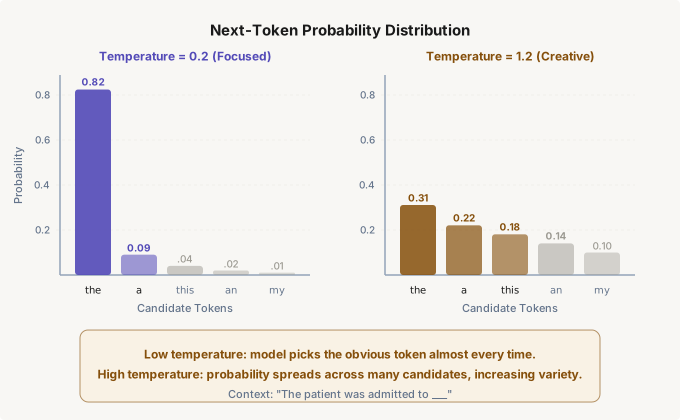
Figure 2.1 — How temperature reshapes the next-token probability distribution. Left: low temperature concentrates mass on the most likely token. Right: high temperature flattens the distribution, giving more tokens a chance of being selected.
Other Sampling Parameters
max_tokens caps the number of tokens the model will generate. This is a hard ceiling, not a target. The model will stop at this limit even mid-sentence. Set it too low and you get truncated output. Set it too high and you pay for unused capacity. For agent systems, calculate your expected output size (the length of a typical tool-call JSON or reasoning trace) and add a 30% buffer.
frequency_penalty and presence_penalty reduce repetition. Frequency penalty scales with how many times a token has already appeared; presence penalty applies a flat penalty to any token that has appeared at all. These are useful for free-form text generation but rarely needed for structured agent outputs where the format constraints already prevent repetition.
seed is available on some providers and enables reproducible outputs when combined with temperature=0. For testing and evaluation, always set a seed so you can deterministically reproduce the model's behavior. In production, omit it — you want the model to degrade gracefully across slightly different conditions rather than overfit to one execution path.
Streaming
Without streaming, an API call blocks until the model has generated its entire response. For a 500-token completion at a typical generation rate of 50 tokens per second, that is a 10-second wait during which your application shows nothing. Streaming changes the communication pattern from request-response to request-stream. The model sends tokens as they are generated, and your application receives them incrementally via Server-Sent Events (SSE).
Enabling streaming is a one-parameter change (stream=True), but handling it correctly requires care. Each chunk in the stream is a partial delta: a fragment of the message being built. You must accumulate these deltas to reconstruct the full response. Tool calls arrive in fragments too: first the function name, then pieces of the arguments JSON. You cannot parse the tool call until the stream signals it is complete.
stream = client.chat.completions.create(
    model="gpt-4o",
    messages=messages,
    stream=True,
)

full_response = ""
for chunk in stream:
    delta = chunk.choices[0].delta
    if delta.content:
        full_response += delta.content
        print(delta.content, end="", flush=True)  # Real-time display

# After the stream ends, full_response contains the complete text
print(f"\n\nTotal length: {len(full_response)} characters")
Streaming is not just a user-experience optimization. In agent architectures, streaming enables early exit: if you detect that the model is generating an obviously wrong tool call (perhaps referencing a tool that does not exist), you can abort the stream and retry with a corrected prompt, saving both time and tokens. Some orchestration frameworks also use streaming to implement speculative execution — starting to prepare for the most likely tool call before the model has finished deciding.
Production Consideration
When streaming over HTTP/2 in production, be aware that load balancers and reverse proxies may buffer SSE responses or enforce idle timeouts. Configure NGINX with proxy_buffering off and set proxy_read_timeout high enough to accommodate long completions. AWS ALBs have a 60-second idle timeout by default that will silently kill streaming connections during complex reasoning tasks. Test your entire infrastructure path with a slow-generating prompt before launching.
Tool and Function Calls
Tool calling is the mechanism that transforms a language model from a text generator into an agent. Without tool calls, the model can only produce strings. With tool calls, the model can decide to invoke external functions — query a database, call an API, read a file, execute code — and then incorporate the results back into its reasoning. This is the foundational capability that the rest of this book builds upon.
The protocol works as follows. In your API request, you include a tools array that describes the available functions: their names, descriptions, and parameter schemas (specified as JSON Schema). The model reads these descriptions alongside the conversation and decides whether to call a tool and, if so, which one with what arguments. If it decides to call a tool, the response's finish_reason is "tool_calls" instead of "stop", and the message contains a tool_calls array with the function name and arguments as a JSON string.
Your application is then responsible for actually executing the function, collecting the result, and sending it back to the model as a message with role: "tool". The model sees this result and either produces a final text response or decides to call another tool. This loop, model decides, application executes, model integrates, is the agent loop. Chapter 4 formalizes this pattern, but the underlying mechanism is just the tool-call protocol defined here.
# Define tools available to the model
tools = [
    {
        "type": "function",
        "function": {
            "name": "get_stock_price",
            "description": "Get the current stock price for a given ticker symbol.",
            "parameters": {
                "type": "object",
                "properties": {
                    "ticker": {
                        "type": "string",
                        "description": "Stock ticker symbol, e.g. 'AAPL'",
                    },
                    "currency": {
                        "type": "string",
                        "enum": ["USD", "EUR", "GBP"],
                        "description": "Currency for the price. Defaults to USD.",
                    },
                },
                "required": ["ticker"],
            },
        },
    }
]

response = client.chat.completions.create(
    model="gpt-4o",
    messages=[
        {"role": "system", "content": "You are a financial data assistant."},
        {"role": "user", "content": "What is Apple's current stock price?"},
    ],
    tools=tools,
    tool_choice="auto",  # Let the model decide whether to call a tool
)

# The model responds with a tool call, not text
tool_call = response.choices[0].message.tool_calls[0]
print(tool_call.function.name)       # "get_stock_price"
print(tool_call.function.arguments)  # '{"ticker": "AAPL"}'
The quality of tool descriptions directly determines how reliably the model selects and parameterizes tools. Vague descriptions like "does stuff with data" lead to misrouted tool calls. Precise descriptions like "Retrieves the current spot price for a publicly traded stock, identified by its NYSE or NASDAQ ticker symbol" give the model enough context to make correct decisions. The parameter schema serves double duty: it constrains the model's output to valid types and provides documentation the model reads during inference.
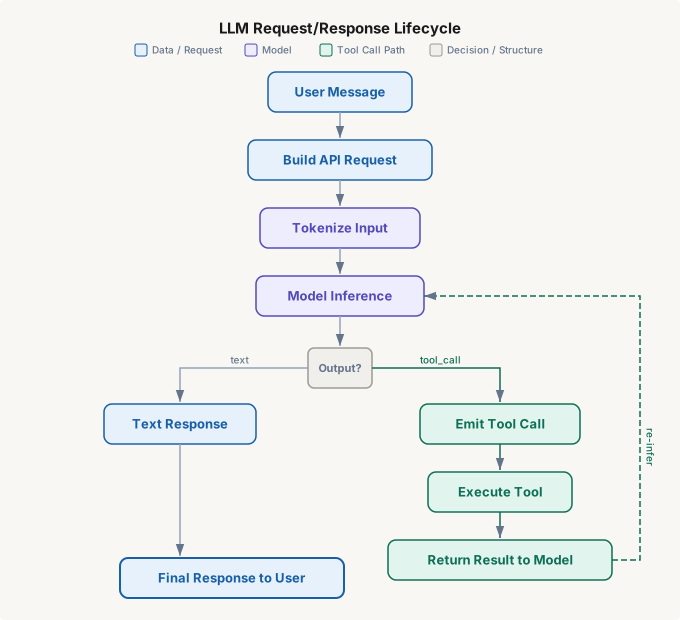
Figure 2.2 — The LLM request/response lifecycle. After model inference, the output branches: either a direct text response (left path) or a tool call that must be executed and fed back to the model for another inference pass (right path). The tool-call loop can repeat multiple times before producing a final response.
Tool Choice and Parallel Tool Calls
The tool_choice parameter controls whether and how the model uses tools. Set to "auto", the model decides on its own. Set to "none", tool calls are disabled entirely, useful for forcing a text-only response. Set to a specific function name, the model is forced to call that function. In agent systems, you will use all three modes: "auto" for general operation, "none" when you want a summary after tool execution, and forced calls when the orchestrator knows exactly which tool should run next.
Some models support parallel tool calls — returning multiple tool calls in a single response. If the model determines that answering the user's question requires both a database lookup and a weather API call, it can issue both simultaneously rather than making two sequential inference passes. Your application must handle this by executing the calls (potentially in parallel), collecting all results, and sending them back as separate tool-result messages. This feature can dramatically reduce latency in multi-tool agent architectures.
Structured Outputs
Free-form text responses are useful for chatbots but problematic for agents. When an agent needs to return a JSON object with specific fields, or when a downstream system expects data in a precise schema, you need the model to produce structured output reliably. There are three approaches, listed in order of increasing reliability.
Prompt-based structuring relies on instructions in the system message: "Respond only in JSON with keys: action, parameters, reasoning." This works surprisingly well but offers no guarantees. The model might include a preamble before the JSON, use slightly different key names, or produce syntactically invalid JSON — especially under high temperature or when the prompt is complex.
JSON mode is a provider-level feature (available as response_format={"type": "json_object"} in the OpenAI API) that constrains the model's output to valid JSON. The model will always produce parseable JSON, but the schema is still not enforced. You might get valid JSON with wrong keys or missing fields.
Structured outputs with schema enforcement is the strongest option. You provide a JSON Schema definition, and the provider's decoding engine constrains the token generation to only produce tokens that result in schema-compliant JSON. This means you get guaranteed type-correct, schema-valid output on every call. For agent systems, this is the correct choice for any tool output that feeds into downstream processing.
from pydantic import BaseModel
from openai import OpenAI

class DiagnosisAssessment(BaseModel):
    condition: str
    confidence: float
    icd10_code: str
    reasoning: str
    recommended_tests: list[str]

client = OpenAI()
completion = client.beta.chat.completions.parse(
    model="gpt-4o",
    messages=[
        {"role": "system", "content": "You are a clinical decision support assistant."},
        {"role": "user", "content": "Patient presents with acute onset chest pain, "
         "diaphoresis, and ST elevation in leads II, III, aVF."},
    ],
    response_format=DiagnosisAssessment,
)

assessment = completion.choices[0].message.parsed
print(assessment.condition)          # "Inferior ST-elevation myocardial infarction"
print(assessment.icd10_code)         # "I21.1"
print(assessment.recommended_tests)  # ["Troponin I", "CK-MB", "Coronary angiography"]
Under the Hood
Schema-enforced structured outputs work by modifying the model's sampling mask at each token generation step. If the schema requires the next value to be a number, all non-numeric tokens are masked to zero probability before sampling. This is implemented at the inference engine level using constrained decoding (sometimes called grammar-guided generation). The model is not "trying harder" to follow the schema — it is physically prevented from generating tokens that would violate it. This is why structured outputs are strictly more reliable than prompt-based approaches: the guarantee is mechanical, not behavioral.
Rate Limits and Error Handling
Every LLM API enforces rate limits, and your production system will hit them. The limits typically operate on three dimensions simultaneously: requests per minute (RPM), tokens per minute (TPM), and sometimes tokens per day (TPD). You can be within your RPM limit but exceed TPM because a few requests carried enormous context windows. The limits vary by model tier, organization, and payment plan — and they can change without notice.
When you hit a rate limit, the API returns HTTP 429 with a Retry-After header indicating how many seconds to wait. The correct handling pattern is exponential backoff with jitter: wait a base delay, double it on each retry, and add a random component to prevent thundering-herd effects when multiple processes retry simultaneously. Most client libraries implement this automatically, but you should verify the behavior and configure the maximum retry count and backoff ceiling.
import time
import random
from openai import OpenAI, RateLimitError

client = OpenAI()

def call_with_backoff(messages, max_retries=5):
    """LLM call with exponential backoff and jitter."""
    for attempt in range(max_retries):
        try:
            return client.chat.completions.create(
                model="gpt-4o",
                messages=messages,
                temperature=0,
            )
        except RateLimitError as e:
            if attempt == max_retries - 1:
                raise
            # Exponential backoff: 1s, 2s, 4s, 8s, 16s + jitter
            wait = (2 ** attempt) + random.uniform(0, 1)
            print(f"Rate limited. Retrying in {wait:.1f}s (attempt {attempt + 1})")
            time.sleep(wait)
    raise RuntimeError("Exhausted retries")
Beyond rate limits, you must handle several other failure modes. Context length exceeded (HTTP 400) means your messages array plus the expected output exceeds the model's context window. Content filter triggered means the input or output was flagged by the provider's safety filters. Server errors (HTTP 500/503) indicate transient provider issues. Timeout means the request took longer than your client's configured timeout, common with large context windows and high max_tokens values. Each requires a different recovery strategy: truncate context, rephrase the prompt, retry, or fall back to a different model.
Common Mistake
Retrying on every error without distinguishing error types. A 400 error (bad request) will never succeed on retry — retrying it just wastes time and quota. A 429 (rate limit) will succeed after waiting. A 500 (server error) might succeed on immediate retry. Build your error handler with a classification layer that routes each error type to the appropriate recovery strategy. The naive except Exception: retry() pattern causes cascading failures in production.
Cost Optimization
LLM API costs follow a simple formula: (input_tokens + output_tokens) x price_per_token. Optimizing that formula requires understanding where tokens accumulate across your entire system. In an agent that makes five tool calls per user request, the conversation history grows with each round trip. By the fifth call, the model is re-reading the original system message, the user query, four previous assistant responses, and four tool results. The cumulative input token count grows quadratically with the number of turns.
The most impactful optimization strategies, in order of typical savings:
- Prompt compression. Audit your system messages and tool descriptions for verbosity. Remove examples that repeat the same pattern. Use abbreviations in tool-result messages that the model can unpack. A system message reduced from 800 tokens to 300 tokens saves 500 tokens on every single request — across millions of requests, this dominates all other optimizations.
- Context window management. Do not pass the full conversation history when only the last two turns matter. Implement a sliding window that keeps the system message, the current user query, and the N most recent exchanges. For long-running agents, periodically summarize older turns into a compact "conversation so far" assistant message.
- Model routing. Not every request needs GPT-4o. A classification layer that routes simple queries to a smaller, cheaper model (GPT-4o-mini, Claude Haiku) and reserves the expensive model for complex reasoning can reduce costs by 70-90% while maintaining quality where it matters. This is sometimes called a "model cascade" or "LLM router."
- Caching. If the same prompt appears repeatedly (common in batch processing and evaluation), cache the response keyed on the full messages array. Some providers offer server-side prompt caching that reduces costs when the prefix of your messages is identical across requests.
- Output token limits. Set
max_tokensto a reasonable ceiling. If your agent's tool-call JSON is never longer than 200 tokens, do not leave the default at 4,096. This does not save money directly (you only pay for tokens actually generated), but it prevents runaway completions where the model generates thousands of tokens of irrelevant text.
Production Consideration
Instrument your token usage from day one. Log input tokens, output tokens, model used, and latency for every request. Build a dashboard that shows cost per user, cost per agent task, and cost per tool call. Teams that wait until they receive a surprising bill to start tracking costs always discover that one poorly optimized agent path accounts for 80% of their spend. The telemetry is trivial to implement — the response object already contains the token counts — and the insight it provides is indispensable.
| Strategy | Typical Savings | Implementation Effort | Trade-off |
|---|---|---|---|
| Prompt compression | 20-50% | Low | Requires careful testing to ensure no quality loss |
| Sliding window context | 30-60% | Medium | May lose relevant context from older turns |
| Model routing | 70-90% | Medium | Adds latency for routing decision; risk of quality drops |
| Response caching | 40-80% | Low | Only helps with repeated identical prompts |
| Max token limits | 5-15% | Trivial | Risk of truncation if set too aggressively |
Project: LLM Explorer
Build an interactive command-line tool that lets you experiment with every LLM primitive covered in this chapter. The LLM Explorer accepts a prompt and lets you modify parameters in real time, observe their effects on output quality, token usage, latency, and cost.
Core Requirements
- Token inspector. Before sending any request, display the tokenized form of the input: token IDs, decoded token strings, and total count. Use
tiktokenfor OpenAI models or the appropriate tokenizer for your provider. - Parameter playground. Accept command-line flags or an interactive menu to set temperature (0.0-2.0), top_p (0.0-1.0), max_tokens, frequency_penalty, and presence_penalty. Send the same prompt with different settings and display outputs side by side.
- Streaming visualizer. Send a streaming request and display tokens as they arrive, with timing information: time to first token and tokens per second. Color-code the stream to distinguish content tokens from whitespace and punctuation.
- Tool call tracer. Define at least three sample tools (e.g., get_weather, calculate, search_knowledge_base). Send prompts that trigger tool calls and display the full lifecycle: model decision, emitted tool call, simulated execution, result injection, and final response.
- Structured output validator. Define a Pydantic model, request structured output, and display the parsed result alongside the raw JSON. Show what happens when you switch from structured output mode to plain JSON mode to prompt-only mode.
- Cost calculator. After every request, display: input tokens, output tokens, total tokens, estimated cost (based on current model pricing), and cumulative session cost.
Domain Variants
| Domain | Example Tools |
|---|---|
| Tech / Software | GitHub API, CI/CD status, code search |
| Healthcare | Drug interaction check, ICD-10 lookup, lab results |
| Finance | Stock price, SEC filing search, risk calculator |
| Education | Curriculum search, grade calculator, LMS query |
| E-commerce | Product search, inventory check, price comparison |
| Legal | Case law search, contract clause lookup, statute finder |
Stretch Goals
- Add a
--compareflag that sends the same prompt to multiple models (GPT-4o, GPT-4o-mini, Claude Sonnet) and displays quality, speed, and cost differences in a table. - Implement prompt caching — detect repeated prompts and serve cached responses, displaying the cost savings.
- Add a rate-limit simulator that artificially throttles requests and demonstrates your backoff strategy working correctly.
Summary
This chapter dismantled the LLM API into its constituent parts — the primitives that every agent, every RAG pipeline, and every production AI system is built from. You now understand that tokens are the atomic unit of LLM computation, and that the tokenizer is a separate artifact you can (and should) run locally to predict costs and manage context windows. The Completion API is stateless: every call must include the full conversation context, which means every message in the history costs tokens on every subsequent call.
You learned that temperature and top-p control the randomness of token selection, and that agent systems almost always want low temperature for deterministic, reproducible behavior. The three message roles — system, user, and assistant — form the control surface of every LLM application, with system messages providing the most reliable anchor for behavioral constraints. Streaming transforms the user experience and enables early-exit optimizations in agent loops.
Tool calling is the mechanism that elevates LLMs from text generators to agents: the model decides to invoke a function, your code executes it, and the result feeds back into the next inference pass. Structured outputs with schema enforcement guarantee that the model's output conforms to your data contract — a non-negotiable requirement for production agent systems. Finally, rate limits and cost optimization are not afterthoughts but core architectural concerns that determine whether your system is economically viable at scale.
Key Takeaways
- Tokens, not words, are the unit of cost, context, and computation. Count them before sending requests, and instrument their usage across your system from the start.
- The Completion API is stateless. You control exactly what the model sees by constructing the messages array — this is a feature, not a limitation. Use it to manage context, reduce costs, and steer behavior.
- Temperature near zero for agents, higher for creativity. Sampling parameters are your primary lever for controlling output determinism. Do not use both temperature and top-p simultaneously.
- Tool calls are the bridge from language to action. The quality of your tool descriptions determines how reliably the model selects and parameterizes them. Treat tool schemas as a first-class API contract.
- Cost grows quadratically with conversation length in multi-turn agents. Prompt compression, context windowing, and model routing are not premature optimizations — they are required for economic viability.
Exercises
| Type | Exercise | Description |
|---|---|---|
| Conceptual | Token budget analysis | You are designing an agent that processes customer support tickets. Each ticket contains an average of 350 words of customer text, your system message is 200 tokens, and each tool call adds approximately 150 tokens of result. The agent averages 3 tool calls per ticket. Calculate the total input tokens consumed per ticket by the final inference pass. Then calculate the daily cost at 10,000 tickets/day using GPT-4o pricing ($2.50 per million input tokens). How much would you save by compressing the system message to 80 tokens and summarizing tool results to 60 tokens each? |
| Coding | Temperature sweep experiment | Write a script that sends the same prompt to GPT-4o at seven temperature values: 0, 0.2, 0.5, 0.7, 1.0, 1.5, and 2.0. For each temperature, make 10 identical requests and measure: (a) the number of unique responses, (b) the average response length in tokens, and (c) the semantic similarity between responses (use an embedding model to compute pairwise cosine similarity). Plot the results showing how each metric changes with temperature. What temperature produces the best trade-off between consistency and diversity for a code-generation task versus a creative-writing task? |
| Design | Model routing architecture | Design a model routing system for a multi-tenant SaaS platform where each customer has a different quality/cost preference. The system should classify incoming requests by complexity (simple factual lookup, moderate reasoning, complex multi-step analysis) and route them to the appropriate model tier. Specify: (1) what features the classifier uses, (2) how you would train or configure the classifier, (3) the fallback strategy when the cheap model's output fails a quality check, and (4) how you would expose cost/quality controls to tenants. Draw the architecture diagram and estimate the cost savings compared to routing everything through GPT-4o. |