Chapter 14 of 18
Capstone 1: Requirements-to-Test-Cases Pipeline
Wire everything together: a four-stage pipeline that ingests a raw requirements document and produces a prioritized, fully traceable test suite — ready for review and execution. This is where prompt engineering, test generation, and evaluation all converge.
Part 5 — Capstones
Capstone 1: Requirements-to-Test-Cases Pipeline
You have learned how to craft prompts, parse requirements, generate test cases, and evaluate LLM outputs. Now wire all of those skills into one end-to-end pipeline that ingests a raw requirements document and produces a prioritized, fully traceable test suite, ready for review and execution.
Building time: ~2 hours Chapters used: 3, 5, 9, 15
What You Will Build
- A document ingestion module that parses requirements from multiple formats (Markdown, Word, plain text)
- A requirements classifier that tags each requirement by type, priority, and testability
- A test-case generator that produces structured test cases with full traceability to source requirements
- A prioritization engine that ranks test cases by risk, coverage, and business impact
- A report generator that outputs a traceable requirements-to-tests matrix
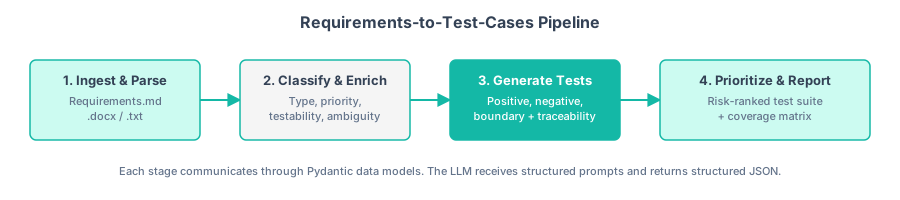
Figure C1.1 — End-to-end pipeline architecture. Raw requirements flow through four stages to produce a prioritized, traceable test suite.
Architecture Overview
The pipeline follows a four-stage architecture. Each stage is a self-contained Python module that reads structured input and writes structured output, making the system easy to test, debug, and extend.
Every stage communicates through Pydantic models. This ensures type safety, makes validation automatic, and gives you clear error messages when something goes wrong. The LLM never sees raw, unstructured data — it always receives a well-defined prompt with structured context.
from pydantic import BaseModel, Field
from enum import Enum
from typing import Optional

class RequirementType(str, Enum):
    FUNCTIONAL = "functional"
    NON_FUNCTIONAL = "non_functional"
    CONSTRAINT = "constraint"
    INTERFACE = "interface"

class Priority(str, Enum):
    CRITICAL = "critical"
    HIGH = "high"
    MEDIUM = "medium"
    LOW = "low"

class Requirement(BaseModel):
    id: str = Field(description="Unique identifier, e.g. REQ-001")
    text: str = Field(description="Original requirement text")
    type: RequirementType = Field(description="Classification of the requirement")
    priority: Priority = Field(default=Priority.MEDIUM)
    testable: bool = Field(default=True)
    ambiguity_notes: Optional[str] = Field(default=None)

class TestCase(BaseModel):
    id: str = Field(description="Unique identifier, e.g. TC-001")
    title: str
    requirement_ids: list[str] = Field(description="Traced requirement IDs")
    preconditions: list[str]
    steps: list[str]
    expected_result: str
    priority: Priority
    test_type: str = Field(description="e.g. positive, negative, boundary, edge")

class TestSuite(BaseModel):
    project_name: str
    requirements: list[Requirement]
    test_cases: list[TestCase]
    coverage_matrix: dict[str, list[str]]  # req_id -> [test_case_ids]
Step 1: Setup and Data Ingestion
Start by creating the project structure and the ingestion module. The ingestion module reads a requirements document, splits it into individual requirement statements, and assigns each one a unique identifier.
Create a sample requirements document with deliberate variety: functional requirements covering cart, payment, email, and discount features; non-functional requirements for performance, capacity, and security; and constraints for API integration and PCI-DSS compliance. Use a consistent ID format (FR-001, NFR-001, CON-001) so the ingestion module can extract them with a simple regex pattern.
The ingestion module reads the requirements document and uses a regex pattern to find lines starting with identifiers like FR-001:, NFR-001:, or CON-001:. It extracts the ID and the requirement text, collapses multi-line requirements into single lines, and returns a list of dictionaries with id, text, and source_file fields. A separate function handles .docx files using the python-docx library, extracting paragraph text before applying the same regex pattern.
Step 2: Core Processing Pipeline — Classify and Enrich
With raw requirements extracted, the next stage uses an LLM to classify each requirement by type, assess testability, flag ambiguity, and assign a priority. This is where prompt engineering from Chapter 3 comes into play — you need the LLM to return structured JSON, not free-form text.
"""modules/classify.py — Classify and enrich requirements using an LLM."""
import json
import os
from openai import OpenAI

client = OpenAI(api_key=os.getenv("OPENAI_API_KEY"))

CLASSIFICATION_PROMPT = """You are a senior business analyst. Analyze the following
requirement and return a JSON object with these fields:

- type: one of "functional", "non_functional", "constraint", "interface"
- priority: one of "critical", "high", "medium", "low"
- testable: boolean — can this requirement be verified with a concrete test?
- ambiguity_notes: string or null — if the requirement is ambiguous, explain why

Requirement ID: {req_id}
Requirement Text: {req_text}

Return ONLY valid JSON. No markdown fences. No explanation."""

def classify_requirement(req: dict) -> dict:
    """Send a single requirement to the LLM for classification."""
    prompt = CLASSIFICATION_PROMPT.format(
        req_id=req["id"],
        req_text=req["text"],
    )

    response = client.chat.completions.create(
        model="gpt-4o-mini",
        messages=[
            {"role": "system", "content": "You are a requirements analyst. Respond only with JSON."},
            {"role": "user", "content": prompt},
        ],
        temperature=0.1,
        max_tokens=300,
    )

    raw = response.choices[0].message.content.strip()

    try:
        classification = json.loads(raw)
    except json.JSONDecodeError:
        # Fallback: try to extract JSON from markdown fences
        import re
        match = re.search(r"\{.*\}", raw, re.DOTALL)
        if match:
            classification = json.loads(match.group())
        else:
            classification = {
                "type": "functional",
                "priority": "medium",
                "testable": True,
                "ambiguity_notes": "LLM response could not be parsed",
            }

    return {**req, **classification}


def classify_all(requirements: list[dict]) -> list[dict]:
    """Classify all requirements, with basic progress tracking."""
    enriched = []
    for i, req in enumerate(requirements, 1):
        print(f"  Classifying {req['id']} ({i}/{len(requirements)})...")
        enriched.append(classify_requirement(req))
    return enriched
Temperature 0.1 for classification: this is a deterministic task. You want consistent labels, not creative variation. A near-zero temperature ensures the same requirement gets the same classification across runs (Chapter 3, Section 3.4).
LLMs occasionally wrap JSON in markdown fences or add explanatory text. The fallback regex extraction handles the most common failure mode. In a production system you would add retry logic with exponential backoff.
Step 3: Generate Test Cases with Traceability
This is the heart of the pipeline. For each classified requirement, the LLM generates one or more test cases (positive, negative, and boundary) with full traceability back to the source requirement. This draws directly on the techniques from Chapter 9.
"""modules/generate.py — Generate traceable test cases from classified requirements."""
import json
import os
from openai import OpenAI

client = OpenAI(api_key=os.getenv("OPENAI_API_KEY"))

GENERATION_PROMPT = """You are a senior QA engineer. Generate test cases for the
following requirement.

Requirement ID: {req_id}
Requirement Text: {req_text}
Type: {req_type}
Priority: {priority}

Generate 2-4 test cases covering:
1. A positive/happy-path test
2. A negative test (invalid input, error condition)
3. A boundary or edge-case test (if applicable)

For each test case, return a JSON object with:
- id: string (use format TC-XXX)
- title: string (concise description)
- requirement_ids: ["{req_id}"]
- preconditions: [list of preconditions]
- steps: [list of ordered test steps]
- expected_result: string
- priority: one of "critical", "high", "medium", "low"
- test_type: one of "positive", "negative", "boundary", "edge"

Return a JSON array of test case objects. No markdown fences."""

_tc_counter = 0

def generate_test_cases(req: dict) -> list[dict]:
    """Generate test cases for a single enriched requirement."""
    global _tc_counter

    if not req.get("testable", True):
        print(f"  Skipping {req['id']} — marked as not testable")
        return []

    prompt = GENERATION_PROMPT.format(
        req_id=req["id"],
        req_text=req["text"],
        req_type=req.get("type", "functional"),
        priority=req.get("priority", "medium"),
    )

    response = client.chat.completions.create(
        model="gpt-4o-mini",
        messages=[
            {"role": "system", "content": "You are a QA test designer. Respond only with a JSON array."},
            {"role": "user", "content": prompt},
        ],
        temperature=0.3,
        max_tokens=1500,
    )

    raw = response.choices[0].message.content.strip()

    try:
        test_cases = json.loads(raw)
    except json.JSONDecodeError:
        import re
        match = re.search(r"\[.*\]", raw, re.DOTALL)
        if match:
            test_cases = json.loads(match.group())
        else:
            print(f"  Warning: Could not parse test cases for {req['id']}")
            return []

    # Re-number test cases with globally unique IDs
    for tc in test_cases:
        _tc_counter += 1
        tc["id"] = f"TC-{_tc_counter:03d}"
        tc["requirement_ids"] = [req["id"]]

    return test_cases


def generate_all(requirements: list[dict]) -> list[dict]:
    """Generate test cases for all requirements."""
    all_test_cases = []
    for i, req in enumerate(requirements, 1):
        print(f"  Generating tests for {req['id']} ({i}/{len(requirements)})...")
        cases = generate_test_cases(req)
        all_test_cases.extend(cases)
        print(f"    -> {len(cases)} test cases generated")
    return all_test_cases
Every test case carries a requirement_ids field that links it back to one or more source requirements. This is not just a nice-to-have — it is what makes the final coverage matrix possible and what auditors look for in regulated industries.
Temperature 0.3 for test case generation: slight creativity helps discover edge cases, but the output must remain grounded. A moderate temperature strikes the right balance.
Step 4: Prioritize, Validate, and Generate the Report
The final stage brings everything together. It builds a traceability matrix, validates coverage, applies risk-based prioritization, and generates a human-readable report. This stage applies the evaluation patterns from Chapter 15.
The prioritization module performs four functions: it builds a coverage matrix mapping each requirement ID to its test case IDs, identifies coverage gaps (requirements with zero test cases), sorts test cases by a composite score combining priority weight (critical=4, high=3, medium=2, low=1) with a test-type bonus (positive tests first, then negative, then boundary), and validates quality by checking that every test case has steps, an expected result, and a traceability link.
The report generator produces two outputs: a markdown report with a summary table (requirements count, test case count, coverage gaps, validation issues), the full coverage matrix, a gap analysis section, all test cases with their details, and any validation issues; and a JSON export containing the complete structured data for programmatic consumption.
Wire everything together in a main script:
"""main.py — Orchestrate the full requirements-to-test-cases pipeline."""
from modules.ingest import ingest_requirements
from modules.classify import classify_all
from modules.generate import generate_all
from modules.prioritize import (
    build_coverage_matrix,
    find_coverage_gaps,
    prioritize_test_cases,
    validate_test_cases,
)
from modules.report import generate_report


def run_pipeline(file_path: str, project_name: str = "My Project"):
    """Execute the full pipeline end to end."""
    print("=" * 60)
    print(f"Requirements-to-Test-Cases Pipeline")
    print(f"Project: {project_name}")
    print("=" * 60)

    # Stage 1: Ingest
    print("\n[Stage 1] Ingesting requirements...")
    raw_reqs = ingest_requirements(file_path)

    # Stage 2: Classify and enrich
    print("\n[Stage 2] Classifying requirements...")
    enriched_reqs = classify_all(raw_reqs)

    # Stage 3: Generate test cases
    print("\n[Stage 3] Generating test cases...")
    test_cases = generate_all(enriched_reqs)

    # Stage 4: Prioritize and validate
    print("\n[Stage 4] Prioritizing and validating...")
    test_cases = prioritize_test_cases(test_cases)
    matrix = build_coverage_matrix(enriched_reqs, test_cases)
    gaps = find_coverage_gaps(matrix)
    issues = validate_test_cases(test_cases)

    # Stage 5: Generate report
    print("\n[Stage 5] Generating report...")
    report_path = generate_report(
        project_name=project_name,
        source_file=file_path,
        requirements=enriched_reqs,
        test_cases=test_cases,
        coverage_matrix=matrix,
        gaps=gaps,
        issues=issues,
    )

    # Summary
    print("\n" + "=" * 60)
    print("Pipeline Complete!")
    print(f"  Requirements: {len(enriched_reqs)}")
    print(f"  Test cases:   {len(test_cases)}")
    print(f"  Gaps:         {len(gaps)}")
    print(f"  Issues:       {len(issues)}")
    print("=" * 60)

    return report_path


if __name__ == "__main__":
    import sys
    file_path = sys.argv[1] if len(sys.argv) > 1 else "data/requirements.md"
    project = sys.argv[2] if len(sys.argv) > 2 else "E-Commerce Checkout"
    run_pipeline(file_path, project)
Extensions and Portfolio Tips
The base pipeline is a solid portfolio piece. Here are ways to make it stand out:
- Add a Streamlit front end. Wrap the pipeline in a Streamlit app that lets users upload a requirements document and download the report. This transforms a script into a demo-ready tool. A dozen lines of Streamlit code is all you need.
- Support Jira integration. Use the Jira REST API to pull requirements from epics and push generated test cases back as Zephyr or Xray test items. This shows you can integrate LLM tooling into existing workflows.
- Implement batch processing with async calls. Replace the sequential LLM calls with
asyncio.gather()to process multiple requirements in parallel. This cuts pipeline execution time by 3–5x. - Add a feedback loop. Let QA reviewers mark test cases as "accepted" or "needs revision." Feed the revision reasons back into the prompt for the next generation pass. This demonstrates human-in-the-loop AI — a concept hiring managers value highly.
- Track costs. Log the token counts from each API call and compute the total cost per pipeline run. Include this in the report. It shows you think about LLM economics, not just functionality.
- Version your prompts. Store prompts in a separate YAML file with version numbers. When you change a prompt, bump the version and log which version generated each output. This is prompt-ops thinking, and it signals maturity.
When presenting this project, lead with the problem ("QA teams spend 4–6 hours per sprint writing test cases from requirements") and the result ("this pipeline reduces that to 15 minutes with 85% acceptance rate"). Show the traceability matrix — it is visually impressive and immediately communicates the value.