Chapter 03 of 20
Agent Anatomy
A customer-service agent went live on Monday and by Tuesday had refunded $14,000 to users who never asked for refunds. The LLM was fine. The architecture had no memory layer, no input validation, no confirmation gate. This chapter is the teardown.
Part 1 — Foundations
Agent Anatomy
A customer-service agent goes live on Monday morning. By Tuesday afternoon it has refunded $14,000 to users who never asked for refunds, because nobody gave it a memory of which conversations were already resolved. The LLM was sharp. The architecture was hollow. This chapter opens the hood.
The Failure That Teaches
The refund agent's designers gave it a clear system prompt: "You are a helpful customer-service agent for Acme Corp. When a customer requests a refund, process it." They connected a process_refund tool. They tested it on ten sample conversations and it worked flawlessly. Then they deployed it.
Within hours, the agent began processing refunds for customers who had simply asked about their order status. A user would write "I'm wondering about my order #4821 — any update?" The agent, lacking any memory of what had already happened in that conversation thread, would interpret the vague query as a complaint, reason that complaints often lead to refunds, and call process_refund. It had no perception layer to distinguish a status inquiry from a refund request. It had no memory to recall that this same customer had received an update five minutes earlier. It had no planning mechanism to pause and verify before taking an irreversible action.
The LLM was performing exactly as language models do: generating plausible next-token sequences given its context window. The failure was architectural. Every missing component — perception, memory, planning — left a gap that the LLM silently filled with hallucinated intent. An LLM is a reasoning engine, not a complete agent. The other components are not optional accessories. They are structural load-bearing walls.
Common Mistake
Treating the LLM as the entire agent rather than one component inside a larger system. When something goes wrong, teams often blame the model ("GPT hallucinated") when the real cause is a missing or misconfigured architectural component — no input validation, no memory, no confirmation gate. Swap the model and the same structural failures will recur.
The Four Pillars
Every agent — from a single-turn chatbot to a multi-agent research swarm — is built from four fundamental components. Some agents have sophisticated versions of each; others have minimal implementations. But all four must exist in some form, even if one of them is just "pass the raw user string through unchanged." When you understand the four pillars, you can diagnose any agent failure by asking: which pillar is weak?
Pillar 1: Perception
Perception is the agent's sensory system — everything that transforms raw external signals into structured information the reasoning core can consume. In the simplest case, perception is a function that receives a user's text message and wraps it into a prompt. In more sophisticated agents, perception includes:
- Input parsing and normalization. Stripping HTML tags, normalizing Unicode, extracting structured data from free text. A financial agent receiving SEC filings needs to parse XBRL before the LLM ever sees the content.
- Intent classification. A lightweight classifier (often a smaller model or even a rule-based system) that routes the input before the main LLM processes it. Is this a refund request, a status inquiry, or small talk? The Acme refund agent failed precisely because it lacked this gate.
- Multimodal ingestion. Converting images, audio, PDFs, or video frames into representations the reasoning core can work with. A medical imaging agent's perception layer might run a vision model to extract findings from an X-ray, then pass those findings as structured text to the planning layer.
- Context enrichment. Fetching additional data the user did not explicitly provide but that is needed for reasoning. When a user says "check my account," the perception layer resolves "my" by looking up the authenticated user's profile.
Perception is not passive. It is an active filtering and structuring process. A well-designed perception layer drastically reduces the reasoning burden on the LLM because the model receives clean, classified, enriched input rather than raw noise — the difference between handing a surgeon a prepared patient file and dumping a box of unsorted medical records on the operating table.
Pillar 2: Memory
Memory gives an agent continuity. Without it, every turn of conversation is a blank slate — the agent has no idea what it said ten seconds ago, let alone what the user's preferences are or what strategy worked in similar situations last month. Memory comes in three distinct flavors, and most production agents use at least two.
Buffer memory (short-term). This is the conversation history: the rolling window of recent messages that gets included in the LLM's context. Just append each user message and agent response to a list, then include the last N turns in the prompt. Buffer memory is cheap, fast, and ephemeral — it lives only for the duration of a session. Its primary limitation is the context window: once you exceed the model's token limit, you must truncate or summarize, and either way you lose information.
Vector memory (long-term semantic). When an agent needs to recall facts across sessions — a user's dietary restrictions, a project's technical constraints, a patient's medication history — you store those facts as embeddings in a vector database. At query time, the agent's perception layer embeds the current input, performs a similarity search against the vector store, and injects the most relevant results into the prompt. Vector memory is how agents achieve personalization and domain grounding without fine-tuning the model.
Episodic memory (experiential). This is the agent's autobiography — a record of past actions, their outcomes, and what the agent "learned" from them. If a coding agent tried three approaches to fix a bug and only the third worked, episodic memory stores that trajectory so the agent can skip the first two next time. Episodic memory is less common in current production systems, but it is the frontier of agent architecture. It enables self-improvement without retraining.
Under the Hood
Buffer memory and vector memory are not competing strategies — they operate at different time scales. Buffer memory is your working memory (what you're thinking about right now). Vector memory is your reference library (what you can look up). Episodic memory is your journal (what you've tried before and how it went). A well-architected agent uses all three, with the perception layer deciding which memories to retrieve for each turn.
Pillar 3: Reasoning
The reasoning core is the LLM itself — the component that takes structured input (from perception), relevant context (from memory), and a goal, then produces a decision about what to do next. The quality of reasoning determines the upper bound on agent capability. But reasoning alone, without the other three pillars, is a brain in a jar.
What does the LLM actually do as a reasoning engine? It performs several interleaved functions:
- Situation assessment. Given the current state (user input + memory context), what is the situation? What does the user want? What constraints apply?
- Plan generation. What sequence of steps would accomplish the goal? Should the agent act immediately or gather more information first?
- Tool selection. Which tool (if any) from the available tool belt should be invoked? With what parameters?
- Response synthesis. After actions are taken and results are returned, how should the agent communicate the outcome to the user?
The LLM performs all of these functions through the same mechanism: next-token prediction over a carefully constructed prompt. The "reasoning" is emergent — it arises from the model's learned ability to produce coherent, contextually appropriate text. This is both the power and the peril: the same mechanism that enables brilliant multi-step reasoning also enables confident, fluent hallucination. The other three pillars exist, in part, to constrain the reasoning core: to feed it good data (perception), give it relevant context (memory), and channel its decisions into safe actions (action).
Pillar 4: Action
Action is the agent's interface with the external world. It encompasses everything the agent can do beyond generating text: calling APIs, querying databases, writing files, sending emails, executing code, or even controlling physical actuators. Without an action layer, you have a chatbot. With one, you have an agent.
The action layer has two critical responsibilities beyond simply executing tool calls.
Validation and sandboxing. Before executing any action, the action layer checks that parameters are well-formed, that the action is permitted given the current user's authorization level, and that the action falls within the agent's operational bounds. A financial trading agent's action layer should reject any order exceeding the position limit, regardless of what the reasoning core requested. This is where guardrails live — not in the prompt, where they can be bypassed, but in deterministic code that wraps every tool invocation.
Result processing. After a tool executes, the action layer transforms the raw result into a format the reasoning core can consume in the next iteration of the agent loop. A database query might return 10,000 rows; the action layer summarizes or paginates before feeding the result back. An API call might return a 500 error; the action layer translates that into a structured error message the LLM can reason about.
Production Consideration
In production systems, the action layer is also where you implement rate limiting, cost controls, and audit logging. Every tool invocation should be logged with a timestamp, the requesting agent, the parameters, and the result. When an agent misbehaves at 3 AM, this audit trail is how you reconstruct what happened. Treat the action layer as a security boundary, not just a convenience wrapper.
How the Pillars Interact
The four pillars do not operate in isolation. They form a continuous cycle — the agent loop — that repeats until the agent decides it has accomplished its goal or hits a termination condition. Understanding this loop is essential for debugging, optimization, and design.
Here is one full iteration of the agent loop, traced step by step:
- Perception receives input. A user message arrives (or a timer fires, or a webhook triggers). The perception layer parses, classifies, and enriches the input. Output: a structured observation.
- Memory retrieval. The structured observation is used as a query key. Buffer memory provides recent conversation turns. Vector memory provides relevant long-term facts. Episodic memory provides relevant past experiences. Output: a context bundle.
- Reasoning deliberates. The LLM receives the observation + context bundle + system instructions. It generates a response that may include text for the user and/or one or more tool calls. Output: a decision (text, tool calls, or both).
- Action executes. If the decision includes tool calls, the action layer validates parameters, executes the tools, and processes results. Output: tool results.
- Memory update. The observation, the decision, and the tool results are all written back to memory. Buffer memory gets the new turn. Vector memory may get new facts to index. Episodic memory may get a new experience record. Output: updated memory state.
- Loop evaluation. The system checks whether the agent should continue (more tool calls needed, multi-step plan in progress) or terminate (final answer generated, max iterations reached, error threshold exceeded). If continuing, go back to step 3 with the tool results as new input.
This loop is the heartbeat of every agent. A chatbot runs one iteration per user message. A research agent might run twenty iterations — searching, reading, synthesizing, searching again — before producing a final report. A coding agent might run hundreds of iterations across multiple files. The architecture is the same; only the number of cycles and the complexity of each pillar differ.
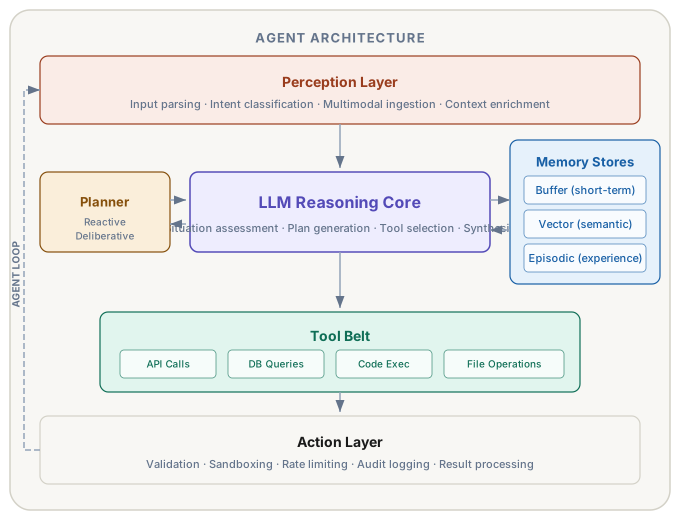
Figure 3.1 — Agent component map. The LLM reasoning core (purple) is surrounded by perception (coral), memory stores (blue), a planner (amber), and a tool belt (teal). The dashed loop-back arrow on the left shows how tool results feed back through perception for the next reasoning cycle.
The LLM as the Reasoning Core
In Chapter 2, we established that an LLM is fundamentally a next-token predictor: a function that takes a sequence of tokens and outputs a probability distribution over the next token. So how does next-token prediction become "reasoning"?
Reasoning, in the context of agents, is not the formal logical reasoning of a theorem prover. It is contextual decision-making: given a situation description and a set of possible actions, choose the action most likely to advance toward the goal. Large language models excel at this because they have been trained on vast quantities of text that describes situations, decisions, and their consequences. When you give an LLM a prompt that says "The user wants X, you have tools Y and Z available, the conversation history shows W," the model draws on its training to generate a response that is — more often than not — a reasonable next step.
Traditional agents (think of a Roomba or a rule-based chatbot) used hand-coded decision trees or reinforcement learning policies. The reasoning was explicit: if obstacle_detected then turn_right. LLM-based agents replace those hand-coded rules with a general-purpose reasoning engine that can handle novel situations it was never explicitly programmed for. The trade-off is that this reasoning is probabilistic and opaque. You cannot easily predict what the model will decide in every situation, and you cannot formally verify its behavior.
You compensate for the reasoning core's unpredictability by:
- Perception: structuring input so the model receives clear, unambiguous information
- Memory: providing relevant context so the model does not have to guess
- Action: validating and constraining output so the model cannot take dangerous actions even if it "decides" to
Treat the LLM like a brilliant but unreliable advisor: give it the best information you can, listen carefully to its recommendations, but always verify before executing.
The Tool Belt Concept
An agent without tools is a conversationalist. It can discuss what it would do, describe plans, and generate text — but it cannot do anything. Tools are what turn conversation into action. The "tool belt" is the complete set of capabilities available to an agent at any given moment.
What Qualifies as a Tool?
A tool is any function that the agent can invoke to interact with the world beyond its context window. Common categories:
- Information retrieval: web search, database queries, file reading, API calls to external services
- Data transformation: calculations, format conversion, data validation, code execution
- Side effects: sending emails, creating files, updating records, deploying code, processing payments
- Agent-to-agent communication: invoking sub-agents, passing messages to other agents in a multi-agent system
Tool Descriptions Are Part of the Architecture
Each tool in the belt is presented to the LLM as a structured description: a name, a description of what it does, and a schema defining its parameters. The quality of these descriptions directly affects how well the agent uses its tools. A vague tool description like "search: searches for things" will produce vague tool usage. A precise description like "search_knowledge_base: Searches the internal knowledge base for articles matching the query. Returns the top 5 results with title, snippet, and relevance score. Use this when the user asks about product features, pricing, or company policies." gives the LLM the information it needs to choose the right tool at the right time.
Tool descriptions are a form of programming. You are not writing code that executes deterministically. You are writing natural-language instructions that influence a probabilistic system. The same care you would put into a function's docstring and type signature should go into every tool description.
Under the Hood
Modern LLM APIs (OpenAI, Anthropic, Google) implement tool use through a specific protocol: you send tool definitions as JSON schemas in the request, and the model responds with structured tool-call objects (function name + arguments) rather than free text. This is more reliable than asking the model to output tool calls in a custom format, because the model has been specifically trained to produce valid tool-call JSON when tool definitions are present. Always use the native tool-calling protocol rather than parsing tool invocations from free text.
Dynamic Tool Belts
In simple agents, the tool belt is static — defined once at startup and never changed. In production systems, tool availability often varies by context. A customer-service agent might have access to process_refund only for premium customers. A coding agent might gain access to a deploy tool only after tests pass. A research agent might acquire new search tools as it discovers new data sources.
Dynamic tool belts are implemented by modifying the tool definitions sent to the LLM on each iteration of the agent loop. The agent runtime evaluates the current state (user permissions, workflow stage, discovered capabilities) and constructs the appropriate tool set for that iteration. This is a powerful pattern because it provides capability-level access control without relying on the LLM to self-restrict. If the tool is not in the belt, the model cannot call it.
Memory Stores in Depth
Buffer Memory
Buffer memory is deceptively simple to implement — and deceptively easy to implement badly. The naive approach is to append every message to a list and include the entire list in each prompt. This works until the conversation exceeds the context window, at which point the agent either crashes (token limit exceeded) or silently drops early messages (if you truncate from the front).
Production buffer memory strategies:
- Sliding window: Keep only the last N messages. Simple but lossy — important context from earlier in the conversation disappears.
- Summarization: Periodically summarize older messages into a condensed paragraph, then replace the originals with the summary. Preserves more information within fewer tokens, but introduces summarization errors.
- Token-budget allocation: Allocate a fixed token budget for conversation history. When the budget is exceeded, compress the oldest messages first. This gives you precise control over prompt size.
- Importance-weighted: Score each message by relevance to the current query and keep the highest-scoring ones regardless of recency. Computationally expensive but preserves the most useful context.
Vector Memory
Vector memory requires three components: an embedding model that converts text into dense vectors, a vector database that stores and indexes those vectors, and a retrieval function that queries the database at runtime.
The design decisions that matter most:
- What to store. Do you store every message? Only user-confirmed facts? Agent decisions and their outcomes? The granularity of storage determines what the agent can recall.
- Chunking strategy. Long documents must be split into chunks before embedding. Chunk too large and retrieval becomes imprecise; chunk too small and you lose context. Most systems use 200-500 token chunks with 50-token overlap.
- Retrieval strategy. Simple cosine similarity is the baseline. Hybrid search (combining semantic similarity with keyword matching) is usually better. Re-ranking retrieved results with a cross-encoder model before injecting them into the prompt further improves quality.
Episodic Memory
Episodic memory is the least standardized of the three types. The general pattern:
- After each agent run (or significant sub-task), serialize the trajectory: what was the goal, what actions were taken, what were the intermediate results, what was the final outcome, was it successful?
- Store the trajectory with metadata (timestamp, goal category, success/failure flag, user feedback if available).
- On future runs, retrieve similar trajectories and include them in the prompt as "examples of past approaches."
The power of episodic memory is that it gives agents a form of learning without retraining. A support agent that keeps episodic memory of resolved tickets can, over time, develop "expertise" in common issue patterns — not because the model weights changed, but because the prompt is enriched with increasingly relevant past experience.
Common Mistake
Storing everything in vector memory without a retention policy. Over time, the vector store accumulates outdated, contradictory, and irrelevant entries that degrade retrieval quality. Implement a TTL (time-to-live) for temporal data, version facts so old versions can be superseded, and periodically audit stored content for accuracy. Memory is not a write-only append log — it requires maintenance.
Planning Strategies
Planning is how the reasoning core decides what to do next. Not all agents need explicit planning — a simple Q&A chatbot can be purely reactive. For any agent that must accomplish multi-step goals, the planning strategy is a critical design choice.
Reactive Planning
The simplest strategy: the agent looks at the current state and decides the next single action. No lookahead, no explicit plan, no maintained agenda. Each iteration of the agent loop is independent. This is the default behavior when you give an LLM tools and let it decide what to do — it will typically choose the most immediately promising action.
Reactive planning works well when tasks are simple (one or two steps), when the environment is unpredictable (planning far ahead is pointless because things change), or when latency matters more than optimality.
Deliberative Planning
The agent explicitly generates a multi-step plan before executing any actions. A common implementation is to prompt the LLM with "Given this goal, produce a numbered list of steps to accomplish it" and then execute each step sequentially, re-planning if a step fails. This is the approach used by Plan-and-Execute agents and some AutoGPT-style systems.
Deliberative planning shines for complex, multi-step tasks where the order of operations matters: research projects, data analysis pipelines, code refactoring across multiple files. Its weakness is brittleness — if step 3 of a 10-step plan fails, the agent must decide whether to retry, skip, or re-plan from scratch, and this meta-decision is itself a hard reasoning problem.
Hybrid Planning
Most production agents use a hybrid approach: generate a rough plan (deliberative), execute the first step (reactive), observe the result, and revise the plan before executing the next step. This combines the strategic coherence of deliberative planning with the adaptability of reactive planning. The ReAct (Reason + Act) pattern, which we will implement in Chapter 4, is the most well-known hybrid planning strategy.
The key design decision in hybrid planning is re-planning frequency. Do you re-plan after every action? Only when an action fails? Only when the result diverges significantly from expectations? Re-planning too often wastes tokens and increases latency. Re-planning too rarely means the agent stubbornly follows an outdated plan. A useful heuristic: re-plan when the result of an action contradicts the assumption that justified the next planned step.
Production Consideration
In production systems, always set a maximum iteration count on the agent loop. Without it, a confused agent can spin indefinitely, burning tokens and money. A typical cap is 10-25 iterations for conversational agents and 50-100 for autonomous task agents. When the cap is reached, the agent should gracefully terminate with a message like "I've been working on this for a while and want to check in. Here's what I've done so far and where I'm stuck." Never let an agent loop run unbounded.
The Agent Loop in Code
Here is a minimal but complete Python implementation that shows how all four pillars connect. This is a teaching implementation designed to make the architecture visible, not a production framework.
import openai

class MinimalAgent:
    """A teaching-quality agent that demonstrates all four pillars."""

    def __init__(self, system_prompt: str, tools: list[dict], max_iterations: int = 10):
        self.client = openai.OpenAI()
        self.system_prompt = system_prompt
        self.tools = tools               # Tool belt: list of tool definitions
        self.tool_functions = {}          # Action layer: name -> callable
        self.buffer_memory = []           # Buffer memory: conversation history
        self.max_iterations = max_iterations

    def register_tool(self, name: str, func):
        """Register a tool implementation in the action layer."""
        self.tool_functions[name] = func

    def perceive(self, user_input: str) -> dict:
        """Perception layer: parse and structure the input."""
        # In production, this would classify intent, enrich context, etc.
        return {"role": "user", "content": user_input}

    def retrieve_memory(self) -> list[dict]:
        """Memory retrieval: return context for the reasoning core."""
        messages = [{"role": "system", "content": self.system_prompt}]
        messages.extend(self.buffer_memory)
        return messages

    def reason(self, messages: list[dict]) -> object:
        """Reasoning core: call the LLM to decide what to do."""
        response = self.client.chat.completions.create(
            model="gpt-4o",
            messages=messages,
            tools=self.tools if self.tools else openai.NOT_GIVEN,
        )
        return response.choices[0].message

    def act(self, tool_call) -> str:
        """Action layer: validate and execute a tool call."""
        func = self.tool_functions.get(tool_call.function.name)
        if func is None:
            return f"Error: unknown tool '{tool_call.function.name}'"
        try:
            import json
            args = json.loads(tool_call.function.arguments)
            result = func(**args)
            return str(result)
        except Exception as e:
            return f"Error executing {tool_call.function.name}: {e}"

    def run(self, user_input: str) -> str:
        """Execute the full agent loop."""
        # Step 1: Perception
        observation = self.perceive(user_input)
        self.buffer_memory.append(observation)

        for iteration in range(self.max_iterations):
            # Step 2: Memory retrieval
            messages = self.retrieve_memory()

            # Step 3: Reasoning
            decision = self.reason(messages)

            # Step 4: Check for tool calls (action needed?)
            if decision.tool_calls:
                # Store the assistant's decision in memory
                self.buffer_memory.append(decision)

                # Execute each tool call
                for tool_call in decision.tool_calls:
                    result = self.act(tool_call)
                    # Step 5: Update memory with tool result
                    self.buffer_memory.append({
                        "role": "tool",
                        "tool_call_id": tool_call.id,
                        "content": result,
                    })
                # Step 6: Loop continues — back to reasoning
                continue

            # No tool calls — final answer
            self.buffer_memory.append({
                "role": "assistant",
                "content": decision.content,
            })
            return decision.content

        return "Max iterations reached. Here is what I've done so far..."
Every method maps to a pillar: perceive() is perception, retrieve_memory() is memory, reason() is the reasoning core, and act() is the action layer. The run() method is the agent loop. The loop termination condition is dual: either the LLM produces a final answer (no tool calls) or the iteration limit is reached. Both conditions are essential.
In production, each of these methods would be substantially more complex. Perception would include intent classification. Memory retrieval would query a vector store. The action layer would validate parameters, enforce permissions, and log every invocation. The structural skeleton — perceive, remember, reason, act, loop — remains identical.
Structural Failure Modes
When you understand the architecture, you can diagnose any agent failure by asking: which pillar is weak?
| Weak Pillar | Symptom | Example |
|---|---|---|
| Perception | Misinterpreted intent, wrong tool chosen | Agent processes a refund when user asked about order status |
| Memory | Repeated questions, forgotten context, contradictory behavior | Agent asks for the user's name three times in one session |
| Reasoning | Wrong plan, hallucinated facts, incoherent step sequences | Agent tries to call an API that does not exist |
| Action | Failed tool calls, unvalidated parameters, no error recovery | Agent sends malformed JSON to a payment API and crashes |
| Loop control | Infinite loops, premature termination, token budget blowout | Agent keeps retrying a failing API call 200 times |
When you encounter a misbehaving agent in the wild, ask "Which pillar is the weakest link?" before changing the prompt or swapping the model. The answer almost always points you to the fix faster.
Project: Agent Blueprint Analyzer
Build a tool that takes a description of any agent system (as structured text, YAML, or natural language) and produces a component-level analysis: which pillars are present, how they are implemented, where the gaps are, and a Mermaid diagram of the component structure. The analyzer itself is an agent — it uses an LLM to reason about agent architectures.
What You Will Build
- A Python CLI that accepts an agent description (file or stdin) and outputs a structured analysis
- Perception layer: parses the input format (YAML, JSON, or natural language) into a normalized schema
- Reasoning: uses an LLM to identify the four pillars, classify their maturity (absent/basic/intermediate/production), and identify gaps
- Action: generates a Mermaid diagram and a markdown report
- Memory: stores analyzed blueprints so the agent can compare new designs against past ones
Core Implementation
"""Agent Blueprint Analyzer — analyzes and diagrams agent architectures."""

import json
import yaml
import openai
from pathlib import Path
from datetime import datetime

ANALYSIS_PROMPT = """You are an expert in agentic AI architecture. Analyze the
following agent description and produce a structured assessment.

For each of the four pillars (perception, memory, reasoning, action), determine:
1. Whether it is present in the design
2. Its maturity level: absent | basic | intermediate | production
3. Specific implementation details mentioned
4. Gaps or risks you identify

Also assess:
- Planning strategy: reactive | deliberative | hybrid | unclear
- Loop control: whether iteration limits, error handling, and termination
  conditions are specified
- Tool belt: what tools are available, whether descriptions are adequate

Output your analysis as JSON matching this schema:
{
  "summary": "One-paragraph overall assessment",
  "pillars": {
    "perception": {"present": bool, "maturity": str, "details": str, "gaps": [str]},
    "memory": {"present": bool, "maturity": str, "details": str, "gaps": [str]},
    "reasoning": {"present": bool, "maturity": str, "details": str, "gaps": [str]},
    "action": {"present": bool, "maturity": str, "details": str, "gaps": [str]}
  },
  "planning_strategy": str,
  "loop_control": {"has_max_iterations": bool, "has_error_handling": bool, "details": str},
  "tool_belt": {"tool_count": int, "tools": [str], "description_quality": str},
  "risks": [str],
  "recommendations": [str],
  "mermaid_diagram": "graph TD\\n  ..."
}"""

class BlueprintAnalyzer:
    def __init__(self):
        self.client = openai.OpenAI()
        self.history_path = Path("blueprint_history.json")
        self.history = self._load_history()

    def _load_history(self) -> list:
        if self.history_path.exists():
            return json.loads(self.history_path.read_text())
        return []

    def _save_history(self):
        self.history_path.write_text(json.dumps(self.history, indent=2))

    def parse_input(self, raw: str) -> dict:
        """Perception layer: detect format and normalize."""
        # Try YAML first (superset of JSON)
        try:
            parsed = yaml.safe_load(raw)
            if isinstance(parsed, dict):
                return {"format": "structured", "content": parsed}
        except yaml.YAMLError:
            pass
        # Fall back to natural language
        return {"format": "natural_language", "content": raw}

    def analyze(self, description: str) -> dict:
        """Full agent loop: perceive, retrieve memory, reason, act."""
        # Perceive
        parsed = self.parse_input(description)

        # Build context with memory of past analyses
        context = f"Agent description ({parsed['format']}):\n"
        if parsed["format"] == "structured":
            context += json.dumps(parsed["content"], indent=2)
        else:
            context += parsed["content"]

        if self.history:
            context += f"\n\nYou have analyzed {len(self.history)} agents before. "
            context += "Common patterns you've seen: "
            patterns = set()
            for h in self.history[-5:]:
                patterns.add(h.get("planning_strategy", "unknown"))
            context += ", ".join(patterns)

        # Reason
        response = self.client.chat.completions.create(
            model="gpt-4o",
            messages=[
                {"role": "system", "content": ANALYSIS_PROMPT},
                {"role": "user", "content": context},
            ],
            response_format={"type": "json_object"},
        )

        analysis = json.loads(response.choices[0].message.content)

        # Act: store in episodic memory
        analysis["analyzed_at"] = datetime.now().isoformat()
        self.history.append(analysis)
        self._save_history()

        return analysis

    def render_report(self, analysis: dict) -> str:
        """Action layer: transform analysis into a readable report."""
        lines = ["# Agent Blueprint Analysis\n"]
        lines.append(f"**Summary:** {analysis['summary']}\n")

        lines.append("## Pillar Assessment\n")
        for pillar, info in analysis["pillars"].items():
            status = "Present" if info["present"] else "MISSING"
            lines.append(f"### {pillar.title()} ({status} — {info['maturity']})")
            lines.append(f"{info['details']}\n")
            if info["gaps"]:
                lines.append("**Gaps:**")
                for gap in info["gaps"]:
                    lines.append(f"- {gap}")
                lines.append("")

        lines.append("## Risks\n")
        for risk in analysis.get("risks", []):
            lines.append(f"- {risk}")

        lines.append("\n## Recommendations\n")
        for rec in analysis.get("recommendations", []):
            lines.append(f"- {rec}")

        lines.append(f"\n## Architecture Diagram\n\n```mermaid\n{analysis.get('mermaid_diagram', 'graph TD')}\n```")
        return "\n".join(lines)


if __name__ == "__main__":
    import sys

    if len(sys.argv) > 1:
        description = Path(sys.argv[1]).read_text()
    else:
        print("Paste agent description (Ctrl+D to finish):")
        description = sys.stdin.read()

    analyzer = BlueprintAnalyzer()
    result = analyzer.analyze(description)
    print(analyzer.render_report(result))
Domain Variants
| Variant | Domain |
|---|---|
| Blueprint Analyzer for DevOps Agents | Tech / Software |
| Clinical Workflow Agent Auditor | Healthcare |
| Trading Bot Architecture Reviewer | Finance |
| Tutoring Agent Design Analyzer | Education |
| Shopping Assistant Blueprint Audit | E-commerce |
| Legal Research Agent Evaluator | Legal |
Exercises
| Type | Exercise | Description |
|---|---|---|
| Conceptual | Pillar audit | Pick any AI-powered product you use regularly (a coding assistant, a customer-support chatbot, a smart-home controller). For each of the four pillars, describe how you think it is implemented. Identify which pillar appears to be the weakest based on the product's failure modes. Write a one-page analysis. |
| Coding | Memory-enhanced agent | Take the MinimalAgent class from this chapter and add vector memory using ChromaDB or a similar lightweight vector store. Store every user message and agent response as embeddings. Before each reasoning call, retrieve the three most relevant past interactions and include them in the prompt as "relevant history." Test with a 20-turn conversation and verify that the agent recalls facts from early in the conversation that would have been lost from the buffer window. |
| Design | Dynamic tool belt design | Design (on paper or in a design document) a tool belt management system for an enterprise customer-service agent. The agent serves three tiers of customers (free, premium, enterprise) and the available tools differ by tier. Specify: how tool availability is determined per request, how the tool registry is structured, how you handle the case where the LLM tries to invoke a tool that was available in a previous turn but is no longer available (e.g., the user's session tier was recalculated). Include a diagram and pseudocode. |