Chapter 04 of 20
Your First Agent
An LLM that calls tools without thinking is just a random function caller with good grammar. In this chapter, you build the loop that turns a language model into something that actually reasons.
Part 1 — Foundations
Your First Agent
An LLM that calls tools without thinking is just a random function caller with good grammar. In this chapter, you build the loop that turns a language model into something that actually reasons.
4.1 The Failure That Teaches Everything
Begin with a disaster. Suppose you give a language model access to two tools — a web search function and a calculator — and ask it: "What is the current population of Tokyo, and what percentage of Japan's total population does that represent?"
A naive implementation does something like this: it sees the question, immediately calls the search tool with the query "population of Tokyo", gets back a snippet saying 13.96 million, then calls the calculator with 13.96 / 125.7 * 100. It never searched for Japan's population. The 125.7 figure was hallucinated from training data. The answer comes back as 11.1%, stated with absolute confidence. The real figure, using 2024 data, is closer to 11.3%. Close enough to seem right, far enough to be wrong, and completely undetectable by anyone who does not already know the answer.
Here is the code that produces this failure:
# naive_agent.py — the wrong way to build an agent
import openai

def run_naive_agent(question: str) -> str:
    """One-shot: ask the LLM, execute every tool call, return the result."""
    messages = [
        {"role": "system", "content": "You are a helpful assistant with tools."},
        {"role": "user", "content": question},
    ]
    response = openai.chat.completions.create(
        model="gpt-4o",
        messages=messages,
        tools=TOOL_SCHEMAS,        # search + calculator
    )
    # Blindly execute whatever tool calls come back
    for tool_call in response.choices[0].message.tool_calls or []:
        result = execute_tool(tool_call)
        messages.append({"role": "tool", "content": result})

    # Ask for a final answer — no verification, no reflection
    messages.append({"role": "user", "content": "Now give me the final answer."})
    final = openai.chat.completions.create(model="gpt-4o", messages=messages)
    return final.choices[0].message.content
The problem is structural, not cosmetic. This agent has no loop. It fires tools once, trusts whatever comes back, and assembles a response. There is no step where it examines the search results and thinks, "Wait, I need Japan's population too." There is no mechanism for it to realize a tool call failed or returned irrelevant data. It is a script with an LLM as a subroutine, not an agent.
Common Mistake
Many tutorials show agents as a single LLM call with tool execution bolted on. This produces impressive demos but fails on any task requiring more than one reasoning step. If your agent cannot decide to call a tool it did not plan to call at the start, it is not an agent — it is a pipeline.
The fix requires a fundamental change in architecture. Instead of "call tools once and assemble," we need a loop where the agent observes what it has learned so far, thinks about what to do next, and then acts, repeating until the task is genuinely complete. This is the ReAct pattern.
4.2 ReAct: Reasoning + Acting
The ReAct pattern was introduced by Yao et al. in their 2022 paper "ReAct: Synergizing Reasoning and Acting in Language Models." The core insight is deceptively simple: if you let a language model alternate between generating thoughts (free-form reasoning text) and actions (structured tool calls), it dramatically outperforms models that only reason or only act.
The reasoning matters because it forces the model to articulate its plan before executing it. Consider the Tokyo population question again. With ReAct, the trace looks like this:
Thought 1: I need two pieces of data — Tokyo's population and Japan's total
           population. Let me search for Tokyo first.
Action 1:  search("current population of Tokyo 2024")
Observation 1: "Tokyo's population is approximately 14.0 million as of 2024..."

Thought 2: Good, I have Tokyo at 14.0 million. Now I need Japan's total.
Action 2:  search("total population of Japan 2024")
Observation 2: "Japan's population is approximately 123.9 million as of 2024..."

Thought 3: I now have both numbers. 14.0 / 123.9 * 100 = 11.30%. Let me
           verify with the calculator.
Action 3:  calculator("14.0 / 123.9 * 100")
Observation 3: 11.2994...

Thought 4: The calculation confirms approximately 11.3%. I have all the data
           I need from reliable sources.
Final Answer: Tokyo's population (~14.0 million) represents approximately
              11.3% of Japan's total population (~123.9 million).
Each Thought does three things: it summarizes what the agent knows so far, identifies what is missing, and states what it intends to do next. Each Action is a specific, targeted tool call. Each Observation is the raw result from the tool. The agent never hallucinates a number it could look up, because the loop gives it a mechanism to look things up iteratively.
This alternating structure creates an explicit reasoning trace that serves three purposes:
- Planning. The thought step forces the model to decompose the problem before acting on it. Multi-step tasks that fail with naive agents succeed because each step is planned individually.
- Grounding. By examining observations before generating the next thought, the model anchors its reasoning in actual tool outputs rather than parametric memory. This reduces hallucination on factual questions.
- Debuggability. When something goes wrong, you can read the trace and see exactly where the reasoning diverged. Was the search query bad? Did the model misinterpret the results? Did it skip a step? The trace tells you.
Under the Hood
ReAct works because of a property of autoregressive language models: generating intermediate text changes the probability distribution over subsequent tokens. When the model writes "I need Japan's population too," the phrase literally shifts the token probabilities to favor generating a search action for Japan's population, rather than hallucinating a number. The thought is not decoration — it is a computational steering mechanism.
4.3 The Observe-Think-Act Loop
Every ReAct agent follows the same three-phase cycle:
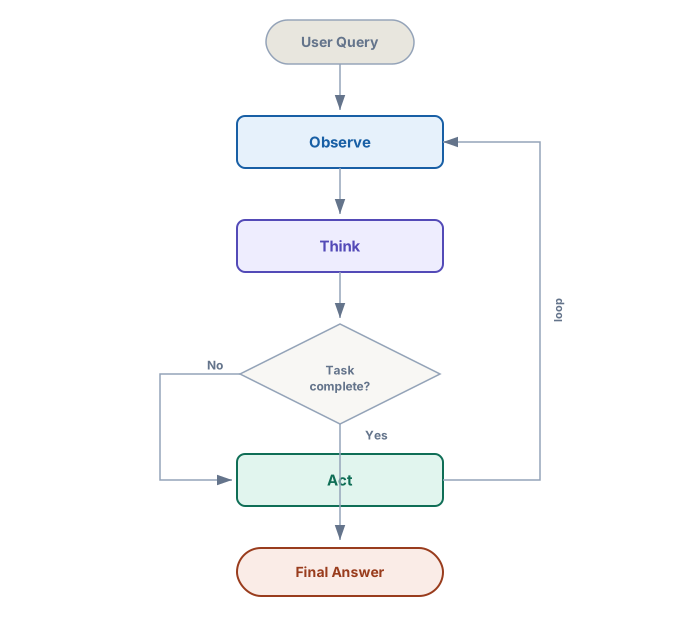
Figure 4-1. The ReAct loop. The agent cycles through Observe, Think, and Act until it determines the task is complete, then emits a Final Answer.
Observe. The agent examines the current state of the conversation: the original question, all previous thoughts, all tool results, and any errors. In implementation terms, this is the message history passed to the LLM. The observation phase does not generate new text — it is the context window itself.
Think. Given the observation, the LLM generates a thought — a free-form reasoning step. This thought might say "I have Tokyo's population but not Japan's, so I need to search again," or "The search returned an error, let me rephrase the query," or "I now have all the data I need to compute the final answer." The thought is appended to the conversation history so the model can reference it in future iterations.
Act. Based on the thought, the agent either calls a tool (search, calculate, write a file, call an API) or decides to emit a final answer. If it calls a tool, the tool's output becomes a new observation, and the loop continues. If it emits a final answer, the loop terminates.
The decision point — "Is the task complete?" — is where most agent bugs live. Section 4.5 addresses stopping conditions in detail.
4.4 Building a ReAct Agent from Scratch
A complete ReAct agent in pure Python with no framework dependencies. The only external library is openai. This is deliberate: you need to understand every piece of the loop before you let a framework abstract it away.
4.4.1 The Tool Registry
First, a way to register tools and their schemas. A tool is any Python function that accepts string arguments and returns a string result. The schema tells the LLM what the tool does and what arguments it expects.
# tools.py — tool registry and built-in tools
import json
import math
from typing import Callable

# Global registry: maps tool name → (function, schema)
TOOL_REGISTRY: dict[str, tuple[Callable, dict]] = {}


def tool(name: str, description: str, parameters: dict):
    """Decorator that registers a function as an agent tool."""
    def decorator(func: Callable) -> Callable:
        schema = {
            "type": "function",
            "function": {
                "name": name,
                "description": description,
                "parameters": {
                    "type": "object",
                    "properties": parameters,
                    "required": list(parameters.keys()),
                },
            },
        }
        TOOL_REGISTRY[name] = (func, schema)
        return func
    return decorator


@tool(
    name="search",
    description="Search the web for current information. Returns a text snippet.",
    parameters={
        "query": {
            "type": "string",
            "description": "The search query to execute",
        }
    },
)
def search(query: str) -> str:
    """Stub — replace with real search API (SerpAPI, Tavily, etc.)."""
    # In production, this calls an actual search API.
    # For now, return a placeholder to keep the example runnable.
    return f'[Search result for "{query}": No live API configured. ' \
           f'Replace this stub with a real search provider.]'


@tool(
    name="calculator",
    description="Evaluate a mathematical expression. Returns the numeric result.",
    parameters={
        "expression": {
            "type": "string",
            "description": "A valid Python math expression, e.g. '14.0 / 123.9 * 100'",
        }
    },
)
def calculator(expression: str) -> str:
    """Safely evaluate a math expression."""
    # Restrict to safe builtins — no exec, no imports
    allowed_names = {k: v for k, v in math.__dict__.items()
                     if not k.startswith("_")}
    try:
        result = eval(expression, {"__builtins__": {}}, allowed_names)  # noqa: S307
        return str(result)
    except Exception as e:
        return f"Error: {e}"


def get_tool_schemas() -> list[dict]:
    """Return OpenAI-compatible tool schemas for all registered tools."""
    return [schema for _, schema in TOOL_REGISTRY.values()]


def execute_tool(name: str, arguments: dict) -> str:
    """Look up a tool by name and execute it with the given arguments."""
    if name not in TOOL_REGISTRY:
        return f"Error: Unknown tool '{name}'. Available: {list(TOOL_REGISTRY.keys())}"
    func, _ = TOOL_REGISTRY[name]
    try:
        return func(**arguments)
    except Exception as e:
        return f"Error executing {name}: {e}"
The @tool decorator does two things: it stores the function so we can call it later, and it stores the JSON schema so the LLM knows the tool exists. This separation — schema for the LLM, function for execution — is the foundation of every tool-use system, whether you build it yourself or use LangChain.
4.4.2 The Agent Loop
# react_agent.py — a from-scratch ReAct agent
import json
import openai
from tools import get_tool_schemas, execute_tool

SYSTEM_PROMPT = """You are a reasoning agent. You solve tasks by thinking
step-by-step and using tools when needed.

For EVERY step, you MUST output your reasoning in a "Thought:" prefix before
deciding to call a tool or give a final answer.

Rules:
1. Always think before acting. Never call a tool without explaining why.
2. After receiving a tool result, think about what it means before continuing.
3. When you have enough information, respond with "FINAL ANSWER:" followed
   by your complete answer.
4. If a tool returns an error, think about why and try a different approach.
5. Never guess when you can look things up.
"""

class ReActAgent:
    def __init__(
        self,
        model: str = "gpt-4o",
        max_iterations: int = 10,
        verbose: bool = True,
    ):
        self.model = model
        self.max_iterations = max_iterations
        self.verbose = verbose
        self.client = openai.OpenAI()

    def run(self, task: str) -> str:
        """Execute the ReAct loop until a final answer or max iterations."""
        messages = [
            {"role": "system", "content": SYSTEM_PROMPT},
            {"role": "user", "content": task},
        ]
        tool_schemas = get_tool_schemas()

        for i in range(self.max_iterations):
            if self.verbose:
                print(f"\n--- Iteration {i + 1} ---")

            # THINK: ask the LLM for a thought + optional tool call
            response = self.client.chat.completions.create(
                model=self.model,
                messages=messages,
                tools=tool_schemas if tool_schemas else None,
                tool_choice="auto",
            )

            message = response.choices[0].message

            # Append the assistant's response to history
            messages.append(message)

            # Check for text content (the "Thought" part)
            if message.content:
                if self.verbose:
                    print(f"Thought: {message.content}")

                # Check for final answer
                if "FINAL ANSWER:" in message.content:
                    answer = message.content.split("FINAL ANSWER:")[-1].strip()
                    return answer

            # ACT: execute any tool calls
            if message.tool_calls:
                for tool_call in message.tool_calls:
                    name = tool_call.function.name
                    args = json.loads(tool_call.function.arguments)

                    if self.verbose:
                        print(f"Action: {name}({args})")

                    # Execute the tool
                    result = execute_tool(name, args)

                    if self.verbose:
                        print(f"Observation: {result}")

                    # OBSERVE: feed the result back as a tool message
                    messages.append({
                        "role": "tool",
                        "tool_call_id": tool_call.id,
                        "content": result,
                    })
            elif not message.content:
                # No content and no tool calls — something went wrong
                messages.append({
                    "role": "user",
                    "content": "Please continue reasoning about the task.",
                })

        # If we hit max iterations, return what we have
        return self._force_final_answer(messages)

    def _force_final_answer(self, messages: list) -> str:
        """Force the agent to produce a final answer after max iterations."""
        messages.append({
            "role": "user",
            "content": (
                "You have reached the maximum number of reasoning steps. "
                "Based on everything you have gathered so far, provide your "
                "best FINAL ANSWER: now."
            ),
        })
        response = self.client.chat.completions.create(
            model=self.model,
            messages=messages,
        )
        content = response.choices[0].message.content or ""
        if "FINAL ANSWER:" in content:
            return content.split("FINAL ANSWER:")[-1].strip()
        return content
Walk through the critical design decisions.
The system prompt enforces structure. By telling the model to prefix every step with "Thought:" and to signal completion with "FINAL ANSWER:", we create a parseable protocol. The model's free-form reasoning becomes machine-readable. This is not a suggestion to the model — it is the contract that the loop depends on.
The loop runs up to max_iterations. This is a hard safety limit. Without it, a confused agent can loop forever, burning API credits and never producing an answer. Ten iterations is a reasonable default for most tasks: enough for complex multi-step problems, but not so many that a stuck agent costs you twenty dollars.
Tool results are fed back as role: "tool" messages. This is the observation step. The LLM sees the tool output as a distinct message type, which helps it distinguish between its own reasoning and external data. The tool_call_id links each result back to the specific call that produced it.
The empty-response guard matters. Sometimes the LLM produces neither text nor a tool call — an API edge case that can stall the loop. The guard injects a nudge to keep things moving.
Under the Hood
The tool_choice="auto" parameter tells the API to let the model decide whether to call a tool or just respond with text. Alternatives include "required" (force a tool call every turn) and "none" (disable tools). For ReAct, "auto" is essential — the model must be free to think without acting.
4.4.3 Running the Agent
# main.py — run the ReAct agent
from react_agent import ReActAgent

agent = ReActAgent(model="gpt-4o", max_iterations=10, verbose=True)

answer = agent.run(
    "What is the current population of Tokyo, and what percentage "
    "of Japan's total population does that represent?"
)

print(f"\n=== Final Answer ===\n{answer}")
With verbose mode on, you see the full reasoning trace: every thought, every tool call, every observation. An agent whose reasoning you cannot inspect is an agent you cannot trust.
4.4.4 Anatomy of a Trace
A successful trace for the population question looks something like this (abbreviated for clarity):
--- Iteration 1 ---
Thought: I need two data points: Tokyo's population and Japan's total
         population. Let me search for the most recent Tokyo figure.
Action: search({"query": "current population of Tokyo 2024"})
Observation: [Search result for "current population of Tokyo 2024": ...]

--- Iteration 2 ---
Thought: I found Tokyo's population is approximately 14.0 million.
         Now I need Japan's total population to calculate the percentage.
Action: search({"query": "total population of Japan 2024"})
Observation: [Search result for "total population of Japan 2024": ...]

--- Iteration 3 ---
Thought: Japan's total population is approximately 123.9 million.
         Now I can calculate: (14.0 / 123.9) * 100.
Action: calculator({"expression": "14.0 / 123.9 * 100"})
Observation: 11.299435028248588

--- Iteration 4 ---
Thought: The calculation gives 11.3%. I have all the data from
         reliable sources and the calculation is verified.
FINAL ANSWER: Tokyo's population of approximately 14.0 million
represents about 11.3% of Japan's total population of 123.9 million.
Four iterations, three tool calls, one final answer. Compare this to the naive agent that hallucinated Japan's population and got the wrong percentage in a single pass. The difference is not the model — it is the loop.
4.5 Stopping Conditions
An agent must know when to stop. This sounds trivial, but it is one of the hardest problems in agent design. There are four stopping conditions, and a well-designed agent uses all of them.
4.5.1 Explicit Completion
The agent declares it is done by emitting the FINAL ANSWER: marker. This is the happy path. The agent has gathered enough information, reasoned through it, and is confident in its answer. In our implementation, the run() method scans for this marker on every iteration.
4.5.2 Iteration Limit
The max_iterations guard catches agents that are stuck in a loop. This happens more often than you might think — an agent might repeatedly search for the same query, getting the same unhelpful results each time. Without a hard cap, it will loop until you kill the process (or exhaust your API budget).
# What a stuck agent looks like
--- Iteration 5 ---
Thought: The search didn't return useful results. Let me try again.
Action: search({"query": "population Tokyo"})
Observation: [same unhelpful result]

--- Iteration 6 ---
Thought: Still not getting what I need. Let me search again.
Action: search({"query": "population Tokyo"})  # identical query!
Observation: [same unhelpful result]

# ...this continues until max_iterations
When the iteration limit is hit, _force_final_answer() asks the model to produce its best answer with whatever information it has gathered so far. A partial answer with a caveat is more useful than silence.
4.5.3 Repeated Action Detection
A smarter approach is to detect when the agent is repeating itself. If the last three actions are identical, the agent is stuck, and more iterations will not help. Here is how to add this check:
def _is_stuck(self, messages: list, window: int = 3) -> bool:
    """Detect if the agent is repeating the same tool calls."""
    recent_calls = []
    for msg in reversed(messages):
        if hasattr(msg, 'tool_calls') and msg.tool_calls:
            for tc in msg.tool_calls:
                recent_calls.append(
                    (tc.function.name, tc.function.arguments)
                )
                if len(recent_calls) >= window:
                    break
        if len(recent_calls) >= window:
            break

    if len(recent_calls) < window:
        return False

    # If all recent calls are identical, the agent is stuck
    return len(set(recent_calls)) == 1
When repetition is detected, you can either force a final answer or inject a message telling the agent to try a different approach. The latter is often more productive:
if self._is_stuck(messages):
    messages.append({
        "role": "user",
        "content": (
            "You appear to be repeating the same action. "
            "Try a completely different approach, or if you "
            "have enough information, provide your FINAL ANSWER:."
        ),
    })
4.5.4 Token Budget
Long-running agents accumulate messages. Each iteration adds a thought, possibly a tool call, and a tool result to the conversation history. After ten iterations, the context window can contain thousands of tokens. With smaller models, or on tasks that produce verbose tool outputs (like full web pages), you can hit the limit.
The pragmatic solution is to track token usage and compress or truncate the conversation when it gets too long:
def _estimate_tokens(self, messages: list) -> int:
    """Rough token estimate: ~4 characters per token."""
    return sum(len(str(m)) for m in messages) // 4

def _compress_history(self, messages: list) -> list:
    """Keep system prompt, first user message, and last N messages."""
    if len(messages) <= 6:
        return messages
    # Keep system + original question + last 4 exchanges
    return messages[:2] + messages[-4:]
Common Mistake
Do not silently truncate tool results. If a search returns 5,000 characters and you trim it to 500, the agent may miss the critical data point. Instead, summarize long tool outputs before adding them to the history: "The search returned a Wikipedia article about Tokyo. Key data: population 14.0 million (2024), area 2,194 km2, density 6,363/km2."
4.6 Error Recovery
Tools fail. APIs time out. Search queries return nothing useful. A robust agent handles these gracefully instead of crashing or hallucinating.
4.6.1 Tool Errors as Observations
The simplest and most effective error recovery strategy: treat errors as observations. When a tool returns an error message, the agent sees it in the next observation and can reason about it:
--- Iteration 3 ---
Thought: Let me calculate the percentage.
Action: calculator({"expression": "14.0 / "})
Observation: Error: unexpected EOF while parsing

--- Iteration 4 ---
Thought: My expression was malformed — I forgot the denominator.
         Let me fix the expression.
Action: calculator({"expression": "14.0 / 123.9 * 100"})
Observation: 11.299435028248588
This works because the ReAct loop naturally handles new information — and an error is just new information. No special error-handling code is needed in the agent loop; the LLM handles it through reasoning.
4.6.2 Retry with Backoff
For transient errors (network timeouts, rate limits), wrapping tool execution in a retry is appropriate. Tool-level retries are invisible to the agent; agent-level retries consume iterations.
import time

def execute_tool_with_retry(
    name: str,
    arguments: dict,
    max_retries: int = 2,
    backoff: float = 1.0,
) -> str:
    """Execute a tool with retries for transient failures."""
    for attempt in range(max_retries + 1):
        result = execute_tool(name, arguments)
        # If the result doesn't look like a transient error, return it
        if not result.startswith("Error: Connection") and \
           not result.startswith("Error: Timeout"):
            return result
        if attempt < max_retries:
            time.sleep(backoff * (2 ** attempt))
    return result  # Return the last error if all retries fail
4.6.3 Fallback Strategies
Sometimes the right response to a failed tool is not to retry it but to try a different tool or a different approach. You can encode this in the system prompt:
# Addition to SYSTEM_PROMPT
FALLBACK_INSTRUCTIONS = """
If a tool returns an error:
1. Think about WHY it failed (bad input? service down? wrong tool?)
2. If the input was malformed, fix it and retry.
3. If the service seems down, try an alternative approach.
4. If no alternative exists, state what you know and what you couldn't verify.
Never pretend a failed tool call succeeded.
"""
The last rule — never pretend a failed call succeeded — is critical. Without it, agents have a tendency to hallucinate results when tools fail, producing answers that look authoritative but are fabricated.
Production Consideration
In production systems, log every tool call and its result, including errors. When an agent produces a wrong answer, the tool call log is your primary debugging artifact. Include timestamps, latency, and the full request/response payloads. This trace data is also essential for evaluating agent performance over time — you cannot improve what you cannot measure.
4.7 Why Build Without Frameworks First
You might be wondering: why write all this from scratch when LangChain, LlamaIndex, CrewAI, and a dozen other frameworks offer ReAct agents out of the box?
Frameworks are abstractions over things you need to understand. When LangChain's AgentExecutor gets stuck in a loop, you need to understand the observe-think-act cycle to diagnose it. When a CrewAI agent hallucinates despite having the right tools, you need to understand how the thought step steers the model. Frameworks do not eliminate complexity. They relocate it.
Our 100-line agent covers 80% of use cases. The ReAct loop you just built handles multi-step reasoning, tool use, error recovery, and configurable stopping conditions. Many production agents are not much more complex than this. Adding a framework adds dependency management, version compatibility issues, and opaque abstractions for features you may not need.
When frameworks help. That said, frameworks are the right choice when you need features that are genuinely hard to build yourself:
- Persistent state across sessions (LangGraph's checkpointing)
- Multi-agent orchestration with complex routing (Chapter 9)
- Streaming with partial tool call assembly
- Built-in tracing and observability integrations
- Pre-built tool libraries for common integrations (databases, APIs, file systems)
Build from scratch until you hit a problem that a framework solves better than you can in an afternoon. Then adopt the framework for that specific capability, not as a wholesale replacement for understanding.
Under the Hood
Most agent frameworks use the exact same pattern internally. LangChain's AgentExecutor is a while loop that calls the LLM, parses tool calls, executes them, and feeds results back — precisely what our ReActAgent.run() does. The framework adds error handling, callbacks, and streaming support on top. Looking at the source code of any major framework after building your own agent is an exercise worth doing — it will feel familiar.
4.8 Making It Configurable
A useful agent is a configurable agent. Here is the version you will use for the chapter project — tools, the model, and the system prompt can all be swapped at initialization time:
# react_agent_v2.py — configurable ReAct agent
import json
import openai
from typing import Callable

class ReActAgent:
    """A configurable ReAct agent with pluggable tools and prompts."""

    def __init__(
        self,
        tools: dict[str, tuple[Callable, dict]] | None = None,
        model: str = "gpt-4o",
        system_prompt: str | None = None,
        max_iterations: int = 10,
        verbose: bool = True,
    ):
        self.tools = tools or {}
        self.model = model
        self.max_iterations = max_iterations
        self.verbose = verbose
        self.client = openai.OpenAI()

        # Build the system prompt
        tool_descriptions = "\n".join(
            f"- {name}: {schema['function']['description']}"
            for name, (_, schema) in self.tools.items()
        )
        self.system_prompt = system_prompt or (
            "You are a reasoning agent. Think step-by-step.\n\n"
            f"Available tools:\n{tool_descriptions}\n\n"
            "Rules:\n"
            "1. Always explain your reasoning before calling a tool.\n"
            "2. When done, respond with FINAL ANSWER: followed by your answer.\n"
            "3. If a tool fails, reason about why and try a different approach.\n"
        )

    def add_tool(self, name: str, func: Callable, schema: dict):
        """Register a new tool after initialization."""
        self.tools[name] = (func, schema)

    def _get_tool_schemas(self) -> list[dict]:
        return [schema for _, schema in self.tools.values()]

    def _execute_tool(self, name: str, arguments: dict) -> str:
        if name not in self.tools:
            return f"Error: Unknown tool '{name}'."
        func, _ = self.tools[name]
        try:
            return func(**arguments)
        except Exception as e:
            return f"Error executing {name}: {e}"

    def _is_stuck(self, messages: list, window: int = 3) -> bool:
        recent = []
        for msg in reversed(messages):
            if hasattr(msg, 'tool_calls') and msg.tool_calls:
                for tc in msg.tool_calls:
                    recent.append((tc.function.name, tc.function.arguments))
                    if len(recent) >= window:
                        return len(set(recent)) == 1
        return False

    def run(self, task: str) -> dict:
        """Run the agent. Returns {"answer": str, "trace": list}."""
        messages = [
            {"role": "system", "content": self.system_prompt},
            {"role": "user", "content": task},
        ]
        schemas = self._get_tool_schemas()
        trace = []  # human-readable reasoning trace

        for i in range(self.max_iterations):
            # Stuck detection
            if self._is_stuck(messages):
                messages.append({
                    "role": "user",
                    "content": "You are repeating yourself. Try a different "
                               "approach or provide your FINAL ANSWER:.",
                })

            response = self.client.chat.completions.create(
                model=self.model,
                messages=messages,
                tools=schemas or None,
                tool_choice="auto",
            )
            msg = response.choices[0].message
            messages.append(msg)

            # Record the thought
            if msg.content:
                trace.append({"type": "thought", "content": msg.content})
                if self.verbose:
                    print(f"[Step {i+1}] Thought: {msg.content[:200]}")
                if "FINAL ANSWER:" in msg.content:
                    answer = msg.content.split("FINAL ANSWER:")[-1].strip()
                    return {"answer": answer, "trace": trace}

            # Execute tool calls
            if msg.tool_calls:
                for tc in msg.tool_calls:
                    name = tc.function.name
                    args = json.loads(tc.function.arguments)
                    trace.append({"type": "action", "tool": name, "args": args})

                    result = self._execute_tool(name, args)
                    trace.append({"type": "observation", "content": result})

                    if self.verbose:
                        print(f"[Step {i+1}] Action: {name}({args})")
                        print(f"[Step {i+1}] Result: {result[:200]}")

                    messages.append({
                        "role": "tool",
                        "tool_call_id": tc.id,
                        "content": result,
                    })

        # Max iterations reached — force final answer
        messages.append({
            "role": "user",
            "content": "Maximum steps reached. Provide your FINAL ANSWER: now.",
        })
        response = self.client.chat.completions.create(
            model=self.model, messages=messages
        )
        content = response.choices[0].message.content or "Unable to determine."
        if "FINAL ANSWER:" in content:
            content = content.split("FINAL ANSWER:")[-1].strip()
        trace.append({"type": "forced_answer", "content": content})
        return {"answer": content, "trace": trace}
Key improvements over the first version: tools are passed in as a dictionary rather than pulled from a global registry; run() returns both the answer and the full trace; stuck detection is built in. The trace is a list of dictionaries you can serialize to JSON, store in a database, or display in a UI.
Project: ReAct Agent with Configurable Tools
Build a from-scratch ReAct agent that accepts a configurable set of tools and solves multi-step problems. Your agent must implement the full observe-think-act loop, handle tool errors gracefully, detect when it is stuck, and produce a readable reasoning trace.
Requirements
- Core loop. Implement the ReAct loop with Thought/Action/Observation structure. The agent must alternate between reasoning and tool use, terminating when it emits
FINAL ANSWER:or hits a configurable iteration limit. - Tool registry. Tools are registered as Python functions with JSON schemas. Support at least three tools: a search tool, a calculator, and one domain-specific tool from your chosen variant.
- Error recovery. Tool errors must be treated as observations. The agent should attempt to recover from errors through reasoning, not crash.
- Stuck detection. If the agent repeats the same tool call three times in a row, inject a "try a different approach" message.
- Trace output. Return a structured trace (list of thought/action/observation dictionaries) alongside the final answer.
- Tests. Write at least three tests: one for a successful multi-step task, one for error recovery, and one for stuck detection.
Domain Variants
| Domain | Example Tools |
|---|---|
| Tech / Software | GitHub API search, code snippet executor, documentation lookup |
| Healthcare | PubMed search, drug interaction checker, ICD-10 code lookup |
| Finance | Stock price lookup, SEC filing search, financial calculator |
| Education | Curriculum search, learning objective mapper, quiz generator |
| E-commerce | Product catalog search, price comparison, review analyzer |
| Legal | Case law search, statute lookup, contract clause extractor |
Stretch Goals
- Add a
--streamflag that prints thoughts and actions in real-time as they are generated - Implement conversation history compression for long-running tasks
- Add a simple web UI (Flask or Streamlit) that displays the reasoning trace with color-coded steps
- Benchmark your agent against the naive single-pass approach on 10 multi-step questions
Exercises
| Type | Exercise | Description |
|---|---|---|
| Conceptual | Reasoning traces as debugging tools | An agent is asked to find the GDP per capita of three countries and rank them. It correctly finds all three GDPs but returns the wrong ranking. You have the full reasoning trace. Where in the trace would you look first, and what pattern would indicate the bug? Describe at least two distinct failure modes that could produce a correct-data, wrong-ranking result. |
| Coding | Add a "memory" tool | Extend the ReAct agent with a note_to_self tool that saves a key-value pair to a Python dictionary, and a recall tool that retrieves a value by key. Modify the system prompt to encourage the agent to use these tools for intermediate results. Test it on a five-step research task and compare the trace length and accuracy against the base agent. Does explicit memory reduce the number of redundant tool calls? |
| Design | Confidence-aware agent | Sketch the architecture for a ReAct agent that assigns a confidence score (0.0 to 1.0) to its own answers. The agent should: (a) state its confidence at each thought step, (b) automatically seek additional evidence when confidence is below 0.7, and (c) include the final confidence score in its output. What changes to the system prompt, stopping conditions, and output format would you need? What are the risks of an agent that over-reports or under-reports its own confidence? |