Chapter 09 of 20
Orchestration
A fraud checker timed out. Nobody had specified what to do when that happened, so the workflow approved the claim anyway. Forty-seven later, an auditor found they all came from the same body shop, identical damage photos rotated by a few degrees. Orchestration is what keeps a missing timeout handler from becoming a $200,000 problem.
Part 3: Multi-Agent Systems
Orchestration
The insurance claim seemed straightforward. A customer uploaded a photo of hail damage, and the agent kicked off three parallel tasks: image analysis, policy lookup, and fraud scoring. The image analyzer finished first and classified the damage as severe. The policy lookup returned a coverage limit of $15,000. But the fraud scorer timed out, and no one had programmed what should happen next. The system approved the claim without a fraud check. Forty-seven similar claims later, an auditor discovered that every one came from the same body shop, with identical damage photos rotated by a few degrees. The agent did exactly what it was told. The problem was that nobody told it what to do when a step fails.
That gap between "no explicit instruction" and "bad outcome" is what orchestration closes.
9.1 The Problem with Ad-Hoc Chaining
The simplest way to coordinate multiple agents is to call them sequentially. Agent A produces output, you pass it to Agent B, Agent B's output feeds Agent C. This works for demos. It breaks the moment any of the following become true: a step can fail, a step needs to be retried, two steps can run in parallel, the output of one step determines which step runs next, a human needs to approve before continuing, or you need to resume a workflow that crashed halfway through.
Sequential chaining is implicit orchestration. The control flow hides inside procedural code: nested if-statements, try-except blocks, boolean flags tracking which steps have completed. Within a month of production traffic, you cannot look at the code and answer a basic question: given the current state of this workflow, what happens next?
Explicit orchestration defines the workflow as a data structure, a graph, where nodes represent actions, edges represent transitions, and the current position in the graph tells you everything about what has happened and what will happen. Business process management, compiler design, and network protocol specification all converged on this insight decades ago. When control flow gets complex, make it a first-class data structure you can inspect, serialize, and reason about.
Common Mistake: Hidden Cost of Implicit Orchestration
Teams that chain agents with procedural code spend roughly 40% of their debugging time reconstructing what happened. The logs show which functions ran, but not which state the workflow was in when it decided to skip the fraud check or retry the API call. Explicit graphs make state observable by default — the graph position is the state.
9.2 State Machines for Agents
A finite state machine is the simplest formalism for explicit orchestration. It consists of a finite set of states, a set of transitions between those states, and a current state. At any moment, the system is in exactly one state. Transitions are triggered by events — an agent completing its work, a timeout firing, a human clicking "approve." The machine moves to the next state, and the process repeats until it reaches a terminal state.
For agent orchestration, the states represent phases of a workflow: "analyzing input," "retrieving context," "generating response," "awaiting approval," "complete." The transitions encode business rules: you cannot generate a response before retrieving context; you cannot mark a task complete without approval if the confidence score is below a threshold.
from enum import Enum, auto
from dataclasses import dataclass, field
from typing import Callable

class WorkflowState(Enum):
    """States in an insurance claim processing workflow."""
    START = auto()
    ANALYZING_IMAGE = auto()
    LOOKING_UP_POLICY = auto()
    SCORING_FRAUD = auto()
    AWAITING_REVIEW = auto()
    APPROVED = auto()
    DENIED = auto()
    ERROR = auto()

@dataclass
class Transition:
    """A transition between two states."""
    source: WorkflowState
    target: WorkflowState
    condition: Callable[[dict], bool] = lambda ctx: True
    label: str = ""

class StateMachine:
    """Minimal finite state machine for workflow orchestration."""

    def __init__(self, initial: WorkflowState):
        self.state = initial
        self._transitions: list[Transition] = []
        self._handlers: dict[WorkflowState, Callable] = {}
        self._history: list[tuple[WorkflowState, WorkflowState]] = []

    def add_transition(self, source, target, condition=None, label=""):
        self._transitions.append(Transition(
            source=source,
            target=target,
            condition=condition or (lambda ctx: True),
            label=label,
        ))

    def on_enter(self, state: WorkflowState, handler: Callable):
        """Register a handler that runs when entering a state."""
        self._handlers[state] = handler

    def step(self, context: dict) -> WorkflowState:
        """Evaluate transitions from the current state and advance."""
        valid = [
            t for t in self._transitions
            if t.source == self.state and t.condition(context)
        ]
        if not valid:
            raise RuntimeError(
                f"No valid transition from {self.state} "
                f"with context keys: {list(context.keys())}"
            )
        transition = valid[0]  # First matching transition wins
        old_state = self.state
        self.state = transition.target
        self._history.append((old_state, self.state))

        if self.state in self._handlers:
            self._handlers[self.state](context)
        return self.state

    def is_terminal(self) -> bool:
        return self.state in {
            WorkflowState.APPROVED,
            WorkflowState.DENIED,
            WorkflowState.ERROR,
        }
This buys three things procedural code does not. Inspectability: serialize the current state and you know exactly where the workflow stands. Determinism: given a state and a context, the next state is unambiguous. Recoverability: if the process crashes, reload the last saved state and resume from there rather than from the beginning.
The limitation: finite state machines cannot model concurrent execution. In the insurance example, image analysis and policy lookup are independent and should run in parallel. A pure FSM forces you to serialize them. Graphs generalize the model.
9.3 Graph-Based Workflows
A workflow graph is a directed graph where nodes represent computational steps and edges represent the flow of data and control between them. Unlike a state machine, a graph can express parallelism (a node with two outgoing edges that both execute), convergence (two edges merging into a single node that waits for both), and conditional branching (edges with guard conditions that determine which path to take at runtime).
The key insight is that a graph separates what happens (nodes) from when and why it happens (edges). You can change execution order without touching individual steps, add a validation node between two existing nodes without rewriting either one, and hand the rendered diagram to a product manager who has never read a line of code.
from typing import Any
from dataclasses import dataclass, field
import asyncio

@dataclass
class Node:
    """A computational step in the workflow graph."""
    name: str
    func: Callable[[dict], dict]
    description: str = ""

@dataclass
class Edge:
    """A connection between two nodes."""
    source: str
    target: str
    condition: Callable[[dict], bool] | None = None
    label: str = ""

class WorkflowGraph:
    """A directed graph for orchestrating agent workflows."""

    def __init__(self):
        self.nodes: dict[str, Node] = {}
        self.edges: list[Edge] = []
        self.entry_point: str | None = None

    def add_node(self, name: str, func: Callable, description: str = ""):
        self.nodes[name] = Node(name=name, func=func, description=description)

    def add_edge(self, source: str, target: str, condition=None, label=""):
        self.edges.append(Edge(source, target, condition, label))

    def set_entry(self, name: str):
        self.entry_point = name

    def get_next_nodes(self, current: str, state: dict) -> list[str]:
        """Return all valid next nodes from the current position."""
        outgoing = [e for e in self.edges if e.source == current]
        return [
            e.target for e in outgoing
            if e.condition is None or e.condition(state)
        ]

    async def run(self, initial_state: dict) -> dict:
        """Execute the graph from the entry point to completion."""
        if not self.entry_point:
            raise ValueError("No entry point set")

        state = dict(initial_state)
        current_nodes = [self.entry_point]
        visited = set()

        while current_nodes:
            # Run all current nodes in parallel
            tasks = []
            for node_name in current_nodes:
                if node_name in visited:
                    continue
                visited.add(node_name)
                node = self.nodes[node_name]
                tasks.append(self._execute_node(node, state))

            results = await asyncio.gather(*tasks, return_exceptions=True)

            # Merge results into state
            for result in results:
                if isinstance(result, Exception):
                    state["_error"] = str(result)
                    return state
                state.update(result)

            # Determine next nodes
            next_nodes = []
            for node_name in current_nodes:
                next_nodes.extend(self.get_next_nodes(node_name, state))
            current_nodes = list(set(next_nodes))

        return state

    async def _execute_node(self, node: Node, state: dict) -> dict:
        if asyncio.iscoroutinefunction(node.func):
            return await node.func(state)
        return node.func(state)
Under the Hood: Graphs Are Inspectable by Default
A graph-based workflow can be serialized to JSON, rendered as a diagram, and diffed in version control. When a claim is approved incorrectly, you do not grep through logs — you render the graph with the path that was taken highlighted. The audit trail is the execution trace through the graph.
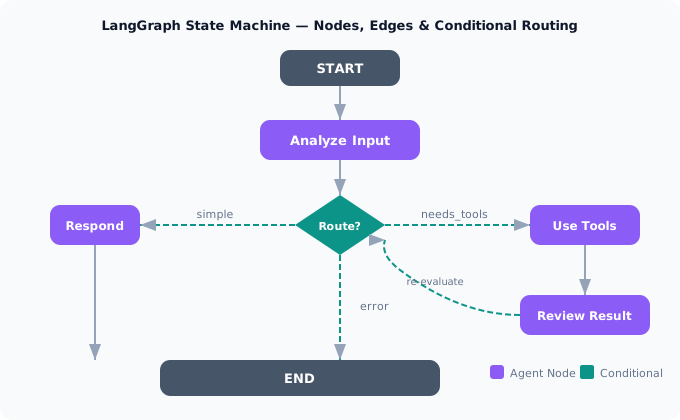
Figure 9-1. A LangGraph state machine with agent nodes (purple), conditional routing edges (teal), and start/end terminals (gray). The conditional router inspects state at runtime to determine which path to take. The loop from Review back to Route enables iterative tool use.
9.4 LangGraph Concepts
LangGraph is a framework for building agent workflows as graphs. It builds on four core abstractions: state, nodes, edges, and conditional edges. These abstractions represent the minimal vocabulary for describing any agent orchestration system — worth understanding regardless of whether you use LangGraph directly.
State
State is a typed dictionary that flows through the graph. Every node receives the current state and returns an update to it. LangGraph merges the update into the existing state using reducers — functions that define how to combine old and new values. The default reducer replaces the old value with the new one. For accumulating data, you use an append reducer. For counters, you use an add reducer.
from typing import Annotated, TypedDict
from langgraph.graph import StateGraph
from operator import add

class ClaimState(TypedDict):
    """State for insurance claim processing workflow."""
    claim_id: str
    image_url: str
    policy_id: str
    # Annotated with 'add' reducer: messages accumulate
    messages: Annotated[list[str], add]
    damage_assessment: dict | None
    policy_details: dict | None
    fraud_score: float | None
    decision: str | None
    requires_review: bool
The state schema is your contract. It defines what information the workflow tracks, what each node can read, and what each node is expected to produce. When a node writes a key that does not exist in the schema, LangGraph raises an error. When a node fails to write a required key, the next node that reads it gets None. That strictness is intentional — it catches integration errors at graph compilation time rather than at 2 AM in production.
Nodes
A node is a Python function that takes state and returns a partial state update. It can call an LLM, invoke a tool, query a database, or run any arbitrary computation. The only constraint is that it must return a dictionary whose keys are a subset of the state schema.
async def analyze_damage(state: ClaimState) -> dict:
    """Node: analyze the uploaded damage image."""
    image_url = state["image_url"]
    assessment = await vision_model.analyze(
        image_url=image_url,
        prompt="Assess vehicle damage severity. Return JSON with "
               "severity (minor/moderate/severe), affected_areas, "
               "and estimated_repair_cost."
    )
    return {
        "damage_assessment": assessment,
        "messages": [f"Damage analyzed: {assessment['severity']}"],
    }

async def lookup_policy(state: ClaimState) -> dict:
    """Node: retrieve policy details from the database."""
    policy = await policy_db.get(state["policy_id"])
    coverage_limit = policy["coverage_limit"]
    return {
        "policy_details": policy,
        "messages": [f"Policy {state['policy_id']}: limit ${coverage_limit:,}"],
    }

async def score_fraud(state: ClaimState) -> dict:
    """Node: compute fraud probability score."""
    score = await fraud_model.predict(
        claim_id=state["claim_id"],
        image_url=state["image_url"],
        damage=state["damage_assessment"],
    )
    return {
        "fraud_score": score,
        "messages": [f"Fraud score: {score:.2f}"],
    }
Edges and Conditional Edges
An edge connects two nodes. A normal edge is unconditional: when node A finishes, node B always runs next. A conditional edge calls a routing function that inspects the current state and returns the name of the next node. This is how the graph makes decisions.
def route_after_scoring(state: ClaimState) -> str:
    """Decide the next step based on fraud score and damage severity."""
    fraud_score = state.get("fraud_score", 0)
    damage = state.get("damage_assessment", {})
    severity = damage.get("severity", "unknown")

    if fraud_score > 0.7:
        return "flag_for_investigation"
    if severity == "severe" or fraud_score > 0.3:
        return "human_review"
    return "auto_approve"

# Building the graph
graph = StateGraph(ClaimState)

# Add nodes
graph.add_node("analyze_damage", analyze_damage)
graph.add_node("lookup_policy", lookup_policy)
graph.add_node("score_fraud", score_fraud)
graph.add_node("human_review", human_review)
graph.add_node("auto_approve", auto_approve)
graph.add_node("flag_for_investigation", flag_investigation)

# Normal edges
graph.set_entry_point("analyze_damage")
graph.add_edge("analyze_damage", "lookup_policy")
graph.add_edge("lookup_policy", "score_fraud")

# Conditional edge: fraud score determines next node
graph.add_conditional_edges(
    "score_fraud",
    route_after_scoring,
    {
        "human_review": "human_review",
        "auto_approve": "auto_approve",
        "flag_for_investigation": "flag_for_investigation",
    },
)

# Terminal edges
graph.add_edge("human_review", "__end__")
graph.add_edge("auto_approve", "__end__")
graph.add_edge("flag_for_investigation", "__end__")

# Compile
app = graph.compile()
Under the Hood: Compilation Catches Errors Early
When you call graph.compile(), LangGraph validates the graph structure: unreachable nodes, missing edges, state schema violations, and cycles without exit conditions. This is the equivalent of a type checker for workflows. A graph that compiles will not fail due to structural errors at runtime — only due to the logic inside your nodes.
9.5 Routing Patterns
Routing is the mechanism by which a graph decides what happens next. The simplest pattern is static routing: edge A always goes to node B. But production workflows demand dynamic decisions.
Content-Based Routing
The routing function inspects the content of the state — the output of a previous node — and selects the next node based on what it finds. This is the most common pattern. The fraud scoring example above is content-based routing: the fraud score determines whether the claim goes to auto-approve, human review, or investigation.
Model-Based Routing
Instead of writing explicit routing logic, you ask an LLM to decide. This is useful when the routing decision requires judgment that is hard to encode in rules. The LLM reads the current state and returns a structured decision.
from pydantic import BaseModel, Field

class RoutingDecision(BaseModel):
    """Structured output for routing decisions."""
    next_step: str = Field(
        description="The next node to execute",
        enum=["research", "draft_response", "escalate_to_human"],
    )
    reasoning: str = Field(
        description="Why this route was chosen",
    )

async def model_router(state: dict) -> str:
    """Use an LLM to decide the next step."""
    decision = await llm.with_structured_output(RoutingDecision).ainvoke(
        f"Given this customer inquiry and the information gathered so far, "
        f"decide the next step.\n\n"
        f"Inquiry: {state['inquiry']}\n"
        f"Context gathered: {state['context']}\n"
        f"Confidence: {state['confidence_score']}"
    )
    # Log the reasoning for audit trail
    state["routing_log"].append(decision.reasoning)
    return decision.next_step
Parallel Fan-Out and Fan-In
When multiple nodes can execute independently, you fan out from a single node to multiple parallel branches, then fan in to a node that aggregates the results. In LangGraph, you create this by adding multiple edges from the same source node. The target nodes run concurrently, and the fan-in node waits for all of them to write their state updates before executing.
# Fan-out: analyze_damage and lookup_policy run in parallel
graph.add_edge("start", "analyze_damage")
graph.add_edge("start", "lookup_policy")

# Fan-in: score_fraud waits for both to complete
graph.add_edge("analyze_damage", "score_fraud")
graph.add_edge("lookup_policy", "score_fraud")
This is where the insurance claim example at the opening of this chapter went wrong. The original code ran steps sequentially. When the fraud scorer timed out, the sequential chain simply continued without it. A graph with fan-in makes this failure mode explicit: score_fraud cannot run until both analyze_damage and lookup_policy have written their state. If either times out, score_fraud never executes, and the workflow enters an error state rather than silently proceeding.
Production Consideration: Fan-Out Reduces Latency, Not Cost
Running three LLM calls in parallel takes the time of the slowest call instead of the sum of all three. You still pay for all three calls. Fan-out is a latency optimization. When token costs matter more than response time, sequential execution with early termination can be more economical.
9.6 Interrupts and Human-in-the-Loop
Not every decision should be made by a machine. High-stakes actions — approving a $50,000 claim, sending a legal notice, modifying a patient's treatment plan — require human oversight. An interrupt is a deliberate pause in the workflow. The graph stops at a designated node, persists its state, notifies a human, and waits. When the human responds, the graph resumes from exactly where it paused.
LangGraph implements interrupts through the interrupt_before and interrupt_after parameters at compile time. When execution reaches an interrupt point, the framework raises an InterruptException, saves the current state to the checkpoint store, and returns control to the caller.
# Compile with interrupt before human_review node
app = graph.compile(
    checkpointer=checkpointer,
    interrupt_before=["human_review"],
)

# First invocation runs until the interrupt
config = {"configurable": {"thread_id": "claim-2847"}}
result = await app.ainvoke(initial_state, config)
# result.status == "interrupted"
# The graph is paused at human_review

# --- Time passes. A human reviews the claim. ---

# Resume with the human's decision injected into state
await app.aupdate_state(
    config,
    {"decision": "approved", "reviewer_notes": "Damage verified via photos"},
)
final_result = await app.ainvoke(None, config)
# Resumes from human_review with updated state
Three critical design considerations follow from this pattern. First, timeouts: what happens if the human never responds? You need a separate monitoring process that checks for stale interrupts and either escalates or auto-resolves them. Second, state validity: the world may have changed while the workflow was paused — the policy may have been updated, the customer may have submitted additional documents. The resuming node should re-validate any state it depends on. Third, concurrent modifications: if two reviewers can see the same paused workflow, you need optimistic locking to prevent conflicting updates.
Production Consideration: Interrupts in Regulated Industries
In healthcare, finance, and legal domains, autonomous agent actions on high-stakes decisions can create regulatory liability. An interrupt is a compliance requirement. Design your graphs with interrupt points at every action that has legal, financial, or safety consequences. The cost of a 30-second human review is negligible compared to an automated decision that violates a regulation.
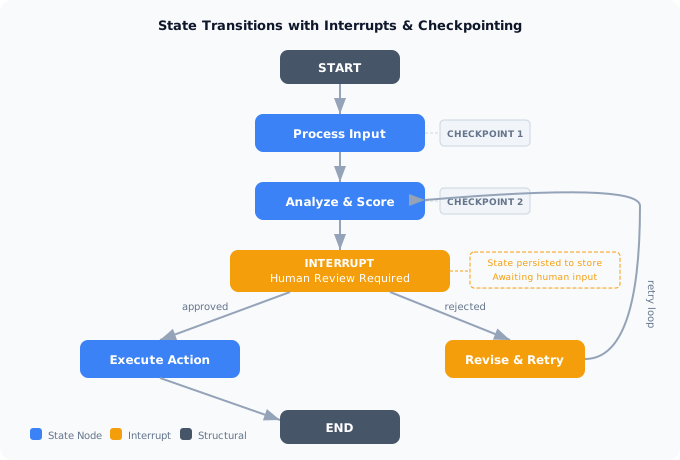
Figure 9-2. A workflow with interrupt points (coral) where the graph pauses for human review. Checkpoints (dark labels) mark state persistence boundaries. The retry loop allows a rejected workflow to revise and re-enter analysis without losing prior state.
9.7 Checkpointing and Durable Execution
A checkpoint is a snapshot of the entire graph state at a specific point in execution. Checkpointing serves three purposes: durability (surviving process crashes), resumability (supporting human-in-the-loop pauses), and observability (replaying the exact sequence of state transitions for debugging or audit).
LangGraph provides a checkpointer interface with implementations for in-memory storage (testing), SQLite (single-machine), and PostgreSQL (production). Every time a node completes, the framework writes a checkpoint. Every checkpoint is identified by a thread ID and a sequence number, forming a complete history of the workflow's execution.
from langgraph.checkpoint.postgres import PostgresSaver

# Production checkpointer with connection pooling
checkpointer = PostgresSaver.from_conn_string(
    "postgresql://user:pass@localhost/workflows"
)

# Compile the graph with checkpointing enabled
app = graph.compile(checkpointer=checkpointer)

# Every node execution automatically saves a checkpoint
config = {"configurable": {"thread_id": "claim-2847"}}
result = await app.ainvoke(initial_state, config)

# If the process crashes after node 3, restart from the last checkpoint
# The framework detects the existing thread and resumes
result = await app.ainvoke(None, config)

# Replay: inspect every state the workflow passed through
history = [state async for state in app.aget_state_history(config)]
for i, snapshot in enumerate(history):
    print(f"Step {i}: node={snapshot.metadata.get('source')}, "
          f"state_keys={list(snapshot.values.keys())}")
Checkpointing introduces a design question: what belongs in state? Everything in state gets serialized at every checkpoint. Store references and decisions, not raw data. Store the document ID, not the document. Store the assessment summary, not the full model output. A typical workflow with 8 nodes and 2 KB state generates 16 KB per execution — trivial for PostgreSQL. Storing full LLM responses in state jumps that to 800 KB per execution. Design your state schema with storage in mind from day one.
9.8 Error Handling in Graphs
Errors in graph-based workflows are fundamentally different from errors in sequential code. In sequential code, an exception propagates up the call stack and you handle it in a catch block. In a graph, an error in one node should not necessarily terminate the entire workflow. The graph should be able to route around errors, retry failed nodes, or proceed with partial information.
import asyncio
from functools import wraps

def with_retry(max_attempts: int = 3, backoff: float = 1.0):
    """Decorator that adds retry logic to a graph node."""
    def decorator(func):
        @wraps(func)
        async def wrapper(state: dict) -> dict:
            last_error = None
            for attempt in range(max_attempts):
                try:
                    return await func(state)
                except Exception as e:
                    last_error = e
                    if attempt < max_attempts - 1:
                        await asyncio.sleep(backoff * (2 ** attempt))
            # All retries exhausted: return error state
            return {
                "messages": [f"Node {func.__name__} failed after "
                             f"{max_attempts} attempts: {last_error}"],
                "_error_node": func.__name__,
                "_error_detail": str(last_error),
            }
        return wrapper
    return decorator

@with_retry(max_attempts=3, backoff=0.5)
async def score_fraud(state: ClaimState) -> dict:
    """Fraud scoring with automatic retry."""
    score = await fraud_model.predict(
        claim_id=state["claim_id"],
        image_url=state["image_url"],
    )
    return {"fraud_score": score}

def route_with_error_handling(state: ClaimState) -> str:
    """Router that accounts for node failures."""
    if state.get("_error_node"):
        return "error_handler"
    if state.get("fraud_score", 0) > 0.7:
        return "flag_for_investigation"
    return "auto_approve"
The key principle: errors are states, not exceptions. When a node fails, it writes an error indicator to the state. The routing function reads that indicator and directs the workflow to an error-handling node. The error handler can log the failure, notify an operator, attempt a fallback strategy, or gracefully terminate the workflow with a meaningful status rather than a stack trace.
9.9 Putting It All Together
A complete orchestration system combines all the patterns from this chapter: a graph structure for explicit control flow, typed state for data passing, conditional routing for dynamic decisions, interrupts for human oversight, checkpointing for durability, and error handling for resilience. Here is the full insurance claim workflow, assembled from the pieces above.
from langgraph.graph import StateGraph, END
from langgraph.checkpoint.postgres import PostgresSaver

# Build the complete graph
workflow = StateGraph(ClaimState)

# Add all nodes
workflow.add_node("analyze_damage", analyze_damage)
workflow.add_node("lookup_policy", lookup_policy)
workflow.add_node("score_fraud", score_fraud)
workflow.add_node("make_decision", make_decision)
workflow.add_node("human_review", human_review_node)
workflow.add_node("execute_decision", execute_decision)
workflow.add_node("error_handler", handle_error)

# Entry point
workflow.set_entry_point("analyze_damage")

# Parallel fan-out: damage + policy run concurrently
workflow.add_edge("analyze_damage", "score_fraud")
workflow.add_edge("lookup_policy", "score_fraud")

# Conditional routing after fraud scoring
workflow.add_conditional_edges(
    "score_fraud",
    route_with_error_handling,
    {
        "auto_approve": "make_decision",
        "flag_for_investigation": "human_review",
        "error_handler": "error_handler",
    },
)

# Human review leads to decision execution
workflow.add_edge("human_review", "execute_decision")
workflow.add_edge("make_decision", "execute_decision")
workflow.add_edge("execute_decision", END)
workflow.add_edge("error_handler", END)

# Compile with checkpointing and interrupts
checkpointer = PostgresSaver.from_conn_string(DB_URL)
app = workflow.compile(
    checkpointer=checkpointer,
    interrupt_before=["human_review"],
)

# Run
result = await app.ainvoke(
    {
        "claim_id": "CLM-2847",
        "image_url": "s3://claims/CLM-2847/damage.jpg",
        "policy_id": "POL-9921",
        "messages": [],
        "requires_review": False,
    },
    {"configurable": {"thread_id": "claim-2847"}},
)
This graph is inspectable: render it as a diagram for compliance review. It is durable: if the server crashes after damage analysis, it resumes from the last checkpoint. It is safe: high-risk claims pause for human review. It is debuggable: the checkpoint history shows every state transition and routing decision.
The fraud checker that timed out in the opening story would not slip through this graph. Fan-in forces score_fraud to wait for both upstream nodes; a timeout writes an error state; the router sees the error and redirects to error_handler rather than auto_approve. The 47 claims that should have been caught would have been caught.
Project: Workflow Orchestrator
Build a graph-based workflow orchestrator that processes domain-specific requests through multiple agent nodes with conditional routing, checkpointing, and human-in-the-loop interrupts. Your orchestrator must support at least three agent nodes, one conditional routing decision, one interrupt point, and checkpoint-based recovery from simulated failures.
Variant A: Deployment Pipeline Tech / Software
Variant B: Clinical Trial Triage Healthcare
Variant C: Loan Underwriting Finance
Variant D: Assignment Grading Education
Variant E: Return Processing E-commerce
Variant F: Contract Review Legal
Exercises
| Type | Exercise | Description |
|---|---|---|
| Conceptual | Failure mode analysis | You have a five-node workflow where nodes 2 and 3 run in parallel (fan-out from node 1, fan-in at node 4). Node 3 consistently times out after 30 seconds for 5% of requests. Design three different strategies for handling this: (a) fail the entire workflow, (b) proceed with partial data, (c) retry with exponential backoff. For each strategy, describe the trade-offs in terms of latency, correctness, and user experience. Which would you choose for a customer-facing application, and why? |
| Coding | Graph visualization | Write a function that takes a compiled LangGraph and outputs a Mermaid diagram string. The function should represent nodes as rectangles, conditional edges as diamond decision points, and interrupt points with a distinct color. Test it on a graph with at least five nodes and two conditional edges. Bonus: add the ability to overlay a specific execution trace, highlighting the path that was taken in a different color. |
| Design | Multi-tenant orchestration | Design an orchestration platform where different teams can define their own workflows using a shared pool of agent nodes. Address: how teams compose graphs from a node registry, how state schemas are validated when connecting nodes from different teams, how you prevent one team's long-running workflow from starving another team's resources, and how you version workflows so that in-flight executions continue on the old graph while new executions use the updated graph. |
See also: For how orchestration patterns fit into enterprise-scale GenAI platforms, see The AI-First Enterprise, Chapter 10: GenAI Architectures.