Chapter 05 of 20
Cypher for SQL People
A side-by-side translation of 20 common SQL query patterns into Cypher. Covers SELECT, JOIN, WHERE, GROUP BY, subqueries, INSERT, UPDATE, DELETE, and five queries that are painful in SQL but elegant in Cypher. Includes a complete cheatsheet table.
Overview
You know SELECT, JOIN, WHERE, GROUP BY. Here are the same 20 queries in Cypher.
01. The Mental Shift
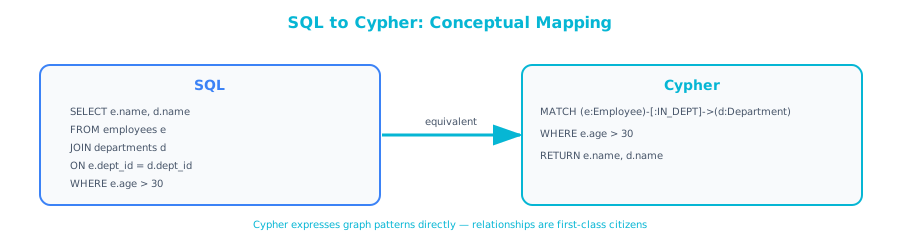
 If you have written SQL for any length of time, you think in terms of operations: SELECT these columns, FROM these tables, WHERE this condition, JOIN on this key. SQL describes what to do to get data.
Cypher describes what the data looks like. You draw the pattern of nodes and relationships you are looking for, and the database finds all instances that match.
This is not as different as it sounds. Once you see the mapping, most Cypher reads like SQL with a different syntax. And there are a handful of query types where Cypher is so much more natural than SQL that you will wonder why you ever used recursive CTEs.
Think of it like this: SQL is like giving someone directions: "Go to the Employees table, find the row where name equals 'Bob,' look at the manager_id column, go to the Employees table again, find the row where emp_id matches that manager_id." Cypher is like showing someone a picture: "Find this pattern: a person named Bob, connected by a REPORTS_TO arrow, to another person."
02. The Basics: SELECT, FROM, WHERE
SELECT ... FROM ... WHERE
SQL:
SELECT name, title, salary
FROM employees
WHERE department = 'Engineering'
  AND salary > 100000;
Cypher:
MATCH (e:Employee)
WHERE e.department = 'Engineering' AND e.salary > 100000
RETURN e.name, e.title, e.salary
The mapping:
FROM employeesbecomesMATCH (e:Employee): find nodes labeled EmployeeWHEREis identicalSELECTbecomesRETURN- Column references use dot notation:
e.nameinstead ofname
SELECT with alias
SQL:
SELECT name AS employee_name, salary * 12 AS annual_salary
FROM employees
WHERE hire_date > '2023-01-01';
Cypher:
MATCH (e:Employee)
WHERE e.hire_date > date('2023-01-01')
RETURN e.name AS employee_name, e.salary * 12 AS annual_salary
Aliases work the same way: AS in both languages.
SELECT DISTINCT
SQL:
SELECT DISTINCT department FROM employees;
Cypher:
MATCH (e:Employee)
RETURN DISTINCT e.department
ORDER BY and LIMIT
SQL:
SELECT name, salary FROM employees
ORDER BY salary DESC
LIMIT 10;
Cypher:
MATCH (e:Employee)
RETURN e.name, e.salary
ORDER BY e.salary DESC
LIMIT 10
Identical syntax for ORDER BY and LIMIT.
03. JOINs Become Relationship Patterns
This is where Cypher diverges from SQL, and where it gets interesting.
INNER JOIN (one-to-many)
SQL:
SELECT e.name, d.name AS department
FROM employees e
JOIN departments d ON e.dept_id = d.dept_id;
Cypher:
MATCH (e:Employee)-[:BELONGS_TO]->(d:Department)
RETURN e.name, d.name AS department
The JOIN disappears. Instead of matching e.dept_id = d.dept_id, you describe the relationship pattern: (e)-[:BELONGS_TO]->(d). The arrow -> indicates direction.
LEFT JOIN (optional match)
SQL:
SELECT e.name, d.name AS department
FROM employees e
LEFT JOIN departments d ON e.dept_id = d.dept_id;
Cypher:
MATCH (e:Employee)
OPTIONAL MATCH (e)-[:BELONGS_TO]->(d:Department)
RETURN e.name, d.name AS department
LEFT JOIN becomes OPTIONAL MATCH. If no matching relationship exists, the variables from the OPTIONAL MATCH are null. This is the same behavior as a LEFT JOIN returning NULLs.
Multi-table JOIN
SQL:
SELECT e.name, d.name AS department, p.name AS project, ep.role
FROM employees e
JOIN departments d ON e.dept_id = d.dept_id
JOIN employee_projects ep ON e.emp_id = ep.emp_id
JOIN projects p ON ep.project_id = p.project_id
WHERE d.name = 'Engineering';
Cypher:
MATCH (e:Employee)-[:BELONGS_TO]->(d:Department {name: 'Engineering'})
MATCH (e)-[w:WORKS_ON]->(p:Project)
RETURN e.name, d.name AS department, p.name AS project, w.role
Three JOINs become two MATCH lines. The junction table employee_projects disappears. Its data (the role column) lives on the WORKS_ON relationship as a property.
Self-JOIN (hierarchy)
SQL:
SELECT e.name AS employee, m.name AS manager
FROM employees e
JOIN employees m ON e.manager_id = m.emp_id;
Cypher:
MATCH (e:Employee)-[:REPORTS_TO]->(m:Employee)
RETURN e.name AS employee, m.name AS manager
The self-referencing foreign key becomes a named relationship type. The direction of the arrow makes the meaning explicit.
04. Aggregation: GROUP BY, COUNT, SUM
COUNT with GROUP BY
SQL:
SELECT department, COUNT(*) AS emp_count
FROM employees
GROUP BY department
HAVING COUNT(*) > 5;
Cypher:
MATCH (e:Employee)-[:BELONGS_TO]->(d:Department)
WITH d.name AS department, COUNT(e) AS emp_count
WHERE emp_count > 5
RETURN department, emp_count
Key differences:
GROUP BYis implicit: Cypher groups by the non-aggregated columns in theWITHclauseHAVINGbecomes a regularWHEREafter theWITHWITHis Cypher's way of piping results from one stage to the next (like a subquery in SQL)
SUM, AVG, MIN, MAX
SQL:
SELECT d.name, AVG(e.salary) AS avg_salary,
       MIN(e.salary) AS min_salary, MAX(e.salary) AS max_salary
FROM employees e
JOIN departments d ON e.dept_id = d.dept_id
GROUP BY d.name;
Cypher:
MATCH (e:Employee)-[:BELONGS_TO]->(d:Department)
RETURN d.name,
       avg(e.salary) AS avg_salary,
       min(e.salary) AS min_salary,
       max(e.salary) AS max_salary
The aggregate functions are the same names. The grouping is implicit: Cypher groups by d.name because it is the non-aggregated column in the RETURN.
collect(): Cypher's Unique Aggregation
Cypher has a function that SQL does not: collect(), which gathers values into a list.
SQL (using string_agg or GROUP_CONCAT):
SELECT d.name, STRING_AGG(e.name, ', ') AS employees
FROM employees e
JOIN departments d ON e.dept_id = d.dept_id
GROUP BY d.name;
Cypher:
MATCH (e:Employee)-[:BELONGS_TO]->(d:Department)
RETURN d.name, collect(e.name) AS employees
collect() returns an actual list (array), not a concatenated string. This is useful when you need to process the list further.
05. Subqueries: WITH as the Pipeline
SQL uses subqueries and CTEs. Cypher uses WITH to pipe results between stages of a query. The mental model is the same: compute an intermediate result, then use it in the next step.
Subquery / CTE Equivalent
SQL:
WITH dept_sizes AS (
    SELECT dept_id, COUNT(*) AS size
    FROM employees
    GROUP BY dept_id
)
SELECT d.name, ds.size
FROM dept_sizes ds
JOIN departments d ON ds.dept_id = d.dept_id
WHERE ds.size > 10
ORDER BY ds.size DESC;
Cypher:
MATCH (e:Employee)-[:BELONGS_TO]->(d:Department)
WITH d, COUNT(e) AS size
WHERE size > 10
RETURN d.name, size
ORDER BY size DESC
The WITH clause in Cypher serves the same purpose as a CTE: it computes an intermediate result that subsequent clauses can use. The difference is that WITH is inline. You do not need to declare it separately.
Correlated Subquery
SQL:
SELECT e.name, e.salary,
    (SELECT AVG(e2.salary) FROM employees e2
     WHERE e2.dept_id = e.dept_id) AS dept_avg
FROM employees e
WHERE e.salary > (SELECT AVG(e3.salary) FROM employees e3
                  WHERE e3.dept_id = e.dept_id);
Cypher:
MATCH (e:Employee)-[:BELONGS_TO]->(d:Department)<-[:BELONGS_TO]-(colleague:Employee)
WITH e, d, avg(colleague.salary) AS dept_avg
WHERE e.salary > dept_avg
RETURN e.name, e.salary, dept_avg
The correlated subquery becomes a pattern match. Find the employee, find their department, find all colleagues in that department, compute the average, filter.
06. Write Operations: INSERT, UPDATE, DELETE
INSERT → CREATE
SQL:
INSERT INTO employees (emp_id, name, title, salary)
VALUES (201, 'Eve Torres', 'Data Engineer', 130000);
Cypher:
CREATE (e:Employee {emp_id: 201, name: 'Eve Torres',
                     title: 'Data Engineer', salary: 130000})
INSERT with relationship
SQL:
-- Two inserts: one for the employee, one for the junction table
INSERT INTO employees (emp_id, name, title) VALUES (201, 'Eve Torres', 'Data Engineer');
INSERT INTO employee_projects (emp_id, project_id, role) VALUES (201, 7, 'Contributor');
Cypher:
MATCH (p:Project {project_id: 7})
CREATE (e:Employee {emp_id: 201, name: 'Eve Torres', title: 'Data Engineer'})
CREATE (e)-[:WORKS_ON {role: 'Contributor'}]->(p)
The junction table insert becomes a relationship creation. One statement creates both the node and its relationship.
UPSERT → MERGE
SQL (PostgreSQL):
INSERT INTO employees (emp_id, name, title)
VALUES (201, 'Eve Torres', 'Data Engineer')
ON CONFLICT (emp_id) DO UPDATE
SET name = EXCLUDED.name, title = EXCLUDED.title;
Cypher:
MERGE (e:Employee {emp_id: 201})
ON CREATE SET e.name = 'Eve Torres', e.title = 'Data Engineer'
ON MATCH SET e.name = 'Eve Torres', e.title = 'Data Engineer'
MERGE is Cypher's upsert: if the node exists, match it; if it does not, create it. ON CREATE SET and ON MATCH SET let you control what happens in each case.
UPDATE → SET
SQL:
UPDATE employees
SET salary = 145000, title = 'Senior Data Engineer'
WHERE emp_id = 201;
Cypher:
MATCH (e:Employee {emp_id: 201})
SET e.salary = 145000, e.title = 'Senior Data Engineer'
Find the node, set the properties. Straightforward.
DELETE
SQL:
-- Delete from junction table first (foreign key constraint)
DELETE FROM employee_projects WHERE emp_id = 201;
-- Then delete the employee
DELETE FROM employees WHERE emp_id = 201;
Cypher:
-- DETACH DELETE removes the node AND all its relationships
MATCH (e:Employee {emp_id: 201})
DETACH DELETE e
DETACH DELETE is important. In a graph, you cannot delete a node that still has relationships (similar to foreign key constraints in SQL). DETACH removes all relationships first, then deletes the node. If you want to delete only the relationships and keep the node:
MATCH (e:Employee {emp_id: 201})-[r:WORKS_ON]->()
DELETE r
07. Five Queries That Are Painful in SQL but Elegant in Cypher
These are the queries that justify learning a new query language. Each one is possible in SQL but requires significant complexity. In Cypher, each is natural and readable.
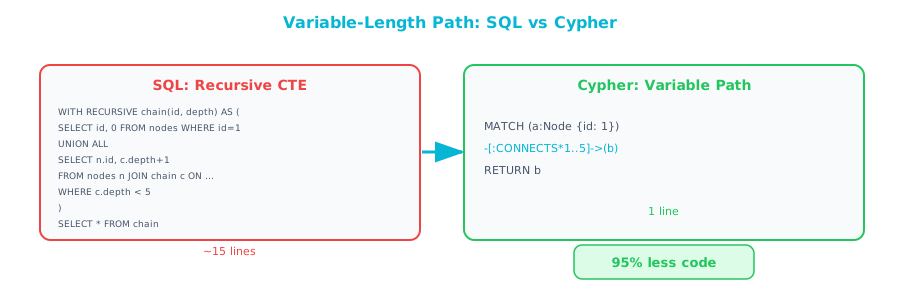
Query 1: Variable-Length Path
"Find all managers above Bob, at any depth."
SQL:
WITH RECURSIVE chain AS (
    SELECT emp_id, name, manager_id, 1 AS depth
    FROM employees WHERE name = 'Bob Park'
    UNION ALL
    SELECT e.emp_id, e.name, e.manager_id, c.depth + 1
    FROM employees e JOIN chain c ON e.emp_id = c.manager_id
    WHERE c.depth < 20
)
SELECT name, depth FROM chain WHERE depth > 1 ORDER BY depth;
Cypher:
MATCH (bob:Employee {name: 'Bob Park'})-[:REPORTS_TO*1..20]->(manager:Employee)
RETURN manager.name
One line. The *1..20 means "between 1 and 20 hops."
Query 2: Shortest Path
"Find the shortest connection between Alice and Dave in the org chart."
SQL:
-- This requires a BFS implementation in SQL, which is
-- dozens of lines of recursive CTE with path tracking
-- and duplicate detection. Most people give up and
-- do it in application code.
Cypher:
MATCH path = shortestPath(
    (alice:Employee {name: 'Alice Chen'})-[*]-(dave:Employee {name: 'Dave Kim'})
)
RETURN [n IN nodes(path) | n.name] AS path_names,
       length(path) AS hops
shortestPath() is a built-in function. It returns the shortest path between two nodes, considering any relationship type and direction.
Query 3: Pattern Matching (Fraud Detection)
"Find all circular payment chains: A pays B, B pays C, C pays A."
SQL:
SELECT t1.from_account, t1.to_account,
       t2.from_account, t2.to_account,
       t3.from_account, t3.to_account
FROM transactions t1
JOIN transactions t2 ON t1.to_account = t2.from_account
JOIN transactions t3 ON t2.to_account = t3.from_account
WHERE t3.to_account = t1.from_account
  AND t1.amount > 10000
  AND t2.amount > 10000
  AND t3.amount > 10000;
Cypher:
MATCH (a:Account)-[t1:TRANSFERRED {amount_gt: 10000}]->(b:Account)
      -[t2:TRANSFERRED]->(c:Account)-[t3:TRANSFERRED]->(a)
WHERE t1.amount > 10000 AND t2.amount > 10000 AND t3.amount > 10000
RETURN a.id, b.id, c.id, t1.amount, t2.amount, t3.amount
The circular pattern (a)→(b)→(c)→(a) is visually obvious in Cypher. In SQL, you have to mentally trace the JOIN conditions to see the circle.
Query 4: Recommendations (Collaborative Filtering)
"Find products that people similar to me bought, that I have not bought yet."
SQL:
SELECT p2.name, COUNT(*) AS recommendation_score
FROM purchases pu1
JOIN purchases pu2 ON pu1.product_id = pu2.product_id
    AND pu1.customer_id != pu2.customer_id
JOIN purchases pu3 ON pu2.customer_id = pu3.customer_id
JOIN products p2 ON pu3.product_id = p2.product_id
LEFT JOIN purchases my_pu ON my_pu.customer_id = pu1.customer_id
    AND my_pu.product_id = pu3.product_id
WHERE pu1.customer_id = 42
  AND my_pu.product_id IS NULL
GROUP BY p2.name
ORDER BY recommendation_score DESC
LIMIT 10;
Cypher:
MATCH (me:Customer {id: 42})-[:PURCHASED]->(product)<-[:PURCHASED]-(similar_person)
      -[:PURCHASED]->(recommendation)
WHERE NOT (me)-[:PURCHASED]->(recommendation)
RETURN recommendation.name, COUNT(similar_person) AS score
ORDER BY score DESC
LIMIT 10
The Cypher reads like the algorithm: "Find products I bought, find people who also bought them, find what else those people bought, exclude what I already bought."
Query 5: Impact Analysis
"If the Authentication Service goes down, what other services are affected, transitively?"
SQL:
WITH RECURSIVE impacted AS (
    SELECT service_id, name FROM services WHERE name = 'Authentication Service'
    UNION ALL
    SELECT s.service_id, s.name
    FROM services s
    JOIN service_dependencies sd ON s.service_id = sd.dependent_id
    JOIN impacted i ON sd.dependency_id = i.service_id
)
SELECT DISTINCT name FROM impacted;
Cypher:
MATCH (auth:Service {name: 'Authentication Service'})<-[:DEPENDS_ON*]-(affected:Service)
RETURN DISTINCT affected.name
Variable-length path traversal in one line. The DEPENDS_ON* follows the dependency chain to any depth.
08. The Complete Cheatsheet
| SQL | Cypher | Notes |
|---|---|---|
SELECT | RETURN | |
SELECT DISTINCT | RETURN DISTINCT | |
FROM table | MATCH (n:Label) | Labels are like table names |
WHERE | WHERE | Same syntax, mostly |
AND / OR / NOT | AND / OR / NOT | Same |
IN (...) | IN [...] | Square brackets, not parentheses |
IS NULL | IS NULL | Same |
LIKE '%text%' | CONTAINS 'text' | Also: STARTS WITH, ENDS WITH |
JOIN ON key | ()-[:REL]->() | Relationship pattern |
LEFT JOIN | OPTIONAL MATCH | |
GROUP BY | (implicit in WITH/RETURN) | Grouped by non-aggregated columns |
HAVING | WHERE (after WITH) | |
COUNT(*) | COUNT(n) | Must specify the variable |
SUM / AVG / MIN / MAX | sum / avg / min / max | Lowercase in Cypher |
STRING_AGG / GROUP_CONCAT | collect() | Returns a list, not a string |
CASE WHEN | CASE WHEN | Same syntax |
ORDER BY | ORDER BY | Same |
LIMIT | LIMIT | Same |
OFFSET | SKIP | Different keyword |
INSERT INTO | CREATE | |
INSERT ... ON CONFLICT | MERGE ... ON CREATE / ON MATCH | |
UPDATE ... SET | MATCH ... SET | |
DELETE FROM | MATCH ... DELETE | |
| (cascade delete) | DETACH DELETE | Removes node + all relationships |
WITH (CTE) | WITH | Inline, not declared separately |
RECURSIVE CTE | *1..N (variable-length path) | No recursion syntax needed |
EXISTS (subquery) | EXISTS { MATCH ... } | |
UNION | UNION | Same |
09. Common Gotchas for SQL Developers
Gotcha 1: MATCH Filters, Not Scans
In SQL, FROM employees reads the entire table (before WHERE filters it). In Cypher, MATCH (e:Employee {name: 'Bob'}) uses an index on the name property (if one exists) to find Bob directly. You should create indexes on properties you filter by:
CREATE INDEX FOR (e:Employee) ON (e.name);
CREATE INDEX FOR (e:Employee) ON (e.emp_id);
Gotcha 2: Relationships Have Direction
All relationships in Neo4j have a direction. (a)-[:KNOWS]->(b) is different from (a)<-[:KNOWS]-(b). If you do not care about direction in your query, omit the arrow:
MATCH (a:Person)-[:KNOWS]-(b:Person) -- either direction
Gotcha 3: NULL Handling
Cypher's NULL handling is similar to SQL, but property access on non-existent properties returns NULL (it does not throw an error). This is like accessing a column that might not exist in a schema-less model.
MATCH (e:Employee)
WHERE e.middle_name IS NOT NULL  -- only returns employees that have this property
RETURN e.name, e.middle_name
Gotcha 4: No Implicit Cross Join
In SQL, SELECT * FROM a, b creates a cartesian product. Cypher does not have this. If you need a cartesian product, you use:
MATCH (a:A), (b:B)
RETURN a, b
But this is rare in practice. If you find yourself writing this, reconsider your query design.
Gotcha 5: MERGE Is Expensive
MERGE checks if a pattern exists before creating it. On large graphs, this can be slow if properties are not indexed. Always index properties used in MERGE patterns:
CREATE INDEX FOR (e:Employee) ON (e.emp_id);
MERGE (e:Employee {emp_id: 201})  -- now this is fast
10. Putting It Into Practice with Python
Here is a complete Python example that demonstrates the major Cypher patterns:
from neo4j import GraphDatabase

driver = GraphDatabase.driver("bolt://localhost:7687", auth=("neo4j", "password"))

def setup_data(tx):
    """Create sample data — equivalent to INSERT statements."""
    tx.run("""
        // Clear existing data
        MATCH (n) DETACH DELETE n
    """)
    tx.run("""
        // Create departments and employees
        CREATE (eng:Department {name: 'Engineering'})
        CREATE (sales:Department {name: 'Sales'})

        CREATE (sarah:Employee {emp_id: 1, name: 'Sarah', title: 'CEO', salary: 250000})
        CREATE (tom:Employee {emp_id: 2, name: 'Tom', title: 'VP Eng', salary: 200000})
        CREATE (lisa:Employee {emp_id: 3, name: 'Lisa', title: 'VP Sales', salary: 195000})
        CREATE (bob:Employee {emp_id: 4, name: 'Bob', title: 'Sr Dev', salary: 150000})
        CREATE (eve:Employee {emp_id: 5, name: 'Eve', title: 'Dev', salary: 120000})
        CREATE (dan:Employee {emp_id: 6, name: 'Dan', title: 'Sales Rep', salary: 110000})

        CREATE (tom)-[:REPORTS_TO]->(sarah)
        CREATE (lisa)-[:REPORTS_TO]->(sarah)
        CREATE (bob)-[:REPORTS_TO]->(tom)
        CREATE (eve)-[:REPORTS_TO]->(bob)
        CREATE (dan)-[:REPORTS_TO]->(lisa)

        CREATE (tom)-[:BELONGS_TO]->(eng)
        CREATE (bob)-[:BELONGS_TO]->(eng)
        CREATE (eve)-[:BELONGS_TO]->(eng)
        CREATE (lisa)-[:BELONGS_TO]->(sales)
        CREATE (dan)-[:BELONGS_TO]->(sales)

        CREATE (p1:Project {name: 'Data Platform', budget: 500000})
        CREATE (p2:Project {name: 'CRM Upgrade', budget: 200000})

        CREATE (bob)-[:WORKS_ON {role: 'Lead'}]->(p1)
        CREATE (eve)-[:WORKS_ON {role: 'Dev'}]->(p1)
        CREATE (dan)-[:WORKS_ON {role: 'Stakeholder'}]->(p2)
    """)

def query_basics(tx):
    """SELECT equivalent: find high-salary employees."""
    result = tx.run("""
        MATCH (e:Employee)
        WHERE e.salary > 140000
        RETURN e.name, e.title, e.salary
        ORDER BY e.salary DESC
    """)
    print("\n--- High salary employees ---")
    for record in result:
        print(f"  {record['e.name']:12s} {record['e.title']:12s} ${record['e.salary']:,.0f}")

def query_join(tx):
    """JOIN equivalent: employees with departments."""
    result = tx.run("""
        MATCH (e:Employee)-[:BELONGS_TO]->(d:Department)
        RETURN e.name, d.name AS department
        ORDER BY d.name, e.name
    """)
    print("\n--- Employees by department ---")
    for record in result:
        print(f"  {record['e.name']:12s} → {record['department']}")

def query_hierarchy(tx):
    """Recursive CTE equivalent: management chain."""
    result = tx.run("""
        MATCH (eve:Employee {name: 'Eve'})-[:REPORTS_TO*]->(manager)
        RETURN manager.name, manager.title
    """)
    print("\n--- Eve's management chain ---")
    for record in result:
        print(f"  → {record['manager.name']} ({record['manager.title']})")

def query_aggregation(tx):
    """GROUP BY equivalent: department sizes."""
    result = tx.run("""
        MATCH (e:Employee)-[:BELONGS_TO]->(d:Department)
        RETURN d.name AS department, COUNT(e) AS size, collect(e.name) AS members
    """)
    print("\n--- Department sizes ---")
    for record in result:
        print(f"  {record['department']}: {record['size']} members — {record['members']}")

def query_recommendation(tx):
    """Collaborative filtering: find coworker connections."""
    result = tx.run("""
        MATCH (bob:Employee {name: 'Bob'})-[:WORKS_ON]->(p)<-[:WORKS_ON]-(colleague)
        WHERE colleague <> bob
        RETURN colleague.name, p.name AS project
    """)
    print("\n--- Bob's project colleagues ---")
    for record in result:
        print(f"  {record['colleague.name']} (via {record['project']})")


with driver.session() as session:
    session.execute_write(setup_data)
    session.execute_read(query_basics)
    session.execute_read(query_join)
    session.execute_read(query_hierarchy)
    session.execute_read(query_aggregation)
    session.execute_read(query_recommendation)

driver.close()
Expected output:
--- High salary employees ---
  Sarah        CEO          $250,000
  Tom          VP Eng       $200,000
  Lisa         VP Sales     $195,000
  Bob          Sr Dev       $150,000

--- Employees by department ---
  Bob          → Engineering
  Eve          → Engineering
  Tom          → Engineering
  Dan          → Sales
  Lisa         → Sales

--- Eve's management chain ---
  → Bob (Sr Dev)
  → Tom (VP Eng)
  → Sarah (CEO)

--- Department sizes ---
  Engineering: 3 members — ['Tom', 'Bob', 'Eve']
  Sales: 2 members — ['Lisa', 'Dan']

--- Bob's project colleagues ---
  Eve (via Data Platform)
11. Chapter Checklist
Before moving on, make sure you can answer these questions:
- Can you translate a basic SELECT/WHERE/ORDER BY query from SQL to Cypher?
- Do you understand how JOINs become relationship patterns?
- Can you use WITH for intermediate results (like a CTE)?
- Do you know the difference between CREATE, MERGE, SET, DELETE, and DETACH DELETE?
- Can you write a variable-length path query (
*1..N) without reaching for a recursive CTE?
If you answered yes to all five, you are ready for Chapter 6, the decision framework for when graphs are (and are not) the right choice.