Chapter 10 of 20
GraphRAG — Beyond Vector Search
Why vector-only RAG fails for relationship questions, and how GraphRAG solves it. Covers the architecture of hybrid retrieval combining vector search with graph traversal, Microsoft's community summary approach, a step-by-step implementation with LangChain and Neo4j, and a comparison of vector-only vs GraphRAG across ten question types.
Overview
Your RAG chatbot answers "What is our return policy?" perfectly. Ask "Which manager approved the vendor whose part failed the safety test?" and you get a blank stare.
01. Where Vector-Only RAG Breaks
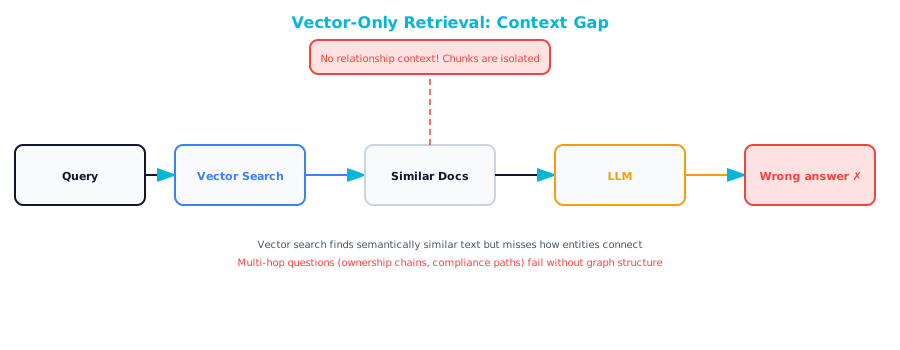
 Retrieval-Augmented Generation (RAG) has become the standard architecture for enterprise AI. You embed your documents, store them in a vector database, retrieve relevant chunks based on semantic similarity to the user's question, and feed those chunks to an LLM for synthesis.
This works well for lookup questions: questions where the answer lives in a single chunk of text. "What is the vacation policy?" "How do I submit an expense report?" "What are the system requirements for Product X?" The embedding captures the meaning of the question, the vector search finds the matching chunk, and the LLM extracts the answer.
It breaks for relationship questions. Here is why.
The Embedding Problem
When you embed the sentence "Acme Corp supplies the X-200 valve," you get a vector that captures the semantic meaning: something about a company, a product, and a supply relationship. When a user asks "Which vendors supply components used in Building 7?" the embedding of that question is semantically similar to chunks about vendors, components, and buildings. But the vector search has no way to connect the dots. Acme supplies the X-200, the X-200 is installed in the HVAC system, the HVAC system is in Building 7. Each of those facts might live in a different chunk, a different document, or even a different system.
Think of it like this: Vector search is like searching a library by topic. You can find every book about "climate" and every book about "agriculture," but you cannot ask "which climate events affected crop yields in the Midwest in 2024?" because that answer requires connecting facts from multiple books. Graph traversal is the librarian who knows that Book A mentions a drought, Book B links that drought to Iowa corn production, and Book C has the yield data.
The Three Failure Modes
| Failure Mode | Example Question | Why Vector Search Fails |
|---|---|---|
| Multi-hop | "Who manages the person who approved Vendor X's contract?" | Answer spans 3 entities across different documents |
| Aggregation | "How many vendors supply components for Building 7?" | Requires collecting all vendor-component-building paths |
| Path reasoning | "What is the chain of approvals for PO-4521?" | Answer is a sequence of connected entities, not a text chunk |
02. What GraphRAG Is
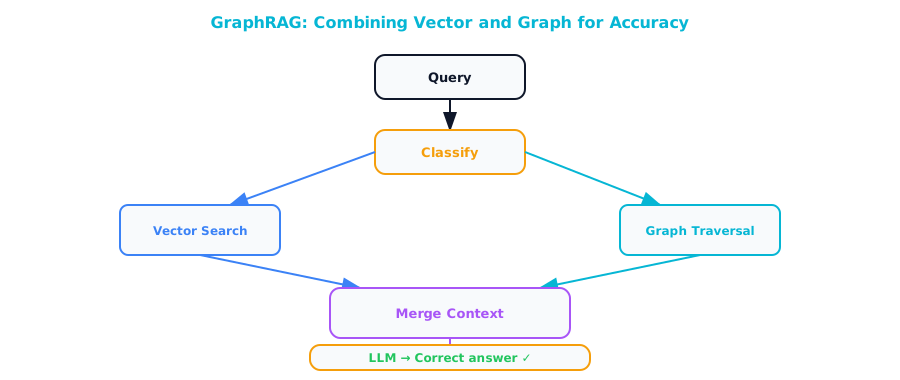
GraphRAG is an architecture that adds graph traversal to the RAG pipeline. Instead of relying solely on vector similarity to find relevant context, GraphRAG uses the structure of a knowledge graph to follow relationships between entities.
The core idea: when a question involves relationships between entities, retrieve context by traversing the graph rather than by embedding similarity.
User Question
    │
    ├── Vector Retrieval ──> Relevant text chunks
    │
    ├── Entity Detection ──> Entities mentioned in question
    │       │
    │       └── Graph Traversal ──> Connected entities + paths
    │
    └── LLM Synthesis ──> Answer (using both chunk + graph context)
The Three Components
1. Vector retrieval — Same as standard RAG. Embed the question, retrieve similar chunks. This handles the topic-level matching.
2. Graph retrieval — Identify entities in the question, then traverse the knowledge graph to find related entities, paths, and subgraphs. This handles the structural matching.
3. LLM synthesis — Combine the text chunks from vector retrieval with the structured data from graph retrieval, and ask the LLM to synthesize an answer.
03. Microsoft's GraphRAG Approach
Microsoft Research published the most cited GraphRAG paper in 2024. Their approach is worth understanding even if you build your own implementation. It introduced two important concepts.
Community Summaries
Microsoft's approach starts by building a knowledge graph from your documents (similar to Chapter 7). It then runs a community detection algorithm (Leiden) on the graph, which identifies clusters of densely connected nodes. For each community, it generates a natural language summary using an LLM.
These community summaries act as a layer of abstraction. Instead of traversing raw graph data, you retrieve relevant community summaries that describe groups of related entities.
Local Search vs. Global Search
Local search: Given a question, identify the most relevant entities, retrieve their local neighborhood from the graph, and use that as context. Good for specific questions: "What does Vendor X supply?"
Global search: Given a broad question, retrieve community summaries across the entire graph and use them as context. Good for thematic questions: "What are the main risks in our supply chain?"
Think of it like this: Local search is like asking one well-connected person in the office about a specific topic — they know everything about their immediate network. Global search is like reading the executive summary of every department's quarterly report — you get a high-level view of the entire organization.
04. Building a GraphRAG Pipeline Step by Step
Here is a practical implementation using Neo4j for the graph, a vector store for embeddings, and Claude for synthesis.
Step 1: Set Up the Graph and Vector Store
Assuming you have already built a knowledge graph (Chapters 7 to 9), add vector embeddings to your nodes:
from neo4j import GraphDatabase
import anthropic
import numpy as np

driver = GraphDatabase.driver(
    "bolt://localhost:7687",
    auth=("neo4j", "password")
)
llm_client = anthropic.Anthropic()


def get_embedding(text: str) -> list[float]:
    """Get embedding vector for text.

    Uses a local embedding model or API.
    Replace with your preferred embedding provider.
    """
    # Example using a hypothetical embedding API
    # In practice, use sentence-transformers, OpenAI, or
    # Cohere embeddings
    import requests
    response = requests.post(
        "http://localhost:11434/api/embeddings",
        json={"model": "nomic-embed-text", "prompt": text}
    )
    return response.json()["embedding"]


def create_vector_index():
    """Create a vector index in Neo4j for similarity search."""
    with driver.session() as session:
        session.run("""
            CREATE VECTOR INDEX chunk_embeddings IF NOT EXISTS
            FOR (c:Chunk)
            ON (c.embedding)
            OPTIONS {
              indexConfig: {
                `vector.dimensions`: 768,
                `vector.similarity_function`: 'cosine'
              }
            }
        """)


def embed_chunks():
    """Add embeddings to all Chunk nodes."""
    with driver.session() as session:
        result = session.run("""
            MATCH (c:Chunk)
            WHERE c.embedding IS NULL
            RETURN c.id AS id, c.text AS text
        """)
        for record in result:
            embedding = get_embedding(record["text"])
            session.run("""
                MATCH (c:Chunk {id: $id})
                SET c.embedding = $embedding
            """, id=record["id"], embedding=embedding)
Step 2: Entity Detection in Questions
Before you can traverse the graph, you need to identify which entities the user is asking about:
def detect_entities(question: str) -> list[dict]:
    """Detect entity references in a user question."""
    response = llm_client.messages.create(
        model="claude-sonnet-4-20250514",
        max_tokens=1024,
        messages=[{
            "role": "user",
            "content": f"""Identify all named entities in this
question. For each entity, provide its name and likely type.

Question: "{question}"

Return JSON array:
[{{"name": "entity name", "type": "Person|Organization|Component|Document|Location"}}]

Only include explicitly named entities. Do not infer."""
        }]
    )
    text = response.content[0].text
    if "```json" in text:
        text = text.split("```json")[1].split("```")[0]
    elif "```" in text:
        text = text.split("```")[1].split("```")[0]

    import json
    return json.loads(text)
Step 3: Graph Retrieval
Given detected entities, traverse the graph to find relevant context:
def graph_retrieve(
    entities: list[dict],
    max_depth: int = 3
) -> dict:
    """Retrieve relevant subgraph around detected entities."""
    context = {
        "entities": [],
        "relationships": [],
        "paths": []
    }

    with driver.session() as session:
        for entity in entities:
            # Find matching nodes
            result = session.run("""
                MATCH (n)
                WHERE toLower(n.name) CONTAINS toLower($name)
                RETURN n.name AS name,
                       labels(n)[0] AS type,
                       properties(n) AS props
                LIMIT 5
            """, name=entity["name"])

            matched_nodes = list(result)
            for node in matched_nodes:
                context["entities"].append(dict(node))

            # Get neighborhood (1-2 hops out)
            result = session.run("""
                MATCH (n)
                WHERE toLower(n.name) CONTAINS toLower($name)
                MATCH path = (n)-[*1..{depth}]-(connected)
                RETURN n.name AS source,
                       [r IN relationships(path) |
                        type(r)] AS rel_types,
                       [m IN nodes(path) |
                        m.name] AS node_names,
                       connected.name AS target,
                       labels(connected)[0] AS target_type,
                       properties(connected) AS target_props
                LIMIT 50
            """.format(depth=max_depth), name=entity["name"])

            for record in result:
                context["relationships"].append(dict(record))

        # Find paths between detected entities (if multiple)
        if len(entities) >= 2:
            for i in range(len(entities)):
                for j in range(i + 1, len(entities)):
                    result = session.run("""
                        MATCH (a), (b)
                        WHERE toLower(a.name)
                              CONTAINS toLower($name_a)
                          AND toLower(b.name)
                              CONTAINS toLower($name_b)
                        MATCH path = shortestPath(
                            (a)-[*..6]-(b)
                        )
                        RETURN [n IN nodes(path) |
                                n.name] AS nodes,
                               [r IN relationships(path) |
                                type(r)] AS rels
                        LIMIT 3
                    """,
                        name_a=entities[i]["name"],
                        name_b=entities[j]["name"]
                    )
                    for record in result:
                        context["paths"].append(dict(record))

    return context


def vector_retrieve(
    question: str,
    top_k: int = 5
) -> list[dict]:
    """Standard vector similarity search."""
    question_embedding = get_embedding(question)

    with driver.session() as session:
        result = session.run("""
            CALL db.index.vector.queryNodes(
                'chunk_embeddings', $k, $embedding
            ) YIELD node, score
            RETURN node.text AS text,
                   node.source AS source,
                   score
        """, k=top_k, embedding=question_embedding)

        return [dict(r) for r in result]
Step 4: Hybrid Context Assembly
Combine vector and graph results into a unified context:
def assemble_context(
    vector_results: list[dict],
    graph_context: dict
) -> str:
    """Combine vector and graph retrieval into LLM context."""
    parts = []

    # Vector-retrieved text chunks
    if vector_results:
        parts.append("## Relevant Document Excerpts\n")
        for i, chunk in enumerate(vector_results, 1):
            parts.append(
                f"[Source: {chunk['source']}, "
                f"Relevance: {chunk['score']:.2f}]\n"
                f"{chunk['text']}\n"
            )

    # Graph-retrieved entities
    if graph_context["entities"]:
        parts.append("\n## Known Entities\n")
        for entity in graph_context["entities"]:
            props = entity.get("props", {})
            props_str = ", ".join(
                f"{k}: {v}" for k, v in props.items()
                if k not in ["embedding", "source"]
            )
            parts.append(
                f"- {entity['name']} ({entity['type']})"
                f"{': ' + props_str if props_str else ''}"
            )

    # Graph-retrieved relationships
    if graph_context["relationships"]:
        parts.append("\n## Known Relationships\n")
        seen = set()
        for rel in graph_context["relationships"][:20]:
            key = (rel["source"], str(rel["rel_types"]),
                   rel["target"])
            if key not in seen:
                seen.add(key)
                rel_chain = " -> ".join(rel["rel_types"])
                parts.append(
                    f"- {rel['source']} --[{rel_chain}]--> "
                    f"{rel['target']} ({rel['target_type']})"
                )

    # Graph-retrieved paths
    if graph_context["paths"]:
        parts.append("\n## Paths Between Entities\n")
        for path in graph_context["paths"]:
            nodes = path["nodes"]
            rels = path["rels"]
            path_str = nodes[0]
            for k, rel in enumerate(rels):
                path_str += f" --[{rel}]--> {nodes[k + 1]}"
            parts.append(f"- {path_str}")

    return "\n".join(parts)
Step 5: LLM Synthesis
def graphrag_query(question: str) -> str:
    """Full GraphRAG pipeline: question to answer."""
    # 1. Detect entities in the question
    entities = detect_entities(question)
    print(f"Detected entities: {entities}")

    # 2. Vector retrieval
    vector_results = vector_retrieve(question, top_k=5)
    print(f"Vector results: {len(vector_results)} chunks")

    # 3. Graph retrieval
    graph_context = graph_retrieve(entities, max_depth=2)
    print(f"Graph context: {len(graph_context['entities'])} "
          f"entities, {len(graph_context['relationships'])} "
          f"relationships, {len(graph_context['paths'])} paths")

    # 4. Assemble context
    context = assemble_context(vector_results, graph_context)

    # 5. LLM synthesis
    response = llm_client.messages.create(
        model="claude-sonnet-4-20250514",
        max_tokens=2048,
        system="""You are a knowledge assistant with access to both
document excerpts and a knowledge graph. Use both sources to
answer questions accurately.

When the graph provides relationship data (paths, connections),
use it to answer "who/what is connected to what" questions.

When document excerpts provide textual detail, use them for
context and supporting evidence.

If the available information is insufficient to answer
confidently, say so. Do not fabricate connections.""",
        messages=[{
            "role": "user",
            "content": f"""Answer this question using the context
below.

QUESTION: {question}

CONTEXT:
{context}"""
        }]
    )

    return response.content[0].text
05. Hybrid Retrieval: When to Use What
Not every question needs graph traversal. Not every question is answered by vector search alone. The key is routing each question to the right retrieval strategy.
def classify_question(question: str) -> str:
    """Classify question type to determine retrieval strategy."""
    response = llm_client.messages.create(
        model="claude-sonnet-4-20250514",
        max_tokens=50,
        messages=[{
            "role": "user",
            "content": f"""Classify this question into ONE category:

- LOOKUP: Answer is in a single text passage
  ("What is our return policy?")
- RELATIONSHIP: Answer requires following connections
  ("Who approved Vendor X's contract?")
- AGGREGATION: Answer requires collecting multiple related items
  ("How many vendors supply to Building 7?")
- PATH: Answer is a chain of connections
  ("Show the approval chain for PO-4521")
- COMPARISON: Answer requires comparing entities
  ("What's the difference between Policy A and Policy B?")

Question: "{question}"

Category:"""
        }]
    )
    return response.content[0].text.strip().upper()


def smart_query(question: str) -> str:
    """Route to the best retrieval strategy."""
    category = classify_question(question)
    print(f"Question type: {category}")

    if category == "LOOKUP":
        # Vector-only is sufficient
        results = vector_retrieve(question, top_k=5)
        context = "\n\n".join(r["text"] for r in results)
    elif category in ("RELATIONSHIP", "PATH", "AGGREGATION"):
        # Full GraphRAG
        return graphrag_query(question)
    else:
        # Hybrid — use both
        return graphrag_query(question)

    # For LOOKUP, simpler synthesis
    response = llm_client.messages.create(
        model="claude-sonnet-4-20250514",
        max_tokens=1024,
        messages=[{
            "role": "user",
            "content": f"Answer this question based on the "
                       f"context.\n\nQuestion: {question}\n\n"
                       f"Context:\n{context}"
        }]
    )
    return response.content[0].text
06. Comparison: Vector-Only RAG vs. GraphRAG
Here is a side-by-side comparison across ten common question types. The "Quality" column rates how well each approach answers on a 5-point scale (1 = fails, 5 = excellent). Use this table to set expectations before pitching GraphRAG to stakeholders.
| # | Question Type | Example | Vector RAG | GraphRAG | Why |
|---|---|---|---|---|---|
| 1 | Factual lookup | "What is the vacation policy?" | 5 | 5 | Both retrieve the relevant chunk |
| 2 | Definition | "What does SOC 2 Type II mean?" | 5 | 5 | Single-chunk answer |
| 3 | Single-hop relationship | "Who manages the NYC office?" | 3 | 5 | Vector may find the chunk; graph guarantees it |
| 4 | Multi-hop relationship | "Who approved the vendor that supplies the failed part?" | 1 | 5 | Vector cannot chain 3 entities |
| 5 | Path query | "Show the approval chain for PO-4521" | 1 | 5 | Vector has no concept of paths |
| 6 | Aggregation | "How many vendors are in the APAC region?" | 2 | 5 | Vector finds some chunks; graph counts all nodes |
| 7 | Impact analysis | "What is affected if Vendor X goes bankrupt?" | 1 | 4 | Requires traversing all downstream dependencies |
| 8 | Comparison | "Compare Vendor A and Vendor B risk profiles" | 3 | 5 | Graph pulls structured attributes for both |
| 9 | Temporal | "Which contracts expire this quarter?" | 2 | 4 | Graph filters on date properties |
| 10 | Global theme | "What are the biggest supply chain risks?" | 4 | 5 | Vector finds risk-related text; graph adds structure |
Key insight: Vector-only RAG is excellent for questions where the answer lives in a contiguous chunk of text. GraphRAG is essential for questions that involve connections between entities. In enterprise contexts, those are often the most valuable questions.
07. Performance Considerations
GraphRAG adds latency compared to vector-only RAG. Here is where the time goes and how to reduce it:
| Stage | Typical Latency | Optimization |
|---|---|---|
| Entity detection (LLM) | 500-1500ms | Cache common questions; use a smaller model |
| Vector retrieval | 50-200ms | Standard vector DB optimization |
| Graph traversal | 100-500ms | Index on name properties; limit traversal depth |
| Context assembly | < 50ms | Limit total context size |
| LLM synthesis | 1000-3000ms | Use streaming; optimize prompt length |
| Total | 1.7-5.3s | Target: under 3s for interactive use |
Caching Strategies
from functools import lru_cache
import hashlib

@lru_cache(maxsize=1000)
def cached_entity_detection(question: str) -> tuple:
    """Cache entity detection results."""
    entities = detect_entities(question)
    return tuple(
        tuple(sorted(e.items())) for e in entities
    )

def cached_graph_retrieve(entities_key: tuple) -> dict:
    """Cache graph retrieval for repeated entity sets."""
    cache_key = hashlib.md5(
        str(entities_key).encode()
    ).hexdigest()

    # Check cache (Redis, local dict, etc.)
    cached = cache_store.get(cache_key)
    if cached:
        return cached

    # Convert back to entity list
    entities = [dict(e) for e in entities_key]
    result = graph_retrieve(entities)
    cache_store.set(cache_key, result, ttl=3600)
    return result
08. Common Pitfalls
Pitfall 1: Over-Retrieving from the Graph
Traversing 3 hops from a highly connected node can return thousands of relationships. The LLM context window fills up with irrelevant data and answer quality drops.
Fix: Limit traversal depth based on node connectivity. High-degree nodes (more than 50 connections) should be traversed only 1 hop. Low-degree nodes can go 2 to 3 hops.
Pitfall 2: Entity Detection Mismatches
The LLM detects "Building 7" in the question, but the graph stores it as "Facility B7" or "Building Seven." No graph results are found.
Fix: Use fuzzy matching in the graph lookup. Full-text indexes in Neo4j support approximate matching. Maintain an alias table for common alternate names. This also handles abbreviations like "NYC" versus "New York City."
// Create full-text index for fuzzy entity matching
CREATE FULLTEXT INDEX entityNames IF NOT EXISTS
FOR (n:Organization|Person|Component|Location)
ON EACH [n.name]

// Fuzzy search
CALL db.index.fulltext.queryNodes(
    'entityNames', 'Building~0.8'
) YIELD node, score
RETURN node.name, labels(node)[0], score
Pitfall 3: Ignoring the Graph When It Has No Matches
If entity detection finds nothing in the graph, fall back gracefully to vector-only RAG. Do not return "no results." The vector store may still have the answer.
09. Chapter Checklist
Before moving to the next chapter, make sure you can answer these questions:
- Can you explain why vector-only RAG fails for relationship questions?
- Can you describe the three components of GraphRAG (vector retrieval, graph retrieval, LLM synthesis)?
- Can you implement entity detection from a user question?
- Can you write a graph traversal query to retrieve context around detected entities?
- Can you assemble hybrid context from both vector and graph sources?
- Can you classify questions to route them to the best retrieval strategy?
The next chapter extends GraphRAG by giving AI agents the ability to actively query and reason over the knowledge graph. The agents do not just retrieve context. They plan and execute multi-step graph operations.