Chapter 03 of 17
Discovery for AI Features
Users can't tell you whether they want an AI feature. They can tell you how they behave when the AI is wrong — and that's what you actually need to know.
Overview
The Fundamental Research Problem
User research for a new feature usually starts simply: talk to users, understand their pain, show them concepts, gather feedback. This works well when the feature lives in a category users understand — a new filter, a redesigned dashboard, a faster workflow. They can relate it to things they've experienced and give you useful reactions.
AI features break this in a specific way. Most users don't have an accurate mental model of what AI can and cannot do. They have a mental model — assembled from product demos, science fiction, and media coverage — but it's reliably wrong in ways that will lead your research astray if you don't account for it.
Ask users whether they'd like an AI that summarizes their data. They'll say yes. Ask whether they'd like one that sometimes gets the summary slightly wrong. They'll say no. Neither answer is useful. The first doesn't distinguish genuine demand from reflexive enthusiasm. The second doesn't tell you what "slightly wrong" means to them or whether they'd actually behave differently.
The goal of user research for AI features is not to ask users what they want. It's to expose them to realistic AI behavior and study how they actually respond.
Why You Cannot Just Ask
When a user says "I would love it if AI could automatically categorize all my support tickets," they're imagining an AI that categorizes correctly, instantly, without review burden, and that they can fully trust. When you build that feature and it categorizes correctly 87% of the time, they experience something else: a system that's sometimes wrong, requires spot-checking, and occasionally creates more work than it saves.
Their stated preference said yes. Their behavior in production says "I'll use this when I'm in a hurry and double-check the ones that matter." That gap — between stated preference and actual usage behavior — is what your research needs to surface before you build.
Wizard-of-Oz Testing
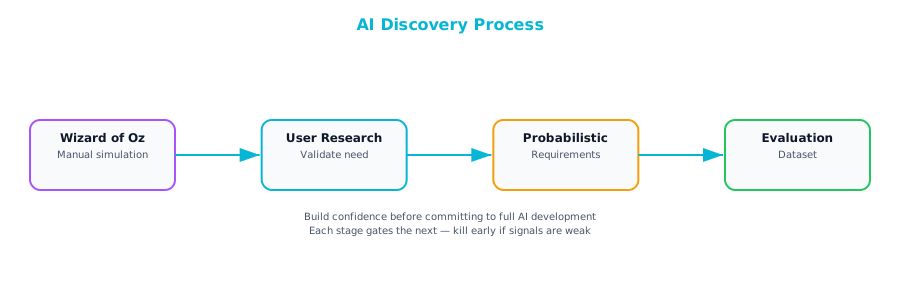
Wizard-of-Oz testing is the single most valuable research technique for AI features. In a Wizard-of-Oz test, you simulate the AI's behavior with a human — typically a researcher or knowledgeable team member — while the user interacts with what they believe (or reasonably assume) to be an AI system. The human "wizard" receives the same inputs the AI would receive and produces outputs that simulate what a good AI might produce, including realistic imperfections.
How to Run a Wizard-of-Oz Test
Step 1: Define the interaction surface. What does the AI receive as input, and what does it return? Map this precisely. A summarization AI receives a document and returns a summary. A categorization AI receives a ticket and returns a category and confidence score. The wizard needs to know exactly what to produce.
Step 2: Define the quality distribution. A test that always produces perfect outputs tells you nothing about user tolerance for imperfection. Before the test, define the mix of output quality you'll simulate — perhaps 80% accurate, 15% approximately correct (right category, wrong subcategory), 5% clearly wrong. Use realistic error patterns, not arbitrary ones. If you know what kinds of mistakes the AI is likely to make, simulate those specifically.
Step 3: Design realistic scenarios. Give users real tasks from their actual workflow, not abstract prompts. "Here are five support tickets — use the categorization tool and then respond to each" produces more useful data than "play around with this feature."
Step 4: Observe behavior, not opinions. Watch what users do. Do they accept outputs without reviewing? Do they correct outputs when wrong? Do they verify the AI output against their own judgment, or use it as a starting point? How long does it take them to realize an output is wrong?
Step 5: Ask about the experience, not the technology. After the session, ask about workflow fit, trust, and frustration — not about the AI. "When the tool suggested the wrong category on that third ticket, what went through your mind?" yields better data than "Do you trust the AI's categorizations?"
What Wizard-of-Oz Testing Tells You
Three questions that are impossible to answer through surveys or interviews alone:
-
At what error rate does the AI become net-negative for the user's workflow? This is the most important finding. It defines the quality floor below which shipping the feature would harm users.
-
What kinds of errors are tolerable and which are catastrophic? Users often have asymmetric tolerance — accepting errors in low-stakes decisions, zero tolerance in high-stakes ones. This shapes where you invest in quality improvement.
-
Do users integrate the AI output into their workflow, or treat it as advisory? Some features become load-bearing: users stop doing the underlying work themselves and rely entirely on the AI. Others stay advisory. Knowing which you're building changes how you design the product and monitor it in production.
Discovering Tolerance for Non-Determinism
AI features produce different outputs for similar inputs. A user asks the same question twice and gets two different phrasings. Two users submit similar tickets and get different categorizations. A summary generated today is slightly different from tomorrow's.
Non-determinism isn't a bug — it's intrinsic to how most AI systems work. But users often experience it as a bug, specifically as inconsistency, and inconsistency erodes trust in ways that are hard to recover from.
Tolerance for non-determinism is not uniform across user types, workflows, or stakes levels. Your research needs to surface it.
The Non-Determinism Tolerance Research Protocol
Run structured sessions where you deliberately show users two outputs for equivalent inputs and ask them to evaluate both.
Low-stakes non-determinism: Show two slightly different summaries of the same document. Does it matter that these are different? Which is better? Would you want the system to always produce the same summary for the same document?
High-stakes non-determinism: Show two different risk assessments for similar customer profiles, or two different categorizations for similar tickets. Watch for elevated concern. Does this variation concern you? How would you handle it if you got a different answer than a colleague got for the same case?
Consequential non-determinism: Show outputs that differ on a dimension that would change the user's action — a recommendation to escalate vs. resolve, a high-risk vs. medium-risk classification. If the system had classified this differently, would you have done something different?
Document the patterns. Users who accept non-determinism in informational contexts but are troubled by it in action-triggering contexts are telling you to design different confidence communication for different use cases. Users who expect full consistency even in low-stakes contexts need more explicit framing around how AI works.
Defining "Good Enough": Probabilistic Acceptance Criteria
Traditional acceptance criteria are binary: the feature does X or it does not. AI features require probabilistic acceptance criteria: the feature does X correctly at least Y% of the time under Z conditions.
The job of user research is to establish what Y needs to be for the feature to deliver the behavioral outcome in your value hypothesis. This is not a technical question — it's a user experience question, and the answer has to come from users.
The Research Method
Design a task where the AI output directly influences a user decision. Control the accuracy rate the user experiences. Run the task at multiple accuracy levels — say 70%, 80%, 90%, 95% — across different user segments and measure:
- Task completion rate: Do users complete the task successfully even when some AI outputs are wrong?
- Correction rate: How often do users catch and correct wrong outputs? Does this change at different accuracy levels?
- Trust trajectory: Does trust in the AI increase, decrease, or stay stable over the course of the session? At what accuracy level does trust deteriorate noticeably?
- Stated threshold: Ask users directly what accuracy rate they'd need to use the tool in their daily workflow. Cross-reference with observed behavior — stated and behavioral thresholds often diverge.
From this research, you should be able to produce a table like this:
| Accuracy Level | User Trust | Task Completion | Correction Overhead | Adoption Likelihood |
|---|---|---|---|---|
| 70% | Low — users frequently frustrated | Partial — users abandon complex tasks | High — users re-doing significant work | Unlikely — only for trivial tasks |
| 80% | Moderate — acceptable for advisory use | Good — most tasks completed | Moderate — manageable review burden | Conditional — for lower-stakes decisions |
| 90% | Good — users comfortable delegating | High | Low | High — most users would incorporate |
| 95% | High — users trust proactively | Very high | Minimal | Very high — users rely on it |
This table becomes a direct input to technical requirements: your team needs to achieve at least the accuracy level that maps to "High adoption likelihood" for your specific user segment and use case. Below that bar, shipping the feature creates user experience harm regardless of the technical achievement.
The User Expectations Gap
Users arrive at AI features with expectations formed by everything they've seen, read, and experienced. The gap between those expectations and what your feature actually does is one of the primary sources of user disappointment, trust erosion, and eventual abandonment.
The expectations gap shows up in four common forms:
The precision gap: Users expect the AI to be precisely right, not approximately right. A summarization AI that captures the main themes but misses one important nuance is, from a user's perspective, wrong — even if from a technical perspective it's performing well.
The consistency gap: Users expect the AI to behave consistently across similar inputs. Inconsistency is experienced as unreliability, even when the underlying outputs are all technically correct.
The explanation gap: Users want to know why the AI said what it said. "This account is at high churn risk" is less trustworthy than "This account is at high churn risk because NPS dropped 20 points last month and no feature adoption has occurred in 60 days." Without reasoning, users can't evaluate whether the AI's judgment is sound.
The scope gap: Users assume the AI knows everything relevant to the task. A customer success AI providing churn predictions doesn't know about the offline conversation the account manager had last week — but the user expects it to factor in everything relevant.
To surface the expectations gap, run a specific session: show users an AI output, then ask them to explain in their own words why the AI produced that output, and what it would need to know to improve it. This reliably reveals assumptions users are carrying that don't match how your feature works. A user who explains a churn prediction by saying "it probably analyzed email sentiment in their support tickets" — when your feature doesn't use email at all — has an expectations gap you need to close. Either use email sentiment or clearly communicate that you don't.
The Problem with "As a User, I Want..."
The standard user story format has served product teams well for decades. "As a [user type], I want [capability] so that [outcome]." It's concise, user-centered, and easy to write. But it was designed for systems where behavior is fully determined by logic — where the same inputs always produce the same output, and "done" means the system does what it was specified to do.
AI features are not those systems. When you write "as a support manager, I want tickets to be automatically categorized so that I don't have to do it manually," you've written a requirement that can't be tested with a binary pass/fail. The AI categorizes some tickets correctly and some incorrectly. The question isn't whether it categorizes — it's how well, for which types of tickets, under which conditions, and what happens when it's wrong.
A user story that ignores these questions doesn't just fail to specify the feature. It actively misleads the team. Engineering builds toward "categorization works." Leadership reads it as a commitment. QA writes tests that verify categorization happens. Nobody writes down the quality bar that actually determines whether the feature creates or destroys user value.
The AI Story Template
An AI story has five components that replace the traditional user story format. Each captures something the traditional format leaves out.
Component 1: Context and User Problem
As [specific user segment], I experience [specific friction] when [specific situation], which currently causes [measurable impact].
Familiar territory. The difference is that specificity matters more for AI features — the user segment and situation will determine your evaluation criteria.
Component 2: AI Capability Hypothesis
We hypothesize that an AI that [specific AI task and approach] can [change user behavior] by [mechanism of change].
Note "hypothesize." This is deliberate. AI stories should acknowledge that the AI capability you're describing is a bet, not a certainty.
Component 3: Success Metric (probabilistic)
The feature succeeds when [AI output type] meets [quality threshold] as measured on [evaluation set], resulting in [behavioral outcome] for at least [% of target users].
The quality threshold is not "it works." It's the specific accuracy, precision, recall, or other quality measure your user research established as the adoption threshold.
Component 4: Edge Case Inventory
Known failure modes: [list]. For each, the designed behavior is [description]. These are acceptable because [rationale] or require mitigation [specific mitigation].
Edge cases are not afterthoughts in AI requirements. They're first-class content. AI systems fail on the tails of the distribution — the edges are where users will most frequently be surprised or harmed.
Component 5: Kill Criteria
We will stop or re-scope this feature if [specific condition]: [measured metric] falls below [threshold] after [timeframe or data volume], because [specific harm to users or business].
Kill criteria turn an open-ended commitment into a time-bounded bet. They are not failure conditions to be avoided — they're decision points at which you'll have enough evidence to choose the right next action.
A Complete AI Story Example
Context: As an enterprise account manager responsible for 60+ accounts, I lose time every week manually reviewing usage data to identify which accounts need attention, which means I'm reactive rather than proactive and I miss early churn signals until it's too late.
AI Capability Hypothesis: We hypothesize that an AI that scores account health weekly based on product usage patterns, support ticket volume, and NPS signals can cause account managers to initiate proactive outreach more than 48 hours before a renewal conversation, by surfacing accounts in need of attention before the account manager would otherwise notice.
Success Metric: The feature succeeds when the account health score correctly identifies accounts that subsequently churn within 90 days with a recall rate of at least 75% and a precision of at least 60% on our evaluation set of 200 historical accounts, and at least 65% of account managers in the pilot cohort initiate a proactive outreach within 5 days of a high-risk alert within 60 days of launch.
Edge Case Inventory:
- New accounts (less than 60 days old): Insufficient signal for reliable scoring. Designed behavior: display "insufficient data" indicator rather than a score. Acceptable because new accounts don't present an immediate churn risk.
- Accounts with no product usage in 30+ days: Could indicate churned already vs. a legitimate pause. Designed behavior: flag for manual review rather than automated scoring. Requires mitigation: clear UI communication about why the account is flagged.
- Accounts with very high support ticket volume: Might score high-risk due to volume even when all tickets are routine. Designed behavior: separate "support intensity" signal from churn risk signal in the UI. Requires mitigation before launch.
Kill Criteria: We will pause and re-evaluate if, after 90 days in production with at least 50 account managers, the proactive outreach rate is below 30% (adoption failure) or churned accounts identified by the AI represent fewer than 50% of actual churn events (the model is missing the signal). We will kill the feature entirely if the false positive rate causes account managers to report increased workflow burden from false alarm fatigue.
This story is longer than a traditional user story. Every decision the engineering team needs to make — what to optimize for, what to do on the edges, what constitutes done — is answered in the story rather than left for ad hoc decisions during development.
Defining Success Probabilistically
"The AI is 92% accurate" sounds precise but is almost meaningless without context. 92% accurate at what task? On what data distribution? With what definition of correct? Measured how?
Probabilistic success criteria need to specify five things:
1. The task definition. Not "summarize documents" but "produce a 3–5 sentence summary that captures the main conclusion, the key supporting points, and any action items from meeting transcripts."
2. The metric type. Classification tasks use precision, recall, and F1. Regression tasks use mean absolute error. Generation tasks often use human evaluation or LLM-as-judge approaches.
3. The measurement dataset. Accuracy on a curated, representative, well-labeled dataset is meaningful. Accuracy on hand-selected best examples is not. The evaluation dataset needs to represent the actual distribution of inputs the AI will encounter in production.
4. The threshold and its source. The required accuracy level should come from user research, not from optimism. "We need 90% precision because user research showed that below 90%, correction overhead exceeds time savings" is a defensible threshold.
5. The floor vs. the ceiling. Document both: the floor below which you won't launch, and the ceiling at which further quality investment stops producing measurable user benefit.
A Probabilistic Success Criteria Template
| Dimension | Specification |
|---|---|
| Task | [Specific AI task description] |
| Primary metric | [Metric name and definition] |
| Threshold (floor) | [Minimum acceptable level, source: user research / comparable product / business requirement] |
| Threshold (stretch) | [Level at which user benefit is meaningfully better] |
| Evaluation set | [Description: size, composition, labeling approach, representativeness] |
| Measurement cadence | [How often this will be re-measured after launch] |
| Acceptable error types | [Errors the product can tolerate and why] |
| Unacceptable error types | [Errors that will trigger review / escalation / feature pause] |
Edge Case Taxonomy: What Happens When the AI Is Wrong?
Edge cases for AI features aren't the same as edge cases for traditional software. In traditional software, an edge case is usually a boundary condition — what happens when the input is null, when the number overflows, when the file is empty. Often rare. Often handled by explicit rules.
In AI features, edge cases are situations where performance degrades below the acceptable threshold. Often neither rare nor handled by explicit rules.
Four categories to cover:
Distribution shift: Inputs outside the distribution the AI was trained or designed for. These degrade gradually rather than failing completely, which makes them harder to catch.
Adversarial or unusual inputs: Within intended scope but structured in unusual ways the AI handles poorly. Very short inputs, very long inputs, unusual formatting, unexpected languages or registers.
Consequential errors: Errors that, even when rare, have disproportionate impact. Identify these explicitly and design mitigations for each.
Cascading failures: Situations where the AI's output feeds another system, and an error propagates and amplifies downstream.
For each category, specify: how the product detects it's in an edge case situation, what the designed behavior is (lower confidence indicator, human review flag, non-AI fallback, refusal to respond), and who's responsible for monitoring and responding in production.
The Evaluation Dataset as the Real Requirement
Here's a reframe that changes how most PMs think about AI requirements: your evaluation dataset is more important than your written requirements.
Written requirements feel authoritative. But the evaluation dataset — the curated set of inputs and expected outputs against which you measure the AI's quality — is the concrete instantiation of your requirements. It answers questions that written requirements cannot. Not "the AI should produce accurate summaries" but "on these 200 documents, with these human-provided reference summaries, the AI outputs should achieve this level of agreement."
The evaluation dataset makes vague requirements operational. "The AI should handle edge cases gracefully" is a requirement. A dataset with 30 edge case examples and specified acceptable outputs is a testable specification.
What Makes a Good Evaluation Dataset
Representative: Reflects the actual distribution of inputs the AI will encounter in production.
Labeled: Each example has a ground truth label — the output that represents a correct or acceptable response.
Adversarial: Deliberately hard. Includes the edge cases you've identified, inputs near decision boundaries, and inputs designed to expose specific failure modes.
Versioned: As you learn more about how the AI fails and what users care about, the dataset should grow and evolve. Version it the way you version your code.
Building the Evaluation Dataset in Discovery
Don't wait until after the model is built. Building the evaluation dataset during discovery forces the team to make explicit decisions about what quality means before those decisions get made implicitly by whoever writes the first evaluation script.
The process:
- Collect 200–500 real examples of the inputs the AI will process
- Have 2–3 domain experts independently label the expected outputs for each example
- Resolve disagreements through discussion — the disagreements are often the most valuable data, because they reveal ambiguity in your requirements
- Tag each example by input type, difficulty level, and edge case category
- Document labeling guidelines so future examples can be labeled consistently
The resulting dataset is a living specification.
Synthesizing Research Into Acceptance Criteria
The output of AI user research isn't a list of feature requests. It's a set of probabilistic acceptance criteria that define the quality bar the feature needs to reach before it creates the value your hypothesis describes.
Baseline accuracy requirement: The AI must achieve [X]% accuracy on [task type] as measured on [evaluation set type], derived from user tolerance research indicating that below this threshold, users experience [specific failure mode].
Error type constraints: Errors of type [A] are more damaging to user trust than errors of type [B], based on research showing [specific behavioral response to each]. Optimize to minimize type [A] errors even at some cost to overall accuracy.
Consistency requirement: Users expect similar inputs to produce similar outputs. Define "similar" and specify an acceptable variation range based on research findings.
Explanation requirement: Users require [type and level of reasoning] alongside the AI output in order to trust and act on the recommendation.
These criteria become the inputs to your technical requirements conversation with the ML team.
Communicating AI Requirements to Stakeholders
"The AI will be right 87% of the time" is confusing to a stakeholder accustomed to software that either works or doesn't. Three framing strategies help:
The human comparison frame: "Our AI categorizes support tickets with 87% accuracy. Our best human agents categorize at roughly 91% on their best days, and 78% on average. The AI performs between the average and the best — and it does it instantaneously for every ticket."
The workflow frame: "Users will review AI categorizations for the 13% of tickets where the AI is uncertain. The AI flags these explicitly. For the other 87%, users can accept the categorization with a single click. Net time savings per support manager: 4 hours per week."
The improvement trajectory frame: "We're launching at 87% accuracy, which our user research shows is above the adoption threshold of 83%. Our roadmap includes specific quality investments that reach 92% by Q3 — where research says the correction overhead becomes negligible."
Building the evaluation dataset during discovery, not after development, is what separates teams that ship AI features users trust from teams that ship features that technically work and fail in production.