Chapter 12 of 18
Building Custom AI Assistants
One-off prompts are powerful, but they hit a ceiling. You type a prompt, get a response, copy-paste it somewhere, and start over. A custom AI assistant, by contrast, remembers context, calls external tools, follows multi-step workflows, and integrates into the systems your team already uses. In this
Part 4: Advanced Patterns
Building Custom AI Assistants
One-off prompts are powerful, but they hit a ceiling. You type a prompt, get a response, copy-paste it somewhere, and start over. A custom AI assistant, by contrast, remembers context, calls external tools, follows multi-step workflows, and integrates into the systems your team already uses. In this chapter, you will move from isolated prompts to persistent, tool-equipped assistants that automate entire BA and QA workflows end-to-end.
Reading time: ~25 min Project: BA/QA Assistant
What You Will Learn
- Why persistent assistants with memory and tools outperform one-off prompts for recurring workflows
- How to design assistant workflows with clear states, decision points, and fallbacks
- Building multi-step reasoning chains that break complex tasks into manageable subtasks
- Integrating external tools (APIs, databases, file systems) into assistant workflows
- Managing conversation memory and context windows effectively
- Designing user experiences that build trust and handle assistant failures gracefully
- Deploying, monitoring, and iterating on custom assistants in production
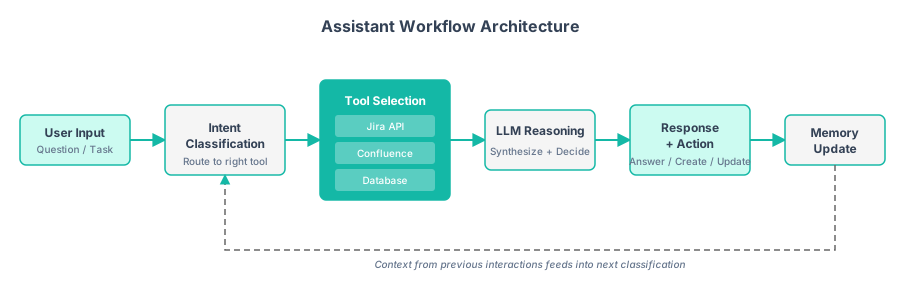
Figure 14.1 — A custom AI assistant follows a structured workflow: classify intent, select the right tool, reason with the LLM, take action, and update memory for future context.

Figure 14.2 — Multi-step reasoning chains break complex tasks into discrete steps with a feedback loop from verification back to analysis for self-correction.
14.1 Beyond One-Off Prompts
Most BA and QA professionals start with LLMs by pasting text into ChatGPT and copying the result back. This works for simple tasks. It breaks down when the workflow requires multiple steps, external data, or consistency across interactions.
Consider a typical BA workflow: gathering requirements from a stakeholder interview transcript. A one-off prompt approach requires you to manually paste the transcript, copy out the requirements, paste them into Jira, go back to the LLM to generate acceptance criteria, copy those into each story, then return to generate test cases. Each step is disconnected. A custom assistant handles the entire flow in one conversation:
| Capability | One-Off Prompts | Custom Assistant |
|---|---|---|
| Context retention | None: each prompt is independent | Remembers the full conversation and prior outputs |
| Tool access | Manual copy-paste to/from external systems | Reads from Jira, writes to Confluence, queries databases |
| Multi-step workflows | User orchestrates each step manually | Assistant follows a defined workflow automatically |
| Consistency | Varies with each prompt | System prompt ensures consistent format and tone |
| Error handling | User must notice and correct errors | Built-in validation and fallback logic |
| Auditability | No history unless manually saved | Full conversation logs with timestamps |
The shift from one-off prompts to custom assistants is the difference between using a calculator and using a spreadsheet. Both do math, but only one remembers your data, applies formulas across cells, and updates automatically.
Start with the workflow, not the technology. Before writing any code, map out the manual workflow you want to automate. Identify the inputs, outputs, decision points, and external systems involved. The most common mistake is building an assistant that is impressive in a demo but does not match how people actually work. Shadow a BA or QA analyst for a day and document every step they take. Then decide which steps the assistant should handle.
14.2 Designing Assistant Workflows
An assistant workflow is a state machine. At each state, the assistant either waits for user input, performs an action, or makes a decision about what to do next. Designing these workflows explicitly, rather than letting the LLM improvise, is key to reliability.
The workflow is defined as a series of named states (such as GATHER_CONTEXT, ANALYZE_REQUIREMENTS, GENERATE_STORIES, REVIEW_AND_REFINE, EXPORT). Each state has a description, an associated system prompt, a set of available tools, and transition rules defining which states can follow. A handler function runs the logic for each state, and the workflow controller moves through states based on LLM decisions and user input.
Each state maps to a specific system prompt and set of available tools. This prevents the assistant from jumping ahead (generating stories before understanding context) or going off-track (discussing unrelated topics during review).
| State | System Prompt Focus | Available Tools | Exit Condition |
|---|---|---|---|
| GATHER_CONTEXT | Ask probing questions about scope and constraints | None (conversation only) | User says "ready to analyze" |
| ANALYZE_INPUT | Extract structured requirements from raw input | Document parser, summarizer | Analysis JSON produced |
| GENERATE_ARTIFACTS | Create user stories, acceptance criteria, test cases | Template engine, prior stories DB | All artifacts generated |
| REVIEW | Present artifacts clearly, accept feedback | Diff viewer, comment tracker | User approves or requests changes |
| EXPORT | Format and push to external systems | Jira API, Confluence API, file writer | Export confirmed |
Always include an escape hatch. Users must be able to override the workflow: go back to a previous step, skip a step, or abandon the workflow entirely. An assistant that forces users through a rigid sequence will frustrate them. Model the escape transitions explicitly (e.g., from any state back to GATHER_CONTEXT) rather than hoping the LLM handles it gracefully.
14.3 Multi-Step Reasoning Chains
Complex BA and QA tasks require the assistant to break a problem into subtasks, execute them in sequence, and combine the results. This is "chain of thought" at the workflow level: not just inside a single prompt, but across multiple LLM calls.
The implementation follows the chain pattern from Figure 14.2: each step receives the output of the previous step as input. The chain runner iterates through steps sequentially, calling the LLM once per step with a focused prompt. If any step fails, the chain halts and reports which step failed and why. Results accumulate in a dictionary that grows richer at each step.
Multi-step chains provide several advantages over single-prompt approaches:
- Better quality: Each step focuses on one task, reducing the cognitive load on the LLM and improving output quality.
- Debuggability: When something goes wrong, you can identify which step produced the bad output and fix it in isolation.
- Reusability: Steps can be reused across different chains. The "generate_test_cases" step works whether the stories come from a transcript, a Jira export, or manual entry.
- Token efficiency: Each step only receives the context it needs, rather than the entire conversation history.
Chain failures cascade. If step 2 produces bad output, every downstream step will also produce bad output. Build validation checks between steps: verify that the JSON is well-formed, that required fields exist, and that counts make sense (e.g., each story should have at least one acceptance criterion). If validation fails, retry the step or ask the user for clarification before proceeding.
14.4 Tool Integration Patterns
Tools extend the assistant's capabilities beyond text generation. A tool is any function the assistant can call: reading from a database, creating a Jira ticket, querying an API, or running a calculation. The LLM decides when to call a tool and how to interpret the result.
from openai import OpenAI
import json
import requests
from datetime import datetime

client = OpenAI()

# Define tools the assistant can use
TOOLS = [
    {
        "type": "function",
        "function": {
            "name": "search_jira",
            "description": "Search Jira for issues matching a JQL query",
            "parameters": {
                "type": "object",
                "properties": {
                    "jql": {
                        "type": "string",
                        "description": "JQL query string"
                    },
                    "max_results": {
                        "type": "integer",
                        "description": "Maximum results to return",
                        "default": 10
                    }
                },
                "required": ["jql"]
            }
        }
    },
    {
        "type": "function",
        "function": {
            "name": "create_jira_story",
            "description": "Create a new user story in Jira",
            "parameters": {
                "type": "object",
                "properties": {
                    "project_key": {"type": "string"},
                    "summary": {"type": "string"},
                    "description": {"type": "string"},
                    "story_points": {"type": "integer"},
                    "priority": {"type": "string",
                                 "enum": ["Highest", "High",
                                          "Medium", "Low", "Lowest"]},
                    "labels": {
                        "type": "array",
                        "items": {"type": "string"}
                    }
                },
                "required": ["project_key", "summary", "description"]
            }
        }
    },
    {
        "type": "function",
        "function": {
            "name": "query_test_results",
            "description": "Query test execution results from the test management system",
            "parameters": {
                "type": "object",
                "properties": {
                    "test_plan": {"type": "string"},
                    "status": {
                        "type": "string",
                        "enum": ["passed", "failed", "blocked", "all"]
                    },
                    "since": {
                        "type": "string",
                        "description": "ISO date string (YYYY-MM-DD)"
                    }
                },
                "required": ["test_plan"]
            }
        }
    },
    {
        "type": "function",
        "function": {
            "name": "generate_report",
            "description": "Generate a formatted report document",
            "parameters": {
                "type": "object",
                "properties": {
                    "title": {"type": "string"},
                    "sections": {
                        "type": "array",
                        "items": {
                            "type": "object",
                            "properties": {
                                "heading": {"type": "string"},
                                "content": {"type": "string"}
                            }
                        }
                    },
                    "format": {
                        "type": "string",
                        "enum": ["markdown", "html", "confluence"]
                    }
                },
                "required": ["title", "sections"]
            }
        }
    }
]


def execute_tool(name: str, arguments: dict) -> str:
    """Execute a tool call and return the result.
    In production, these would call actual APIs."""

    if name == "search_jira":
        # Simulated Jira search
        return json.dumps({
            "total": 3,
            "issues": [
                {"key": "PROJ-101", "summary": "User login flow",
                 "status": "In Progress", "assignee": "Jane D."},
                {"key": "PROJ-102", "summary": "Password reset",
                 "status": "To Do", "assignee": "Unassigned"},
                {"key": "PROJ-103", "summary": "SSO integration",
                 "status": "Done", "assignee": "Bob S."},
            ]
        })

    elif name == "create_jira_story":
        return json.dumps({
            "key": f"{arguments['project_key']}-{104}",
            "url": f"https://jira.example.com/browse/"
                   f"{arguments['project_key']}-104",
            "status": "Created"
        })

    elif name == "query_test_results":
        return json.dumps({
            "test_plan": arguments["test_plan"],
            "total_tests": 45,
            "passed": 38,
            "failed": 5,
            "blocked": 2,
            "pass_rate": "84.4%",
            "failed_tests": [
                {"id": "TC-201", "title": "Checkout with expired card",
                 "failure": "Expected error message not displayed"},
                {"id": "TC-215", "title": "Search with special characters",
                 "failure": "500 Internal Server Error"},
            ]
        })

    elif name == "generate_report":
        content = f"# {arguments['title']}\n\n"
        for section in arguments["sections"]:
            content += f"## {section['heading']}\n{section['content']}\n\n"
        return json.dumps({
            "status": "generated",
            "format": arguments.get("format", "markdown"),
            "preview": content[:500]
        })

    return json.dumps({"error": f"Unknown tool: {name}"})


class ToolEquippedAssistant:
    """Assistant that can call external tools."""

    def __init__(self, system_prompt: str, tools: list[dict],
                 model: str = "gpt-4o"):
        self.model = model
        self.tools = tools
        self.messages = [{"role": "system", "content": system_prompt}]

    def chat(self, user_message: str) -> str:
        """Send a message and handle any tool calls."""
        self.messages.append({"role": "user", "content": user_message})

        while True:
            response = client.chat.completions.create(
                model=self.model,
                messages=self.messages,
                tools=self.tools,
                temperature=0.3
            )

            message = response.choices[0].message
            self.messages.append(message)

            # If no tool calls, return the text response
            if not message.tool_calls:
                return message.content

            # Execute each tool call
            for tool_call in message.tool_calls:
                func_name = tool_call.function.name
                func_args = json.loads(tool_call.function.arguments)

                print(f"  [Tool] {func_name}({func_args})")
                result = execute_tool(func_name, func_args)

                self.messages.append({
                    "role": "tool",
                    "tool_call_id": tool_call.id,
                    "content": result
                })

            # Loop back to get the LLM's response after tool results


# Create a BA assistant
ba_assistant = ToolEquippedAssistant(
    system_prompt="""You are a Business Analyst assistant.
You help BAs manage requirements, user stories, and test results.

When asked about existing work, search Jira first.
When creating new stories, use the create_jira_story tool.
When reporting on quality, query test results first.
Always confirm with the user before creating or modifying anything.

Be concise and professional.""",
    tools=TOOLS
)

# Interactive usage
response = ba_assistant.chat(
    "What stories do we have for the authentication epic?"
)
print(response)
Confirm before mutating. Read-only tools (search, query) can run automatically. Write tools (create, update, delete) should always ask the user for confirmation before executing. This prevents the assistant from creating 50 duplicate Jira tickets because it misunderstood a request. Pattern: "I am ready to create these 5 stories in PROJ. Shall I proceed?"
14.5 Integrating LLMs with Your Existing Tools
The tool integration patterns in Section 14.4 are general-purpose. Most BA and QA teams live inside a specific ecosystem: Jira for work tracking, Azure DevOps for pipelines, Confluence for documentation. This section shows concrete integration patterns for the tools analysts use every day.
Jira: Auto-Generating User Stories and Classifying Bugs
Jira is the centre of gravity for most agile teams. Two LLM integrations deliver immediate value.
Auto-generating user stories from meeting notes. After a stakeholder interview or sprint planning session, paste the raw transcript or notes into a prompt that extracts action items and converts each into a structured user story with acceptance criteria. The assistant then calls the Jira API to create each story in the correct project, with labels, priority, and story points pre-populated. The analyst reviews and adjusts before moving stories to "Ready for Refinement."
Auto-classifying bugs. When a new defect is logged, the LLM reads the summary and description, classifies the bug by component, severity, and affected feature area, and suggests a priority based on historical patterns. This eliminates the triage bottleneck where a lead manually reviews every incoming defect before it gets assigned.
Azure DevOps: Test Plans and Work Item Linking
For teams on Microsoft's stack, Azure DevOps integration follows similar patterns through its REST API.
Generating test plans from requirements. The LLM reads a set of work items tagged as requirements, generates test cases for each (including boundary conditions and negative scenarios), and creates them as test case work items linked to the originating requirement. This builds traceability automatically, with no manual matrix maintenance required.
Linking related work items. The LLM analyses new work items against existing ones and suggests parent-child relationships, predecessor-successor links, and duplicate candidates. This is especially valuable during backlog grooming, when dozens of new items need to be connected to the existing work item hierarchy.
Confluence: Summarisation and Documentation Currency
Documentation goes stale because updating it is tedious. LLM integrations can keep Confluence spaces current.
Auto-summarising pages. For long specification documents or meeting notes, the LLM generates a "TL;DR" summary block at the top of each page. When the page content is updated, the summary regenerates. Stakeholders who only need the headline can scan summaries without reading full documents.
Keeping documentation current. A scheduled job compares Confluence pages against the latest Jira stories and test results. When a requirement has changed in Jira but the Confluence specification still reflects the old version, the LLM flags the discrepancy and drafts an updated section for the author to review and publish.
Tool Integration Comparison
| Tool | Integration Method | Use Case | Complexity |
|---|---|---|---|
| Jira | REST API (v2/v3) or Python jira library | Story generation, bug classification, triage automation | Low-Medium |
| Azure DevOps | REST API or Python azure-devops library | Test plan generation, work item linking, backlog analysis | Medium |
| Confluence | REST API or Python atlassian-python-api | Page summarisation, documentation freshness checks | Low-Medium |
| Slack / Teams | Bot framework or webhook API | Notification of LLM-generated artifacts, review requests | Low |
| TestRail | REST API | Test case import, execution result analysis | Medium |
| Google Sheets | Google Sheets API or gspread library | Requirements tracking, test data export, reporting | Low |
Concrete Example: Reading Jira Issues and Generating Test Cases
The following script connects to a Jira instance, reads user stories from a sprint, and generates test cases for each. It demonstrates the end-to-end pattern of reading from a project management tool, processing with an LLM, and writing results back.
"""Generate test cases from Jira user stories using an LLM.

Requires: pip install jira openai
Set environment variables: JIRA_URL, JIRA_EMAIL, JIRA_TOKEN, OPENAI_API_KEY
"""

import os
import json
from jira import JIRA
from openai import OpenAI

# Connect to Jira
jira = JIRA(
    server=os.environ["JIRA_URL"],
    basic_auth=(os.environ["JIRA_EMAIL"], os.environ["JIRA_TOKEN"]),
)

# Connect to LLM
llm = OpenAI()

SYSTEM_PROMPT = """You are a senior QA analyst. Given a user story,
generate test cases that cover:
1. The happy path described in the acceptance criteria
2. At least two boundary/edge cases
3. At least one negative test (invalid input, unauthorised access, etc.)

For each test case, provide:
- title: concise description
- preconditions: what must be true before the test
- steps: numbered list of actions
- expected_result: what should happen
- priority: High / Medium / Low

Return a JSON array of test case objects."""


def generate_test_cases(story_key: str, summary: str,
                        description: str,
                        acceptance_criteria: str) -> list[dict]:
    """Generate test cases for a single user story."""
    prompt = f"""User Story: {story_key}
Summary: {summary}
Description: {description or 'No description provided.'}
Acceptance Criteria: {acceptance_criteria or 'Not specified.'}"""

    response = llm.chat.completions.create(
        model="gpt-4o",
        messages=[
            {"role": "system", "content": SYSTEM_PROMPT},
            {"role": "user", "content": prompt},
        ],
        response_format={"type": "json_object"},
        temperature=0.3,
    )

    result = json.loads(response.choices[0].message.content)
    return result.get("test_cases", result.get("tests", []))


def main():
    # Fetch stories from the current sprint
    jql = (
        'project = "PROJ" AND issuetype = Story '
        'AND sprint in openSprints() ORDER BY priority DESC'
    )
    stories = jira.search_issues(jql, maxResults=20)
    print(f"Found {len(stories)} stories in the current sprint.\n")

    for story in stories:
        summary = story.fields.summary
        description = story.fields.description or ""
        # Extract acceptance criteria from description or custom field
        acceptance_criteria = description  # Adjust for your Jira setup

        print(f"Generating test cases for {story.key}: {summary}")
        test_cases = generate_test_cases(
            story.key, summary, description, acceptance_criteria
        )

        for tc in test_cases:
            print(f"  - [{tc.get('priority', 'Medium')}] {tc['title']}")

            # Optionally create test case as a sub-task in Jira
            # jira.create_issue(
            #     project="PROJ",
            #     issuetype={"name": "Sub-task"},
            #     parent={"key": story.key},
            #     summary=f"[TC] {tc['title']}",
            #     description=format_test_case(tc),
            # )

        print(f"  Generated {len(test_cases)} test cases.\n")


if __name__ == "__main__":
    main()
Start read-only, graduate to write. When first connecting an LLM workflow to Jira or Azure DevOps, begin with read-only operations (search, query). Once you trust the output quality, add write operations (create, update) with a mandatory confirmation step. The Jira creation lines in the example above are commented out deliberately. Uncomment them only after you have validated the generated test cases on several stories.
14.6 Memory and Context Management
LLMs have finite context windows. A conversation that accumulates 100 messages with tool results will eventually overflow. Effective memory management keeps the assistant responsive while retaining the information that matters.
from openai import OpenAI
import json
from datetime import datetime

client = OpenAI()

class ConversationMemory:
    """Manage assistant memory across conversations."""

    def __init__(self, max_messages: int = 50,
                 model: str = "gpt-4o"):
        self.model = model
        self.max_messages = max_messages
        self.messages: list[dict] = []
        self.summary_buffer: str = ""
        self.facts: dict = {}  # Persistent key-value facts
        self.session_id: str = datetime.now().strftime("%Y%m%d_%H%M%S")

    def add_message(self, role: str, content: str) -> None:
        """Add a message and manage context window."""
        self.messages.append({
            "role": role,
            "content": content,
            "timestamp": datetime.now().isoformat()
        })

        # If we are approaching the limit, summarize older messages
        if len(self.messages) > self.max_messages:
            self._compress_history()

    def _compress_history(self) -> None:
        """Summarize older messages to free up context space."""
        # Keep the last 20 messages, summarize the rest
        to_summarize = self.messages[:-20]
        to_keep = self.messages[-20:]

        summary_input = "\n".join(
            f"[{m['role']}]: {m['content'][:200]}"
            for m in to_summarize
        )

        response = client.chat.completions.create(
            model=self.model,
            messages=[{
                "role": "user",
                "content": f"""Summarize this conversation history
into a concise paragraph. Focus on: decisions made, artifacts
created, key facts established, and current task status.

Conversation:
{summary_input}"""
            }],
            temperature=0,
            max_tokens=300
        )

        self.summary_buffer = response.choices[0].message.content
        self.messages = to_keep
        print(f"  [Memory] Compressed {len(to_summarize)} messages "
              f"into summary")

    def extract_facts(self, message: str) -> None:
        """Extract persistent facts from a message."""
        response = client.chat.completions.create(
            model=self.model,
            messages=[{
                "role": "user",
                "content": f"""Extract any factual information from this
message that should be remembered across conversations. Examples:
project names, deadlines, stakeholder names, decisions, preferences.

Message: {message}

Return JSON with key "facts" (object of key-value pairs).
If no facts to extract, return {{"facts": {{}}}}."""
            }],
            response_format={"type": "json_object"},
            temperature=0
        )
        new_facts = json.loads(
            response.choices[0].message.content
        ).get("facts", {})

        if new_facts:
            self.facts.update(new_facts)
            print(f"  [Memory] Stored facts: {list(new_facts.keys())}")

    def get_context_messages(self, system_prompt: str) -> list[dict]:
        """Build the message list for the LLM call."""
        messages = [{"role": "system", "content": system_prompt}]

        # Add summary of older conversation if it exists
        if self.summary_buffer:
            messages.append({
                "role": "system",
                "content": f"Summary of earlier conversation: "
                           f"{self.summary_buffer}"
            })

        # Add persistent facts
        if self.facts:
            facts_str = "\n".join(
                f"- {k}: {v}" for k, v in self.facts.items()
            )
            messages.append({
                "role": "system",
                "content": f"Known facts about this project:\n{facts_str}"
            })

        # Add recent messages (without timestamps for the LLM)
        for m in self.messages:
            messages.append({
                "role": m["role"],
                "content": m["content"]
            })

        return messages

    def save_session(self, path: str) -> None:
        """Save the session state to disk for later resumption."""
        state = {
            "session_id": self.session_id,
            "messages": self.messages,
            "summary_buffer": self.summary_buffer,
            "facts": self.facts,
            "saved_at": datetime.now().isoformat()
        }
        with open(path, "w") as f:
            json.dump(state, f, indent=2)
        print(f"  [Memory] Session saved to {path}")

    def load_session(self, path: str) -> None:
        """Resume a previous session."""
        with open(path) as f:
            state = json.load(f)
        self.session_id = state["session_id"]
        self.messages = state["messages"]
        self.summary_buffer = state["summary_buffer"]
        self.facts = state["facts"]
        print(f"  [Memory] Resumed session {self.session_id} "
              f"({len(self.messages)} messages, "
              f"{len(self.facts)} facts)")
Memory management strategies and when to use each:
| Strategy | Mechanism | Best For | Tradeoff |
|---|---|---|---|
| Full history | Keep all messages | Short conversations (< 30 messages) | Hits context limit on long sessions |
| Sliding window | Keep last N messages | Support conversations | Loses early context (names, decisions) |
| Summarize + recent | Compress old messages, keep recent | Multi-hour work sessions | Summary may lose details |
| Fact extraction | Extract key-value facts persistently | Cross-session memory | Extra LLM calls, facts can become stale |
| RAG over history | Embed and retrieve past messages | Very long-running projects | Complex, retrieval may miss relevant history |
The best memory strategy combines approaches. Use fact extraction for persistent project knowledge (stakeholder names, project codes, decisions), summarize-and-keep-recent for the active conversation, and full history for short interactions. The assistant should gracefully degrade: if context is running low, summarize more aggressively rather than silently dropping messages.
14.7 User Experience Design
An assistant that produces perfect outputs but is confusing to use will be abandoned within a week. UX design for AI assistants follows different rules than traditional software UX. The interaction is conversational and the outputs are probabilistic.
The UX layer wraps assistant interactions with clear formatting: user messages are visually distinct from assistant responses, tool calls show progress indicators ("Searching Jira..."), and errors display in a friendly format with suggested next steps. The assistant always confirms before taking destructive actions (like creating or updating tickets) and provides a summary of what it did at the end of multi-step workflows.
Common UX mistakes in AI assistants and how to avoid them:
| Mistake | Symptom | Fix |
|---|---|---|
| Wall of text responses | Users stop reading after the first paragraph | Use progressive disclosure; break output into steps with headers |
| Overconfident tone | Users trust wrong answers | Add confidence indicators; always cite sources |
| No feedback mechanism | Same mistakes repeat | Add thumbs up/down, "this is wrong" button, correction flow |
| Silent failures | Tool call fails, assistant pretends it worked | Explicit error messages with recovery suggestions |
| Rigid conversation flow | Users feel trapped | Support "go back," "start over," and free-form questions at any point |
Add a "/status" command. Let users type "/status" at any time to see: the current workflow state, what documents or data the assistant has loaded, how many messages are in the context window, and what tools are available. This builds trust by making the assistant's internal state visible.
14.8 Deployment and Monitoring
Deploying a custom assistant means running it reliably for multiple users while monitoring quality, cost, and performance. Unlike traditional software, AI assistants can degrade silently, producing subtly worse answers without throwing errors. Monitoring therefore requires quality metrics, not just uptime checks.
Production deployment requires three monitoring layers: operational metrics (response latency, error rates, uptime), quality metrics (user satisfaction ratings, task completion rates, hallucination frequency), and cost metrics (tokens consumed per conversation, cost per task category, monthly spend trends). Log every conversation turn with timestamps, token counts, and tool calls. Set alerts for latency spikes above 10 seconds, error rates above 5%, and daily cost exceeding your budget threshold. Review a random sample of 20 conversations weekly to catch quality degradation that automated metrics miss.
Key monitoring dimensions for production assistants:
| Dimension | Metrics | Alert Threshold |
|---|---|---|
| Reliability | Error rate, timeout rate | Error rate > 5% |
| Performance | P50/P95 latency, tokens per query | P95 latency > 10s |
| Quality | User rating, feedback sentiment | Avg rating < 3.5 |
| Cost | Tokens per day, cost per query | Daily cost > budget threshold |
| Usage | Queries per day, unique users, peak hours | Traffic spike > 3x normal |
| Tools | Tool call success rate, tool latency | Tool failure rate > 10% |
Monitor quality, not just uptime. A traditional web service is either up or down. An AI assistant can be "up" while returning increasingly poor answers, for example if the model provider changes the model version, if source documents become stale, or if user queries shift to topics outside the assistant's training. Schedule weekly reviews of low-rated queries and randomly sample 10 conversations per week for manual quality review.
Project: BA/QA Assistant
Build a custom AI assistant that supports the full BA/QA workflow: gathering requirements, generating user stories, creating test cases, querying project status, and producing reports. The assistant should maintain conversation memory, call external tools, and follow a structured workflow.
Project Requirements
- Implement a workflow state machine with at least 5 states (gather context, analyze, generate artifacts, review, export)
- Support at least 3 tools: search existing stories, create new stories, query test results
- Implement conversation memory with summarization for long sessions
- Build a multi-step reasoning chain that goes from raw input to user stories to test cases
- Add confirmation prompts before any write operations
- Include a monitoring dashboard showing query count, latency, and error rate
- Handle errors gracefully with user-friendly messages and recovery suggestions
Starter Code
Your BA/QA Assistant project integrates all the patterns from this chapter: a workflow state machine that routes user requests, tool integrations for Jira and Confluence, conversation memory with sliding-window compression, and a UX layer that confirms actions before execution. Initialize it with your API keys and tool configurations, then interact through a chat-style interface that maintains context across the full conversation.
Extension Ideas
- Add a Slack or Microsoft Teams integration so team members can interact with the assistant in their usual chat tool
- Implement a web UI with Streamlit that shows the workflow state, memory contents, and monitoring dashboard side-by-side with the chat
- Add role-based access: BAs can create stories, QAs can generate test cases, managers can view reports but not modify artifacts
- Build a feedback loop: when users correct the assistant, store corrections and include them in future system prompts as examples
- Implement session handoff: allow a user to share their assistant session with a colleague, including all context and memory
Summary
- Custom assistants outperform one-off prompts for recurring workflows because they retain context, call external tools, and follow structured processes, eliminating the copy-paste overhead between the LLM and external systems.
- Design workflows as state machines with explicit states, transitions, and available tools per state. This prevents the assistant from skipping steps or going off-track.
- Multi-step reasoning chains break complex tasks (transcript to stories to test cases) into focused subtasks, improving quality and debuggability while enabling step-by-step validation.
- Tool integration extends the assistant beyond text generation: reading from Jira, writing to Confluence, and querying databases. Always confirm before write operations.
- Memory management combines summarization of older messages, persistent fact extraction, and full history for recent context to work within context window limits.
- UX design for AI assistants requires transparency (confidence indicators, source citations), progressive disclosure (one step at a time), and escape hatches (undo, override, restart).
- Production monitoring must track quality (user ratings, sampled reviews), not just reliability (uptime, error rate), because AI assistants can degrade silently.
Exercises
- Workflow design. Map out a manual workflow you perform weekly (e.g., sprint planning, test reporting, requirements review). Identify the states, transitions, and tools needed. Draw the state machine diagram before writing any code.
- Tool integration. Connect the assistant to one real external system (Jira, Confluence, a database, or even a Google Sheet via API). Implement both read and write operations with proper confirmation prompts.
- Memory stress test. Have a 50-message conversation with your assistant. Does it remember facts from the beginning? At what point does it lose context? Implement the summarization strategy and test again.
- Reasoning chain. Build a 4-step chain for your domain. Run it on 5 different inputs. Track where errors occur and add validation between steps to catch them.
- UX audit. Have three colleagues use your assistant for 15 minutes each without guidance. Note where they get confused, frustrated, or misled. Redesign the UX based on their feedback.