Chapter 08 of 18
Test Case Generation
Writing test cases is the most time-consuming activity in the QA lifecycle — yet most test cases follow predictable patterns that an LLM can generate in seconds. In this chapter, you will build a system that reads a requirement and produces comprehensive, categorized test cases automatically.
Part 3: Quality Assurance with LLMs
Test Case Generation
Writing test cases is the most time-consuming activity in the QA lifecycle. Most test cases follow predictable patterns that an LLM can generate in seconds. In this chapter, you will build a system that reads a requirement and produces comprehensive, categorized test cases automatically.
Reading time: ~25 min Project: Test Case Generator
What You Will Learn
- How to prompt LLMs to generate functional, negative, and boundary test cases from plain-language requirements
- Techniques for boundary value analysis and equivalence partitioning using LLMs
- Methods for generating negative test cases that probe failure modes
- How to prioritize generated test cases by risk and coverage
- Strategies for measuring and improving test coverage with LLM assistance
- Building a reusable Test Case Generator pipeline in Python
9.1 The Testing Bottleneck
Every QA professional knows the pain: a sprint planning session reveals twelve new user stories, each needing test cases by the end of the week. Manual test case writing is slow, inconsistent, and prone to blind spots. Senior QAs write better tests than juniors. Even the best testers miss edge cases when working under time pressure.
Consider the numbers. A typical requirement like "Users can reset their password via email verification" needs at minimum:
| Test Category | Typical Count | Manual Time (min) |
|---|---|---|
| Happy path / positive tests | 3–5 | 15–25 |
| Negative / invalid input tests | 5–10 | 25–50 |
| Boundary value tests | 4–8 | 20–40 |
| Security-related tests | 3–6 | 15–30 |
| Integration / cross-system tests | 2–4 | 10–20 |
| Total | 17–33 | 85–165 |
An LLM can generate a first draft of all these categories in under a minute. The QA analyst's role shifts from writing to reviewing, refining, and augmenting. This is a far better use of their expertise.
Human-in-the-loop is non-negotiable. LLM-generated test cases are a starting point. They may miss domain-specific constraints, security nuances, or regulatory requirements that only a human tester would know. Always review, validate, and supplement generated test cases before adding them to your test suite.
The bottleneck is not just speed. It is consistency. When five QAs write tests for five features, you get five different styles, five different levels of coverage depth, and five different interpretations of "thorough." An LLM-driven pipeline standardizes the output format, ensures every category is considered, and provides a baseline that the team can then customize.
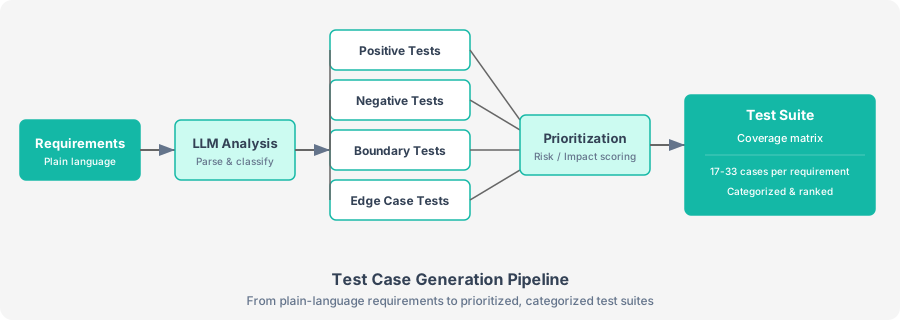
Figure 9-1. The test case generation pipeline transforms plain-language requirements into a prioritized, categorized test suite through LLM analysis.
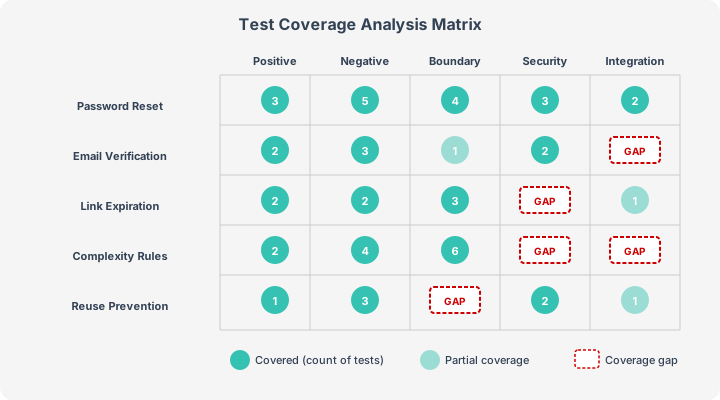
Figure 9-2. A coverage matrix maps requirements against test types, making gaps immediately visible. Numbers indicate test case count; dashed cells highlight missing coverage.
9.2 Generating Tests from Requirements
The foundation of LLM-based test generation is a well-structured prompt that takes a requirement as input and produces categorized test cases as output. Provide the LLM with a clear taxonomy of test types and ask it to populate each category systematically.
The approach is straightforward: describe the requirement in plain language, tell the LLM what test categories to cover, and specify the output format you want. The prompt instructs the LLM to act as a senior QA engineer, generating test cases across five categories (positive, negative, boundary, security, integration) with structured fields: test_id, category, title, preconditions, steps, expected_result, and priority.
For a requirement like "Users can reset their password by clicking 'Forgot Password' on the login page. The link expires after 30 minutes. The new password must be at least 8 characters with one uppercase letter, one number, and one special character. Users cannot reuse their last 5 passwords.", the LLM produces output such as:
[TC-001] (positive) Successful password reset with valid email
  Priority: high
  Expected: User receives reset email within 2 minutes

[TC-002] (positive) Password reset with valid new password meeting all criteria
  Priority: high
  Expected: Password is updated, user can log in with new password

[TC-003] (negative) Reset link used after 30-minute expiration
  Priority: high
  Expected: System displays "Link expired" and prompts new reset request

[TC-004] (boundary) New password with exactly 8 characters meeting all criteria
  Priority: medium
  Expected: Password accepted and updated successfully

[TC-005] (security) Attempt to reuse the 5th most recent password
  Priority: high
  Expected: System rejects password with "Cannot reuse recent passwords" message
Prompt engineering tip. Setting temperature=0.3 makes the output more deterministic across runs. For test case generation, you want consistency: the same requirement should produce similar test cases each time. Use higher temperatures (0.7-0.9) only when you want creative, exploratory test ideas.
The system prompt defines the exact schema you expect. This is critical: without a clear output structure, the LLM may return test cases in an unpredictable format, making downstream processing brittle. Using response_format={"type": "json_object"} ensures you always get valid JSON back.
9.3 Boundary Value Analysis with LLMs
Boundary value analysis (BVA) is one of the most effective testing techniques and one of the most tedious to apply manually. For every input field with a defined range, you need to test at minimum the lower boundary, just below it, just above it, the upper boundary, and nominal values in between.
LLMs excel at BVA because they can parse natural-language constraints and systematically derive boundary values. You describe the requirement, for example: "The new password must be between 8 and 64 characters long. The user's age must be between 18 and 120. The reset code is a 6-digit number." The LLM generates the full boundary table with min, max, and edge values for every bounded field it identifies.
The output produces a comprehensive boundary table:
| Field | Boundary | Value | Expected |
|---|---|---|---|
| password_length | min - 1 | 7 chars | FAIL |
| password_length | min | 8 chars | PASS |
| password_length | min + 1 | 9 chars | PASS |
| password_length | nominal | 20 chars | PASS |
| password_length | max - 1 | 63 chars | PASS |
| password_length | max | 64 chars | PASS |
| password_length | max + 1 | 65 chars | FAIL |
| user_age | min - 1 | 17 | FAIL |
| user_age | min | 18 | PASS |
| reset_code | min | 100000 | PASS |
| reset_code | max | 999999 | PASS |
| reset_code | max + 1 | 1000000 | FAIL |
Why LLMs beat templates for BVA. Traditional BVA templates require you to manually identify each bounded field and fill in values. An LLM reads the requirement in natural language, identifies all bounded fields automatically, and generates the full boundary table. When requirements change, say the password max moves from 64 to 128 characters, you re-run the prompt and the entire table updates.
9.4 Equivalence Partitioning Automation
Equivalence partitioning divides input data into groups (partitions) where all values in a partition should produce the same behavior. Instead of testing every possible input, you test one representative from each partition. This reduces the number of tests while maintaining coverage.
An LLM can identify equivalence classes from requirement text and generate representative test values for each. Given a shipping calculator requirement with weight ranges, destination types, and insurance options, the prompt asks the LLM to identify valid and invalid partitions for every input field and provide a representative test value for each class.
The LLM identifies partitions such as:
| Field | Type | Class | Value | Expected |
|---|---|---|---|---|
| weight | valid | Light parcel (0.1–4.99 kg) | 2.5 | $5 base rate |
| weight | valid | Medium parcel (5.0–20.0 kg) | 12.0 | $15 base rate |
| weight | valid | Heavy parcel (20.01–50.0 kg) | 35.0 | $30 base rate |
| weight | invalid | Below minimum (less than 0.1 kg) | 0.05 | Error: weight too low |
| weight | invalid | Above maximum (over 50.0 kg) | 55.0 | Error: weight exceeds limit |
| destination | valid | Domestic | domestic | 1x rate multiplier |
| destination | valid | International standard | intl-std | 3x rate multiplier |
| destination | valid | International express | intl-exp | 5x rate multiplier |
| insurance | valid | With insurance | yes | +10% to total |
| insurance | valid | Without insurance | no | No surcharge |
The power of combining equivalence partitioning with LLMs becomes clear when you consider pairwise combinations. With three fields (weight: 5 classes, destination: 3, insurance: 2), full combinatorial testing requires 30 test cases. Pairwise testing covers all two-way interactions with far fewer. You can ask the LLM to generate a minimal pairwise covering array where every pair of classes from different fields appears in at least one test.
Verify pairwise coverage. LLMs sometimes miss pairs in their generated covering arrays. Always validate that the returned test set actually achieves full pairwise coverage by checking each pair of classes programmatically. Use the generated set as a starting point and add any missing pairs.
9.5 Negative Test Case Generation
Negative testing verifies that the system handles invalid, unexpected, and malicious input gracefully. This is where LLMs excel. Human testers tend to have a "happy path bias," instinctively thinking about how users are supposed to use the system. LLMs, prompted correctly, generate an exhaustive catalogue of things that can go wrong.
The prompt instructs the LLM to act as a destructive tester across seven attack categories: invalid input, missing data, overflow, injection, race conditions, state violations, and authorization bypass. You use a slightly higher temperature (0.5) to encourage creative attack vector discovery. For a money transfer requirement, a well-prompted LLM generates test cases that many testers would miss:
| Category | Attack | Payload | Expected Safe Behavior |
|---|---|---|---|
| Injection | SQL injection in account field | ' OR 1=1; DROP TABLE accounts;-- | Input rejected, error logged |
| Overflow | Transfer amount of MAX_FLOAT | 1.7976931348623157e+308 | Rejected: amount exceeds limit |
| Race condition | Two simultaneous transfers draining same account | Concurrent $500 transfers from $600 balance | Second transfer rejected or queued |
| State violation | Transfer from a frozen account | Source account with status=frozen | Transfer blocked with clear error message |
| Authorization | Transfer from another user's account | Source account owned by different user | 403 Forbidden, attempt logged |
| Invalid input | Negative transfer amount | -500.00 | Rejected: amount must be positive |
| Missing data | Empty destination account | "" | Validation error: destination required |
Layer negative tests by severity. Not all negative tests are equal. Injection and authorization tests are critical: they represent real attack vectors. Missing data tests are important for UX. Overflow tests catch edge cases. Prioritize your negative test suite so the critical security tests run first in every regression cycle.
9.6 Test Case Prioritization
Generating 50 test cases is useful. Knowing which 15 to run when you only have an hour before release is essential. LLMs prioritize test cases by analyzing risk factors, historical defect data, and business impact.
The approach uses three scoring dimensions: Risk (1-5, how likely is this to fail?), Impact (1-5, how severe if it fails in production?), and Coverage (1-5, how much unique functionality does it test?). These combine into a composite score: Risk * 0.4 + Impact * 0.4 + Coverage * 0.2. Given a time budget, the LLM ranks all tests and marks the top N as "selected" for execution.
The prioritization output gives QA leads a clear execution order:
>>> RUN  1. [TC-005] Score: 4.6 | Reuse of recent password (security)
         Risk=5 Impact=5 Coverage=4
         Password reuse bypass could lead to account compromise

>>> RUN  2. [TC-003] Score: 4.4 | Expired reset link used
         Risk=5 Impact=4 Coverage=5
         Only test covering expiration logic — critical timing boundary

>>> RUN  3. [TC-012] Score: 4.2 | SQL injection in email field
         Risk=4 Impact=5 Coverage=4
         Injection attacks are high-impact and commonly exploited

    skip  9. [TC-008] Score: 2.4 | Valid reset with Gmail address
         Risk=2 Impact=2 Coverage=2
         Covered by other positive tests; low incremental value
Feed historical data for smarter prioritization. If your defect tracker has data on which modules and features have the most bugs, include that context in the prompt. For example: "The authentication module has had 12 defects in the last 3 sprints, mostly around session handling." This lets the LLM weight risk scores based on real project history, not just general heuristics.
9.7 Coverage Analysis
Generating test cases is only half the work. You also need to verify that your test suite actually covers the requirement. LLMs perform a gap analysis by comparing the requirement text against the generated test cases and identifying untested scenarios.
The coverage prompt asks the LLM to compare the requirement text against existing test cases and classify each area as Covered, Partially Covered, Gap (no tests at all), or Implicit (requirements not stated but implied, such as performance, accessibility, or rate limiting). For each gap, it suggests specific test cases to fill it.
A typical coverage analysis reveals gaps like these:
| Status | Area | Action Needed |
|---|---|---|
| Covered | Happy path password reset | None |
| Covered | Password complexity rules | None |
| Partial | Link expiration | Add test for link used at exactly 30 min |
| Gap | Multiple simultaneous reset requests | Test: user requests reset twice. Which link is valid? |
| Gap | Email delivery failure | Test: what happens when email service is down? |
| Implicit | Rate limiting on reset requests | Test: 100 reset requests in 1 minute from same IP |
| Implicit | Accessibility of reset form | Test: screen reader compatibility, keyboard navigation |
Iterative coverage improvement. Run the coverage analysis, generate tests for the gaps, add them to your suite, and run the analysis again. Two or three iterations typically push coverage from 60–70% (first generation) to 90%+ (after gap-filling). Automate this loop in your CI pipeline for continuous coverage monitoring.
Project: Test Case Generator
Build a complete test case generation pipeline that takes a requirements document (multiple requirements) and produces a structured test plan with prioritized, categorized test cases and a coverage report.
Project Requirements
- Accept a text file containing multiple requirements (one per paragraph)
- Generate test cases for each requirement across all five categories
- Perform boundary value analysis for all bounded fields
- Generate negative and security test cases
- Prioritize the complete test suite
- Run coverage analysis and fill gaps
- Output a structured test plan in JSON and a human-readable summary
Pipeline Steps
The project follows these pipeline stages, each handled by a separate LLM call:
- Parse requirements from a text file (one requirement per paragraph)
- Generate core test cases across all five categories for each requirement
- Add boundary and negative tests via specialized prompts
- Deduplicate using the LLM to identify semantically identical test cases
- Analyze coverage and fill gaps with additional targeted tests
- Prioritize the complete suite across all requirements
- Export a structured JSON test plan and human-readable summary
Extension Ideas
- Add Gherkin (Given/When/Then) output format for BDD teams
- Integrate with Jira or Azure DevOps to push test cases directly into your test management tool
- Add a Streamlit UI for non-technical stakeholders to input requirements and review generated tests
- Export to CSV/Excel for teams that use spreadsheet-based test management
Summary
- LLMs accelerate test case generation by producing categorized test cases from plain-language requirements in seconds rather than hours.
- Boundary value analysis becomes automated. The LLM identifies bounded fields and generates the full BVA table with min, max, and edge values.
- Equivalence partitioning is enhanced by LLMs that can identify valid and invalid classes and generate pairwise covering arrays.
- Negative testing benefits most from LLMs because they generate adversarial scenarios (injection, race conditions, authorization bypasses) that human testers often overlook.
- Prioritization uses risk, impact, and coverage scores to ensure the most critical tests run first when time is limited.
- Coverage analysis closes the loop by identifying gaps, implicit requirements, and areas needing additional test cases.
- Human review remains essential. LLM output is a high-quality first draft, not a finished product.
Exercises
- Generate and compare. Take a real requirement from your current project and generate test cases using the pipeline in this chapter. Compare them against your existing test cases. What did the LLM find that you missed? What did you have that the LLM missed?
- Tune the temperature. Run the negative test generator three times at temperatures 0.2, 0.5, and 0.9. Compare the creativity and relevance of the generated attacks at each setting.
- Build a coverage dashboard. Extend the coverage analysis to produce a visual HTML report showing covered, partially covered, and uncovered requirement areas with color coding.
- Cross-requirement coverage. Modify the pipeline to detect when test cases from one requirement also cover aspects of another requirement, reducing total test count.
- Gherkin output. Add an output formatter that converts generated test cases into Gherkin (Given/When/Then) syntax suitable for Cucumber or Behave.