Chapter 11 of 18
RAG for Enterprise Knowledge
Every enterprise sits on a mountain of knowledge locked inside wikis, SharePoint sites, Confluence pages, PDF policies, and Slack threads. Employees spend 20% of their workweek searching for information they know exists somewhere. Retrieval-Augmented Generation (RAG) unlocks that mountain by letting
Part 4: Advanced Patterns
RAG for Enterprise Knowledge
Every enterprise sits on a mountain of knowledge locked inside wikis, SharePoint sites, Confluence pages, PDF policies, and Slack threads. Employees spend 20% of their workweek searching for information they know exists somewhere. Retrieval-Augmented Generation (RAG) unlocks that mountain by letting an LLM answer questions grounded in your organization's actual documents, not its training data. In this chapter, you will build a complete RAG pipeline from document ingestion through retrieval-augmented answering, and learn how to evaluate whether the answers are trustworthy.
Reading time: ~25 min Project: Knowledge Base Assistant
What You Will Learn
- Why RAG is the most practical pattern for connecting LLMs to enterprise knowledge without fine-tuning
- How to build a document knowledge base with embeddings and a vector store
- Chunking strategies that preserve context and improve retrieval accuracy
- Embedding models, similarity search, and retrieval pipelines
- Query enhancement techniques including HyDE, query decomposition, and re-ranking
- Metrics and methods for evaluating RAG quality (faithfulness, relevance, coverage)
- Architecture patterns for production RAG systems in the enterprise
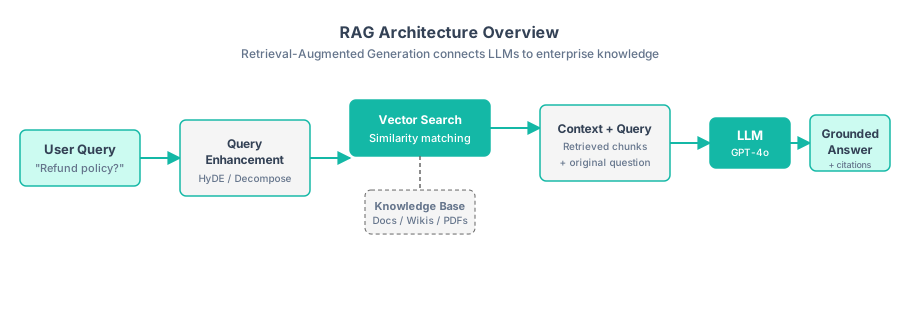
Figure 13.1 — The RAG pipeline transforms a user query into a grounded answer by retrieving relevant document chunks and providing them as context to the LLM.
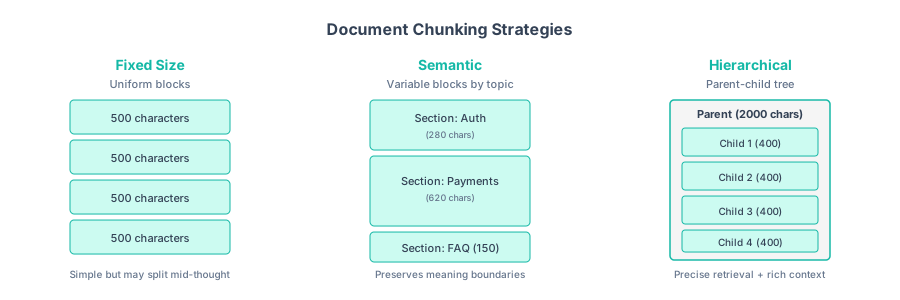
Figure 13.2 — Three chunking strategies compared. Fixed-size splits uniformly, semantic splits by topic, and hierarchical uses parent-child relationships for precise retrieval with full context.
13.1 Why RAG Matters for Analysts
Business analysts and quality analysts deal with enormous volumes of documentation daily: requirements specifications, process documents, compliance policies, test plans, defect databases, and release notes. The challenge is not creating documentation. It is finding the right piece of information at the right moment.
Consider the alternatives for connecting an LLM to your enterprise knowledge:
| Approach | Cost | Freshness | Accuracy | Complexity |
|---|---|---|---|---|
| Prompt stuffing (paste docs into prompt) | Low | Real-time | Good for small docs | Low |
| Fine-tuning | High ($$$) | Stale until retrained | Variable | High |
| RAG | Medium | Near real-time | High (grounded) | Medium |
| Full context window | High (tokens) | Real-time | Good | Low |
RAG hits the sweet spot for most enterprise use cases. It keeps the LLM grounded in actual documents (reducing hallucination), stays current as documents are updated, and works with any LLM without expensive retraining. For BAs, this means an assistant that answers "What is the refund policy for enterprise customers?" by citing the actual policy document, not by guessing from training data.
The core RAG loop is deceptively simple:
- Index: Split documents into chunks, compute embeddings, store in a vector database
- Retrieve: When a user asks a question, embed the query and find the most similar document chunks
- Generate: Pass the retrieved chunks to the LLM as context along with the question
RAG does not replace search. It augments it. Traditional keyword search (Elasticsearch, Solr) is still excellent at finding exact matches, known document titles, and structured metadata queries. RAG excels at answering questions that span multiple documents, require synthesis, or use different terminology than the source material. The best enterprise systems combine both.
13.2 Building a Knowledge Base
Before you can retrieve anything, you need to ingest your enterprise documents into a searchable knowledge base. This involves three steps: loading documents from various formats (Markdown, PDF, Word, HTML), extracting clean text content, and preparing them for chunking and embedding.
A typical document loader scans a directory, detects file types by extension, and uses format-specific extractors: PyMuPDF for PDFs, python-docx for Word files, and BeautifulSoup for HTML. Each loaded document carries a unique ID (usually a content hash), the source file path, file type, last-modified timestamp, and metadata such as filename and file size. These metadata fields become critical later when you need to filter retrieval results by department, recency, or document type, and when you cite sources in generated answers.
Key design decisions for your document loader:
- Error handling: Skip files that fail to parse rather than crashing the entire pipeline. Log warnings so you can fix format issues later.
- Metadata richness: Capture as much metadata as possible at ingestion time: filename, directory, size, and last modified date. You cannot add metadata after embedding without re-indexing.
- Deduplication: Use content hashing to detect and skip duplicate documents. The same policy document living in three wikis should be indexed once.
A well-organized knowledge base is the foundation of RAG quality. Garbage in, garbage out applies doubly here. If your source documents are poorly formatted, duplicated, or outdated, the LLM will faithfully retrieve and cite bad information.
Clean your data before indexing. Common issues that degrade RAG quality include: duplicate documents (same policy in three wikis), outdated versions (the 2023 process doc still indexed alongside the 2025 update), boilerplate noise (headers, footers, and navigation text from HTML extraction), and encoding artifacts from PDF extraction. Spend time on data cleaning. It has a bigger impact on RAG quality than any model or algorithm choice.
13.3 Document Chunking Strategies
Documents must be split into chunks small enough to fit in an embedding model's context window and focused enough to be relevant to a specific question. This is where most RAG implementations succeed or fail. Figure 13.2 above shows three primary strategies visually.
Each chunk is a self-contained unit of text with a document ID, chunk index, and metadata inherited from the source document. The three main chunking strategies work as follows:
- Fixed-size chunking splits text into equal-length segments (typically 500 characters) with overlap between consecutive chunks (typically 100 characters). It tries to break at sentence boundaries to avoid splitting mid-thought. Simple and predictable, but can fragment a single idea across two chunks.
- Semantic chunking splits on document structure markers like headings and paragraph breaks. It preserves meaning boundaries, so a chunk about "authentication" stays together rather than being mixed with "payment processing." This produces variable-sized chunks, which is usually a benefit.
- Parent-child chunking creates large parent chunks (around 2,000 characters) with smaller child chunks (around 400 characters) nested inside. The system searches against child chunks for precision, but returns the parent chunk to the LLM for richer context. This is the most sophisticated strategy and works best for long documents with context dependencies.
Choosing the right strategy depends on your document types and query patterns:
| Strategy | Best For | Pros | Cons |
|---|---|---|---|
| Fixed-size (500 chars) | Homogeneous text, logs | Simple, predictable chunk count | Can split mid-thought, loses context |
| Semantic sections | Structured docs (policies, specs) | Preserves meaning boundaries | Uneven chunk sizes, some too large |
| Parent-child | Long documents with context dependencies | Precise retrieval + rich context | More storage, complex indexing |
| Sentence-level | FAQ pages, short answers | Maximum retrieval precision | Loses surrounding context |
| Sliding window | Narrative text, conversations | Smooth overlap prevents lost context | Duplicate content in index |
Start with semantic chunking and 500-800 character chunks. This gives you the best balance of precision and context for most enterprise documents. If retrieval quality is low, experiment with parent-child chunking. Retrieve on small child chunks for precision, but pass the larger parent chunk to the LLM for richer context.
13.4 Embedding and Retrieval
Embeddings are the bridge between natural language and mathematical similarity. An embedding model converts text into a dense numerical vector such that semantically similar texts produce similar vectors. This allows relevant document chunks to be found by measuring vector distance rather than keyword matching.
The embedding and retrieval workflow has four parts:
- Embed text: Send each chunk to an embedding model (such as OpenAI's
text-embedding-3-small) to get a numerical vector. Process chunks in batches of 100 for efficiency. - Index chunks: Store the vectors alongside their chunk text and metadata. For prototyping, an in-memory NumPy array works. For production, use a dedicated vector database such as Pinecone, Weaviate, Chroma, or pgvector.
- Search: When a user asks a question, embed the query using the same model, then compute cosine similarity between the query vector and all stored vectors. Return the top-k most similar chunks.
- Filter: Apply a similarity threshold (typically 0.65-0.70) to remove low-relevance results that would add noise to the LLM's context window.
The retrieval step is where RAG quality is won or lost. A perfect LLM cannot answer correctly if it receives the wrong chunks. Key factors that affect retrieval quality:
| Factor | Impact | How to Optimize |
|---|---|---|
| Embedding model quality | High | Use text-embedding-3-large for critical use cases; benchmark with your domain data |
| Chunk size | High | Test 300-800 characters; smaller for precise retrieval, larger for more context |
| top_k value | Medium | Start with 5; increase if answers are incomplete, decrease if irrelevant chunks appear |
| Similarity threshold | Medium | Filter out chunks below 0.7 similarity to reduce noise |
| Metadata filtering | Medium | Filter by document type, date, or department before vector search |
Hybrid search outperforms pure vector search. Combine vector similarity search with traditional keyword search (BM25). Vector search excels at semantic matching ("cost reduction" finds "budget optimization"), while keyword search catches exact terms the user expects (product names, policy numbers, error codes). Most production RAG systems use a hybrid approach with reciprocal rank fusion to merge results.
13.5 Query Enhancement Techniques
Users rarely ask perfect questions. They use vague language, omit context, or ask complex questions that span multiple topics. Query enhancement techniques transform the user's raw query into one or more optimised queries that retrieve better chunks.
from openai import OpenAI
import json

client = OpenAI()

class QueryEnhancer:
    """Enhance user queries for better RAG retrieval."""

    def __init__(self, model: str = "gpt-4o"):
        self.model = model

    def hypothetical_document(self, query: str) -> str:
        """HyDE: Generate a hypothetical answer, then use it
        as the search query. The hypothetical answer is closer
        in embedding space to the real answer than the question is."""
        response = client.chat.completions.create(
            model=self.model,
            messages=[{
                "role": "user",
                "content": f"""Write a short paragraph that would be
the ideal answer to this question. Write it as if it is an excerpt
from an enterprise document. Do not mention that it is hypothetical.

Question: {query}"""
            }],
            temperature=0.7,
            max_tokens=200
        )
        return response.choices[0].message.content

    def decompose_query(self, query: str) -> list[str]:
        """Break a complex question into simpler sub-questions.
        Each sub-question retrieves its own set of relevant chunks."""
        response = client.chat.completions.create(
            model=self.model,
            messages=[{
                "role": "user",
                "content": f"""Break this question into 2-4 simpler,
independent sub-questions that together cover the full intent.
Return a JSON array of strings.

Question: {query}"""
            }],
            response_format={"type": "json_object"},
            temperature=0.3
        )
        result = json.loads(response.choices[0].message.content)
        return result.get("questions", result.get("sub_questions", []))

    def expand_with_terms(self, query: str,
                           domain: str = "enterprise IT") -> str:
        """Add domain-specific synonyms and related terms
        to broaden retrieval without losing focus."""
        response = client.chat.completions.create(
            model=self.model,
            messages=[{
                "role": "user",
                "content": f"""Expand this search query with synonyms
and related terms from the {domain} domain. Return a single
enhanced query string (not a list).

Original query: {query}"""
            }],
            temperature=0.3,
            max_tokens=100
        )
        return response.choices[0].message.content

    def rerank_results(self, query: str,
                        results: list[dict],
                        top_k: int = 3) -> list[dict]:
        """Use the LLM to re-rank retrieved chunks by relevance.
        More expensive but more accurate than vector similarity alone."""
        chunks_text = "\n\n".join(
            f"[{i}] {r['text'][:500]}"
            for i, r in enumerate(results)
        )

        response = client.chat.completions.create(
            model=self.model,
            messages=[{
                "role": "user",
                "content": f"""Given this question and retrieved passages,
rank the passages by relevance. Return a JSON object with key
"ranking" containing an array of passage indices (numbers only)
ordered from most to least relevant.

Question: {query}

Passages:
{chunks_text}"""
            }],
            response_format={"type": "json_object"},
            temperature=0
        )
        ranking = json.loads(
            response.choices[0].message.content
        )["ranking"]

        return [results[i] for i in ranking[:top_k]]


# Enhanced retrieval pipeline
enhancer = QueryEnhancer()

query = "How do we handle data retention for GDPR compliance?"

# Strategy 1: HyDE
hyde_query = enhancer.hypothetical_document(query)
hyde_results = store.search(hyde_query, top_k=5)

# Strategy 2: Query decomposition
sub_queries = enhancer.decompose_query(query)
decomposed_results = []
for sq in sub_queries:
    decomposed_results.extend(store.search(sq, top_k=3))

# Strategy 3: Term expansion
expanded = enhancer.expand_with_terms(query)
expanded_results = store.search(expanded, top_k=5)

# Merge and re-rank all results
all_results = hyde_results + decomposed_results + expanded_results
# Deduplicate by chunk ID
seen = set()
unique_results = []
for r in all_results:
    key = (r["chunk"].doc_id, r["chunk"].chunk_index)
    if key not in seen:
        seen.add(key)
        unique_results.append(r)

# Final re-ranking
final_results = enhancer.rerank_results(query, unique_results, top_k=5)
print(f"Final chunks for context ({len(final_results)}):")
for r in final_results:
    print(f"  [{r['score']:.3f}] {r['text'][:100]}...")
Each enhancement technique addresses a different retrieval failure mode:
| Technique | Solves | When to Use | Cost |
|---|---|---|---|
| HyDE | Vocabulary mismatch between question and answer | Users ask in different terms than documents use | 1 extra LLM call |
| Query decomposition | Complex multi-part questions | "Compare X and Y across dimensions A, B, C" | 1 LLM call + N searches |
| Term expansion | Missing domain synonyms | Domain jargon, acronyms, varied terminology | 1 extra LLM call |
| Re-ranking | Noisy retrieval results | Vector search returns some irrelevant chunks | 1 extra LLM call |
Use HyDE as your first enhancement. It is the single most effective technique for improving retrieval quality. The intuition is simple: the hypothetical answer lives in the same embedding neighborhood as the real answer, whereas the question might be far away. A question about "employee onboarding" might not match a document titled "New Hire Integration Process," but a hypothetical answer about onboarding will.
13.6 Evaluating RAG Quality
A RAG system that returns confident-sounding wrong answers is worse than no system at all. You need rigorous evaluation metrics to ensure your RAG pipeline is trustworthy. RAG evaluation covers three dimensions: retrieval quality, generation quality, and end-to-end quality.
RAG evaluation has three core methods, each addressing a different dimension of quality:
- Faithfulness evaluation checks whether every claim in the generated answer is supported by the retrieved context. It asks the LLM to quote each claim, find supporting evidence in the context, and mark claims as "supported" or "hallucinated." The output is a faithfulness score from 0.0 to 1.0.
- Relevance evaluation measures whether the answer actually addresses the user's question, scoring it on completeness (fully answers the question), directness (no unnecessary tangents), and specificity (actionable information, not generic advice).
- Retrieval evaluation uses traditional information retrieval metrics (precision, recall, F1) to measure whether the right document chunks are being found. This requires ground-truth annotations: for each test question, you must know which chunks contain the answer.
A full evaluation suite runs all three checks across a test set of question-answer pairs, aggregates the scores, and flags any questions where faithfulness drops below 0.8 for human review.
Target quality metrics for enterprise RAG systems:
| Metric | Minimum | Target | What It Measures |
|---|---|---|---|
| Faithfulness | 0.85 | 0.95+ | No hallucinated claims beyond the source documents |
| Answer relevance | 0.80 | 0.90+ | Answer directly addresses the question asked |
| Retrieval precision | 0.60 | 0.80+ | Most retrieved chunks are actually relevant |
| Retrieval recall | 0.70 | 0.90+ | All relevant chunks are being found |
| Response latency | < 10s | < 5s | Time from query to answer display |
Do not skip evaluation. Every RAG project should have a test set of at least 50 question-answer pairs with known correct answers and source documents. Without this, you are guessing at quality. Build the test set incrementally: every time a user reports a wrong answer, add it to the test set with the correct answer and source document. This creates a regression test suite for your RAG system.
Cross-Reference: For a deeper dive into GenAI architecture patterns, including when to use RAG versus fine-tuning versus full-context approaches, see The AI-First Enterprise, Chapter 10: GenAI Architectures. For a production-grade reference architecture with access controls, source citations, and data lineage, see the Enterprise RAG Blueprint.
13.7 Enterprise RAG Architecture
Moving from a prototype RAG notebook to a production system serving hundreds of analysts requires architectural decisions around scalability, security, freshness, and observability. The following section presents a reference architecture for enterprise RAG.
"""
Enterprise RAG Architecture — Component Overview

┌─────────────┐     ┌──────────────┐     ┌──────────────┐
│  Document    │────>│  Ingestion   │────>│   Vector     │
│  Sources     │     │  Pipeline    │     │   Database   │
│              │     │              │     │  (Pinecone / │
│ - SharePoint │     │ - Extract    │     │   pgvector)  │
│ - Confluence │     │ - Clean      │     └──────┬───────┘
│ - Git repos  │     │ - Chunk      │            │
│ - Databases  │     │ - Embed      │            │
└─────────────┘     └──────────────┘     ┌──────▼───────┐
                                         │  Retrieval   │
┌─────────────┐     ┌──────────────┐     │  Service     │
│   User      │────>│  Query       │────>│              │
│   Interface  │     │  Service     │     │ - Vector     │
│              │     │              │     │   search     │
│ - Chat UI   │     │ - Enhance    │     │ - BM25       │
│ - Slack bot  │     │ - Route      │     │ - Rerank     │
│ - API       │     │ - Cache      │     │ - Filter     │
└─────────────┘     └──────┬───────┘     └──────┬───────┘
                           │                     │
                    ┌──────▼─────────────────────▼──┐
                    │       Generation Service       │
                    │                                │
                    │  - Prompt assembly             │
                    │  - LLM call (GPT-4o / Claude) │
                    │  - Citation extraction         │
                    │  - Guardrails / filtering      │
                    └───────────────┬────────────────┘
                                   │
                    ┌──────────────▼───────────────┐
                    │     Observability Layer       │
                    │                               │
                    │  - Query logs + latency       │
                    │  - Retrieval quality metrics   │
                    │  - User feedback tracking      │
                    │  - Cost monitoring             │
                    └───────────────────────────────┘
"""

from openai import OpenAI
import json

client = OpenAI()


class EnterpriseRAGPipeline:
    """Production-ready RAG pipeline with guardrails."""

    def __init__(self, store: EmbeddingStore,
                 enhancer: QueryEnhancer,
                 model: str = "gpt-4o"):
        self.store = store
        self.enhancer = enhancer
        self.model = model
        self.query_log = []

    def answer(self, query: str,
               top_k: int = 5,
               use_hyde: bool = True,
               max_tokens: int = 1000) -> tuple[str, list[Chunk]]:
        """Answer a question using the RAG pipeline."""
        import time
        start_time = time.time()

        # Step 1: Enhance the query
        if use_hyde:
            search_query = self.enhancer.hypothetical_document(query)
        else:
            search_query = query

        # Step 2: Retrieve relevant chunks
        results = self.store.search(search_query, top_k=top_k)

        # Step 3: Filter low-relevance results
        filtered = [r for r in results if r["score"] > 0.65]
        if not filtered:
            filtered = results[:3]  # Fallback to top 3

        # Step 4: Build prompt with context and guardrails
        context = "\n\n---\n\n".join(
            f"[Source: {r['chunk'].metadata.get('filename', 'unknown')}]\n"
            f"{r['text']}"
            for r in filtered
        )

        system_prompt = """You are an enterprise knowledge assistant.
Answer the user's question based ONLY on the provided context.

Rules:
1. Only use information from the context below.
2. If the context does not contain enough information, say so.
3. Cite sources using [Source: filename] notation.
4. Do not make up information or use your training data.
5. If the question asks about something not in the context,
   respond: "I could not find information about this in the
   knowledge base. Please check [suggest where to look]."
6. Keep answers concise but complete."""

        # Step 5: Generate answer
        response = client.chat.completions.create(
            model=self.model,
            messages=[
                {"role": "system", "content": system_prompt},
                {"role": "user", "content": f"""Context:
{context}

Question: {query}"""}
            ],
            temperature=0.2,
            max_tokens=max_tokens
        )

        answer = response.choices[0].message.content
        elapsed = time.time() - start_time

        # Step 6: Log for observability
        self.query_log.append({
            "query": query,
            "enhanced_query": search_query[:200],
            "chunks_retrieved": len(filtered),
            "top_score": filtered[0]["score"] if filtered else 0,
            "answer_length": len(answer),
            "latency_seconds": round(elapsed, 2),
            "model": self.model
        })

        chunks = [r["chunk"] for r in filtered]
        return answer, chunks

    def get_analytics(self) -> dict:
        """Return usage analytics for monitoring."""
        if not self.query_log:
            return {"message": "No queries logged yet"}

        latencies = [q["latency_seconds"] for q in self.query_log]
        scores = [q["top_score"] for q in self.query_log]

        return {
            "total_queries": len(self.query_log),
            "avg_latency": round(sum(latencies) / len(latencies), 2),
            "p95_latency": round(
                sorted(latencies)[int(len(latencies) * 0.95)], 2
            ),
            "avg_top_retrieval_score": round(
                sum(scores) / len(scores), 3
            ),
            "low_confidence_queries": sum(
                1 for s in scores if s < 0.7
            ),
        }


# Production usage
pipeline = EnterpriseRAGPipeline(store, enhancer)

# Answer questions
answer, sources = pipeline.answer(
    "What is our data retention policy for customer PII?"
)
print(f"Answer:\n{answer}\n")
print("Sources:")
for s in sources:
    print(f"  - {s.metadata.get('filename')} (chunk {s.chunk_index})")

# Check analytics
print("\nPipeline Analytics:")
print(json.dumps(pipeline.get_analytics(), indent=2))
Key architectural decisions for enterprise RAG:
| Decision | Options | Recommendation |
|---|---|---|
| Vector database | Pinecone, Weaviate, Chroma, pgvector, Qdrant | pgvector if you already use PostgreSQL; Pinecone for managed simplicity |
| Embedding model | OpenAI text-embedding-3, Cohere embed, open-source (BGE, E5) | OpenAI text-embedding-3-small for cost; -large for quality |
| Refresh frequency | Real-time, hourly, daily, weekly | Daily for most wikis; real-time for critical policies via webhooks |
| Access control | Document-level ACLs, team-based filtering, no filtering | Document-level ACLs mirroring source system permissions |
| Caching | Query cache, embedding cache, answer cache | Cache embeddings always; cache answers for common queries with TTL |
Access control is not optional. If your RAG system indexes HR policies, salary bands, executive memos, and engineering docs, every employee should not see every document. Mirror the access control model from your source systems (SharePoint permissions, Confluence spaces, Git repo access). Filter retrieval results based on the querying user's permissions before passing chunks to the LLM. This is a security requirement, not a nice-to-have.
Project: Knowledge Base Assistant
Build a complete RAG-powered knowledge base assistant that can ingest enterprise documents and answer questions with cited sources. The assistant should handle multiple document formats, provide source citations, and include quality metrics.
Project Requirements
- Load documents from a directory containing at least 10 files (mix of .md, .txt, and .pdf if available)
- Implement two chunking strategies (semantic sections and parent-child) and let the user choose
- Build an embedding index using OpenAI text-embedding-3-small
- Implement query enhancement with HyDE and query decomposition
- Generate answers with source citations in [Source: filename] format
- Evaluate faithfulness and relevance on at least 10 test questions
- Log queries and display analytics (latency, retrieval scores, query count)
Implementation Approach
Your Knowledge Base Assistant combines all the components discussed in this chapter into a single class. It initializes by loading documents from a directory, chunking them with your chosen strategy (semantic or parent-child), and building a vector index. The ask() method runs the full RAG pipeline: enhance the query, retrieve chunks, assemble the prompt with guardrails, generate an answer, and return results with source citations and analytics. An evaluate() method runs the faithfulness and relevance checks from Section 13.6 against a test set of question-answer pairs.
Test with questions like "What is our password rotation policy?", "How do I submit an expense report over $5,000?", and "What are the SLA requirements for Tier 1 support?" to verify your pipeline retrieves the right chunks and generates grounded answers.
Extension Ideas
- Add a Streamlit or Gradio web interface with a chat-style UI and source document previews
- Implement conversation memory so follow-up questions have context from previous answers
- Add support for structured data sources (CSV, database tables) alongside unstructured documents
- Build an automatic document freshness checker that flags outdated content in the knowledge base
- Implement multi-tenant access control so different teams only see their permitted documents
Summary
- RAG grounds LLM answers in your actual documents rather than training data, making it the most practical pattern for enterprise knowledge access without expensive fine-tuning.
- Document chunking is the highest-leverage optimization. Semantic chunking that respects document structure (headings, sections) outperforms naive fixed-size splitting for most enterprise documents.
- Embedding quality and hybrid search determine retrieval accuracy. Combine vector similarity search with keyword search (BM25) and re-ranking for best results.
- Query enhancement techniques, especially HyDE (hypothetical document embeddings), dramatically improve retrieval by bridging the vocabulary gap between questions and documents.
- Evaluation is non-negotiable. Measure faithfulness (no hallucination), relevance (answers the question), and retrieval quality (right chunks found) with a test set of at least 50 annotated question-answer pairs.
- Enterprise RAG requires access control. Mirror source-system permissions so users only retrieve documents they are authorized to see.
- Observability and logging covering query latency, retrieval scores, and user feedback are essential for continuous improvement of the RAG pipeline.
Exercises
- Chunk comparison. Take a 10-page document and chunk it three ways: fixed-size (500 chars), semantic sections, and parent-child. Ask the same five questions against each. Which chunking strategy retrieves the most relevant passages?
- HyDE experiment. Pick 10 questions about your knowledge base. For each, compare retrieval results using the raw question versus the HyDE-enhanced query. How many times does HyDE improve the top result?
- Faithfulness audit. Generate answers for 20 questions and manually check each claim against the source documents. What is your system's actual faithfulness rate? Where does it hallucinate?
- Hybrid search. Implement BM25 keyword search alongside vector search. Use reciprocal rank fusion to merge results. Compare answer quality against vector-only retrieval on 15 test questions.
- Access control design. Map out the document permissions in your organization. Design a metadata schema that would let you filter retrieval results by user role and department. Implement the filter in your search function.