Chapter 09 of 18
Test Data and Scenario Design
Good tests are only as good as the data behind them. In this chapter, you will learn how to use LLMs to generate realistic synthetic test data, discover hidden edge cases, build persona-driven test scenarios, and handle the critical challenge of data privacy — all without ever touching production da
Part 3: Quality Assurance with LLMs
Test Data and Scenario Design
Good tests are only as good as the data behind them. In this chapter, you will learn how to use LLMs to generate realistic synthetic test data, discover hidden edge cases, build persona-driven test scenarios, and handle the critical challenge of data privacy. All of this is achievable without ever touching production databases.
Reading time: ~25 min Project: Test Data Factory
What You Will Learn
- How to generate realistic, domain-specific synthetic test data with LLMs
- Techniques for discovering edge cases that production data reveals but test data rarely includes
- Building persona-based test scenarios that reflect real user behavior
- Methods for data masking and privacy-compliant test data generation
- Creating cross-system test data that maintains referential integrity
- Defining and validating data quality rules with LLM assistance
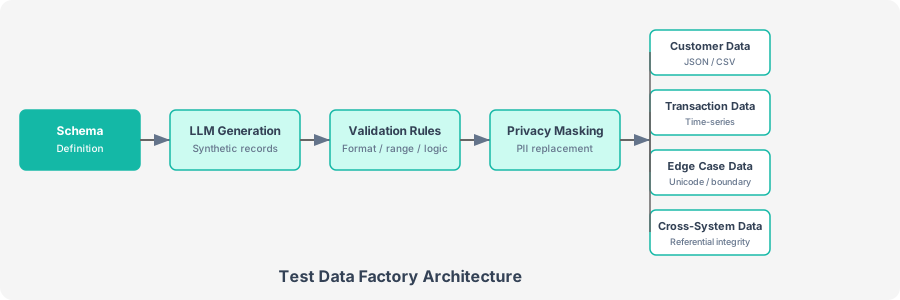
Figure 10-1. The Test Data Factory pipeline transforms schema definitions into validated, privacy-compliant test data sets across multiple data types.
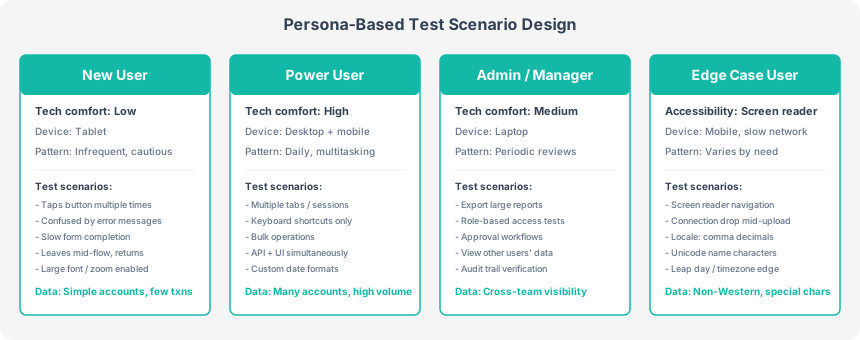
Figure 10-2. Each persona represents a distinct user archetype with specific behaviors, constraints, and data characteristics that drive targeted test scenarios.
10.1 The Test Data Challenge
Ask any QA team what slows them down, and test data ranks near the top. The problems are familiar. Production data cannot be used because of privacy regulations (GDPR, HIPAA, CCPA). Manually created test data is too clean: it lacks the messiness of real-world data. Generated data from simple random functions lacks semantic coherence. A randomly generated "customer" might have a phone number from New York but an address in Tokyo.
The test data problem breaks down into five distinct challenges:
| Challenge | Description | Impact on Testing |
|---|---|---|
| Volume | Need thousands of records for performance and load tests | Manual creation is infeasible |
| Realism | Data must look and behave like production data | Unrealistic data misses real bugs |
| Privacy | Cannot use real PII, health records, financial data | Legal and regulatory risk |
| Consistency | Cross-table and cross-system relationships must hold | Foreign key violations, orphaned records |
| Edge cases | Need data that triggers unusual code paths | Most bugs hide in rare data combinations |
LLMs address these challenges because they have absorbed patterns from vast amounts of text data. They understand that a valid US Social Security number has the format XXX-XX-XXXX, that "123 Main Street" is a plausible address but "123 !!$$ Street" is not, and that a person born in 1990 should not have a retirement date in 2015. This semantic understanding produces test data that is more realistic than random generation.
LLMs can leak real data. Because LLMs are trained on internet text, they may occasionally generate real names, addresses, or phone numbers that belong to actual people. Always add a post-processing step that validates generated data is not accidentally real. Check names against known public figures, verify phone numbers are from designated test ranges, and use clearly synthetic identifiers.
10.2 Synthetic Data Generation
The core technique is to describe your data schema and domain constraints in plain language, then ask the LLM to generate records that are realistic but entirely fictional. The prompt specifies rules for internal consistency (ages matching birth dates, addresses being plausible), realistic distribution (not all values identical), and natural imperfections (optional fields sometimes empty, varied formats). You set a higher temperature (0.8) to encourage variety across records.
For an insurance application customer schema with 16 fields (customer_id, name, DOB, email, phone, address, policy type, premium, risk score, status), the LLM generates data like:
{
  "customer_id": 10001,
  "first_name": "Margaret",
  "last_name": "Thornbury",
  "middle_name": "Ellen",
  "date_of_birth": "1978-03-14",
  "email": "m.thornbury@inbox.example.com",
  "phone": "(312) 555-0147",
  "address_line1": "4521 Oakwood Drive",
  "address_line2": null,
  "city": "Naperville",
  "state": "IL",
  "zip_code": "60540",
  "policy_type": "home",
  "annual_premium": 2340.00,
  "risk_score": 34,
  "status": "active"
}
Notice the semantic coherence: the phone area code (312) matches Illinois, the zip code (60540) is valid for Naperville, IL, and the premium and risk score are reasonable for a home policy. A purely random generator would not produce this level of consistency.
Scaling Beyond LLM Token Limits
For large datasets (hundreds or thousands of records), you cannot generate everything in a single LLM call. The strategy is to use the LLM to generate a diverse seed set (10-20 records), then expand it programmatically by cloning seed records with random variations in numeric fields, optional fields, and status values. Generate 10 seeds, scale to 1,000 by varying premiums, risk scores, and optional field presence.
Use batched generation for variety. Instead of generating 10 seeds and scaling to 1,000, generate 5 batches of 20 seeds with different prompts (e.g., "young urban customers," "rural elderly customers," "high-risk customers") and scale each batch. This produces a dataset with natural demographic clusters, which is more realistic than uniform random variation.
10.3 Edge Case Discovery
The most valuable test data is data that triggers bugs. Bugs hide at the edges. LLMs are good at brainstorming edge cases because they have seen patterns of what goes wrong in real software. The key is to ask them to think like a destructive tester, generating records that are technically valid but represent unusual, extreme, or tricky situations across eight categories: Unicode characters, length extremes, special characters, date boundaries, numeric edges, format variations, cultural variations, and unusual state combinations.
The LLM discovers edge cases such as:
| Edge Case | Example Value | Why It Breaks Software |
|---|---|---|
| Apostrophe in name | O'Malley-Sanchez | SQL injection risk, string escaping failures |
| Unicode name | Renée Françoise | Character encoding issues, sorting problems |
| Leap day birthday | 2000-02-29 | Age calculation breaks on non-leap years |
| Very long name | 50-character first name | UI overflow, database truncation |
| Zip+4 format | 60540-1234 | Validation regex may reject valid format |
| Minimum age (exactly 18) | DOB = today minus 18 years | Off-by-one in age calculation |
| Zero premium pending policy | premium=0.00, status=pending | Division by zero in rate calculations |
| 100 risk score | risk_score=100 | Boundary: is 100 accepted or only 1-99? |
Edge cases cluster around data type boundaries. Strings break with special characters and encoding. Numbers break at zero, negative values, and extremes. Dates break at month/year boundaries, leap days, and time zones. Enums break with unexpected values. Train yourself to think in these categories, and use the LLM to generate concrete examples for each.
10.4 Persona-Based Test Scenarios
Real users do not interact with software randomly. A 72-year-old retiree navigates a banking app differently than a 25-year-old power user. Persona-based testing creates user profiles with realistic behaviors, goals, and limitations. It then generates test scenarios that reflect how each persona would actually use the system.
The prompt asks the LLM to act as a UX researcher and QA specialist, creating detailed personas with attributes like tech comfort level, accessibility needs, device preferences, and usage patterns. For each persona, it generates 5-8 test scenarios that reflect how that person would actually use the system, including realistic mistakes they would make.
Persona-driven scenarios reveal testing gaps that functional test cases miss:
| Persona | Scenario | What It Tests |
|---|---|---|
| Elderly user (low tech comfort) | Taps "Transfer" button three times because the page is slow to respond | Duplicate transaction prevention |
| Visually impaired user | Uses screen reader to navigate bill pay form | ARIA labels, tab order, focus management |
| Power user (high tech comfort) | Opens 4 tabs, initiates transfers from the same account simultaneously | Concurrent session handling, balance consistency |
| Non-native speaker | Enters amount with comma as decimal separator (1.500,00) | Locale-aware input parsing |
| Rural user on slow connection | Starts mobile check deposit, connection drops mid-upload | Upload resume, partial data handling |
Map personas to test environments. Each persona implies a specific test environment: the elderly user needs testing on a tablet with large fonts enabled. The rural user needs throttled network testing. The visually impaired user needs screen reader testing. Create a persona-to-environment mapping table and include it in your test plan.
Converting Personas to Test Data
Once you have personas, you can generate matching test data by feeding the persona profile back to the LLM along with the data schema. The LLM creates user accounts, transaction histories, and system state that reflects each persona's situation. An elderly user gets a simple account with few transactions and large fonts enabled, while a power user gets multiple accounts with high transaction volume and concurrent session data.
10.5 Data Privacy and Masking
When you need test data that preserves the statistical properties of production data without exposing any real personal information, LLMs can perform intelligent data masking. Unlike simple search-and-replace, LLM-based masking understands context. It knows that "John Smith" is a name, "123-45-6789" is an SSN, and "john.smith@company.com" is related to the same person.
The masking prompt instructs the LLM to replace all PII with realistic synthetic equivalents while preserving data types, statistical distributions, referential relationships, and business logic validity. Names become different but plausible names, SSNs use the 900-999 range (reserved for testing), emails use example.com domains, and phone numbers use the 555-01XX range reserved for fiction. Date of birth is shifted by a consistent offset so age relationships are preserved.
Never send real production data to an external LLM API. The masking approach above is for demonstration. In practice, you should either: (1) use an on-premises LLM that keeps data within your network, (2) use traditional masking tools (e.g., Microsoft Presidio, AWS Macie) for the initial pass, then use an LLM to enhance realism, or (3) use the LLM to generate a masking strategy that your team applies locally without sending the actual data.
Privacy-Safe Data Generation Strategy
A safer approach is to analyze production data locally for patterns, then send only the patterns (not the data) to the LLM:
The process works in two steps. First, analyze production data locally to extract statistical patterns: field types, min/max/mean values for numbers, average lengths and format patterns for strings (e.g., "SSN format: XXX-XX-XXXX"), null ratios, and unique value ratios. Second, send only these patterns (no actual data) to the LLM to generate synthetic records that match the same statistical profile. No PII ever leaves your machine.
10.6 Data Privacy and Compliance for Analysts
Generating test data is only half the challenge. The other half is making sure you never inadvertently expose real personal data: to an LLM API, to a test environment, or to a colleague who should not have access. Privacy regulations carry real penalties, and "I was just testing" is not a legal defence. This section gives you a practical framework for navigating GDPR, HIPAA, and CCPA when LLMs are part of your workflow.
GDPR Considerations When Using LLMs
The General Data Protection Regulation applies to any organisation that processes data of EU residents, regardless of where the organisation is based. For analysts using LLMs, three GDPR requirements demand attention.
- Data Processing Agreements (DPAs). Before sending any data that could contain EU personal data to an LLM provider, your organisation must have a signed DPA with that provider. The DPA specifies what data is processed, how long it is retained, and what happens if there is a breach. Most major providers (OpenAI, Anthropic, Google, Microsoft) offer DPAs for enterprise accounts, but the free tier of ChatGPT typically does not qualify. Verify your agreement covers LLM usage specifically, not just general cloud services.
- Right to erasure (Article 17). If a data subject requests deletion of their personal data, you must be able to confirm that their data was not sent to an LLM, or, if it was, that the provider has deleted it. This is nearly impossible to guarantee with most LLM APIs. The safest approach is to never send identifiable personal data to an external LLM in the first place.
- Consent and lawful basis. Processing personal data through an LLM requires a lawful basis under Article 6. Legitimate interest may apply for internal analysis, but consent is typically required if the data was collected for a different purpose. When in doubt, anonymise the data before it touches an LLM.
HIPAA Requirements for Healthcare Analyst Workflows
If you work with Protected Health Information (PHI): patient names, medical record numbers, diagnoses, or treatment dates, the Health Insurance Portability and Accountability Act imposes strict controls.
- Business Associate Agreements (BAAs). Any LLM provider that processes PHI must sign a BAA with your organisation. As of early 2026, only a handful of LLM platforms offer HIPAA-eligible environments with signed BAAs (notably Microsoft Azure OpenAI Service and AWS Bedrock with specific configurations). Using a consumer LLM product with PHI is a HIPAA violation, full stop.
- Minimum necessary standard. Even with a BAA in place, you should only send the minimum data necessary for the task. If you need the LLM to generate test cases for a patient scheduling system, send the schema and sample synthetic data, not actual patient records.
- Audit logging. HIPAA requires that you log who accessed PHI, when, and for what purpose. If LLM calls are part of your workflow, those calls must appear in your audit trail with the same detail as any other data access.
CCPA Requirements for California Consumer Data
The California Consumer Privacy Act (and its amendment, CPRA) gives California residents rights over their personal information. For analysts, the key requirements are:
- Disclosure obligations. If your organisation collects personal information from California residents and sends it to an LLM provider for processing, that provider must be disclosed as a "service provider" in your privacy policy.
- Right to delete and right to know. Similar to GDPR's right to erasure, consumers can request deletion of their data and ask what data you have collected. You must be able to trace whether their data was included in any LLM processing.
- Do not sell or share. Sending personal data to an LLM provider whose terms allow them to use your data for model training could be construed as "sharing" under CCPA. Ensure your enterprise agreement explicitly prohibits the provider from using your data for training.
Practical Checklist: Before Sending Data to an LLM
Use this checklist every time you prepare data for an LLM workflow. It takes two minutes and can save your organisation from a six-figure fine.
| # | Check | Action if Failed |
|---|---|---|
| 1 | Scan for PII. Does the data contain names, emails, phone numbers, addresses, SSNs, or other personally identifiable information? | Anonymise or use synthetic data instead |
| 2 | Check for PHI. Does the data include medical record numbers, diagnoses, treatment information, or health plan IDs? | Do not send to any LLM without a signed BAA and HIPAA-eligible environment |
| 3 | Check for financial data. Does the data include credit card numbers, bank account details, or transaction records? | Mask all financial identifiers; use tokenised or synthetic equivalents |
| 4 | Verify your vendor DPA. Does your organisation have a signed Data Processing Agreement with the LLM provider? | Do not proceed until Legal confirms the DPA is in place |
| 5 | Confirm data residency. Where will the data be processed? Does it cross national borders? Does this comply with your data sovereignty requirements? | Use a regional deployment (e.g., EU-based Azure OpenAI) if data must stay within a jurisdiction |
| 6 | Check the provider's training policy. Will the LLM provider use your data to train or improve their models? | Ensure your enterprise agreement opts out of training data usage |
| 7 | Verify data classification. What is the data's internal classification (Public, Internal, Confidential, Restricted)? | Only Public and Internal data should go to external LLMs without additional controls |
| 8 | Log the interaction. Is there a record of what data was sent, to which provider, when, and by whom? | Set up audit logging before proceeding |
| 9 | Confirm purpose limitation. Is the LLM processing consistent with the purpose for which the data was originally collected? | If not, obtain new consent or find an alternative lawful basis |
| 10 | Review retention. How long will the LLM provider retain your data? Is the retention period documented? | Confirm retention periods align with your data retention policy |
Make the checklist a habit, not an obstacle. Print it, pin it next to your monitor, or embed it as a pre-flight check in your team's LLM workflow templates. The goal is to make privacy-safe behaviour automatic, not burdensome.
PII Detection and Masking in Practice
When you need to send data to an LLM but suspect it may contain PII, a simple detection-and-masking step can catch the most common identifiers before they leave your machine. The following function uses regular expressions for common PII patterns and replaces them with placeholder tokens. It runs locally: no data is sent anywhere.
import re
from typing import NamedTuple


class MaskResult(NamedTuple):
    masked_text: str
    detections: list[dict]


def detect_and_mask_pii(text: str) -> MaskResult:
    """Detect and mask common PII patterns in text.

    Runs entirely locally — no data is sent to any external service.
    Returns the masked text and a list of what was detected.
    """
    patterns = [
        ("SSN", r"\b\d{3}-\d{2}-\d{4}\b"),
        ("CREDIT_CARD", r"\b\d{4}[\s-]?\d{4}[\s-]?\d{4}[\s-]?\d{4}\b"),
        ("EMAIL", r"\b[A-Za-z0-9._%+-]+@[A-Za-z0-9.-]+\.[A-Z|a-z]{2,}\b"),
        ("PHONE_US", r"\b(\+?1[-.\s]?)?\(?\d{3}\)?[-.\s]?\d{3}[-.\s]?\d{4}\b"),
        ("IP_ADDRESS", r"\b\d{1,3}\.\d{1,3}\.\d{1,3}\.\d{1,3}\b"),
        ("DATE_OF_BIRTH", r"\b(DOB|Date of Birth|Born)[:\s]+\d{1,4}[-/]\d{1,2}[-/]\d{1,4}\b"),
    ]

    detections = []
    masked = text

    for label, pattern in patterns:
        for match in re.finditer(pattern, masked, re.IGNORECASE):
            detections.append({
                "type": label,
                "value": match.group(),
                "position": match.start(),
            })

        masked = re.sub(
            pattern,
            f"[{label}_REDACTED]",
            masked,
            flags=re.IGNORECASE,
        )

    return MaskResult(masked_text=masked, detections=detections)


# Usage example
raw_text = """
Customer: Jane Doe
Email: jane.doe@example.com
Phone: (415) 555-0198
SSN: 123-45-6789
DOB: 1985-07-22
Credit Card: 4111-1111-1111-1111
"""

result = detect_and_mask_pii(raw_text)
print("Masked text:")
print(result.masked_text)
print(f"\nDetected {len(result.detections)} PII instances:")
for d in result.detections:
    print(f"  {d['type']}: {d['value']}")
This produces output like:
Masked text:

Customer: Jane Doe
Email: [EMAIL_REDACTED]
Phone: [PHONE_US_REDACTED]
SSN: [SSN_REDACTED]
DOB: [DATE_OF_BIRTH_REDACTED]
Credit Card: [CREDIT_CARD_REDACTED]

Detected 5 PII instances:
  SSN: 123-45-6789
  CREDIT_CARD: 4111-1111-1111-1111
  EMAIL: jane.doe@example.com
  PHONE_US: (415) 555-0198
  DATE_OF_BIRTH: DOB: 1985-07-22
Notice that the function catches structured identifiers (SSN, email, phone, credit card) but does not catch the name "Jane Doe." Name detection requires a Named Entity Recognition (NER) model, which is beyond simple regex. For production use, consider Microsoft Presidio (open source), AWS Comprehend, or Google Cloud DLP. All of these run locally or within your cloud boundary and provide robust name, address, and organisation detection.
Regex catches the obvious; NER catches the subtle. The function above is a first line of defence, not a complete solution. For high-sensitivity data (healthcare, financial services, government), always layer a dedicated PII detection library on top. The combination of fast regex pre-screening plus accurate NER post-processing gives you both speed and coverage.
10.7 Cross-System Test Data
Enterprise applications rarely live in isolation. A customer order touches the CRM, the inventory system, the payment gateway, the shipping service, and the notification system. Test data for integration testing must maintain consistency across all these systems. An order ID in the payment system must reference the same order in the inventory system.
The prompt defines the schemas for each system (CRM, Order Management, Inventory, Payment Gateway) with their foreign key relationships, then describes a specific test scenario: "A gold-tier customer places two orders: one is delivered successfully, the other is partially shipped with one item backordered." The LLM generates consistent records across all four systems where every foreign key references a valid parent record, timestamps are chronologically ordered, and quantities balance.
Think in terms of test scenarios, not test data. Instead of generating random data and hoping it covers your test cases, start with the scenario ("customer upgrades their subscription mid-billing-cycle") and generate only the data needed to support it. This produces smaller, more focused datasets that are easier to debug when tests fail.
10.8 Data Validation Rules
Beyond generating data, LLMs can help you define and enforce the validation rules that your test data and production data must satisfy. This is especially useful when working with legacy systems where validation rules are buried in code and not documented.
The LLM generates validation rules with six attributes: rule_id, field, rule_type (format, range, required, dependency, uniqueness, cross-field), description, a validation expression, and severity (error or warning). You then apply these rules against your generated records to catch inconsistencies. This creates a virtuous cycle: generate data, validate it, fix violations, and improve the generation prompt.
Common validation rules the LLM generates:
| Rule Type | Example | Expression |
|---|---|---|
| Format | ZIP code format | re.match(r'^\d{5}(-\d{4})?$', record['zip_code']) |
| Range | Risk score bounds | 1 <= record['risk_score'] <= 100 |
| Required | Last name not empty | record.get('last_name') and len(record['last_name']) > 0 |
| Cross-field | Age consistent with DOB | calculated_age(record['dob']) >= 18 |
| Dependency | Active status needs premium | record['status'] != 'active' or record['annual_premium'] > 0 |
| Uniqueness | Customer ID unique | Check across all records |
Turn validation rules into test assertions. The validation expressions generated by the LLM can be directly converted into pytest assertions or data quality checks in your ETL pipeline. This creates a bridge between test data design and production data monitoring. The same rules that validate your test data can catch data quality issues in production.
Project: Test Data Factory
Build a reusable Test Data Factory that generates, validates, and manages test data across multiple schemas and test scenarios.
Project Requirements
- Accept a YAML or JSON schema definition for one or more data entities
- Generate synthetic records with configurable volume and edge case percentage
- Support persona-based data generation with realistic usage patterns
- Maintain cross-entity referential integrity
- Auto-generate and apply validation rules
- Export data in JSON, CSV, and SQL INSERT formats
Factory Pipeline Steps
The Test Data Factory follows these steps for each entity:
- Load schemas from a YAML or JSON definition file
- Generate regular records (80% of target count) via the LLM with domain context
- Generate edge case records (20%) with a separate prompt focused on unusual-but-valid data
- Auto-generate validation rules from the schema and apply them to all records
- Export in multiple formats: JSON for test frameworks, CSV for spreadsheet review, and SQL INSERT statements for database seeding
Extension Ideas
- Add a Streamlit UI where testers can configure schemas, adjust parameters, and preview data
- Build a data lineage tracker that shows which LLM call generated each record
- Add support for time-series data (transaction logs, event streams)
- Integrate with database seeding tools (Flyway, Liquibase) for automated test environment setup
Summary
- LLMs produce semantically coherent test data. Names match regions, dates are consistent with ages, and business rules are respected. Random generators cannot match this level of coherence.
- Synthetic data generation avoids privacy risks while maintaining the statistical properties of production data.
- Edge case discovery is where LLMs add the most value, finding unusual-but-valid data combinations (Unicode names, leap day birthdays, boundary values) that manual creation misses.
- Persona-based scenarios uncover usability and accessibility issues that functional test cases overlook.
- Data privacy requires a defense-in-depth approach: analyze patterns locally, generate data via LLM, and never send real PII to external APIs.
- Cross-system data must maintain referential integrity and chronological consistency across all participating systems.
- Validation rules generated by LLMs serve double duty: validating test data quality and monitoring production data integrity.
Exercises
- Generate and validate. Create a schema for your project's main entity, generate 100 records, and validate them. How many violations does the LLM-generated validation ruleset catch?
- Edge case tournament. Generate edge cases at three different temperatures (0.3, 0.6, 0.9) and compare. Which temperature produces the most useful edge cases?
- Persona coverage matrix. Create four personas for a system you test. Map each persona's scenarios against your existing test cases. What gaps do the personas reveal?
- Privacy-safe pipeline. Implement the "analyze locally, generate remotely" pattern from Section 5. Compare the statistical properties of the synthetic data against the original.
- Cross-system integrity checker. Write a validation function that checks all foreign key relationships in cross-system test data and reports any orphaned references.