Chapter 03 of 18
Chapter 3: Prompt Engineering Fundamentals
The difference between a mediocre LLM output and a brilliant one almost never lies in the model — it lies in the prompt. Prompt engineering is the single most important skill for any analyst working with LLMs, and the good news is that it builds directly on skills you already have: clear communicati
Part 1 — Foundations
Chapter 3: Prompt Engineering Fundamentals
The difference between a mediocre LLM output and a brilliant one almost never lies in the model. It lies in the prompt. Prompt engineering is the single most important skill for any analyst working with LLMs, and it builds directly on skills you already have: clear communication, structured thinking, and precise specification of requirements.
Reading time: ~20 min Project: Prompt Library Builder
What You Will Learn
- The structural components that make a prompt effective and how to combine them
- When and how to use zero-shot, few-shot, and chain-of-thought prompting strategies
- How to use role-based prompting to get domain-appropriate outputs
- Techniques for controlling output format, building reusable prompt templates, and avoiding common pitfalls
3.1 The Anatomy of a Good Prompt
A well-constructed prompt has a clear structure, just like a well-written requirement. The components do not always need to appear in the same order, and not every prompt needs every component, but understanding the full anatomy lets you diagnose why a prompt is not working and fix it systematically.
The six components of a complete prompt are:
| Component | Purpose | Example | When to Use |
|---|---|---|---|
| Role / Persona | Sets the expertise and perspective | "You are a senior QA engineer with 10 years of experience in financial systems" | Almost always — it calibrates the model's response style and depth |
| Context | Provides background information the model needs | "We are building a patient portal for a hospital system. The system must be HIPAA-compliant." | Whenever the task requires domain or project knowledge |
| Task / Instruction | Specifies exactly what you want the model to do | "Analyze the following user story and identify missing acceptance criteria" | Always — this is the core of every prompt |
| Input Data | The material to be processed | The actual user story, document excerpt, or data to analyze | Whenever you are asking the model to process specific content |
| Output Specification | Defines the format, length, and structure of the response | "Respond in a numbered list with no more than 10 items. Each item should include a severity rating." | Whenever you need structured or consistently formatted output |
| Constraints / Rules | Boundaries and requirements the output must respect | "Do not suggest changes to the database schema. Focus only on UI/UX improvements." | Whenever you need to exclude certain types of responses |
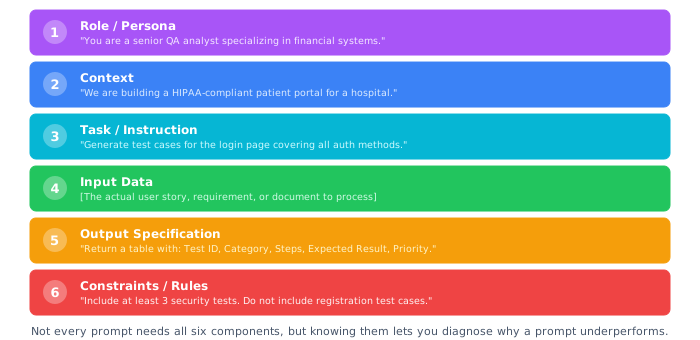
Anatomy of a Good Prompt — six components that transform a vague request into a precise instruction. The Role sets expertise, Context provides background, the Task defines what to do, Input Data is the material to process, Output Specification controls format, and Constraints set boundaries.
Let's see the difference between a weak prompt and a strong one for the same task:
Weak prompt: "Write test cases for a login page." Too vague, produces generic results.
Strong prompt (using all six components):
Role: You are a senior QA analyst specializing in web application security testing.

Context: We are testing a login page for an online banking application. The login
supports email/password authentication, Google SSO, and biometric login on mobile.
The application must comply with OWASP Top 10 security standards. The system locks
accounts after 5 failed attempts.

Task: Generate a comprehensive set of test cases for the login page.

Output Format: Present each test case as a table row with these columns:
- Test Case ID (TC-LOGIN-001 format)
- Category (Functional / Security / Usability / Performance / Edge Case)
- Description (one sentence)
- Preconditions
- Test Steps (numbered)
- Expected Result
- Priority (Critical / High / Medium / Low)

Constraints:
- Include at least 3 security-specific test cases aligned with OWASP
- Include at least 2 test cases for each authentication method
- Include edge cases for the account lockout mechanism
- Do not include test cases for registration or password reset (those are separate)
The Specificity Principle: The more specific your prompt, the better the output. Vague prompts produce generic outputs. Specific prompts produce targeted, actionable outputs. As a BA, you already know this. It is the same principle that makes "the system shall be fast" a bad requirement and "the system shall return search results within 200ms under a load of 1,000 concurrent users" a good one.
3.2 Zero-Shot vs Few-Shot
One of the most powerful techniques in prompt engineering is providing examples of the desired output. The terminology comes from machine learning research, but the concept is simple:
Zero-shot prompting: You give the model instructions but no examples. The model must figure out what you want from the description alone.
Few-shot prompting: You provide one or more examples of inputs paired with desired outputs. The model learns the pattern from your examples and applies it to new inputs.
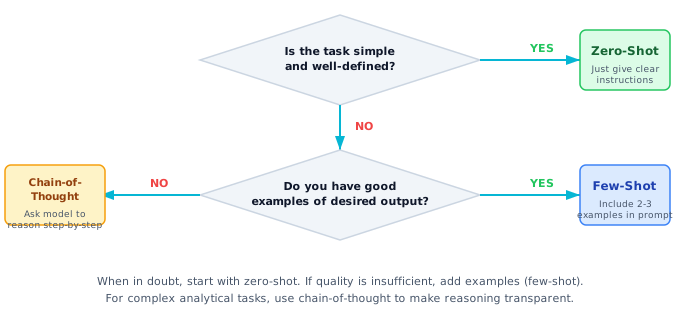
Zero-Shot vs Few-Shot Decision Tree -- start with the simplest approach and escalate only when output quality demands it. Chain-of-thought is best for complex analytical tasks where you need auditable reasoning.
When to use zero-shot:
- The task is straightforward and well-defined
- You're using a capable model (GPT-4o, Claude Sonnet)
- Standard output formats are acceptable
- You want to minimize prompt length (and cost)
When to use few-shot:
- You need output in a very specific format or style
- The task involves domain-specific conventions
- You want consistency across multiple runs
- The model misunderstands your zero-shot instructions
Here is a practical example of few-shot prompting for a BA task, converting informal requirements into structured user stories:
Task: Convert informal requirements into structured user stories with
acceptance criteria.

Example 1:
Input: "Users need to be able to export their data"
Output:
  User Story: As a registered user, I want to export my account data
  in a standard format so that I can maintain a personal backup or
  migrate to another service.

  Acceptance Criteria:
  - Given a logged-in user on the account settings page
    When they click "Export My Data"
    Then the system generates a ZIP file containing their data in JSON format
  - Given an export is requested
    When the data exceeds 100MB
    Then the system emails a download link instead of direct download
  - Given a user has requested an export
    When they request another within 24 hours
    Then the system shows a message: "Export already in progress"

Example 2:
Input: "The dashboard needs to load faster"
Output:
  User Story: As a daily dashboard user, I want the main dashboard to
  load within 2 seconds so that I can begin my morning workflow without delay.

  Acceptance Criteria:
  - Given a user navigates to the dashboard
    When the page loads on a broadband connection (>10 Mbps)
    Then all above-the-fold content renders within 2 seconds
  - Given a user accesses the dashboard on a mobile device
    When the connection speed is 3G or better
    Then the critical metrics display within 4 seconds
  - Given the dashboard has more than 10 widgets configured
    When the page loads
    Then widgets load progressively with skeleton screens shown for pending widgets

Now convert this requirement:
Input: "Managers want to see who's doing what"
Notice how the examples encode implicit standards: the level of specificity expected, the tone, the format of acceptance criteria, and the practice of adding quantifiable metrics. The model will mirror these patterns in its output without you needing to explain each convention explicitly.
Quality of Examples Matters More Than Quantity: Two excellent examples typically outperform five mediocre ones. Choose examples that demonstrate the nuances of what you want: proper specificity levels, edge case handling, appropriate domain language. Your examples are a specification. They define the contract the model will follow.
3.3 Role-Based Prompting
Role-based prompting is the technique of instructing the LLM to adopt a specific persona, expertise level, or perspective. This is not a gimmick. It meaningfully affects the quality, depth, and style of outputs because it activates different patterns in the model's learned representations.
Consider how different roles produce different analyses of the same requirement:
For example, given the requirement "The system shall support up to 10,000 concurrent users," a BA role prompt focuses on completeness (Who are these users? What actions? Is 10,000 based on current or projected usage?). A QA Performance role focuses on testability (How do we define "concurrent"? What are pass/fail criteria? What load tool?). A Security role focuses on threats (What about DDoS above 10,000? Is there rate limiting?). Same requirement, three different and valuable analyses, all driven by the role you set.
Effective role specifications include three elements:
- Title and seniority: "Senior Business Analyst" vs "Junior BA" vs "VP of Product" — each implies different depth and perspective.
- Domain expertise: "specializing in healthcare systems" or "with 10 years in fintech" — narrows the domain lens.
- Behavioral instructions: "You are thorough and always identify at least 3 risks" or "You write concisely and avoid jargon" — shapes the communication style.
Here are proven role templates for common analyst scenarios:
| Scenario | Effective Role Prompt |
|---|---|
| Requirements review | "You are a Senior BA with a reputation for finding gaps that other analysts miss. You are constructively critical and always substantiate concerns with specific questions." |
| Test case design | "You are a QA Engineer who has found critical production bugs that saved millions. You think in edge cases and boundary conditions. You never assume the happy path will work." |
| Stakeholder communication | "You are a BA who excels at translating technical concepts for executive audiences. You use analogies, avoid acronyms, and focus on business impact." |
| Process documentation | "You are a process analyst who creates documentation that new team members can follow without additional training. You use numbered steps, include decision points, and add notes for common mistakes." |
| Devil's advocate | "You are a seasoned analyst who has seen many projects fail. Your job is to challenge assumptions, identify risks, and ask the uncomfortable questions that need asking." |
Avoid Unrealistic Roles: Asking the model to be "the world's best analyst who never makes mistakes" does not improve output. It can make the model more likely to give overconfident responses. Ground your role prompts in realistic expertise descriptions. The model performs best when the role is specific and authentic.
3.4 Chain-of-Thought for Analysis
Chain-of-thought (CoT) prompting is a technique where you instruct the model to show its reasoning process step by step rather than jumping directly to an answer. For analyst tasks, this technique is valuable because it makes the model's reasoning transparent and auditable.
The basic mechanism is simple: include a phrase like "Think through this step by step" or "Show your reasoning process" in your prompt. But for analyst work, structured chain-of-thought is far more powerful than the generic approach.
Generic CoT ("Analyze this requirement. Think step by step.") produces decent results, but Structured CoT is more powerful for analyst work because it forces a systematic analysis through named steps:
"Analyze this requirement using the following framework:

Step 1 — COMPREHENSION: Restate the requirement in your own words
to confirm understanding.

Step 2 — COMPLETENESS: Identify any missing elements using the
INVEST criteria (Independent, Negotiable, Valuable, Estimable,
Small, Testable).

Step 3 — AMBIGUITY: Highlight any terms or phrases that could be
interpreted in multiple ways. For each, suggest a clarifying question.

Step 4 — TESTABILITY: Assess whether the requirement as written
can be definitively tested. If not, suggest measurable criteria.

Step 5 — DEPENDENCIES: Identify any implicit dependencies on other
requirements, systems, or decisions.

Step 6 — RECOMMENDATION: Provide a rewritten version that addresses
the issues found in steps 2-5."
The structured approach produces dramatically better output because it forces the model through a systematic analysis rather than allowing it to jump to whatever pattern matches first.
The same structured CoT approach works beautifully for QA tasks like defect root cause analysis. Define steps such as: (1) SYMPTOM — restate what the user observed, (2) REPRODUCTION — outline likely steps to reproduce, (3) HYPOTHESES — generate 3+ possible root causes ranked by likelihood with confirming/ruling evidence, (4) INVESTIGATION PLAN — recommend specific logs or tests to check, (5) IMPACT ASSESSMENT — what else might be affected? This step-by-step framework produces far more thorough analysis than simply asking "What caused this bug?"
When to Use Chain-of-Thought: CoT is most valuable for complex analytical tasks where you need to trust the model's reasoning: requirements analysis, defect investigation, impact assessment, risk evaluation. For simple generative tasks (drafting an email, formatting data), CoT adds token cost without much benefit. Use it when the reasoning matters as much as the conclusion.
3.5 Output Formatting Techniques
Controlling the format of LLM output is critical for analyst work. You need outputs that can be directly incorporated into deliverables, imported into tools, or consistently compared across multiple runs. LLMs follow formatting instructions well when those instructions are explicit.
Technique 1: Structured Formats with Delimiters
Format your response using the following structure:

## Summary
[2-3 sentence overview]

## User Stories
For each story, use this format:
---
**ID:** US-[NNN]
**Story:** As a [role], I want [feature], so that [benefit]
**Priority:** [Critical | High | Medium | Low]
**Acceptance Criteria:**
- Given [context] When [action] Then [result]
---

## Risks
| Risk | Likelihood | Impact | Mitigation |
|------|-----------|--------|------------|
| ...  | ...       | ...    | ...        |
Technique 2: JSON Output for Tool Integration. When you need machine-readable output (for importing into spreadsheets, dashboards, or other tools), tell the model to return JSON with a specific schema you define. Include the exact field names, data types, and a note saying "Return ONLY valid JSON, no additional text." Most APIs also offer a dedicated JSON mode that guarantees valid structure.
Technique 3: Markdown Tables for Reports. Ask for output as a Markdown table by specifying the exact column headers you want. This produces clean, consistent tabular data you can paste into Confluence, Notion, or any Markdown-compatible tool.
Technique 4: Constrained Length. Specify exact limits: "Respond in exactly 5 bullet points, each no longer than 2 sentences. Focus on actionable insights, not observations." This prevents the model from producing overly verbose output and forces it to prioritize.
A critical technique for ensuring format compliance is to include a negative constraint. Tell the model what NOT to include:
- "Do not include introductory or concluding remarks"
- "Do not explain your reasoning. Output only the final result."
- "Do not add fields beyond the specified schema"
- "Do not wrap the JSON in markdown code fences"
JSON Mode: Many LLM APIs now offer a dedicated JSON output mode that guarantees structurally valid JSON. When building automated workflows (Chapter 4), always use this feature instead of relying on prompt instructions alone. OpenAI's API supports response_format={"type": "json_object"}, and Anthropic's Claude supports similar structured output controls.
3.6 Prompt Templates and Libraries
Once you have developed effective prompts for recurring tasks, the next step is to systematize them into reusable templates. A prompt template is a prompt with placeholders for variable inputs, allowing you to reuse the same carefully crafted structure across different projects and contexts.
Here's a framework for building a prompt library for analyst work:
A prompt template is simply a saved prompt with placeholders (like {domain}, {requirement}, {project_context}) that you fill in each time you use it. You can store templates in a shared document, a spreadsheet, or a simple text file — one per task type. The key is having a consistent structure so every analyst on your team produces the same quality of output. For example, a "User Story Generator" template would include placeholders for the domain, project context, and the informal requirement to convert, with fixed instructions for output format and acceptance criteria standards.
Organizing Your Prompt Library
A well-organized prompt library becomes a team asset. Consider this structure:
| Category | Templates | Use Frequency |
|---|---|---|
| Requirements | User Story Generator, BRD Section Drafter, Gap Analysis, Stakeholder Impact | Daily |
| Quality Assurance | Test Case Generator, Defect Report Enhancer, Test Data Creator, Regression Analyzer | Daily |
| Analysis | Requirements Review, Ambiguity Detector, INVEST Validator, Dependency Mapper | Weekly |
| Communication | Status Report Generator, Meeting Notes Summarizer, Stakeholder Email Drafter | Daily |
| Documentation | Process Flow Describer, Data Dictionary Builder, API Documentation Generator | Weekly |
Version Your Prompts: Treat your prompt library like code. Store it in version control, document changes, and test new versions before deploying them. A prompt that works well with GPT-4o may need adjustment for Claude or Gemini. Track which model and version each template was tested against.
3.7 Common Prompt Pitfalls
Even experienced prompt engineers fall into recurring traps. The following are the most common pitfalls for analyst work, with concrete examples and fixes.
Pitfall 1: The Vague Instruction
| Bad | Good | Why |
|---|---|---|
| "Analyze this requirement" | "Evaluate this requirement against INVEST criteria and identify specific gaps in testability and completeness" | Specifies the framework and focus areas |
Pitfall 2: Missing Context
| Bad | Good | Why |
|---|---|---|
| "Write test cases for the payment feature" | "Write test cases for the payment feature of our B2B SaaS invoicing system. Supports credit card (Stripe), ACH, and wire transfer. Users are finance managers at mid-size companies." | Domain context dramatically changes what test cases are relevant |
Pitfall 3: Conflicting Instructions
| Bad | Good | Why |
|---|---|---|
| "Be concise. Provide a comprehensive, detailed analysis covering all aspects." | "Provide a focused analysis of the three highest-risk areas. For each, include 2-3 sentences of explanation and a specific recommendation." | Resolves the concise-vs-comprehensive conflict with specific expectations |
Pitfall 4: Asking for Confirmation Instead of Critique
| Bad | Good | Why |
|---|---|---|
| "Is this a good requirement? 'The system shall be user-friendly.'" | "Identify every problem with this requirement and suggest a specific improvement for each: 'The system shall be user-friendly.'" | The first phrasing invites sycophancy; the second demands critical analysis |
Pitfall 5: Prompt Overload
Asking the model to do too many things in a single prompt produces mediocre results across the board. A prompt that says "analyze the requirements, generate test cases, write the test plan, create test data, and estimate the testing effort" will produce mediocre results for all five tasks. Run five focused prompts and get excellent results for each.
Pitfall 6: Example Contamination
In few-shot prompting, if all your examples share a characteristic that is coincidental rather than desired (e.g., all examples are about user authentication), the model may incorrectly assume that characteristic is part of the pattern. Ensure your examples are diverse enough to show the general pattern, not a narrow slice.
Pitfall 7: Ignoring the System Message
When using APIs, the system message is your most powerful formatting tool. It sets persistent context that does not need to be repeated. Many analysts put everything in the user message, leading to verbose, repetitive prompts. Use the system message for role, constraints, and output format. Use the user message for the specific task and input data.
The Debugging Approach: When a prompt produces poor results, resist the urge to add more instructions. Instead, diagnose which component is failing. Is the output in the wrong format? Fix the output specification. Is the content domain-inappropriate? Fix the context. Is the analysis shallow? Add chain-of-thought steps. Targeted fixes outperform prompt bloat every time.
Project: Prompt Library Builder
In this project, you will build a personal prompt library with at least 5 tested templates that you can use in your daily work. The library will be structured, version-controlled, and ready for team sharing.
Step 1: Identify Your Top 5 Tasks
From your LLM Impact Assessment (Chapter 1), select the 5 analyst tasks you perform most frequently that involve text generation or analysis.
Step 2: Build Templates
For each task, create a template using the PromptTemplate class. Include role, context placeholders, specific instructions, output format, and constraints.
Step 3: Test and Iterate
Run each template with real data from your work. Score the output on a 1-5 scale for quality, format compliance, and usefulness. Iterate on templates that score below 4.
How to build your library: Create a shared document (Google Doc, Confluence page, or simple spreadsheet) with one row per template. For each, record: Template Name, Category (Requirements, QA, Communication, etc.), The Prompt (with for variable inputs), Recommended Model, and Test Score (1-5, updated after each use). Here is an example template entry:
Template: Meeting Notes to Action Items
Category: Communication

Prompt:
You are a Senior Business Analyst.
Convert the following meeting notes into structured action items.

Meeting Notes: {meeting_notes}

Output Format:
## Action Items
| # | Action | Owner | Due Date | Priority |

## Decisions Made  |  ## Open Questions  |  ## Next Meeting Agenda

Rules:
- Infer owners from context when mentioned by name
- Flag any action without a clear owner as "TBD"
- Set priority based on business impact discussed
Deliverable: A JSON file containing your prompt library with at least 5 templates, each tested at least once with a score of 4 or higher. Share it with your team and invite them to contribute their own templates.
Summary
- Effective prompts have six components: role, context, task, input data, output specification, and constraints. Not every prompt needs all six, but knowing the full anatomy lets you diagnose and fix underperforming prompts.
- Few-shot prompting (providing examples) is your most powerful technique for getting consistent, domain-appropriate output. Invest time in crafting high-quality examples. They function as implicit specifications.
- Role-based prompting meaningfully changes output quality and perspective. Use specific, realistic roles with domain expertise and behavioral instructions.
- Chain-of-thought prompting makes LLM reasoning transparent and auditable. Use structured CoT with named steps for complex analytical tasks like requirements review and defect investigation.
- Build and maintain a prompt library. It transforms individual expertise into a team asset and ensures consistency across projects and analysts.
Exercises
Conceptual
A fellow analyst shows you their prompt: "Write a good BRD for a mobile banking app." Identify at least 5 specific improvements you would make to this prompt, referencing the components from Section 3.1. Explain why each improvement matters.
Coding
Create a Python function called prompt_quality_checker that takes a prompt string as input and evaluates it against the six components from Section 3.1. The function should return a score (0-100) and specific recommendations for improvement. Test it against 3 prompts of varying quality.
Design
Design a few-shot prompt template for converting JIRA defect tickets into structured root cause analysis reports. Include 2 realistic examples with different defect categories (functional bug, performance issue). The output should include: root cause hypothesis, affected components, recommended fix, and regression test suggestions.