Chapter 05 of 18
AI Integration Patterns
Seven patterns cover the vast majority of enterprise AI integration needs. This chapter walks through each one — from the simplest microservice wrapper to the AI Gateway that governs them all — so you can fit AI components into the architecture you already have without rebuilding it from scratch.
Overview
Fitting AI Into Your Existing Systems
Your enterprise already has hundreds of systems in production — ERPs, CRMs, data warehouses, customer portals, internal tools, and probably a few legacy monoliths that nobody wants to touch but everyone depends on. AI does not come along and replace all of that. What it does is work alongside those systems, augmenting what already exists rather than demanding you start from scratch.
The real skill of an enterprise architect in this era is not picking the fanciest model. It is figuring out how to connect AI components to the architecture you already have in a way that is clean, maintainable, and governable.
This chapter walks through the integration patterns that show up again and again in real-world enterprise AI deployments. These are blueprints, not rigid prescriptions — starting points you can adapt. Some of them will feel familiar because they echo patterns you already know from service-oriented architecture and data engineering. That is intentional. AI is not as alien as it sometimes sounds. Most of the hard problems are the same integration problems architects have been solving for decades.
Pattern 1: AI as a Microservice
You wrap an AI model behind a REST or gRPC API and call it from your existing application the same way you would call any other downstream service. Your app sends a request, the AI service processes it, the response comes back. From the perspective of your application code, the AI service is just another endpoint.
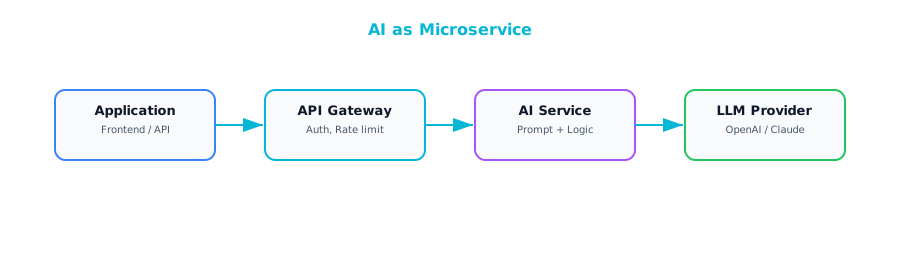
This pattern works best when you have a single-purpose AI capability to bolt onto an existing application — classification, entity extraction, text summarization, sentiment analysis. Your app already does its job well; it just needs one new capability, and the AI microservice provides it without requiring you to refactor anything else in the stack.
The most common implementation is a lightweight wrapper using FastAPI or Flask, deployed as a container, with your standard API gateway in front of it. If you are calling a managed API like OpenAI or Claude, the wrapper handles authentication, prompt construction, and response parsing so your main application stays clean.
Three things tend to catch teams off guard here. First, latency. LLM calls are not like database queries that come back in milliseconds — depending on the model and prompt complexity, you could be looking at one to thirty seconds or more. Design for that gracefully: asynchronous calls, loading indicators, or streaming the response token by token. Second, cost adds up faster than people expect. Every API call costs money, and at high traffic volumes those charges become significant. A caching layer for repeated or similar queries can make a dramatic difference. Third, availability is never guaranteed. External AI APIs have outages just like any other third-party service, so build fallback paths — degrade gracefully, queue requests for retry, or route to an alternative provider.
Pattern 2: AI in the Data Pipeline
A surprising number of the highest-value enterprise AI applications are batch processes that run behind the scenes, chewing through data and storing the results for downstream consumption. No interactive user staring at a loading spinner. The AI does its work on a schedule and the results show up in a dashboard, a database, or a notification.
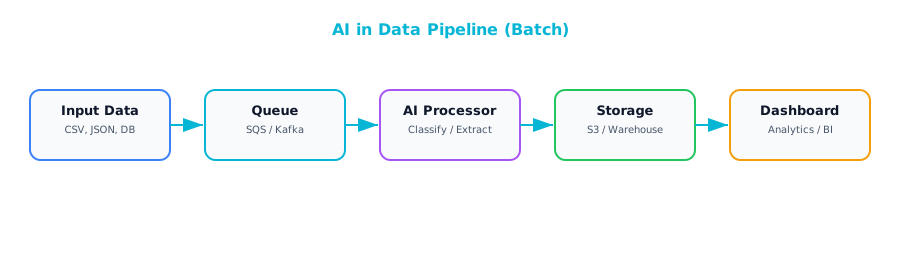
This pattern is ideal for document processing, content classification, data enrichment, and report generation — anything where latency between request and result is measured in minutes or hours rather than seconds. A classic example: a nightly job that processes all new support tickets, classifies each by severity and category, extracts key entities like product names and error codes, and automatically routes each ticket to the appropriate team. By the time support managers sit down in the morning, everything is already organized and waiting.
The advantages are compelling. Batch processing often qualifies for lower pricing tiers from AI providers, because you are not demanding low-latency responses. Error handling is simpler — a failed batch can just be retried without a user being affected. And because there is no user-facing latency to worry about, you can afford to use larger, more capable models that might be too slow for interactive use cases. If you are looking for the lowest-risk way to get AI into your enterprise and start demonstrating value, a pipeline-based approach is hard to beat.
Pattern 3: AI-Augmented User Interface
This pattern is about enhancing an existing user interface with AI-powered features rather than building a whole new application. Embed an AI panel, widget, or sidebar into your existing tool — something that can summarize a document, suggest next actions, auto-complete a form field, or provide a chat-style interface for asking questions about whatever the user is currently looking at. The core application stays exactly as it was.
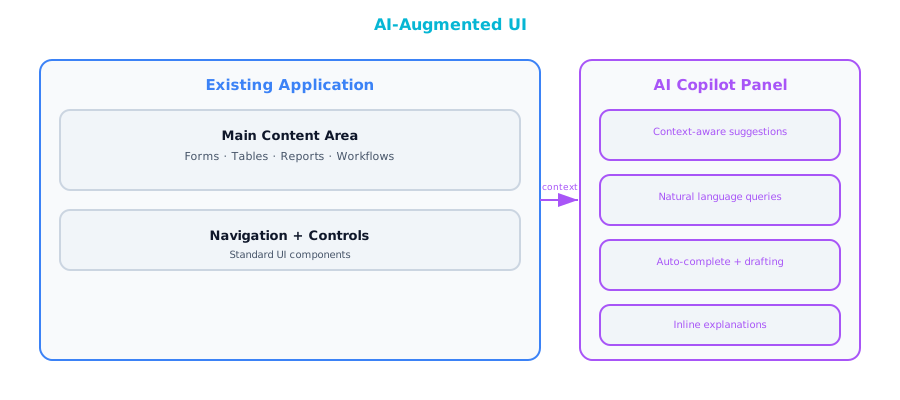
This is the pattern to reach for when you want to add AI capabilities to existing applications without rebuilding them. Your case management system gets a sidebar that can summarize case history. Your CRM gets a button that drafts follow-up emails. Your analytics dashboard gets a natural language query bar. Users keep working in the tools they already know, and the AI meets them where they are.
A few implementation considerations. If you are building a chat-like interface, stream responses rather than making the user wait for the entire answer. Server-Sent Events and WebSockets both work well. Equally important is graceful degradation — the application should work perfectly fine even if the AI service goes down. The AI panel might show a friendly error, but the rest of the application should be completely unaffected. Build user feedback collection from the start. Even thumbs-up/thumbs-down on AI suggestions gives you invaluable signal about quality at almost no implementation cost.
Pattern 4: Event-Driven AI
The AI component listens to events flowing through your event bus or message queue and processes them asynchronously as they arrive. An event fires — a new transaction, a sensor reading, a user action — the AI consumer picks it up, analyzes it, and either takes an action or stores the result.
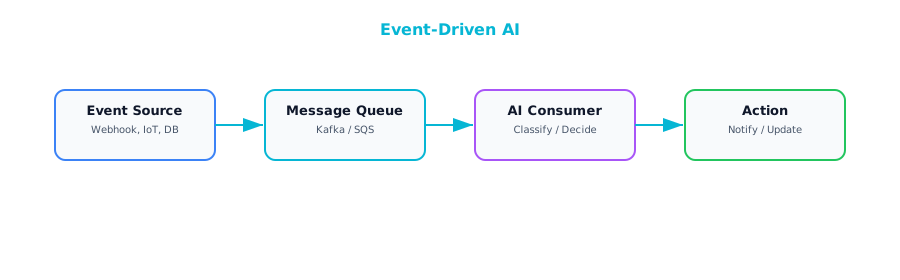
This is the right pattern for AI decisions on streaming data in near real time. Fraud detection is the textbook example — every transaction gets evaluated by an AI model that decides whether it looks suspicious, and if it does, an alert fires or the transaction is held for review. Anomaly detection in IoT data, real-time content moderation on user-generated content, and dynamic pricing adjustments all follow this same shape. The event-driven approach decouples AI processing from the event producers, which means you can scale, update, or replace the AI consumer without touching the systems that generate the events.
Two specific concerns to watch. Backpressure: if events are being produced faster than the AI consumer can process them, your message queue provides natural buffering, but if the gap persists, you need to scale out AI consumers horizontally or implement prioritization logic that processes the most important events first. Ordering: some AI decisions depend on seeing events in the right sequence. Detecting that a user logged in from two different countries within an hour requires processing login events in chronological order. If your architecture does not guarantee event ordering, you need to design around that — partitioned queues keyed on user ID, or buffering events and sorting them before processing.
Pattern 5: RAG-Integrated Application
Retrieval-Augmented Generation is the most common generative AI pattern in the enterprise right now. Your application uses an AI model to answer questions, but instead of relying solely on what the model learned during training, it first retrieves relevant information from your organization's own documents and data. The model then generates its answer grounded in that retrieved context — dramatically improving accuracy and making responses specific to your business rather than generic.
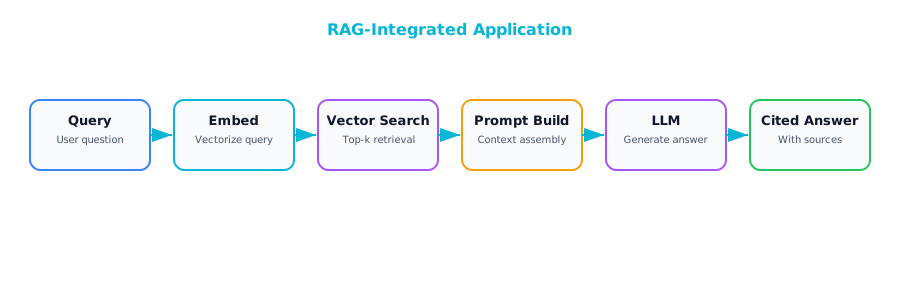
The use cases are everywhere: internal knowledge bases where employees can ask questions and get answers drawn from company policies and procedures, customer support systems that pull from product documentation and known issues, compliance query tools that search through regulatory filings, documentation Q&A for engineering teams. Anywhere that users need answers sourced from your organization's own documents, RAG is likely the right pattern.
Several design decisions will make or break your RAG implementation.
Access control is the most important one. In most enterprises, not every user is allowed to see every document. User A in marketing should not be getting answers based on confidential HR documents. This means your vector search results need to be filtered by the requesting user's permissions — adding meaningful complexity to both your indexing pipeline and your query path.
Citation is essential. Always return the source documents alongside the generated answer. Users need the ability to verify what the AI is telling them. An answer without a source cannot be trusted in a professional setting.
Freshness deserves careful thought. When a document is updated, how quickly does that change appear in search results? If there is a lag of hours or days between a policy being updated and the RAG system reflecting that update, you could be giving users stale or incorrect information — potentially worse than giving no answer at all.
Pattern 6: AI Gateway
As soon as your enterprise has more than a handful of applications using AI, you start running into governance problems. Which teams are using which models? How much is each application spending? Is anyone sending sensitive customer data to an external API? Are there audit logs for regulatory compliance? Trying to answer these questions when every application team manages its own AI integration independently is an exercise in frustration.
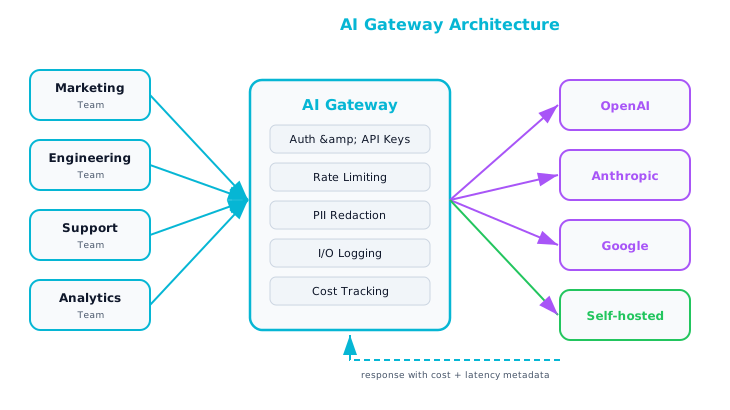
The AI Gateway pattern creates a centralized layer through which all AI interactions in your enterprise flow. It handles request routing — you can send billing-related questions to a less expensive model and legal questions to a more capable one, without any individual application needing to know about multiple providers. It enforces rate limiting and cost budgets on a per-team or per-application basis, so one runaway application cannot blow through the entire organization's AI budget overnight. It maintains a logging and audit trail for every AI interaction — increasingly a regulatory requirement in many industries. It can scrub PII from requests before they are sent to external models. And it can manage failover across providers, so if one vendor has an outage, requests are automatically rerouted without any application code needing to change.
The right time to introduce an AI Gateway is any time your enterprise has more than two or three applications using AI. If you have experience with enterprise service buses or API gateways, this pattern should feel familiar — the same architectural reasoning that made API gateways essential for REST services makes AI gateways essential for AI services.
Pattern 7: Human-in-the-Loop AI
There are decisions where the cost of being wrong is simply too high to let an AI system act autonomously, no matter how good the model is. Loan approvals, medical diagnoses, legal document review, hiring decisions, safety-critical assessments. Mistakes in these domains can cause serious harm to real people, expose the organization to legal liability, or both.
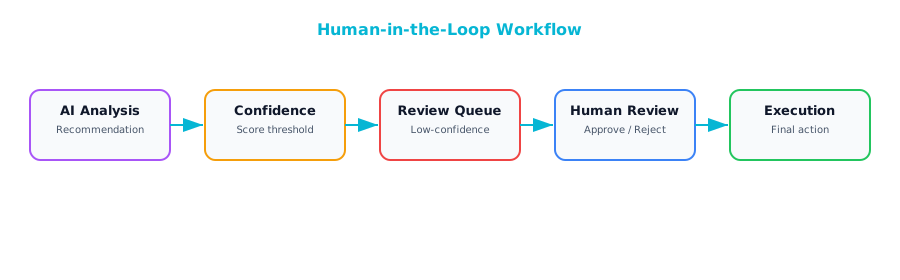
This pattern has the AI do the analysis and make a recommendation, but requires a human to review and approve before any action is taken. You still get enormous value from the AI — it does the heavy lifting of analyzing data, surfacing relevant information, and drafting a recommendation — but a qualified human makes the final call. The AI makes the human faster and more consistent. This is also the pattern that builds the most organizational trust in AI, because people can see the AI's reasoning, agree or disagree with it, and develop a calibrated sense of when the AI tends to be right and when it tends to struggle.
A queue-based approach is the most straightforward: the AI processes inputs and places its recommendations into a review queue, and human reviewers work through the queue at their own pace. A confidence-based approach is more sophisticated and often more practical at scale — the AI assigns a confidence score to each recommendation, and only recommendations below a certain threshold are routed to a human reviewer while high-confidence ones are auto-approved. This dramatically reduces the human workload while still catching the cases where the AI is uncertain.
Build a feedback loop so that human overrides are captured and used to improve the model over time. Every override is a data point that tells you where the model is falling short.
Choosing the Right Pattern
| Pattern | Latency | Complexity | Best For |
|---|---|---|---|
| AI as Microservice | Medium | Low | Single capability |
| AI in Data Pipeline | High (batch) | Low | Bulk processing |
| AI-Augmented UI | Low–Medium | Medium | Enhancing existing apps |
| Event-Driven AI | Low–Medium | High | Stream processing |
| RAG Application | Medium | Medium | Knowledge Q&A |
| AI Gateway | N/A (infra) | Medium | Multi-app governance |
| Human-in-the-Loop | High | Medium | High-stakes decisions |
Most enterprises will not pick just one of these patterns. In a mature AI deployment, you will see several working together. A typical setup: an AI Gateway sits at the center, providing routing, logging, and cost management for all AI interactions across the organization. Behind the gateway, a RAG application powers the internal knowledge base and customer support tools. A handful of AI microservices provide specific capabilities like document classification or sentiment analysis. A batch pipeline runs nightly to process and enrich large data sets. For any decision that carries significant risk, a Human-in-the-Loop workflow ensures a qualified person signs off before the organization acts. The patterns compose naturally because they operate at different layers and solve different problems, and the gateway ties them all together under a single governance umbrella.
Further Reading
From the Agentic AI book: If you are working with event-driven AI (Pattern 4) or agentic tool use patterns, Chapter 6 of Agentic AI covers tool use in depth — how agents select tools, how to design tool interfaces for reliability, and how to handle tool failures gracefully. Chapter 9 of that same book explores orchestration patterns for coordinating multiple AI components, which directly complements the AI Gateway and Human-in-the-Loop patterns discussed here.
Companion Notebook
 — Build a simple AI gateway that routes requests to different models based on task type, logs all interactions, and enforces token budgets.