Chapter 12 of 18
Cost and Performance Engineering for AI
A fintech company's GenAI feature went viral. The next month's AI infrastructure bill was $900,000 against $200,000 in revenue. This chapter covers how AI costs actually work, where the hidden expenses lurk, and the engineering strategies that can reduce your AI bill by 50 to 90 percent without sacrificing the user experience.
Overview
The $30K/Day Surprise
A fintech company launched a GenAI-powered feature, and it was an instant hit. Users loved the experience, adoption curves looked beautiful, and the product team was celebrating. Then the first month's AI infrastructure bill arrived: $900,000. The feature had generated roughly $200,000 in revenue during the same period. The CFO was not amused.
This story is not apocryphal. Variations of it play out at companies of every size, from startups burning through their seed round to enterprises discovering a six-figure line item that nobody budgeted for. The fundamental problem is that AI costs behave differently from traditional software costs. In a conventional application, your compute bill scales with traffic in a relatively predictable way. With LLM-based features, costs scale not just with traffic but with the complexity of each interaction. A single request can cost a fraction of a cent or several dollars, depending on the model, the length of the prompt, and how much context you are sending along.
This chapter is here to make sure the fintech horror story does not happen to you.
Understanding AI Costs
LLM API Pricing (How You Pay)
LLM APIs charge per token — roughly one word or word-fragment. Every request has two sides: the input tokens (your prompt, system instructions, and any context you send) and the output tokens (the model's response). Both sides have their own price, and output tokens are almost always more expensive than input tokens because generating text requires more computation than reading it.
| Model | Input Cost (per 1M tokens) | Output Cost (per 1M tokens) |
|---|---|---|
| GPT-4o | $2.50 | $10.00 |
| Claude Sonnet | $3.00 | $15.00 |
| Claude Haiku | $0.25 | $1.25 |
| Gemini Flash | $0.075 | $0.30 |
| Llama 70B (self-hosted) | ~$0.50* | ~$0.50* |
*Self-hosted costs depend on GPU pricing and utilization.
The difference between the most capable models and the lightweight ones is not two or three times — it can be 30x or more. That ratio is the entire foundation of the cost optimization strategies discussed later in this chapter.
The Cost Equation
The fundamental cost equation for any LLM-powered feature is straightforward, even if the numbers it produces can be startling.
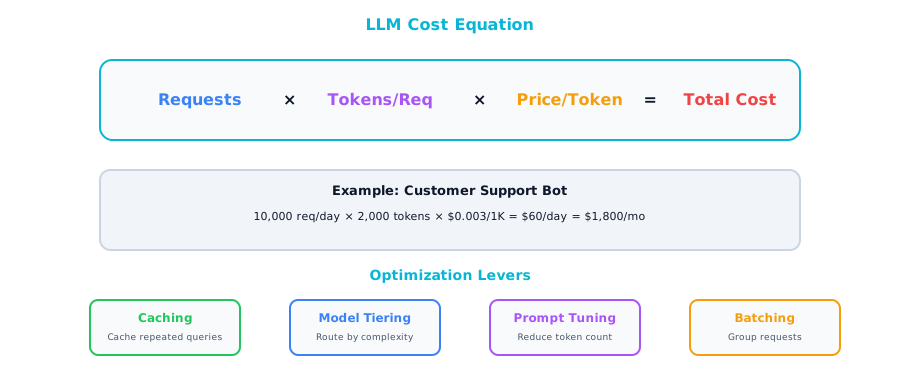
A concrete example. A customer-facing feature handling 100,000 requests per day, with an average of 2,000 tokens per request, using GPT-4o for output generation at $10 per million tokens: 100,000 × 2,000 × $0.00001 = $2,000 per day, roughly $60,000 per month.
Take that exact same workload and run it through Gemini Flash instead: 100,000 × 2,000 × $0.0000003 = about $60 per day, $1,800 per month. The model choice alone produced a 33x cost difference. Same traffic, same feature, same user experience — $58,000 per month saved.
Model selection is not a purely technical decision. It is a business decision with enormous financial implications.
Hidden Costs
| Cost | What It Is | How to Control |
|---|---|---|
| System prompt tokens | Your system prompt is sent with every request | Keep system prompts concise. Cache when possible. |
| RAG context tokens | Retrieved documents pad every request | Retrieve fewer, more relevant chunks |
| Conversation history | Multi-turn chats grow token count every turn | Summarize or truncate old messages |
| Retries | Failed requests cost money and fail again | Implement exponential backoff with budget caps |
| Evaluation | LLM-as-judge evaluations use tokens too | Sample evaluations, don't evaluate everything |
System prompts are particularly insidious because they feel like a one-time configuration, but they are repeated with every single API call. If your system prompt is 2,000 tokens long and you are making 100,000 requests per day, that is 200 million tokens per day just on instructions that never change. Conversation history is another silent budget killer — in a multi-turn chat, every previous message gets resent with every new turn, which means your token count grows quadratically with conversation length if you are not careful. Retries are the cruelest hidden cost of all, because you are paying full price for requests that produce no value.
Cost Optimization Strategies
Strategy 1: Model Tiering
The single most impactful cost optimization technique available to you. Instead of routing every request to your most capable and most expensive model, analyze the difficulty of each request and send it to the cheapest model that can handle it well.
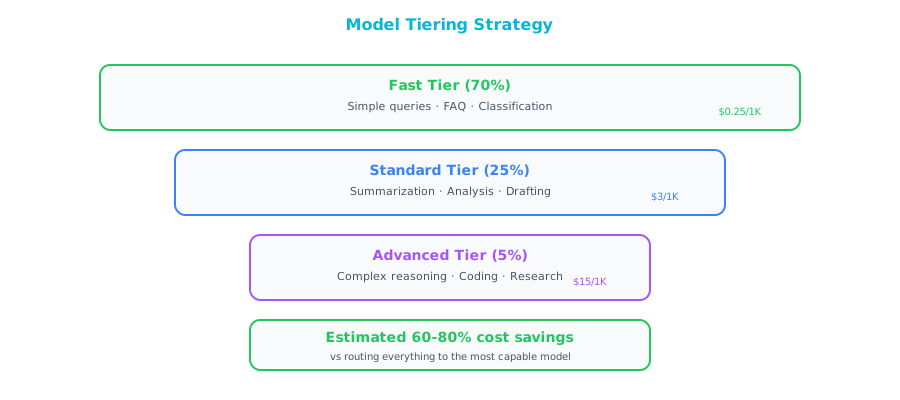
The vast majority of requests to most AI features are straightforward: FAQ-style questions, simple lookups, basic text formatting, routine classification tasks. These do not need a frontier model. Only a small percentage genuinely requires the reasoning depth of a top-tier model.
Typical savings from model tiering run between 60 and 80 percent. The implementation can be as simple as a keyword-based router or as sophisticated as a lightweight classifier trained on your own request data. Start simple. Even a rule-based approach that looks at query length and keyword complexity can capture most of the value.
Strategy 2: Prompt Optimization
Every token in your prompt costs money, and that cost is multiplied by every request you serve. Prompt engineering is not just a quality concern — it is a direct cost optimization lever.
| Before | After | Savings |
|---|---|---|
| 2000-token system prompt | 500-token system prompt | 75% input cost reduction |
| 10 RAG chunks retrieved | 3 re-ranked chunks | 70% context cost reduction |
| Full conversation history | Sliding window of 5 turns | Caps per-request cost |
Think of your system prompt as code that runs on every request. Go through it line by line and ask: does removing this sentence change the output quality? Often, you will find that half the instructions are redundant, overly specific, or addressing edge cases that never actually occur in production.
RAG context optimization deserves special attention because it compounds with query volume. Most naive RAG implementations retrieve far more chunks than the model actually needs. By adding a re-ranking step — scoring the retrieved chunks by relevance and only passing the top few to the model — you can dramatically cut input tokens while often improving response quality, because the model has less noise to sift through.
Strategy 3: Caching
If two users ask the same question, there is no reason to call the LLM twice.
| Cache Type | Hit Rate | Implementation |
|---|---|---|
| Exact match | 5-20% | Hash the full prompt, return cached response |
| Semantic | 20-50% | Embed the query, find similar cached queries |
| Provider-level | Varies | OpenAI/Anthropic prompt caching (automatic) |
Exact-match caching hashes the full prompt text and checks whether you have seen it before — only catches truly identical requests. Semantic caching is more powerful: embed the incoming query, compare it against a vector store of previously answered queries, and return a cached response if the similarity score is above a threshold. This catches paraphrases and minor variations, dramatically improving your hit rate.
Anthropic's prompt caching feature operates at the provider level and requires almost no engineering effort. If your system prompt and RAG context are the same across requests — which they often are for a given user session or feature — Anthropic caches the processed prefix server-side and gives you a 90 percent discount on those cached input tokens. The practical implication: design your prompts to maximize the cacheable prefix by putting system instructions and static context at the beginning, and variable, user-specific content at the end.
Strategy 4: Async and Batch
Not every AI workload needs to run in real time. Batch processing, where you accumulate requests and process them in bulk, typically comes with a significant discount from API providers — often around 50 percent off the real-time price.
| Mode | Cost | Latency | Use Case |
|---|---|---|---|
| Real-time | Full price | Low | User-facing chat |
| Batch | 50% discount | Hours | Document processing, reports |
| Async queue | Full price but controlled | Seconds-minutes | Background enrichment |
The rule of thumb is straightforward: if the user is not waiting for the response, use batch processing. Document summarization, data enrichment, report generation, and content classification at scale are all candidates.
Async queuing sits between real-time and batch. You process requests at full price, but you control the throughput, which lets you smooth out traffic spikes, implement rate limiting, and avoid the costly scenario where a sudden surge in requests triggers expensive retry cascades.
Strategy 5: Self-Hosting
At sufficiently high volumes, running your own model infrastructure can be cheaper than paying per-token API prices. The total cost of self-hosting, however, extends well beyond GPU rental.
At 1 million requests per day at $3 per million tokens, your API cost is approximately $6,000 per day or $180,000 per month. Self-hosting a Llama 70B model on four H100 GPUs in a major cloud provider runs roughly $100,000 per month. On paper, that looks like a clear win — $80,000 per month in savings.
The paper analysis leaves out significant costs. ML engineers to set up and maintain the serving infrastructure. Model updates, security patches, and GPU driver compatibility issues. Monitoring, alerting, and on-call rotation for your inference servers. Scaling management for traffic fluctuations. All of these are real costs that can easily eliminate that $80,000 savings if your team is not already equipped for this kind of operational work.
Self-host only when your monthly API spend consistently exceeds $50,000 and you already have ML engineering staff who are comfortable with GPU infrastructure. If either condition is not met, stick with APIs.
Performance Optimization
Latency Components
LLM request latency is not a single monolithic number. It is the sum of several distinct components, each with its own optimization levers.
Total Latency = Network + Queue Wait + Prefill (input processing) + Generation (output tokens)
| Component | Typical | How to Reduce |
|---|---|---|
| Network | 20-50ms | Use provider's nearest region |
| Queue wait | 0-500ms | Provision throughput, use priority tiers |
| Prefill | 100-500ms | Shorter prompts, prompt caching |
| Generation | 500ms-30s | Fewer output tokens, streaming, faster model |
The generation phase typically dominates total latency because LLMs produce tokens sequentially. Each token depends on all the tokens that came before it. A response of 500 tokens takes roughly 500 sequential generation steps, and there is no way to parallelize that within a single response. The practical implication: asking for shorter, more focused responses is one of the most effective latency optimizations you can make. If you can get the model to answer in 200 tokens instead of 800, you have cut your generation time and your output token cost by 75 percent.
Streaming
One of the most impactful performance optimizations for user-facing applications has nothing to do with making the model faster. It is about changing how you deliver the response. Instead of waiting for the entire response to be generated and then sending it all at once, you stream tokens to the user as they are produced.
Without streaming, the user stares at a loading spinner for 5 to 30 seconds before seeing anything. With streaming, the first token appears in 200 to 500 milliseconds, and the response flows onto the screen in real time. Total time to complete the response is the same — but the user experience is dramatically better because there is immediate feedback.
Implementation is straightforward. Most LLM providers support Server-Sent Events (SSE) for streaming responses. Your backend opens a streaming connection to the provider and forwards tokens to your frontend as they arrive, typically over a WebSocket or SSE connection. Every major LLM provider supports this natively.
Parallel Requests
When your application needs to perform multiple AI operations on the same input — summarizing a document, extracting entities, and analyzing sentiment — running them sequentially wastes performance. Since these operations are independent, they can run in parallel.
# Sequential: 3 × 2s = 6s total
summary = await llm.summarize(doc)
entities = await llm.extract_entities(doc)
sentiment = await llm.analyze_sentiment(doc)

# Parallel: max(2s, 2s, 2s) = 2s total
summary, entities, sentiment = await asyncio.gather(
    llm.summarize(doc),
    llm.extract_entities(doc),
    llm.analyze_sentiment(doc)
)
This pattern shows up constantly in production AI systems. The only caveat is that parallel requests increase your instantaneous throughput demand on the API provider, so make sure your rate limits can accommodate the burst.
Speculative Execution
A more advanced technique borrowed from CPU architecture. In the LLM context, speculative execution means starting expensive operations in advance based on a prediction of what will be needed next.
While the LLM is generating a response to the user's current question, you might speculatively retrieve follow-up context from your RAG pipeline based on the topic of the conversation. If the user does ask a follow-up question, you already have the context warm and ready. If they do not, you have wasted a small amount of compute on the retrieval — retrieval is typically cheap compared to LLM inference, so the expected value of the speculation is positive.
Cost Monitoring Dashboard
You cannot optimize what you do not measure, and AI costs have a well-documented tendency to spike without warning. A sudden change in user behavior, a prompt regression that increases output length, or a broken caching layer can double or triple your daily spend before anyone notices. A real-time cost monitoring dashboard is essential infrastructure for any production AI system.
| Metric | Granularity | Alert When |
|---|---|---|
| Total spend | Daily | Exceeds daily budget |
| Cost per request | Per endpoint | Exceeds threshold |
| Token usage | Per model, per team | Unusual spike |
| Cache hit rate | Hourly | Drops below target |
| Model distribution | Daily | Too many requests to expensive model |
| Error rate | Hourly | Paying for failed requests |
Cache hit rate is particularly important to watch because caching is often the most fragile optimization. A code change that slightly alters prompt formatting can crater your cache hit rate overnight, and if nobody is watching that metric, you will not know until the monthly bill arrives.
Real-World Cost Optimization Case Study
An enterprise customer service platform was running its AI-assisted support feature entirely on GPT-4, with no optimization whatsoever. Every request — whether a simple greeting or a complex technical troubleshooting question — was routed to GPT-4, resulting in a monthly bill of $45,000. No caching layer. A 3,000-token system prompt that had grown organically. A RAG pipeline retrieving 10 chunks per request with no re-ranking.
┌─────────────────────────────────────────────────────────────────┐
│         Cost Optimization Waterfall — Real Example               │
│                                                                  │
│  $45,000 ┤ ████████████████████████████████████████████████████  │
│          │                                                       │
│          │ Model Tiering (−65%)                                   │
│          │ Route 70% → Haiku, 25% → Sonnet, 5% → Opus           │
│  $15,750 ┤ ████████████████████                                  │
│          │                                                       │
│          │ Semantic Caching (−25%)                                │
│          │ 30% cache hit rate                                     │
│  $11,813 ┤ ███████████████                                       │
│          │                                                       │
│          │ Prompt Pruning (−15%)                                  │
│          │ 3,000 → 800 token system prompt                       │
│  $10,040 ┤ █████████████                                         │
│          │                                                       │
│          │ RAG Optimization (−20%)                                │
│          │ 10 chunks → 3 re-ranked chunks                        │
│   $8,032 ┤ ██████████                                            │
│          │                                                       │
│          ├───────────────────────────────────────────────────────│
│          │ Total Savings: 82%  ($45K → $8K/month)                │
│          │ User Satisfaction: Unchanged                           │
│          │ Engineering Time: 3 weeks                              │
└─────────────────────────────────────────────────────────────────┘
The optimization effort took about three weeks of engineering time:
- Model tiering (routing 70% to Haiku, 25% to Sonnet, 5% to Opus): −65%
- Semantic response cache at 30% hit rate: −25%
- Pruning the system prompt from 3,000 to 800 tokens: −15%
- RAG pipeline optimized to 3 re-ranked chunks instead of 10: −20%
Combined result: from $45,000 per month to $8,000 per month — an 82 percent reduction. User satisfaction scores remained unchanged. The customers did not notice the difference, because the vast majority of their interactions were simple enough that the cheaper model handled them just as well. Complex cases that required the premium model still got it, thanks to the tiering logic.
Companion Notebook
 Build a cost calculator for your AI workload. Model different scenarios: model tiering, caching strategies, batch vs. real-time. See the dollar impact of each optimization.