Chapter 14 of 18
Case Studies — AI Architecture in the Real World
Four enterprise AI transformations — a global bank drowning in regulatory documents, a healthcare network burning out its physicians on paperwork, a retailer bleeding $280M a year in forecasting errors, and an insurer promising five-day claims but delivering frustration. What the architecture actually looked like, what worked, and what everyone got wrong.
Overview
Learning from Others' Journeys
The case studies in this chapter are composites, drawn from real enterprise AI transformations I have witnessed, participated in, or studied closely. Names and details have been changed, but the architectural decisions, the tensions, and the lessons are all real. Each one illustrates a different set of trade-offs, and taken together they paint a picture of what it actually looks like when an enterprise goes from "we should use AI" to "we are using AI, and it is working."
What I hope you take away from these stories is not a template to copy but an instinct for recognizing patterns. Every organization is different, but the architectural forces at play — security, trust, integration, explainability — are remarkably consistent.
Case Study 1: Global Bank — AI-Powered Compliance
The Challenge
A compliance department stretched to its breaking point. This bank, one of the largest in the world with operations spanning 40 countries, was drowning in regulatory documents. Every year, roughly 50,000 new regulations, amendments, guidance letters, and enforcement notices landed on their desks. Each one needed to be reviewed by a compliance officer who would read the document, determine which parts of the bank's operations it affected, and draft an internal impact assessment.
On average, that review took four hours per document. Do the math: 50,000 documents at four hours each is 200,000 person-hours of work per year — roughly a hundred full-time compliance officers doing nothing but reading regulations. They were falling behind by a wide margin. An 18-month backlog had accumulated, and regulators were beginning to ask pointed questions about whether the bank was keeping up with its obligations.
The Chief Compliance Officer went to the CTO with a simple message: "We cannot hire our way out of this."
The Architecture
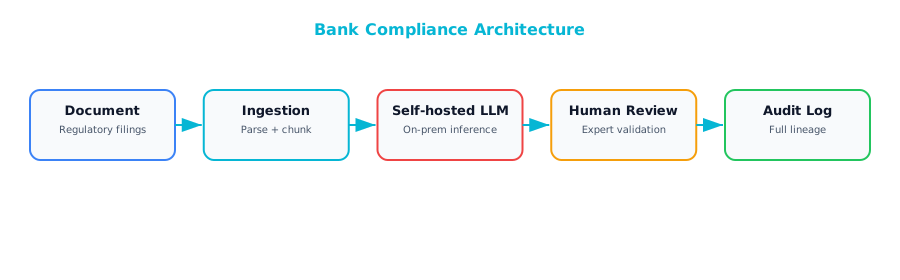
Four architectural decisions shaped the entire project.
The first, and most consequential, was self-hosting the model. Regulatory documents are among the most sensitive materials a bank handles — they reveal internal operations, risk exposures, and strategic positioning. Sending those documents to a third-party API was not an option, regardless of vendor security certifications. The team deployed Llama 70B on their own infrastructure, inside their own data center, behind their own firewalls. No data left the network. This was more expensive and harder to operate than calling an API, but it was the only path the legal and risk teams would approve.
The second decision was keeping humans firmly in the loop. The AI would draft the impact analysis: read the regulatory document, identify the relevant rules, map them to internal business processes, write a first draft of what the bank needed to do. But the AI would never make the final determination. A compliance officer would always review, edit, and approve. Partly a regulatory requirement. Partly a trust decision — the team knew that one high-profile mistake without human oversight would shut the entire program down.
Third, they built a confidence scoring system that was also a workflow engine. Every AI output came with a confidence score that determined where the work landed. High-confidence items — a routine amendment to a well-understood regulation — went to junior reviewers for quick validation. Low-confidence items — a novel regulatory framework from a jurisdiction the bank had recently entered — went to senior reviewers. The most experienced people spent their time on the hardest problems.
Finally, they built an audit trail designed to make regulators comfortable. Every AI decision logged the source document, extracted rules, model version, confidence score, and every action the human reviewer took. When regulators came to examine the bank's compliance processes — and they did — the bank could show not just that it was keeping up, but exactly how every determination had been made and who had signed off.
Results
Review time dropped from four hours per document to 45 minutes — 81 percent reduction. The team cleared the entire 18-month backlog in three months. The AI's draft was accepted without significant changes about 67 percent of the time, which meant two-thirds of all regulatory documents were primarily a quality check rather than a rewrite. The platform cost roughly $2 million per year to run, compared to the $8 million per year it would have cost to hire enough additional compliance officers to achieve the same throughput.
Lessons Learned
The most important lesson was about sequencing trust. The team's original plan was to have the AI both summarize regulations and classify their impact. Compliance officers were skeptical, and the project sponsor was wise enough to listen. They started with summarization only — the AI produced a plain-English summary, and the compliance officers did impact classification themselves. Over three months, the officers came to trust the summaries. Only then did the team introduce AI-assisted classification. By that point, the officers were ready for it.
The second lesson was about model size. Their first attempt used a 7-billion-parameter model — cheaper to host, faster to run. It failed. The smaller model made too many errors on legal terminology, confusing "material adverse change" with "material adverse effect" — which in regulatory language are quite different things. Moving to the 70-billion-parameter model dropped the error rate dramatically. The cost of running the larger model was real, but it was a fraction of the cost of lost trust if compliance officers started ignoring the AI's output.
The third lesson surprised everyone: the user interface mattered as much as the AI itself. Compliance officers did not just want to read the AI's summary. They wanted to see exactly which passage in the source document supported each claim — inline citations linking back to specific paragraphs and page numbers. The first version showed only the summary, and adoption was sluggish. Once the team added inline source citations, adoption jumped. Officers could trust the AI because they could verify it, and they could verify it because the interface made verification effortless.
Case Study 2: Healthcare System — Clinical Documentation
The Challenge
At this particular healthcare network — 200 physicians across multiple specialties — doctors were spending an average of two hours per day writing clinical notes, discharge summaries, and referral letters. Two hours taken away from patient care, continuing education, sleep. The number one driver of physician burnout. And burnout was driving attrition at an alarming rate. Experienced physicians were leaving for concierge practices or early retirement, and replacing a single physician can cost hundreds of thousands of dollars.
The Chief Medical Information Officer's vision was straightforward: what if the documentation could write itself? Not perfectly, but well enough that the physician's job shifted from writing to reviewing?
The Architecture
The system used ambient recording — a microphone in the exam room capturing the conversation between doctor and patient — to generate clinical documentation automatically.
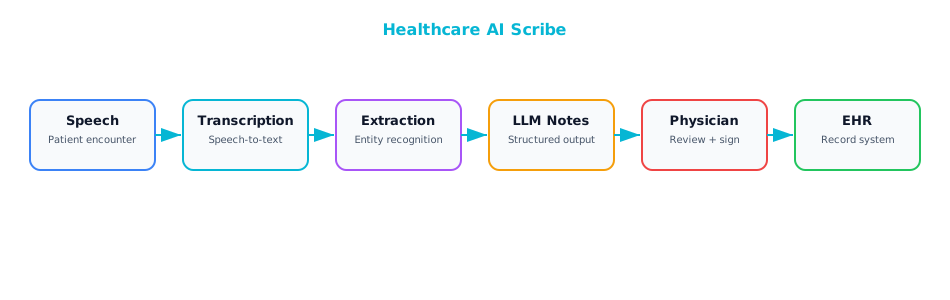
Every architectural decision here was shaped by a single overriding concern: patient safety.
First, the entire pipeline ran inside a HIPAA-compliant, BAA-covered cloud environment. Transcription, AI processing, and storage all happened within the same cloud region. No data crossed compliance boundaries. The team spent weeks working with their cloud provider to verify every data flow and storage location before a single patient interaction was processed.
Second, they produced structured output rather than just prose. When a doctor dictates a note, the AI scribe does not generate a paragraph of text. It extracts structured clinical data — diagnoses, medications, procedures, allergies — and maps them to ICD codes that integrate directly with the EHR's data model. A clinical note is not just a narrative for the next physician to read. It is a data source that drives billing, population health analytics, quality reporting, and research. Getting the structure right was harder than getting the prose right, requiring close collaboration between the AI team, clinical informaticists, and the EHR integration team.
Third, the AI never auto-submits. It drafts the note, the physician reviews and signs. But this team went further than policy: they enforced it architecturally. There is no code path, no API endpoint, no workflow that allows an AI-generated note to land in the EHR without a physician's signature. Even if a developer accidentally removed a UI check, the backend would reject the submission.
The fourth decision was one the team did not initially appreciate would matter so much: specialty-specific prompt templates. A cardiology note has a fundamentally different structure than an orthopedic note or a psychiatry note. Cardiologists want ejection fraction and rhythm findings front and center. Orthopedic surgeons want range-of-motion measurements and imaging results. The team's first attempt used a single generic medical prompt, and the feedback was brutal. No specialist was happy. They built a library of versioned prompt templates by specialty, and note quality improved dramatically once each specialty had its own template.
Results
Documentation time dropped from two hours per day to about 30 minutes — and even that half hour was mostly reviewing and approving, not writing. Physician satisfaction scores improved by 40 percent. Note quality actually improved, because the AI produced consistent structure with fewer omissions than a tired physician writing at 10 PM after a full day of patient care. Coding accuracy improved by 12 percent, with direct impact on revenue and compliance.
Lessons Learned
The dominant lesson from every retrospective: integration was the hard part. The AI scribe was working within about a month. It could listen to a doctor-patient conversation and produce a high-quality clinical note. Getting that note into Epic took six months — six months of working with Epic's APIs, navigating its data model, dealing with authentication and authorization requirements, testing in its sandbox environment, going through its app review process. The AI was the easy part. This is a theme you will see again and again in enterprise AI.
The specialty-specific prompts lesson is worth emphasizing beyond what I described above. When a cardiologist received a note that buried the ejection fraction at the bottom and led with a generic review of systems, they did not just edit the note. They stopped using the system. And once a physician stops using a tool, getting them back is extraordinarily difficult.
The third lesson was about ambient recording itself. Putting a microphone in an exam room raises immediate and legitimate privacy concerns from both patients and physicians. The team implemented visible recording indicators — a light that made it clear when recording was active — and a patient consent workflow before every visit. Some patients declined, and the system had to handle that gracefully, falling back to traditional documentation. AI architecture is not just about models and APIs. It is about the human experience of interacting with the system.
Case Study 3: Retailer — AI-Driven Supply Chain
The Challenge
This retailer — 500 stores, 50,000 SKUs ranging from fresh produce to consumer electronics — was using statistical forecasting models updated quarterly. A team of demand planners would review the forecasts, adjust them based on experience, and feed the numbers into the replenishment system.
The forecasts were not terrible. They were decent. But "decent" was costing $280 million per year: $200 million in markdowns from excess inventory and $80 million in lost sales from stockouts. Even a modest improvement would be worth tens of millions.
The VP of Supply Chain and CTO asked a simple question: "What would it take to update our forecasts daily instead of quarterly, and to incorporate data sources we have never used before?" That question launched a two-year transformation.
The Architecture
The architecture that emerged was notable for its pragmatism. The team resisted the temptation to throw a large language model at the forecasting problem — in the hype cycle of 2024–2025, that took real courage — and instead chose the right tool for each part of the problem.
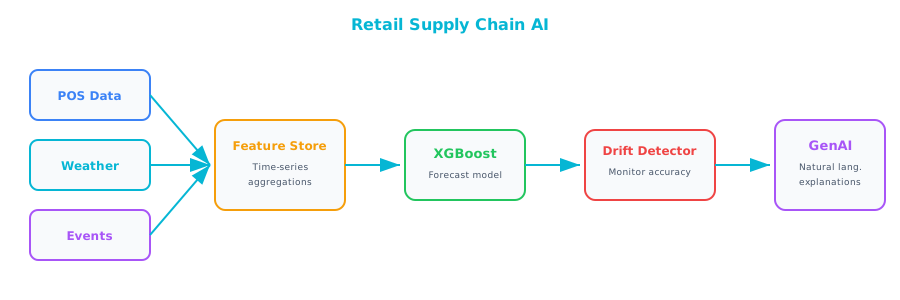
The core forecasting engine was a gradient-boosted ensemble model built on XGBoost. Not fashionable, but right. For tabular prediction tasks with structured features, XGBoost is fast, interpretable, well-understood, and extremely competitive. The model produced a forecast for every combination of SKU, store, and day — millions of individual predictions — in minutes. Generative AI was added later, not to make predictions but to explain them. Store managers could ask "Why is the system ordering so much sunscreen for next week?" and receive a natural-language explanation: "A heat wave is forecast for your region starting Thursday, and last year's heat wave at your store drove a 340 percent increase in sunscreen sales."
The second key decision was automated retraining with drift detection. Models retrained weekly on fresh data, but the team also implemented continuous monitoring using Population Stability Index. If the statistical distribution of incoming data shifted meaningfully — a sudden change in purchasing patterns due to an unexpected event — emergency retraining would trigger automatically. The models stayed current without requiring constant human supervision.
Third, a rigorous A/B testing framework for model deployment. New model versions served forecasts for 10 percent of stores for two weeks. The team compared performance against the existing model on real outcomes — actual sales versus predicted sales — and only deployed to 100 percent of stores if the new model demonstrated a clear improvement. This discipline prevented several "improvements" that looked good on historical data but performed poorly in production.
Fourth, they invested heavily in a feature store built on Feast. The feature store ensured that the exact same feature computation pipeline was used during training and during real-time serving. Training-serving skew — where the model is trained on features computed one way and served features computed a slightly different way — is one of the most common and most insidious sources of degraded model performance. Eliminating it with a shared feature store was one of the highest-leverage architectural decisions the team made.
Results
Forecast accuracy improved by 23 percent, measured by reduction in Mean Absolute Percentage Error. That translated to $60 million per year in reduced markdowns and $25 million in reduced stockouts — combined annual savings of $85 million. The platform cost roughly $3 million per year to operate, making the return on investment nearly 30:1.
Lessons Learned
The first lesson was about knowing which type of AI fits which problem. Early in the project, an enthusiastic data scientist suggested using an LLM for demand forecasting, reasoning that it could "understand" product descriptions and promotional copy. The team tried it. The results were dramatically worse than XGBoost and orders of magnitude more expensive. The LLM was the right tool for explaining forecasts in natural language. It was the wrong tool for making predictions from structured tabular data. This is one of the most important architectural judgments an enterprise architect can make.
The second lesson was about where the real value came from. The team spent months experimenting with different model architectures — random forests, neural networks, ensemble methods — and the differences in accuracy were modest. When they enriched their feature set with weather data, local event calendars, and social media sentiment signals, accuracy jumped dramatically. Feature engineering accounted for roughly 60 percent of the total improvement. Model architecture accounted for the rest.
The third lesson was about the enterprise architect's role. Connecting point-of-sale systems, weather APIs, promotion calendars, the ERP inventory system, and a social media analytics platform into a single coherent data pipeline was an enormous integration challenge. It required understanding data formats, API rate limits, latency requirements, data freshness guarantees, and failure modes across half a dozen different systems. Data scientists could not have done this alone. It was the enterprise architecture team that designed the connectors, defined the data contracts, and ensured the pipeline was robust enough to run in production without constant babysitting. That is the enterprise architect's superpower.
Case Study 4: Insurance Company — Claims Processing
The Challenge
Claims processing is the moment of truth for an insurance company. At this particular insurer, the promise was being fulfilled too slowly. The company processed roughly 10,000 claims per week, and each claim required a gauntlet of steps: reviewing submitted documents, assessing damage, verifying coverage, calculating a settlement amount. The average claim took five days from submission to resolution — five days of the customer waiting, worrying, and growing increasingly dissatisfied.
The claims department had tried the obvious solutions: hiring more adjusters, streamlining manual workflows, investing in training. The fundamental problem remained. Volume was growing, complexity was not decreasing, and the labor market for experienced claims adjusters was brutally competitive. Incremental improvement was not going to cut it.
The Architecture
What emerged was a multi-model pipeline — not a single AI system, but a carefully orchestrated ensemble of specialized models, each handling the part of the problem it was best suited for.
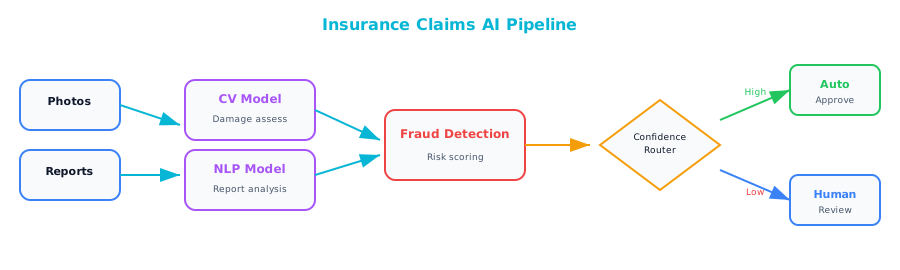
The first and most interesting architectural decision was confidence-based automation. A straightforward fender-bender with clear photos, a police report, and comprehensive coverage is a different animal from a complex multi-vehicle accident with disputed liability and potential injuries. Claims below $2,000 in estimated value with a confidence score above 95 percent were auto-settled with no human involvement. Everything else went to a human reviewer. The thresholds were deliberately conservative at launch and adjusted quarterly based on observed accuracy. Over time, as models improved and trust grew, the thresholds shifted to automate more cases.
The second decision was embracing a multi-model architecture. Computer vision models analyzed damage photographs, estimating repair costs from images of dented fenders and cracked windshields. NLP models read medical and police reports, extracting diagnoses, treatment plans, and fault determinations. A traditional ML model trained on years of historical claims data generated a fraud score. Generative AI wrote the settlement explanation letter — a clear, plain-language account of how the settlement amount was calculated. Each component used the AI type best suited to its task.
The third decision was building explainability into the architecture from day one. Every automated settlement included a detailed explanation: "Settlement of $1,450 based on: damage estimate $1,200 from photographic assessment, medical expenses $250 from Dr. Smith's report (page 3), deductible of $0 under your comprehensive coverage plan." This transparency satisfied regulatory requirements, reduced customer complaints and disputes, and gave human reviewers a clear view into the AI's reasoning when they needed to audit or override a decision.
The fourth decision was a continuous feedback loop between human reviewers and the AI models. Every time a human reviewer overrode an AI decision — changing a damage estimate, rejecting a fraud classification, adjusting a settlement amount — that case was flagged and fed back into training data for the next model iteration. Models were constantly learning from their mistakes. Human reviewers were not just doing their jobs. They were actively teaching the AI, which gave them a sense of ownership in the system's success.
Results
Simple claims went from five days to four hours. Complex claims that required human review still took about two days — significantly better than the previous five-day average. Forty percent of all claims were auto-settled with no human involvement, freeing experienced adjusters to focus their expertise on cases that genuinely needed it. Customer satisfaction improved by 25 percent, driven almost entirely by faster resolution. Fraud detection improved by 15 percent.
Lessons Learned
The first lesson was about the power of starting with simple cases. Automating the easy 40 percent had a cascading effect on the entire operation. Human reviewers who used to spend half their day on routine claims could devote full attention to complex, ambiguous, high-value cases. The quality of decisions on those complex cases improved because reviewers had more time and mental energy. Net quality improved across the board — not just for automated claims, but for human-reviewed ones as well.
The second lesson: explainability was not a nice-to-have. In the insurance industry, regulators require that customers receive a clear explanation of how their claim was adjudicated. The AI architecture had to produce explanations as a first-class output from the start. Retrofitting explainability into an existing pipeline is far more difficult than building it in. The team was grateful they had anticipated this requirement.
The third lesson was subtle: AI improved fraud detection partly because it was consistent in a way humans are not. A claims adjuster processing their 30th routine claim of the day may not bring the same level of scrutiny as they brought to the first. Fatigue, distraction, and cognitive biases all play a role. The AI applies exactly the same analytical rigor to claim number 30 as it does to claim number 1. That consistency — more than any individual analytical capability — was the primary driver of improved fraud detection rates.
Cross-Cutting Themes
Four very different AI transformations spanning banking, healthcare, retail, and insurance. Five themes appeared in all of them.
| Theme | Appears In | Takeaway |
|---|---|---|
| Human-in-the-loop | All 4 cases | AI assists, humans decide |
| Self-hosted for sensitive data | Bank, Healthcare | Data classification drives hosting decisions |
| Traditional ML + GenAI together | Retailer, Insurance | Use the right AI type for each sub-problem |
| Integration is the hard part | All 4 cases | The EA's value is in connecting systems |
| Trust is earned incrementally | Bank, Healthcare | Start with suggestions, prove accuracy, then increase automation |
What strikes me about these themes is their consistency. These four organizations are in completely different industries, with different regulatory environments, different technology stacks, and different organizational cultures. And yet they all converged on the same architectural principles.
Human-in-the-loop is universal — not because the AI is not capable, but because trust has to be earned and accountability has to be maintained. Self-hosting appears wherever data is genuinely sensitive because the risk calculus does not favor sending your most confidential information to a third party. Traditional ML and generative AI work together because they are good at fundamentally different things, and the architect's job is to recognize which tool fits which problem. Integration is always the hardest part because enterprise AI does not exist in a vacuum. Trust is earned incrementally because organizations are made of people, and people need evidence before they change how they work.
Further Reading
From the LLMs for Business Analysts and QA book: Several of the case studies in this chapter — particularly the compliance and claims processing examples — involve gathering, structuring, and validating requirements before the AI system could be designed. Chapter 5 of LLMs for Business Analysts and QA ("Requirements Elicitation with LLMs") covers how to use AI to accelerate the requirements gathering process itself, including techniques for extracting requirements from stakeholder interviews, identifying gaps and conflicts in requirement sets, and generating acceptance criteria. If you are an architect who also wears a BA hat during the early phases of AI initiatives, that chapter is directly applicable.
Companion Notebook
 Build a simplified claims processing pipeline: ingest a claim document, extract key entities, classify urgency, estimate damage, and generate a settlement recommendation with explanation.