Chapter 08 of 18
Cloud Platforms for AI
Google Cloud, AWS, and Azure have each made distinct bets on how AI should be delivered. Those bets create genuine trade-offs. This chapter gives you an honest side-by-side comparison and a decision framework you can bring into your next architecture review.
Overview
The Platform Decision
Every enterprise architect eventually faces a question that carries more weight than it might first appear: which cloud platform should we build our AI strategy on? It is a decision that affects budgets, hiring, vendor relationships, and how quickly your teams can move from prototype to production.
No single platform is perfect for every organization. Google Cloud, AWS, and Azure have each made distinct bets on how AI should be delivered, and those bets create genuine trade-offs. Understanding those trade-offs is the first step toward making a decision you will not regret in two years.
The Big Three — AI Services Compared
Google Cloud (Vertex AI)
Google Cloud's philosophy is AI-first. Google is one of the few cloud providers that also builds frontier AI models in-house, and this shapes everything about how their platform is designed. The Gemini family of models — natively multimodal and supporting large context windows — are first-party citizens on Google Cloud, enjoying a level of integration and optimization that third-party models on other platforms cannot match.
Vertex AI is the most unified AI platform available today. Where other clouds scatter their capabilities across a half-dozen services, Vertex AI pulls training, serving, evaluation, RAG, and agent frameworks into a single, coherent surface. This matters more than it might seem — operational complexity is the silent killer of enterprise AI initiatives. When your team can stay within one platform to build, evaluate, and deploy a model, they move faster and make fewer mistakes.
Google also offers Tensor Processing Units — custom-designed AI accelerators that are typically two to five times more cost-effective than equivalent GPU infrastructure for large-scale training workloads. If your roadmap includes training or fine-tuning large models, TPUs can dramatically change the economics. BigQuery ML lets you run machine learning directly inside your data warehouse, which is powerful for teams that live in SQL.
Google Cloud has historically had a smaller enterprise ecosystem than AWS or Azure. Their enterprise sales motion and support infrastructure have improved, but if your organization values a deep bench of third-party integrations and a large partner network, Google still lags behind the other two. Worth acknowledging, not a deal-breaker.
Google Cloud is the strongest choice for organizations that want a tightly integrated AI platform, have heavy data analytics workloads, or need to run very large models as cost-effectively as possible.
AWS (Bedrock + SageMaker)
Amazon Web Services takes a fundamentally different approach to AI than Google. Rather than building a single flagship model, AWS has adopted a marketplace philosophy: offer every model from every major provider, and let customers choose the right one for each task.
Bedrock is the centerpiece. Through a single, unified API, you can access Claude from Anthropic, Llama from Meta, Mistral, Stability AI's image models, and a growing roster of other providers. The beauty of this approach is optionality — you are never locked into a single model's strengths and weaknesses, and when a better model becomes available, you can switch with minimal code changes. For enterprise architects who lose sleep over vendor lock-in, Bedrock is a compelling answer.
On the custom training side, SageMaker remains the most mature ML platform in the industry. It has been around longer than most of its competitors, and that maturity shows in its breadth of features — from built-in algorithms and automated model tuning to robust model monitoring and deployment pipelines.
AWS also benefits from sheer market share. Your company probably already uses AWS for something, which means your identity management, networking, and compliance controls are already in place. The operational overhead of adding AI to an existing AWS footprint is meaningfully lower than standing up a new cloud relationship from scratch.
The downside is fragmentation. AWS does not have a leading first-party foundation model, and its AI services are scattered across Bedrock, SageMaker, Comprehend, Textract, Rekognition, and others. Navigating which service to use for which task can be genuinely confusing, especially for teams that are new to AI on AWS.
AWS is the best fit for organizations already deeply invested in the AWS ecosystem, teams that value model choice and flexibility above all else, and enterprises with significant custom ML training needs.
Azure (OpenAI Service + AI Studio)
Microsoft's AI strategy is built on two pillars: a deep partnership with OpenAI, and tight integration with the Microsoft product ecosystem that already dominates most enterprises. If your organization runs on Microsoft 365, Active Directory, and GitHub, Azure's AI story feels less like adopting a new platform and more like turning on a feature.
Azure OpenAI Service gives you enterprise-grade access to GPT-4, the o1 reasoning models, and DALL-E — all running within Azure's security and compliance boundary. This is not the same as using the OpenAI API directly. Azure wraps these models with enterprise identity management through Entra ID, content filtering, private networking, and data residency guarantees. For regulated industries that want access to frontier models but cannot tolerate data leaving their control, this is a significant differentiator.
The Copilot ecosystem is another area where Azure shines. GitHub Copilot has become the standard for AI-assisted software development, and Microsoft 365 Copilot brings AI directly into Word, Excel, Outlook, and Teams. For organizations already paying for Microsoft 365 licenses, the incremental cost to enable Copilot is relatively modest, and the productivity gains can be immediate and visible — which makes it much easier to build executive support for broader AI investment.
The risk with Azure's approach is concentration. Microsoft's AI story depends heavily on the OpenAI partnership, which introduces a single-model-provider dependency that the other clouds do not have. If OpenAI stumbles, or if the competitive landscape shifts in a way that favors a different model family, Azure customers may find themselves more exposed than they would like.
Azure is the strongest choice for Microsoft-heavy enterprises, organizations that want GPT-4 with enterprise-grade security and compliance, and teams looking for immediate productivity wins through Copilot.
Platform Comparison Matrix
| Capability | Google Cloud | AWS | Azure |
|---|---|---|---|
| First-party LLM | Gemini (strong) | None | Via OpenAI (strong) |
| Model marketplace | Model Garden (good) | Bedrock (excellent) | AI Studio (good) |
| ML training platform | Vertex AI (good) | SageMaker (excellent) | Azure ML (good) |
| Vector search | Vertex AI Search | OpenSearch, Kendra | Azure AI Search |
| Agent framework | Agent Builder, ADK | Bedrock Agents | AI Studio Agents |
| AI accelerators | TPUs (unique) | Trainium, Inferentia | GPUs (NVIDIA) |
| Data platform | BigQuery (excellent) | Redshift, Athena (good) | Synapse (good) |
| Cost for inference | Competitive (TPUs) | Competitive | Premium (OpenAI) |
Multi-Cloud AI Architecture
In practice, many enterprises do not have the luxury of a single cloud. Mergers and acquisitions, team-level preferences, and best-of-breed procurement decisions mean that multi-cloud is the reality on the ground for most large organizations. The question is not whether to go multi-cloud. It is how to do it without creating an operational nightmare.
The AI Gateway Pattern (Multi-Cloud)
The most effective architectural answer to multi-cloud AI is the AI Gateway pattern. Place a unified gateway layer in front of all your AI providers, and let that gateway handle routing, logging, cost management, and failover. Your application teams talk to the gateway. The gateway talks to the clouds.
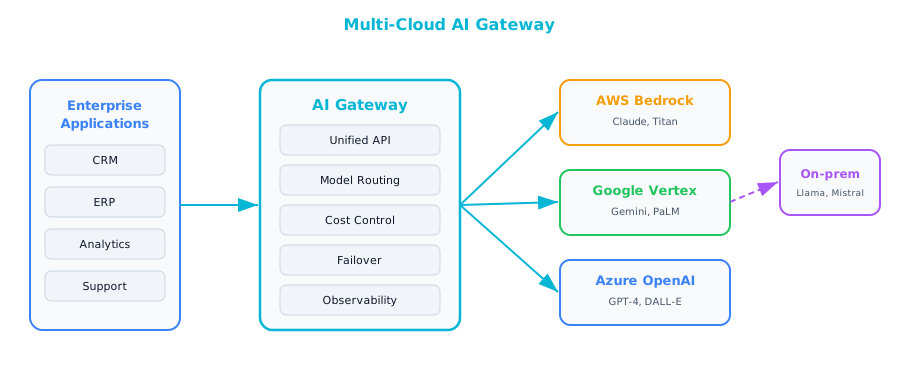
The benefits are substantial. It eliminates single-vendor dependency, which means a pricing change or service disruption from one provider does not become an organizational crisis. It gives you the ability to route each task to the cheapest or best-performing model for that specific use case — lightweight model for summarization, frontier model for complex reasoning, all behind the same API. It provides automatic failover across providers. And it creates a single point for logging, monitoring, and governance.
The costs are real and should not be hand-waved away. Operating a multi-cloud AI architecture is genuinely more complex than going all-in on a single platform. You need engineers who understand multiple cloud providers, you need to think carefully about data residency when calls are crossing cloud boundaries, and you will be managing multiple billing relationships and support contracts. For smaller organizations, this complexity may outweigh the benefits. For larger enterprises, the risk mitigation is usually worth the operational investment.
Architect's Decision Framework
When choosing a platform, or choosing to go multi-cloud, the decision is less about feature comparisons and more about understanding your organization's specific constraints.
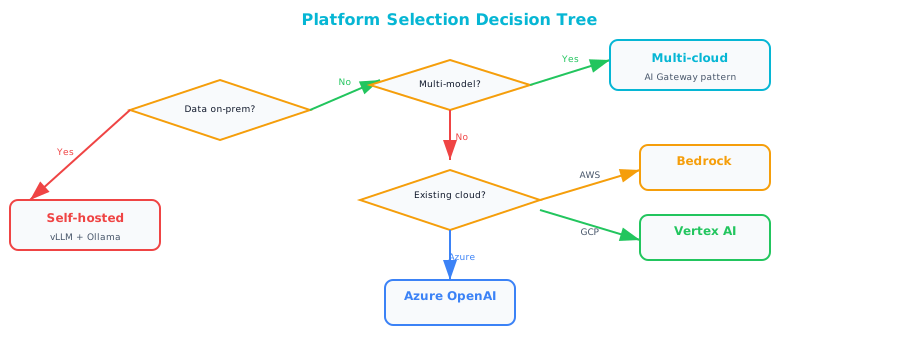
Where is your data today? This is almost always the most important question. Data gravity is a force that is hard to fight. Moving petabytes of data from one cloud to another is expensive, slow, and fraught with risk. If your organization's data warehouse lives in BigQuery, that is a strong argument for Google Cloud. If your data lake is on S3, AWS has a natural advantage. Start where your data already lives, and build outward from there.
Do you need a specific model? If your use case has been validated against GPT-4 and switching models would require re-engineering your prompts and evaluation pipeline, then Azure becomes the path of least resistance. If you are building on Gemini's large context window or multimodal capabilities, Google Cloud makes the most sense. If model flexibility is paramount, Bedrock's marketplace approach gives you the most room to maneuver.
The remaining questions — existing cloud footprint, custom training needs, and risk tolerance — help you refine the decision. There is rarely a single "right" answer. The best platform is the one that fits your organization's constraints.
On-Premises and Hybrid AI
Not every workload can go to the cloud. Regulated data in industries like healthcare, finance, and defense often cannot leave the organization's premises. Air-gapped environments in government and military contexts have no internet connectivity at all. Some applications have latency requirements that make round-trip calls to a cloud API impractical. For all of these scenarios, self-hosted models are not just an option. They are a necessity.
Self-Hosted Model Serving
The tooling for self-hosted model serving has matured dramatically. A few years ago, running your own large language model required deep expertise in distributed systems and custom CUDA kernels. Today, tools like vLLM, Text Generation Inference from Hugging Face, and Ollama have made it accessible to any team with decent infrastructure engineering skills.
| Component | Options |
|---|---|
| Inference engine | vLLM, TGI (Text Generation Inference), Ollama |
| Model format | GGUF (quantized), HuggingFace, ONNX |
| Hardware | NVIDIA GPUs (A100, H100, L40S), AMD MI300X |
| Orchestration | Kubernetes + GPU operator |
Hardware sizing follows parameter count. A 7-billion-parameter model — surprisingly capable for many focused tasks — fits comfortably on a single A100 GPU, or even on a consumer-grade RTX 4090 for development. A 13-billion-parameter model typically needs one to two A100 cards. At 70 billion parameters, you are looking at four A100s or two H100s. The largest open models, in the 405-billion-parameter range, require a full node of eight H100 GPUs and are realistically only practical for enterprises with dedicated infrastructure teams. These numbers depend on quantization and context length, but they give you a reasonable starting point for capacity planning.
Hybrid Pattern
The most practical architecture for many enterprises is a hybrid pattern that splits workloads between on-premises and cloud based on data sensitivity.
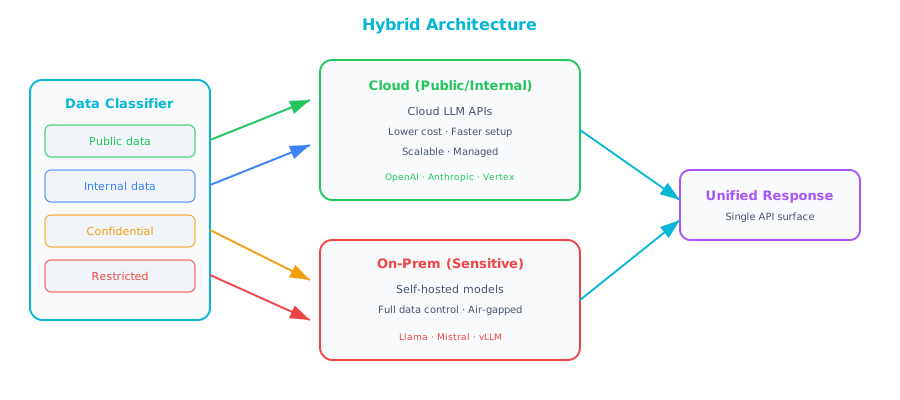
Public and general internal data — marketing content, public documentation, non-sensitive internal communications — should flow through cloud AI APIs, because cloud models are generally more capable and significantly cheaper to operate than self-hosted alternatives. Confidential data — proprietary business strategies, customer records, competitive intelligence — should be processed by your on-premises model, where you have full control over where the data goes. Regulated data — anything subject to HIPAA, GDPR, ITAR, or similar frameworks — must be processed in an approved on-premises environment, with full audit trails and access controls in place.
This hybrid approach is not without challenges. You need to maintain two operational environments, keep your on-premises models reasonably up-to-date, and ensure your routing logic correctly classifies data sensitivity. For enterprises that operate under real regulatory constraints, it is far better than either going fully cloud and accepting the compliance risk, or going fully on-premises and accepting inferior model quality and higher costs.
Companion Notebook
 — Send the same prompts to Gemini, Claude, and GPT-4. Compare response quality, latency, cost per token, and consistency. See why multi-provider architecture makes sense.