Chapter 10 of 18
GenAI Architecture Patterns — From Chat to Enterprise
Nearly every GenAI system in production today is a variation on one of ten core patterns. This chapter is your field guide — walking through each one from simplest to most sophisticated, with clear guidance on when to reach for one over another.
Overview
The Pattern Library
When you first sit down to build something with a large language model, the sheer number of possible architectures can feel overwhelming. Should you just call an API? Do you need a vector database? What about agents? Nearly every GenAI system in production today is a variation on one of ten core patterns, and those patterns build on each other in a natural progression. By the end of this chapter, you will have a mental toolkit that lets you look at any business problem and immediately sketch the right architecture on a whiteboard.
Pattern 1: Simple Chat API
Every journey starts somewhere, and in the world of GenAI architecture, this is your starting line. A direct, stateless call from your application to a language model and back again.
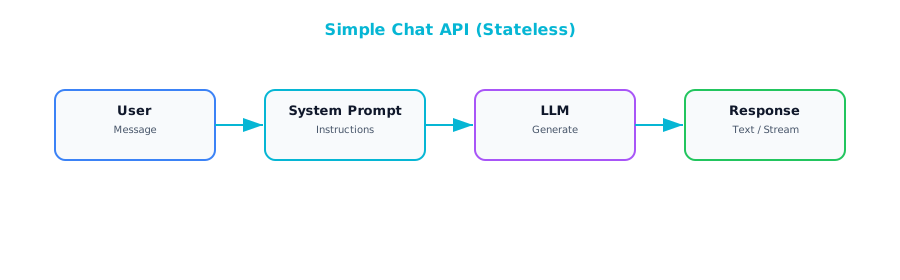
The components here are intentionally minimal: an API endpoint that accepts user input, a system prompt that defines how the model should behave, and a connection to an LLM provider like OpenAI, Anthropic, or Google. No database, no retrieval layer, no memory of previous conversations. Each request stands entirely on its own.
This pattern is ideal for internal tools, rapid prototypes, and single-purpose AI features where conversational continuity is not important. A Slack bot that rewrites emails in a more professional tone. An internal tool that generates SQL queries from natural language descriptions. Situations where the user sends a request, gets a response, and moves on.
Even at this simple level, a few architectural details matter. The system prompt is doing all the heavy lifting in terms of shaping the model's behavior, so invest time getting it right. Temperature is your dial between creativity and consistency: lower values produce more predictable output, which is usually what you want in enterprise settings. And even though it feels trivial, adding response caching for repeated or near-identical queries can save a surprising amount of money at scale.
Pattern 2: Conversational Chatbot
The moment your users expect the AI to remember what they said thirty seconds ago, you have outgrown Pattern 1. The Conversational Chatbot pattern adds memory so the system can track context across multiple turns of dialogue.
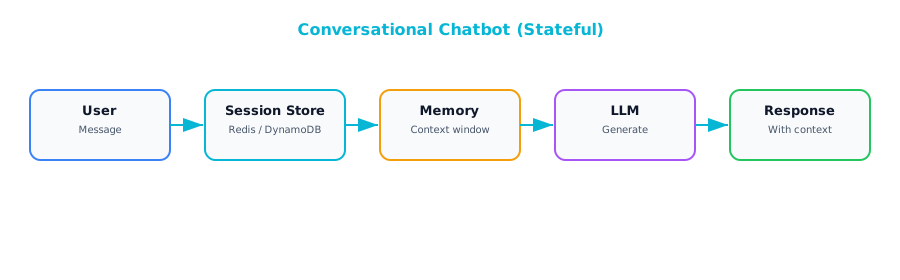
The architecture introduces a session store — a persistent layer where you keep the conversation history. On each new request, your application retrieves the prior messages, assembles them into a prompt alongside the new user input, sends everything to the model, and then stores the response back into the session for next time.
The design decisions hiding inside this pattern separate a polished product from a frustrating one. Memory strategy matters. The simplest approach is a window buffer: keep the last N messages and discard anything older. This works well for short interactions but falls apart in long-running sessions where important context was mentioned early on. A more sophisticated approach is summary memory, where you periodically ask the model to summarize the conversation so far and replace the older messages with that summary. This preserves the gist without consuming your entire context window.
Where those sessions live also matters. Redis is a natural choice for short-lived, disposable conversations. If your users expect to come back days later and pick up where they left off, you need durable storage in a proper database. And long conversations will eventually exceed the model's context window. You need a truncation strategy from day one, not as an afterthought when production users start hitting mysterious errors.
Pattern 3: RAG (Retrieval-Augmented Generation)
If there is one pattern that defines enterprise GenAI adoption, it is RAG. Retrieval-Augmented Generation allows a language model to answer questions about your data — your internal documents, your knowledge base, your proprietary information — without retraining the model itself.
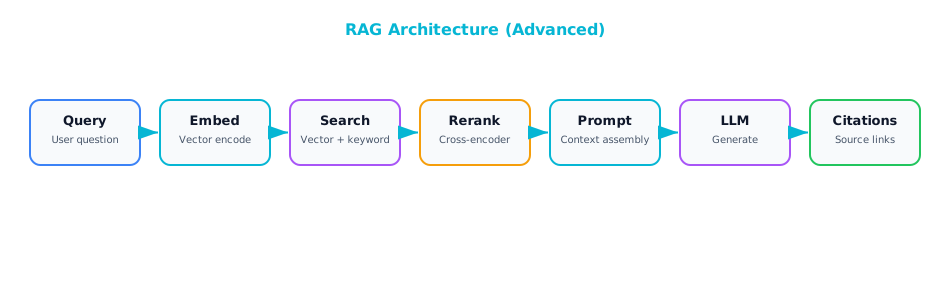
When a user asks a question, you first convert that question into a vector embedding — a numerical representation that captures the semantic meaning of the query. You then search a vector database where you have previously stored embeddings of your own documents, finding the chunks most semantically similar to the question. Those retrieved chunks get injected into the prompt alongside the user's question, and the language model generates an answer grounded in your actual data rather than its general training knowledge.
The required components: an embedding model to convert text into vectors, a vector database to store and search those document embeddings, a chunking pipeline that breaks your documents into pieces small enough to embed and retrieve meaningfully, a prompt template that combines the user's query with the retrieved context, and the LLM to generate the final answer.
The critical design decisions determine whether the system returns genuinely helpful answers or frustrating near-misses. Chunk size matters enormously: too small and you lose context, too large and you dilute relevance. Most production systems settle in the range of 500 to 1,000 tokens per chunk, but the right number depends on your content. Number of chunks retrieved also requires tuning — more is not always better because irrelevant chunks can actually confuse the model. Adding a reranking step, where a cross-encoder model re-scores the retrieved chunks for relevance before they go into the prompt, can dramatically improve answer quality. And metadata filtering — letting you narrow the search by user permissions, document type, date range, or other attributes — is essential for any system where not all users should see all documents.
Pattern 4: Document Processing Pipeline
While the previous patterns focus on interactive question-and-answer experiences, the Document Processing Pipeline is about using AI to process documents at scale in batch-oriented fashion. Invoice automation, contract review, compliance screening, medical records processing — use cases where you have large volumes of documents that need to be read, understood, and converted into structured data.
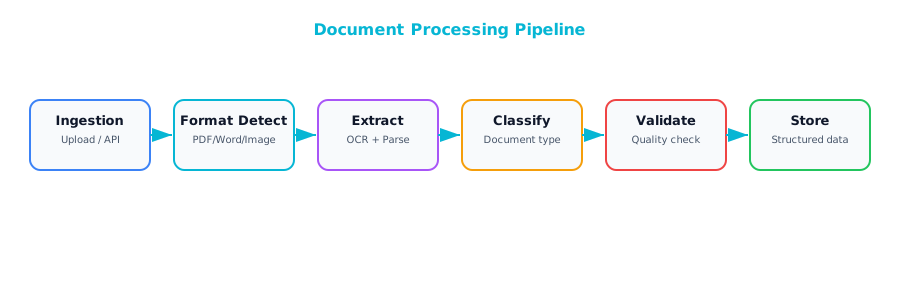
The flow: documents come in through an ingestion layer that handles the messy reality of different file formats — PDFs, scanned images, emails, Word documents. Text gets extracted, sometimes requiring OCR for scanned content. Then the AI processing layer takes over: classification (what type of document is this?), summarization, or structured extraction (pull out the invoice number, date, line items, and total). The output is clean, structured data — typically JSON conforming to a predefined schema — that flows into your databases and downstream systems.
This pattern's architectural character is quite different from a chatbot. It is batch-oriented, meaning documents flow through processing queues rather than being handled one-at-a-time in real-time. Structured output is critical: use JSON mode or function calling to force the model into returning well-formed structured responses. A validation layer that checks extracted data against business rules catches errors before they propagate — for example, verifying that an extracted invoice total actually equals the sum of the line items. And robust error handling is non-negotiable. Documents that fail processing should route to a human review queue rather than silently drop, because in most enterprise contexts, missing a document is worse than processing it slowly.
Pattern 5: Multi-Model Router
Not every question requires your most powerful and most expensive model. A user asking "What time does the office close?" does not need the same computational firepower as a user asking "Analyze the competitive implications of our Q3 earnings relative to industry trends." By routing requests to different model tiers based on complexity, you can dramatically reduce costs without meaningfully sacrificing quality.
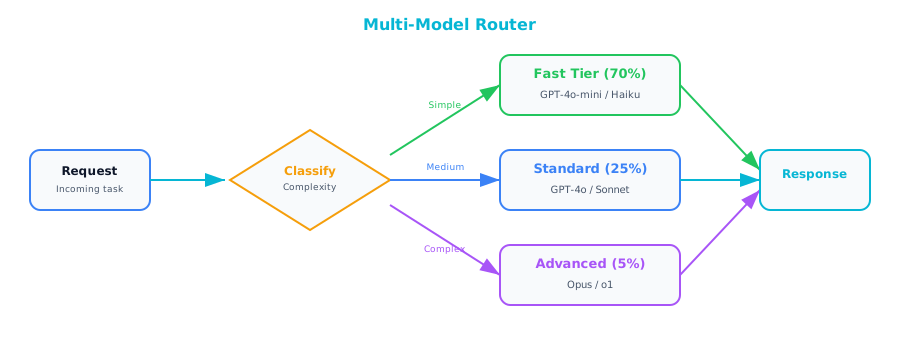
The implementation starts with a request classifier that looks at each incoming request and decides how complex it is. This classifier can be as simple as a set of keyword rules, a small trained classifier, or even a lightweight LLM call that categorizes the request before routing it. Once classified, the request goes to the appropriate model tier: fast and cheap for simple tasks, mid-range for moderate complexity, and the flagship model only for requests that truly demand it.
A smart addition is a fallback mechanism: if the fast model's response fails a quality check, the system automatically escalates to a stronger model. Teams typically report 60 to 80 percent cost reductions after implementing this pattern, because the reality is that most requests in most applications are simple enough for a smaller model to handle well. This is one of the first patterns you should implement once your GenAI application starts scaling.
Pattern 6: Agentic Tool Use
Up to this point, every pattern has been about generating text. Agentic Tool Use is where things get genuinely interesting, because it gives the LLM the ability to take actions in the real world. Instead of just producing words, the model can search databases, call APIs, execute queries, and interact with external systems.
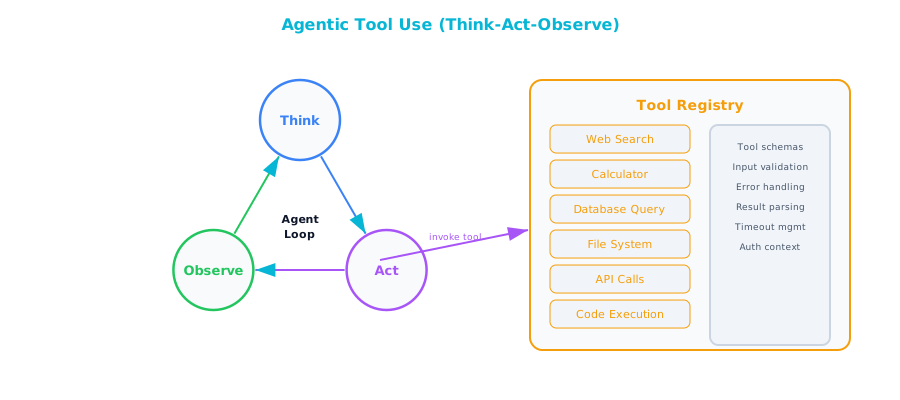
The architecture follows the "think-act-observe" loop. The agent receives a user request, reasons about what needs to be done, selects a tool to call, executes that tool, observes the result, and then decides whether it has enough information to respond or needs to take another action. This loop can repeat multiple times for complex requests, with the agent chaining together several tool calls to accomplish a multi-step task.
The key architectural decisions are fundamentally about control and safety. Tool definitions need to be crisp and unambiguous. Sandboxing is essential — restrict tool permissions carefully: read-only database access rather than write access, approved API endpoints rather than open-ended HTTP calls. A step budget prevents the agent from getting stuck in infinite loops. A wall-clock timeout ensures that even a well-behaved agent does not tie up resources indefinitely on a single request.
These guardrails might feel overly cautious when you are building your prototype, but they are the difference between a system you can trust in production and one that keeps you up at night. Chapter 11 is devoted entirely to agent architecture, covering tool registries, memory systems, permission models, and production deployment. If agentic patterns are central to your use case, that chapter is your next stop.
Pattern 7: Evaluation and Guardrails
This pattern is not optional. Every GenAI system that touches real users or real data needs a safety layer that inspects what goes in and scrutinizes what comes out.
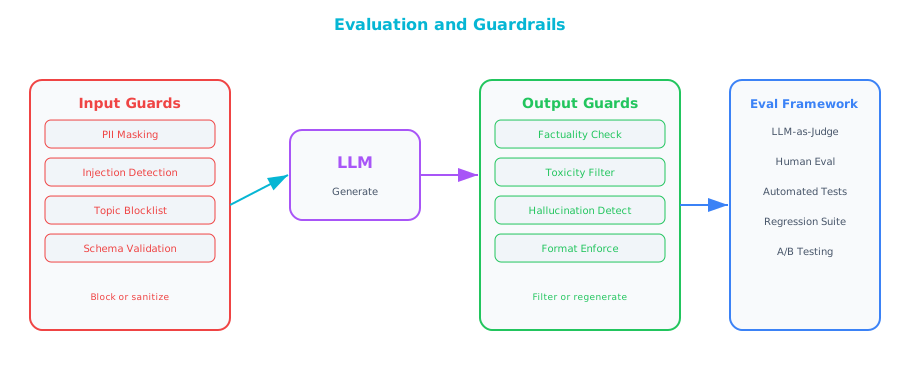
On the input side, guardrails screen for prompt injection attempts, off-topic requests, personally identifiable information that should not be sent to an external model, and rate limit violations. On the output side, guardrails check for leaked PII, harmful or inappropriate content, detected hallucinations, and violations of expected output format.
Three main implementation approaches — and most production systems use a combination. Rule-based guardrails — regex patterns, keyword lists, format validators — are fast, cheap, and deterministic. Your first line of defense for obvious cases. Classifier-based guardrails use a small, purpose-trained model to detect things like toxicity or PII, offering more accuracy than rules alone at a modest computational cost. LLM-based guardrails use a model to evaluate another model's output — asking a judge model "Does this response contain information that contradicts the provided source documents?" to catch subtle hallucinations. This is the most expensive approach, but for high-stakes applications like healthcare, financial advice, and legal analysis, the cost is justified by the risk it mitigates.
Treat guardrails as a first-class architectural component, not something you bolt on after launch.
Pattern 8: Fine-Tuned Model Serving
Sometimes, no matter how carefully you craft your prompts, the base model does not produce output that meets your requirements. Maybe you need a specific brand voice that the model cannot produce from instructions alone, or your domain uses specialized terminology that the model consistently gets wrong. This is where fine-tuning comes in: training a model on your own data so that its default behavior aligns more closely with what you need.
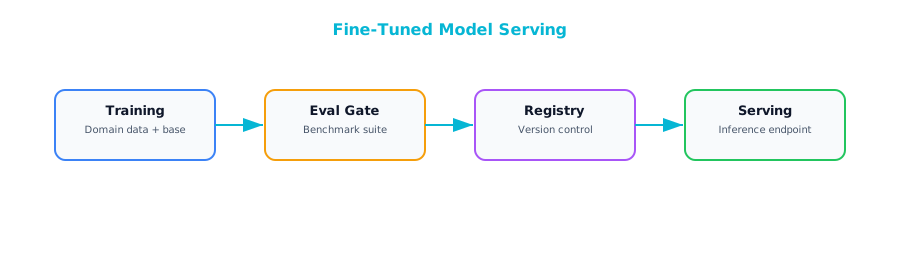
The architecture involves a training pipeline that takes your curated examples, fine-tunes a base model, evaluates the result against an automated test suite, and, if it passes, registers the new model version for serving. The evaluation suite is critical. Without it, you have no way of knowing whether a new fine-tuning run actually improved things or introduced regressions.
Fine-tuning makes sense when you have consistent style or format requirements that prompting cannot reliably achieve, when your domain uses terminology the base model gets wrong even with examples in the prompt, when you need to optimize costs by replacing a large model with a smaller fine-tuned one that performs just as well on your specific task, or when latency is critical and a smaller, faster model would make a meaningful difference.
Reaching for fine-tuning too early is a common mistake. If RAG would solve your problem — because the issue is that the model lacks specific knowledge rather than specific behavior — then RAG is almost always cheaper, easier to update, and faster to deploy. Exhaust the simpler approaches first.
Pattern 9: Multi-Agent Orchestration
When a task is complex enough that a single agent with a pile of tools starts to feel unwieldy, the Multi-Agent Orchestration pattern offers a more elegant solution. Instead of one agent trying to do everything, you break the work into specialized roles — a research agent, an analysis agent, a writing agent — each with its own focused set of tools and system prompt, coordinated by an orchestrator that manages the overall workflow.
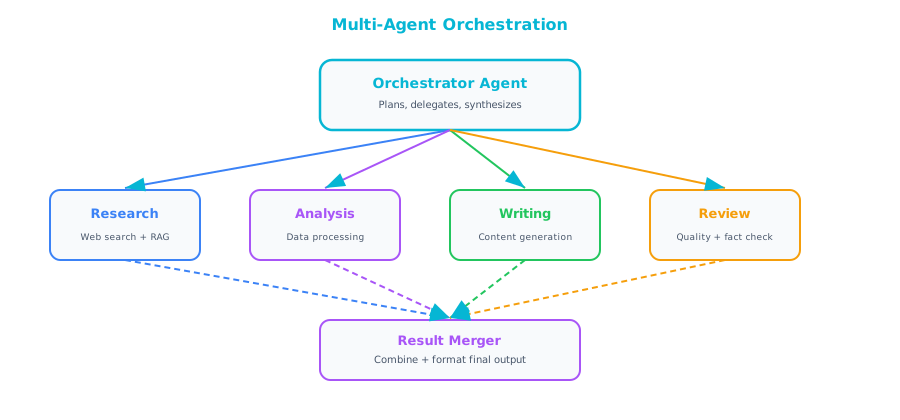
Several orchestration patterns depending on the nature of the work:
Sequential orchestration (a pipeline) passes the output of one agent directly to the next — research feeds analysis, which feeds writing. Clean and predictable, easy to debug.
Parallel orchestration dispatches multiple agents simultaneously and merges their results — useful when the subtasks are independent and speed matters.
Hierarchical orchestration introduces a manager agent that delegates tasks to subordinates and reviews their work before assembling the final output.
The debate pattern — particularly interesting for analytical tasks — has two agents argue different perspectives while a third agent synthesizes their arguments into a balanced conclusion.
Multi-agent systems add significant complexity: more moving parts, more failure modes, more latency, more cost. They are worth it for genuinely complex tasks that benefit from specialization — comprehensive research reports, multi-step data analysis workflows, content creation pipelines. Not worth it for simple question-and-answer interactions where a basic RAG setup would do the job just as well. Reach for this pattern when you have exhausted the simpler ones.
For a detailed treatment of multi-agent orchestration patterns, including sequential pipelines, parallel fan-out, supervisor hierarchies, and human-in-the-loop designs, see Chapter 11.
Pattern 10: Production GenAI Platform
The final pattern is the convergence of all the previous patterns into an enterprise-grade platform. This is what a mature organization's GenAI infrastructure looks like when they have moved past the pilot phase and are running generative AI at scale across multiple use cases and teams.
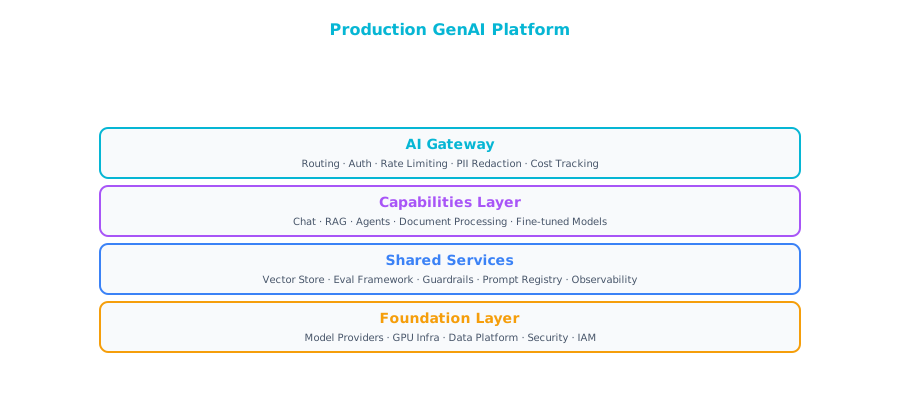
At the top sits an AI Gateway handling all the cross-cutting concerns: authentication, rate limiting, request routing, logging, and cost management. Below that, the individual capability layers: the Chat API for conversational interfaces, the RAG Engine for knowledge retrieval, the Agents Runtime for tool-using agents, the Batch Pipeline for document processing, and Custom Models for any fine-tuned models serving specific use cases. Underneath all of that, a shared services layer provides guardrails, evaluation, monitoring, and a prompt registry. And at the foundation, a data platform houses your vector stores, feature stores, training data, and centralized logging.
This is the target state, not a starting point. No organization should attempt to build this all at once. You grow into it organically as teams adopt different patterns and the need for shared infrastructure becomes apparent. The first team builds a RAG application and stands up a vector database. The second team builds a chatbot and needs the same guardrails. By the third or fourth team, someone recognizes that a shared AI Gateway would save everyone time and money. That is when the platform starts to take shape naturally. Building the platform before you have the use cases is a classic enterprise anti-pattern that leads to expensive infrastructure nobody uses.
Choosing the Right Pattern
| Need | Pattern |
|---|---|
| Quick prototype | 1 (Simple Chat) |
| Customer support | 2 (Chatbot) + 3 (RAG) + 7 (Guardrails) |
| Internal knowledge | 3 (RAG) |
| Document automation | 4 (Document Pipeline) |
| Cost optimization | 5 (Multi-Model Router) |
| Task automation | 6 (Agentic) |
| Complex workflows | 9 (Multi-Agent) |
| Enterprise scale | 10 (Platform) |
Notice how customer support — one of the most common GenAI use cases — actually combines three patterns: a chatbot for conversational interaction, RAG for grounding answers in your knowledge base, and guardrails for production safety. Real systems are almost always compositions of multiple patterns, and understanding each one individually is what lets you assemble them confidently.
Further Reading
From the Agentic AI book: The multi-agent orchestration patterns in this chapter — particularly the supervisor pattern (Pattern 9) and the hierarchical orchestration approach — are explored in much greater depth in Chapter 10 of Agentic AI, which covers the supervisor-worker architecture. That chapter walks through how to design supervisor agents that delegate effectively, evaluate worker output, and handle failures in multi-agent pipelines. It is essential reading if you are building production multi-agent systems.
Companion Notebook
 Build a request classifier that routes questions to different model tiers based on complexity. Measure cost savings compared to using the best model for everything.